Password Hash Synchronization in 2026: Hybrid AD to Entra ID
Password hash synchronization keeps on-prem Active Directory and Microsoft Entra ID authoritative together — how the sync cycle works, its security tradeoffs, and where it fits against federation.

Password hash synchronization keeps on-prem Active Directory and Microsoft Entra ID authoritative together — how the sync cycle works, its security tradeoffs, and where it fits against federation.
- Password hash synchronization (PHS) is the Microsoft Entra Connect feature that replicates a derived form of each user's on-premises Active Directory password hash into Entra ID on a short sync cycle, letting the cloud directory validate sign-ins on its own without a live call back to on-prem infrastructure at every login.
- The plaintext password never crosses the wire. What syncs is a one-way, salted, repeatedly-hashed derivative of the AD hash — a hash of a hash — computed specifically so it can't be reversed to recover the original hash or password even if the sync channel or the Entra ID store were compromised.
- Hash sync, pass-through authentication, and federation are three genuinely different hybrid-identity patterns with different availability, latency, and blast-radius tradeoffs — hash sync trades a small amount of on-prem dependency for cloud-side authentication resilience; PTA and federation keep the on-prem directory in the live validation path.
- The failure modes that actually show up in production are operational, not cryptographic: silent Entra Connect sync-cycle stalls, password writeback drift, and the false assumption that syncing hashes to the cloud is itself a compliance or MFA control rather than an availability decision.
- Hash sync doesn't eliminate on-premises Active Directory as a dependency, doesn't replace multi-factor authentication, and doesn't resolve the governance debt sitting in the on-prem directory — it just changes where authentication validation happens, not what has to be governed.
Password hash synchronization (PHS) is the Microsoft Entra Connect feature that copies a derived form of each on-premises Active Directory user's password hash into Microsoft Entra ID on a short, recurring sync cycle. It matters because it's the mechanism that lets a hybrid organization — one with an on-prem AD forest and a cloud tenant, which is most enterprises running Microsoft 365 or Entra ID — keep cloud sign-in working even when the on-premises network is unreachable, without ever transmitting an actual password to the cloud. It's one of three hybrid authentication patterns Microsoft supports (the other two, pass-through authentication and federation, keep validation on-prem instead), and it's the default most Entra Connect deployments end up running, specifically because it trades a small amount of on-prem dependency for cloud-side authentication resilience.
This is the 2026 update of our earlier look at password hash synchronization. The core mechanics haven't changed — AD still stores a one-way hash, Entra Connect still derives and syncs a non-reversible version of it — but the framing has sharpened considerably as Entra ID has matured past its Azure AD branding and as more hybrid-identity literature has settled on precise language for how hash sync differs from pass-through authentication and federation, three patterns that get conflated in vendor content more often than they should.
What actually syncs, and what doesn't
Active Directory has never stored plaintext passwords. What it stores is a one-way cryptographic hash — historically the NT hash, a hash of the password rather than the password itself, computed so that AD can validate a sign-in attempt by hashing the entered password and comparing hashes, without ever needing to retain or recover the original value. That's the starting point for hash sync, not something the feature introduces.
What Entra Connect does is take that on-prem hash and derive a further, per-user salted version of it before transmitting anything to the cloud — a hash of a hash, computed specifically so the synced value can't be reverse-engineered back to the original AD hash even with full access to the cloud-side copy. This synced derivative is what Entra ID stores and validates against; it is not the AD hash itself, and it is several derivation steps removed from the plaintext password. The sync cycle runs on a short interval by default (commonly every couple of minutes for password changes specifically, faster than the broader directory sync schedule), which is why a password change on-prem shows up as usable for cloud sign-in within minutes rather than hours.
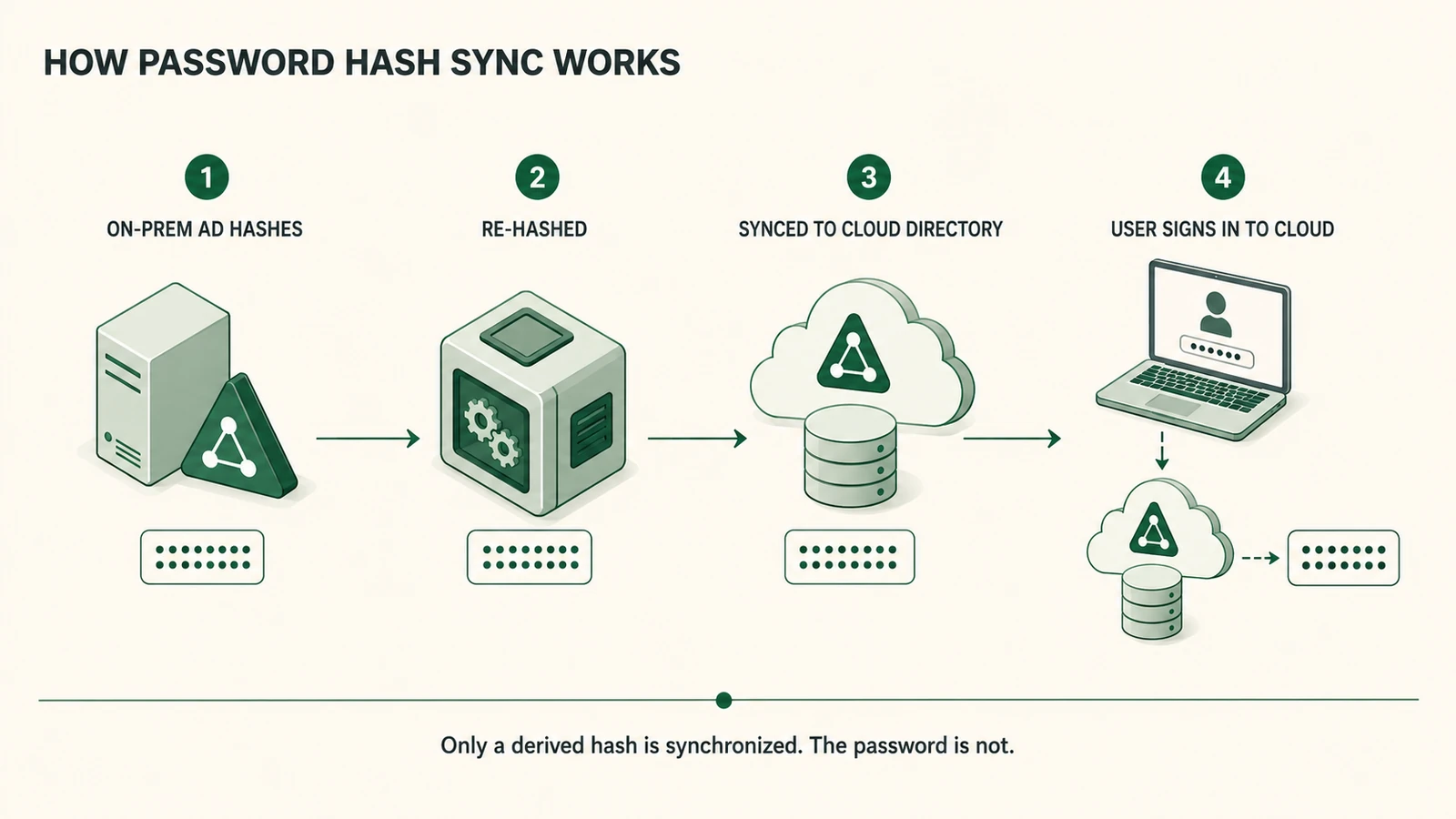 The chain runs hash to hash, never password to hash — the plaintext credential never leaves the on-prem directory at any step.
The practical consequence of this design is that Entra ID becomes capable of validating a sign-in entirely on its own, without a live network path back to an on-premises domain controller at the moment of authentication. That's the entire point of the feature: cloud services stay reachable during an on-prem outage, a maintenance window, or a network partition, because the credential check no longer requires reaching across that boundary in real time.
Security implications of syncing hashes to the cloud
The security question hash sync raises isn't whether the synced value is reversible — Microsoft's derivation is specifically designed against that, and there's no publicly documented practical attack that recovers the original AD hash or password from the synced Entra ID value. The more useful security questions are about what a synced hash does and doesn't protect against, and what expands once a copy of derived credential data exists in a second location.
A synced hash still lets an attacker confirm a guessed or leaked password matches, the same way the on-prem hash would — non-reversibility protects against recovering the password from the hash, not against an attacker who already has the password from another source (a breach dump, a phishing kit, credential stuffing) testing it against the account. That's the sense in which hash sync is neutral on credential-compromise risk rather than a control against it: it doesn't make a weak or reused password stronger, and it doesn't make a compromised credential harder to abuse on its own.
Syncing hash data does mean two systems now hold sensitive authentication material instead of one, which is a real (if narrow) expansion of the estate an attacker could target, and it's why the sync channel itself — TLS-encrypted, agent-to-tenant, not a general-purpose network path — and the security posture of the Entra Connect server hosting the sync agent matter more than they might seem to at first glance. A compromised Entra Connect server, with its elevated on-prem directory permissions, is a materially higher-value target than the sync mechanism's cryptography.
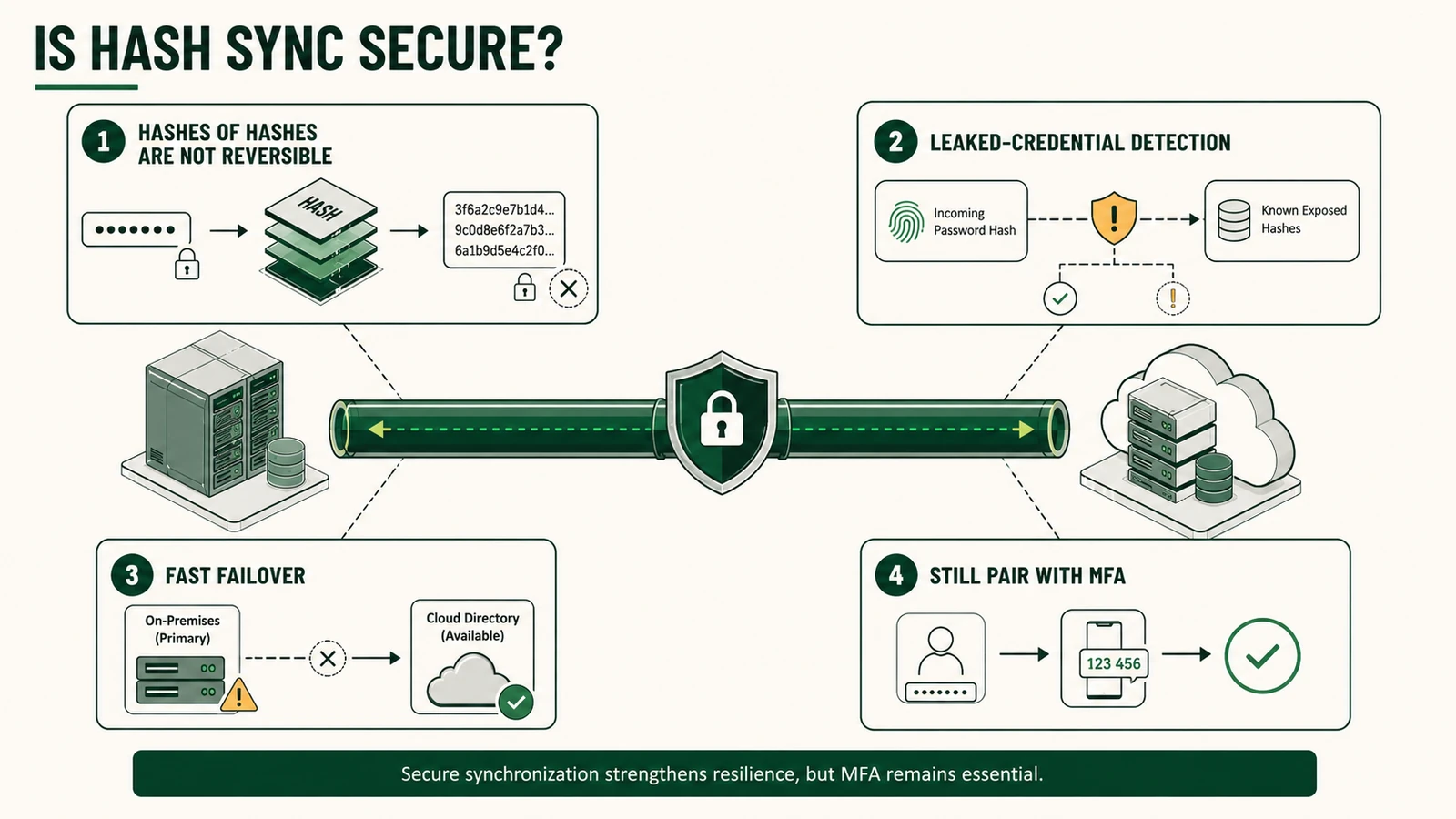 Non-reversibility is table stakes, not the whole story — leaked-credential matching, failover resilience, and MFA are what turn hash sync into a defensible posture.
One underused security benefit worth naming: because Entra ID has visibility into the synced hash, it can compare incoming sign-in attempts against known-breached credential databases and flag or block matches — a leaked-credential detection capability that's genuinely harder to run purely on-prem without separately ingesting the same breach corpora into AD's own validation path. That's a real security upside of the pattern, not just a resilience one, and it's the kind of benefit that gets lost when hash sync is discussed only as a fallback authentication mechanism.
Hash sync vs. pass-through authentication vs. federation
These three patterns solve the same problem — letting a cloud identity plane authenticate users whose canonical password lives on-prem — with genuinely different tradeoffs, and conflating them is where a lot of hybrid-identity planning goes wrong.
Hash sync validates entirely in the cloud, against the synced hash derivative. On-prem AD can be unreachable and cloud sign-in keeps working. The tradeoff is that a copy of derived credential data now exists in the cloud, and any password policy enforcement that depends on real-time on-prem state (account lockout thresholds tied to on-prem logon attempts, for instance) needs separate handling since the cloud isn't checking against live AD state at each sign-in.
Pass-through authentication (PTA) keeps the actual validation on-prem: a lightweight agent on an on-prem server receives the sign-in request from Entra ID, validates it directly against AD in real time, and returns the result. No password-derived data is stored in the cloud at all. The tradeoff runs the other direction from hash sync — cloud sign-in now depends on the PTA agent and the on-prem network path being available at the exact moment of authentication, and a stalled or unreachable agent blocks sign-in the way an on-prem outage would under a pure on-prem-only model.
Federation, typically via AD FS and SAML or WS-Federation, redirects authentication entirely back to an on-premises identity provider, which validates the user against AD and issues a signed assertion the cloud service trusts. No credential data — hashed or otherwise — ever syncs to the cloud. The tradeoff is that the federation service becomes both a hard availability dependency and a high-value attack target; forged-assertion attacks against federation infrastructure (the Golden SAML pattern being the well-documented example) are a materially different risk profile than anything hash sync introduces, precisely because a compromised federation signing key can mint valid assertions for any user without touching a password at all.
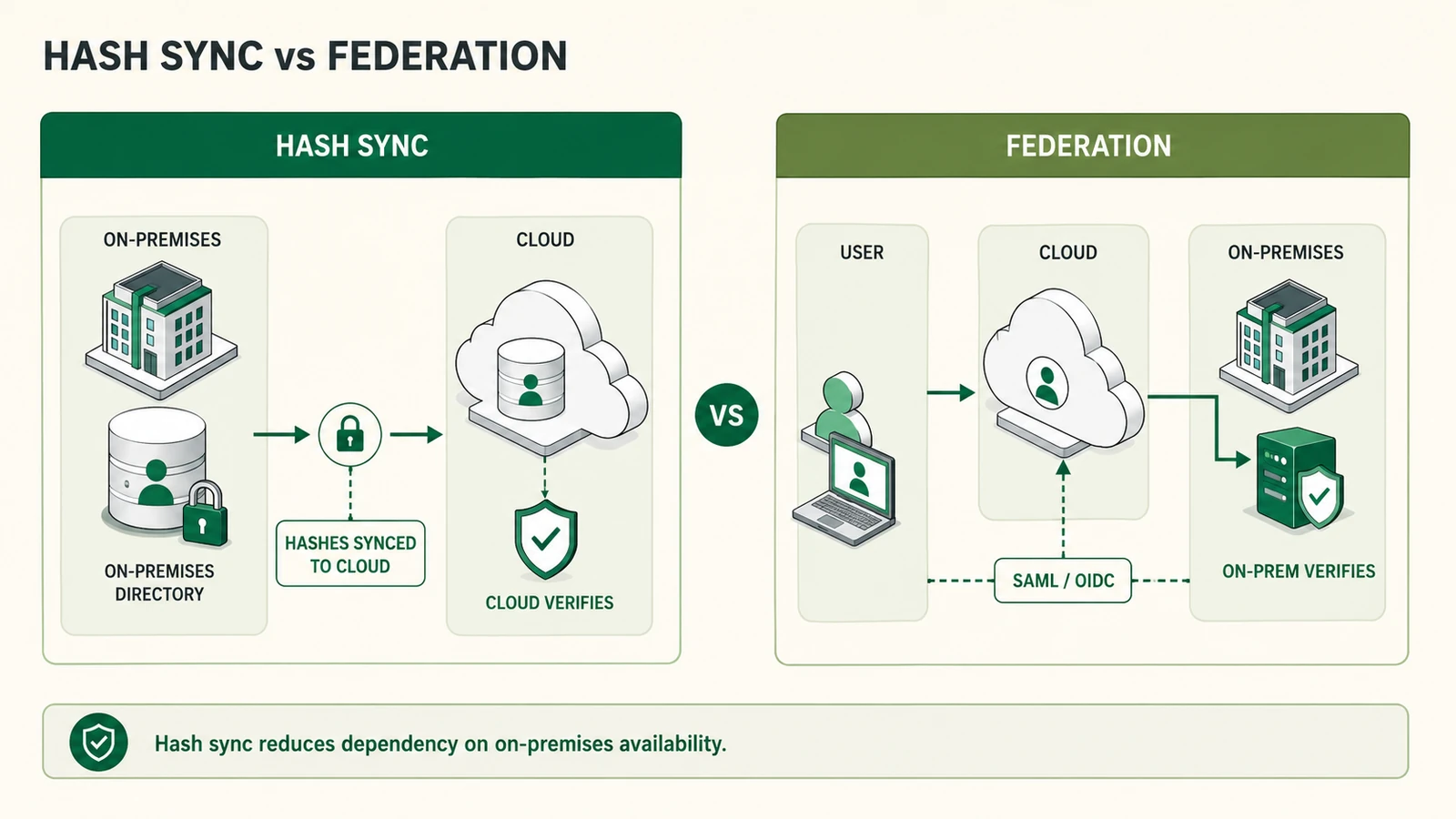 Hash sync moves the verification step to the cloud; federation keeps it on-prem and routes the user there on every sign-in — opposite availability tradeoffs, same underlying directory.
None of the three is categorically more secure than the others — they're different points on an availability-versus-on-prem-dependency spectrum, and the right choice depends more on an organization's outage tolerance, compliance posture, and existing federation investment than on abstract security ranking. Microsoft's own default recommendation for most hybrid deployments is hash sync specifically because it's the pattern with the fewest moving parts to keep healthy in production, which is a meaningful criterion in its own right — see the Cross-Platform Identity Management piece for how that operational-simplicity argument plays out across other protocol-bridging decisions in a hybrid estate.
Operational failure modes
The failures that actually show up in hybrid identity incident reviews are almost never about the hash derivation math. They're operational, and they cluster around a small set of patterns.
Silent sync-cycle stalls. Entra Connect's sync agent runs as a service account with specific on-prem permissions; a password rotation, a certificate expiry, or a firewall change can quietly stop the sync cycle without an obvious alert firing. Cloud sign-in doesn't fail outright when this happens — it keeps validating against an increasingly stale hash, so a password changed on-prem days ago still isn't recognized in the cloud, and nobody notices until a user complains their new password "doesn't work" in Microsoft 365 while working fine on a domain-joined machine.
Password writeback drift. Writeback (letting a cloud-initiated password reset propagate back to on-prem AD) introduces a second sync direction with its own failure surface, particularly where legacy on-prem password complexity policies conflict with what the cloud-side reset flow allows, producing resets that succeed in the cloud and silently fail to apply on-prem.
Mistaking sync health for security posture. A hash sync deployment that's cryptographically sound but operationally unmonitored is common — teams verify the feature is configured correctly at rollout and then treat it as a solved problem, without instrumenting sync-cycle latency or failure alerts as an ongoing operational signal the way they would for any other identity-critical pipeline.
Scope creep into service accounts and non-human identities. Hash sync configurations sometimes default to including accounts that were never meant to authenticate to the cloud at all — service accounts, break-glass credentials, legacy application accounts — expanding the population of synced hashes beyond what anyone deliberately scoped. Filtering sync scope explicitly, rather than accepting the default "sync everything" behavior, is a control that's easy to skip during initial setup and expensive to retrofit later.
When hash sync is the right hybrid-identity choice — and when it isn't
Hash sync earns its place as the default recommendation for most commercial hybrid estates because it solves a specific, common problem well: keeping cloud sign-in available during on-prem outages, with the fewest moving parts of the three patterns, and with a genuinely non-reversible derivation protecting the synced value. For an organization without a hard regulatory requirement that credential-derived data stay entirely on-prem, and without an existing, well-governed federation investment it would otherwise be replacing, hash sync is usually the right starting point — which is why it's Microsoft's default guidance and the pattern most Entra Connect deployments actually run in practice.
It's a weaker fit in a few specific situations. Regulated environments with an explicit requirement that no password-derived data leave the premises in any form — some government and defense contexts, and some contractual arrangements in finance or healthcare — need federation or PTA regardless of hash sync's technical guarantees, because the requirement is about data location, not cryptographic strength. Organizations with a mature, highly available federation infrastructure already in place gain comparatively little from switching, since hash sync mainly adds a second credential-data location to secure without removing the first (federation infrastructure, once built, doesn't go away just because hash sync is also configured). And any environment where on-prem AD's own hygiene is already poor — stale accounts, weak or unenforced password policy, no MFA — should fix that before optimizing which hybrid authentication pattern moves the resulting (still weak) credentials to the cloud fastest.
What Avatier ships toward this pattern
Avatier's hybrid identity layer is built to treat on-premises Active Directory as a first-class canonical source of identity, not a legacy system that has to be worked around before real governance can start. Identity Anywhere synchronizes directory and entitlement state to cloud-side provisioning and IGA workflows on an event-driven basis, so lifecycle events — joiners, movers, leavers — propagate consistently regardless of which authentication pattern (hash sync, PTA, or federation) an organization has configured in Entra Connect; the authentication pattern and the governance pipeline are deliberately decoupled rather than one depending on the other.
On top of whichever hybrid authentication pattern is already running, Identity Anywhere layers step-up and passwordless authentication built on FIDO2-compatible standards, so the MFA layer that should always accompany hash sync isn't tied to a single Entra Connect configuration choice or vulnerable to the same failure modes as the underlying sync pipeline. The LDAP Implementation piece covers the on-prem directory integration layer this builds on, and the Playbook: Legacy IAM to Modern piece covers the broader modernization sequencing that a hybrid AD/Entra estate typically sits inside.
The Avatier Trust Center publishes the compliance posture underneath the platform: SOC 2 Type II audited with zero exceptions noted, ISO/IEC 27001:2022 certified, PCI DSS v4.0.1 compliant, CSA STAR Level 1 attestation, NIST 800-53 Rev. 5 alignment, FedRAMP-aligned controls, and CISA Secure-by-Design Pledge signatory status.
What password hash synchronization does not solve
Worth stating plainly, since "we've enabled hash sync" can read like a finished hybrid-identity decision rather than one piece of a larger architecture. It isn't, on a few specific counts.
Hash sync doesn't eliminate on-premises Active Directory as a dependency. AD is still the canonical source of the password and the hash it's derived from; hash sync changes where validation happens for cloud sign-in, not where the credential is authoritative. If on-prem AD's governance is weak — stale accounts, orphaned entitlements, no consistent password policy — hash sync just moves the consequences of that weak governance to the cloud faster, it doesn't fix them.
It doesn't replace multi-factor authentication. A synced hash that matches a leaked or guessed password still authenticates successfully without MFA in the path; hash sync is an availability and architecture decision, not a control against credential compromise. Pairing hash sync with MFA — ideally phishing-resistant MFA rather than SMS or basic push — is the baseline, not an optional hardening step.
And it doesn't resolve the governance question of what happens to synced credential data once it's in a second system. Access reviews, retention policy, and incident response plans that only account for on-prem AD's credential store and ignore the synced Entra ID copy have a real gap — a smaller one than the hash's non-reversibility might suggest, but a gap all the same, and one worth closing explicitly rather than assuming the cryptography closes it automatically. Hash sync is genuinely useful hybrid-identity infrastructure. It's not, on its own, a finished security posture.
ABOUT THE AUTHOR

More from Access Management

PIM vs PAM vs PUM: Privileged Access Defined for 2026
PIM, PAM, and PUM get used interchangeably and mean three different things. PIM manages who holds privileged identity and which roles carry it. PAM controls how privilege is exercised through vaulting, session control, and just-in-time elevation. PUM manages the shared privileged accounts nobody personally owns. The 2026 reference on distinguishing the three terms, where they overlap, and where to start.

DNS as Identity Infrastructure: A 2026 Reference
DNS resolution, DNSSEC integrity, and DNS poisoning as a credential-harvesting vector — the 2026 reference on treating DNS as identity infrastructure, not network plumbing.
Cloud Infrastructure PAM: Vaulting and Sessions in 2026
Cloud infrastructure PAM controls privileged sessions into AWS, Azure, and GCP — vaulting root credentials and enforcing just-in-time elevation instead of standing admin roles.