The Real Cost of a Help Desk Password Reset (It's Not $15) 2026
The $15-per-password-reset figure that's been quoted for two decades undercounts the true cost meaningfully. The 2026 enterprise reference on the five cost components that make up the actual per-reset price, why each one undercounts, how to compute the number for your own organization, and the savings model when reset automation is deployed properly.
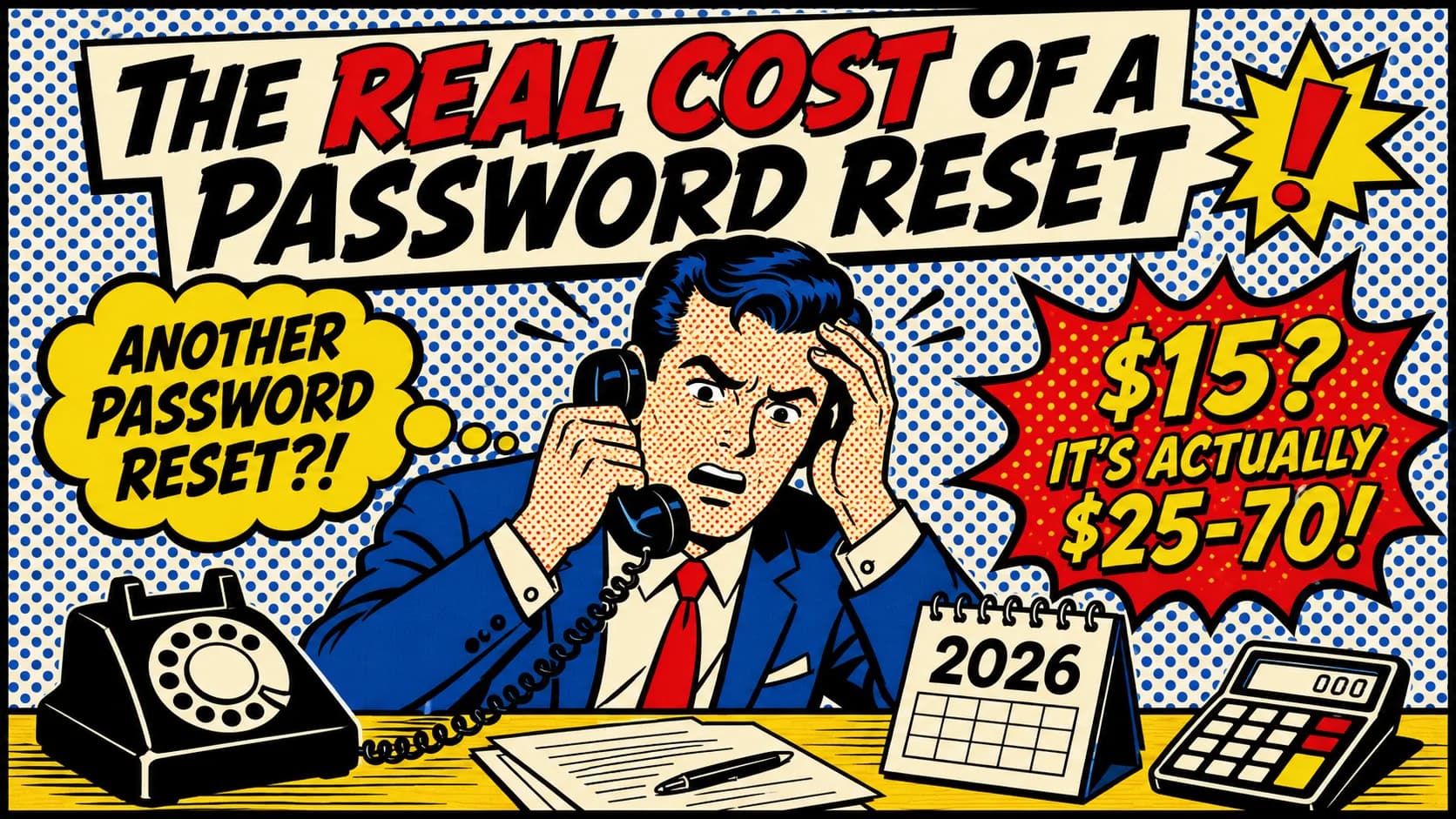
The $15-per-password-reset figure that's been quoted for two decades undercounts the true cost meaningfully. The 2026 enterprise reference on the five cost components that make up the actual per-reset price, why each one undercounts, how to compute the number for your own organization, and the savings model when reset automation is deployed properly.
- The $15-per-password-reset figure has been quoted for two decades and substantially undercounts the true cost. Forrester's average help desk ticket cost is closer to $25 once labor, infrastructure, and lost employee productivity are accounted for — and even that undercounts the indirect costs.
- Five cost components make up the actual per-reset cost: (1) direct help desk labor, (2) lost employee productivity during the reset wait, (3) security amplification risk (phone-based password resets are a social engineering vector), (4) SLA opportunity cost (the help desk staff handling password resets aren't handling higher-value tickets), and (5) infrastructure overhead (ITSM tickets, MFA fallback paths, audit logging).
- Gartner has consistently reported that up to 40% of all help desk calls are password-related. For a 5,000-employee enterprise running at conservative 30% reset volume, that's approximately 18,000 resets per year — and at a realistic $25-50 per reset depending on what costs you include, that's $450,000 to $900,000 per year before any automation.
- Self-service password reset automation typically delivers 60-90% reduction in help desk volume on routine password work. Avatier's calculator uses a conservative 70% baseline based on customer-reported outcomes. For the same 5,000-employee enterprise, that's $315,000-$630,000 in annual savings — and the savings compound over 3 and 5-year horizons.
- The savings calculator at [credentialgovernance.avatier.com/en/calculator](https://credentialgovernance.avatier.com/en/calculator) lets you input your own company size, reset percentage, service desk staff size, and average salary to compute the cost and savings for your specific environment. The defaults use Gartner, Forrester, and BLS sources; adjust to match your actual data.
The $15-per-password-reset figure has been quoted in identity management literature for the better part of two decades. It came from Gartner research published in the 2000s and the math was straightforward — average call duration multiplied by loaded labor cost per hour. The figure was useful at the time, became canonical in IT cost-of-ownership conversations, and has been repeated so often that most people who quote it have forgotten where it came from.
The number undercounts. It captured only direct help desk labor and missed four other cost components that produce a more honest 2026 picture. The real cost of a password reset in most enterprise environments is in the $25-70 range depending on what you include — substantially higher than $15. The economics of password reset automation are correspondingly stronger than the legacy $15 figure suggests.
This piece is the 2026 enterprise reference on what password resets actually cost. The five cost components that make up the real per-reset price, why each one undercounts in the legacy framing, how to compute the number for your own environment, and the savings model when reset automation is deployed properly. The Password Reset Cost Calculator at credentialgovernance.avatier.com/en/calculator computes the math for any organization — input your company size, reset percentage, service desk staff size, and average salary, and the calculator produces the cost picture and the savings model for your environment. The calculator's methodology is Gartner-sourced (40% password-related call volume baseline), Forrester-sourced ($25 average ticket cost), and BLS-sourced ($50,000 median IT support specialist salary). You can use it to compute your own numbers as you read this piece; the components below are what go into the calculation.
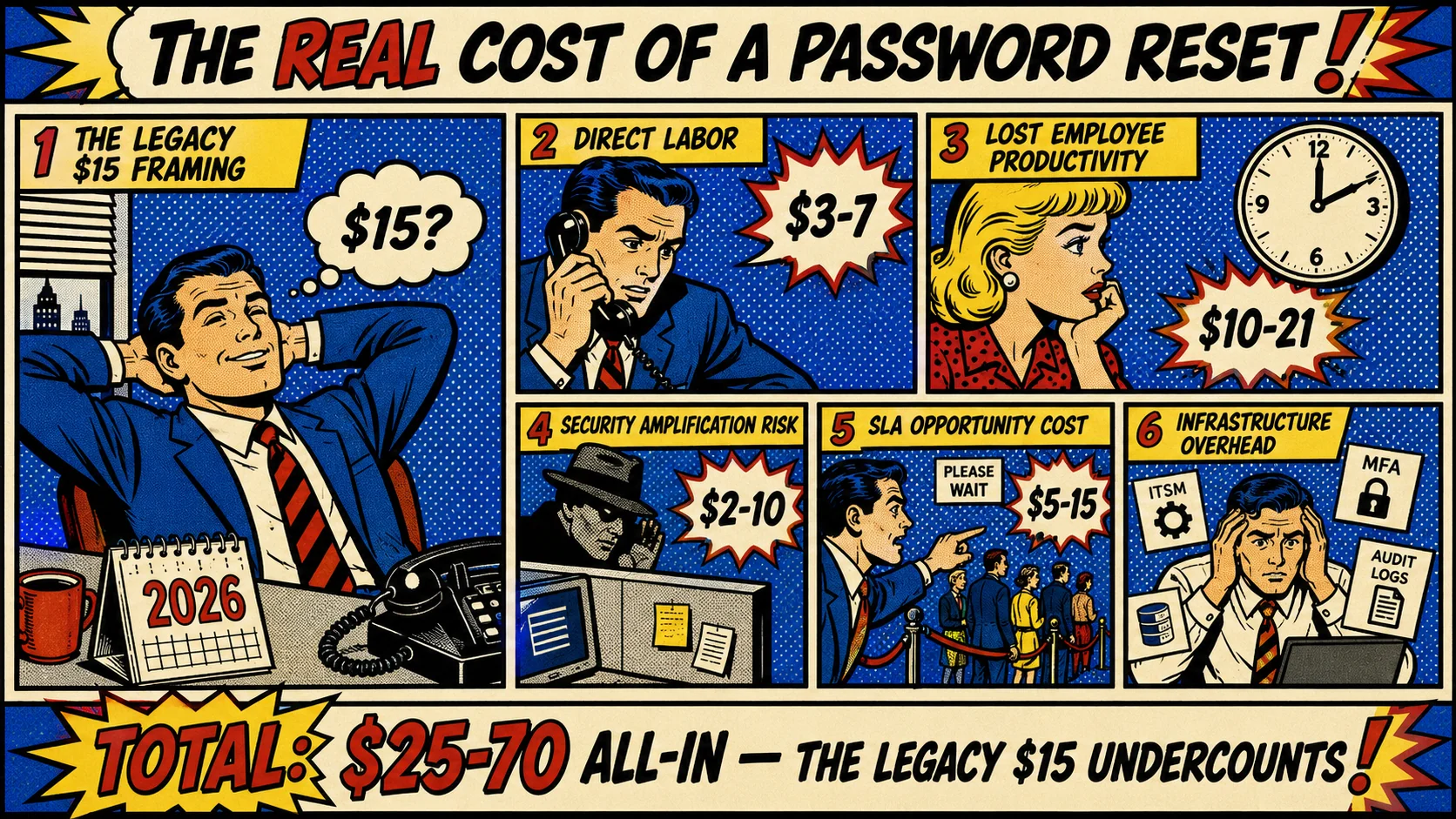 Five components, one honest number. The legacy $15 figure captured one of the five and missed the rest. The 2026 honest picture is $25-70 depending on what you include.
Why the $15 figure undercounts
The $15 figure was always intended to be a direct-labor approximation, not an all-in cost number. The Gartner research that produced it was specifically about help desk staffing levels — how many calls of what duration produced what staffing cost. It was good research for the question it was answering.
The figure became a shorthand for "what does a password reset cost" without the context that produced it. The shorthand omits four components that the original research wasn't trying to capture.
Component 1: Direct help desk labor. This is what the $15 was measuring. Call duration × loaded labor cost per hour. For a typical 6-8 minute password reset call against a loaded labor cost of $35-50 per hour, the direct labor cost is $3.50-7.50. The $15 figure included some adjustment for call overhead (queue wait, post-call documentation, supervisor coverage) which is reasonable. Forrester's current $25 figure includes broader help desk infrastructure (the ticketing system, the queue management software, the workforce-management overhead) plus immediate productivity loss; the broader calculation accounts for most of the gap to $25.
Component 2: Lost employee productivity during the reset wait. The user can't work while waiting for the password reset. The wait time isn't just the call duration; it includes the queue wait (often 5-15 minutes during business hours, longer at peak times), the call itself, and the post-reset login flow. Total productive-time loss is typically 15-30 minutes per reset. The employee's loaded cost is usually higher than help desk staff — a knowledge worker at $80,000 loaded annual cost (the BLS-style figure for a corporate professional in 2026) loses approximately $42 per hour of productive time, so 15-30 minutes of lost productivity is $10-21 per reset. This component alone often exceeds the legacy $15 estimate.
Component 3: Security amplification risk. Phone-based password reset workflows are a known social engineering vector. The attacker calls the help desk impersonating the user, provides plausible identity details (often researched in advance via OSINT), and persuades the operator to reset the password and provide the temporary credential. The pattern produced multiple major 2023-25 incidents, including the kind documented in our Storm-2949 governance failure analysis. The expected-value cost per reset from this risk is hard to compute precisely (most resets don't produce attacks, but the ones that do are catastrophic), but a defensible estimate puts it at $2-10 per reset based on typical breach-cost amortization across reset volumes in healthcare, financial services, and government environments. The component doesn't show up in most cost models because it's contingent rather than realized — but auditors and risk officers increasingly count it.
Component 4: SLA opportunity cost. Help desk staff handling password resets aren't handling tickets where their judgment adds more value — escalated technical issues, complex account states, enterprise software troubleshooting, executive support. The opportunity cost is the value the help desk staff would otherwise be producing. In healthy support organizations this is meaningful — the same hour spent on a password reset could have produced 2-3 higher-value ticket resolutions or one substantive technical investigation. Quantifying it depends on the support organization's mix, but $5-15 per reset is a defensible range.
Component 5: Infrastructure overhead. ITSM tickets that have to be opened, MFA fallback channels that have to be maintained, audit logging that has to be generated, compliance documentation that has to be produced. The overhead exists whether or not the reset happens, but each reset consumes a unit of it. Loaded overhead per reset is typically $3-8 depending on the organization's compliance scope and tooling sophistication.
The five components total to a realistic per-reset cost in the $25-70 range, depending on which components you include. The $25 figure (Forrester's average) is roughly Component 1 + immediate productivity loss; the $70 figure is the all-in including security and opportunity cost. The $15 figure is closer to a 2010-era direct-labor approximation that hasn't aged well.
Try it for your own organization: the Password Reset Cost Calculator at credentialgovernance.avatier.com/en/calculator takes your company size, reset percentage, service desk staff size, and average salary, and produces a realistic cost picture using Gartner, Forrester, and BLS-sourced defaults. Adjust the inputs to match your environment for a tailored estimate.
How many resets does an average enterprise actually run?
Gartner has consistently reported that up to 40% of all help desk calls are password-related. The figure varies by industry, by workforce composition, by existing self-service deployment, but the 30-40% range is robust across published research over the past decade.
For a 5,000-employee enterprise running the calculator's conservative 30% reset volume default against typical help desk call patterns, the math works out to roughly 18,000 resets per year. That's the calculator's default output when you enter 5,000 employees.
Larger enterprises scale proportionally. A 25,000-employee enterprise running the same patterns produces 90,000 resets per year. A 50,000-employee enterprise produces 180,000. A 100,000-employee enterprise produces 360,000. The scale is what makes the per-reset cost matter — even small differences in the per-reset number multiply by very large volumes.
Some environments run lower volumes. Mature self-service deployments may run 15-25% (rather than 30%) because users learned to use the self-service portal and password complexity policies are less restrictive. Some environments run higher — 40-50% — because of legacy password complexity policies that produce frequent forced changes, or workforces with high turnover (contractors, locum clinical staff, frontline retail) that drive elevated onboarding-related reset volumes.
The calculator's 30% default sits in the middle of the realistic range and stays conservative for organizations with mature self-service already in place. Adjusting to your actual data is the right move; the calculator supports user-specified percentages.
The worked example — 5,000-employee enterprise
The calculator defaults to a 5,000-employee enterprise scenario because it's a useful illustrative size. Let's walk through what the calculator produces and what it means.
| Input | Default value |
|---|---|
| Company Size (Employees) | 5,000 |
| Percentage of Reset Requests | 30% |
| Service Desk Staff Size | 10 |
| Service Desk Average Salary | $50,000 |
Output: 18,000 resets per year. $500,000 annual cost without automation. $350,000 saved over 1 year with Avatier automation.
The 18,000 figure comes from the employees × reset percentage × 12 monthly cycle multiplier. The $500,000 figure comes from service desk staff × average salary — it's the labor cost of running the queue. The $350,000 savings figure applies the 70% reduction baseline to the annual cost.
The 3-year horizon is $1.05 million in savings. The 5-year horizon is $1.75 million. The calculator lets you toggle between the three horizons to see how the model compounds over typical planning windows.
What the figures mean operationally. The $500,000 annual cost without automation isn't theoretical — it's the labor cost of the help desk staff running the password reset queue at the calculator's default inputs. Whether the cost is "saved" by automation depends on what happens to the staff. Three common outcomes:
-
Reallocation to higher-value work. The help desk team's time shifts from password resets to escalated technical work, executive support, and proactive customer success. The headcount doesn't decrease; the per-hour value of the team's output increases. This is the most common 2026 outcome in larger enterprises.
-
Headcount reduction through natural attrition. The team doesn't get backfilled as members leave; the smaller team handles the lower volume. This is common in environments where the help desk was over-staffed for password reset volume specifically.
-
Service-level improvement at the same headcount. Response times improve, ticket backlogs shrink, customer satisfaction rises. The "savings" show up as service quality rather than as dollars on the P&L. This is common when help desk capacity was the limiting factor on broader IT service delivery.
Each of the three outcomes is legitimate; the business case framing for your environment depends on which is operationally appropriate. The calculator computes the cost reduction; the business case translates the cost reduction into the operationally relevant outcome.
Build your own business case: the calculator at credentialgovernance.avatier.com/en/calculator supports user-specified company size, reset percentage, service desk staff size, and average salary. Toggle the 1, 3, and 5-year horizons to see your planning-window projection.
How automation actually delivers the 70% reduction
The 70% reduction baseline in the calculator reflects what Avatier customers consistently report within the first quarter of deployment. The reduction comes from three operational shifts.
Self-service for routine resets. Users authenticate through alternative factors (challenge questions, mobile push, hardware-token-backed flows), reset their own password, and never involve the help desk. The routine case (forgotten password, expired password, locked account) is the bulk of the volume; self-service captures it.
Workflow-verified recovery for higher-assurance cases. For higher-risk situations — privileged accounts, accounts that recently appeared in breach corpus updates, accounts with anomalous activity — the workflow-verified recovery pattern documented in our Temporary Password Best Practices piece handles the reset without temporary credentials being issued at all. The user re-enrolls their FIDO2 credential directly after multi-step identity verification.
Help desk handles the exceptions. Federated identity issues, MFA recovery, complex account states, IT-policy exception cases. The remaining volume is meaningfully smaller than the original, and the help desk staff can focus on cases where their judgment adds value.
The three operational shifts together produce the volume reduction. The reduction isn't theoretical — it's the operational reality in deployments that follow the architecture pattern this piece's companion piece on Temporary Password Best Practices describes.
The 70% baseline is conservative. Some Avatier deployments report higher reductions (80-90%) in environments where the password reset volume was particularly high or where the self-service deployment was particularly thorough. Some deployments report somewhat lower (60-65%) in environments with complex federated identity landscapes where the exception cases dominate the volume. The 70% is the calculator's middle estimate; your actual reduction will depend on your environment.
The components your finance team will want in the business case
When you're building the business case for password reset automation, finance teams typically want to see the cost model with explicit components. The calculator produces the headline savings number; the business case translates that into the finance-team-friendly format.
Direct labor cost reduction. The headline number from the calculator. The 70% reduction in help desk volume × the loaded labor cost. This is the cleanest line item.
Indirect labor cost reduction. The lost employee productivity component. For 5,000 employees losing 15-30 minutes per reset on 18,000 resets per year, that's 4,500-9,000 hours of lost productivity, valued at $190,000-$378,000 at the $42-per-hour knowledge-worker rate. Capturing 70% of this is $130,000-$265,000 in additional indirect labor savings.
Risk reduction. Quantifying the security amplification risk is harder, but a defensible approach is amortizing typical breach costs across reset volumes. If the organization's reset-vector breach risk is meaningful (financial services, healthcare, government), even a small percentage reduction produces meaningful expected-value savings.
Service-level improvement. Faster resolution, lower backlog, higher customer satisfaction. These show up in IT-service metrics rather than directly on the P&L, but they're real and they matter for ITSM-mature organizations.
Implementation cost. The automation platform, the integration work, the change management. Pricing varies by vendor and deployment scope; Avatier's pricing is competitive within the enterprise IGA market. The 1-year horizon typically shows positive ROI even after implementation cost; the 3 and 5-year horizons show strong returns.
The business case framework matters because the cost picture is more compelling when finance teams see the full component breakdown rather than just the headline number. The calculator gives you the headline; this piece's framing gives you the components to build the case around.
The 2026 reference path
Stop quoting the $15 figure. It's two-decade-old direct-labor approximation that doesn't reflect modern all-in cost. The realistic 2026 per-reset cost is $25-70 depending on which components you include.
Compute the cost for your specific environment. The calculator at credentialgovernance.avatier.com/en/calculator handles the math against your inputs. Use the Gartner-sourced 40% (or the calculator's conservative 30% default) for reset volume. Use the Forrester-sourced $25 baseline ticket cost or adjust upward to include the indirect components.
Build the business case around the full component breakdown. Direct labor reduction (the headline). Indirect labor reduction (lost employee productivity). Risk reduction (security amplification, more important in regulated industries). Service-level improvement (the soft benefits ITSM-mature organizations care about). Implementation cost (the offset against the savings).
Pick the 70% reduction baseline as the starting estimate. The figure reflects what Avatier customers report within the first quarter of deployment; some environments do better and some do somewhat less. The calculator uses it as the default; adjust to your environment if you have better data.
Compose with the broader credential lifecycle architecture. The Temporary Password Best Practices piece covers the workflow-verified recovery pattern that handles the higher-assurance cases. The Best Enterprise Password Management Software piece covers the broader platform landscape. The HRIS-Driven Lifecycle piece covers the foundation that prevents reset-volume spikes from poor onboarding patterns.
The password reset queue is one of the highest-leverage operational improvements available to identity teams in 2026. The cost model has been understated by the legacy $15 framing for two decades; the honest 2026 number is meaningfully higher. The savings from automation are correspondingly more substantial than the legacy framing suggests. Build the business case on the honest numbers, deploy the automation deliberately, and the operational improvement materializes.
Compute your own savings: credentialgovernance.avatier.com/en/calculator
ABOUT THE AUTHOR

More from Pillar 3: Assisted Reset

AI Virtual Assistants for Identity Management: Conversational Access Without a New Attack Surface (2026)
A chatbot that resets passwords is trivial to build and a genuinely bad idea — because the hard part of a password reset was never the conversation, it was proving who is asking. The 2026 reference on conversational identity done properly: the four workflows worth deflecting to chat, why identity verification must live outside the language model, the prompt-injection and social-engineering surface a naive deployment opens, and the deflection math against a $480-per-employee support baseline.

Temporary Password Best Practices 2026: NIST 800-63B Rev. 4 and Beyond
Temporary passwords are the recovery credential class that most enterprises still issue, share insecurely, and persist beyond their intended scope. NIST 800-63B Rev. 4 raised the bar in 2025, and the 2026 architectural pattern moves further — away from temporary passwords toward workflow-verified recovery. The enterprise reference on what's required, what's recommended, and where temporary passwords genuinely still belong.
Outcome-Based Software Pricing: A CFO's Guide to Buying Identity in the AI Era
Outcome-based software pricing charges for completed, verified, audited work instead of seats, modules, or long commitments. In an AI era where the best technology can change in a quarter, it is the pricing model that lets a CFO keep options open and make every vendor prove its value.