Least-Privilege Access for AI Agents: Scoping MCP Tools with Avatier
Least privilege for AI agents means task-scoped, time-bound access capped at the user's own authority. A five-step how-to for scoping MCP tools, and where the MCP spec helps.
Least privilege for AI agents means task-scoped, time-bound access capped at the user's own authority. A five-step how-to for scoping MCP tools, and where the MCP spec helps.
- Least privilege for AI agents means an agent holds only the capabilities a specific task needs, only for as long as the task runs, and never more authority than the person it acts for. Standing, broad agent access is the anti-pattern.
- Where an HTTP-based MCP server implements authorization (it is optional in MCP), the spec supports scoping: it builds on OAuth 2.1, tells servers and clients to follow least privilege in scope requests, requires servers to accept only tokens issued for them, forbids token passthrough, and defines a step-up flow for added scopes.
- Tier agent tool permissions by how far they reach, not only by what they do: reading your own data, changing your own credentials, acting for people you already have authority over, and organization-wide or privileged changes.
- The five-step scoping flow is allow-list the task's capabilities, bind every call to delegated authority, tier and gate sensitive actions with human approval, make grants time-bound, then review usage and revoke what is no longer needed.
- Avatier Actions exposes Avatier's identity action set as MCP tools. Every request must invoke an approved Avatier capability, permissions are inherited from the identity platforms customers already run, and every outcome carries its own audit evidence. In Avatier's words, the assistant is the interface, never the authority.
Least privilege for AI agents means an agent holds only the capabilities a specific task needs, only for as long as that task runs, and never more authority than the person on whose behalf it acts. In practice it comes down to a few rules: scope access per task instead of granting standing access, cap the agent at delegated authority, allow-list the approved capabilities it may call, require human approval for anything that changes identity, and review and revoke on a schedule.
The general principle is covered in The Principle of Least Privilege. This guide is a how-to for one surface: AI agents calling tools over the Model Context Protocol (MCP), including where the MCP authorization model helps and where it stops. For what an agent's identity is, start with the agentic identity hub. For how each action is governed once it runs, see MCP identity governance.
MCP is an open standard, introduced by Anthropic in November 2024, that lets AI assistants connect to tools and data through MCP servers. Servers can offer three kinds of features: resources (context and data), prompts (templated messages and workflows for users), and tools (functions the AI model can execute). Tools are where least privilege matters most, because tools act.
Why standing access fails for AI agents
Standing access is permission an identity holds all the time, whether or not it is doing anything. With agents the familiar problem gets worse, for three reasons.
Agents read untrusted content. Tickets and emails can carry instructions, and the MCP specification itself says clients must consider tool annotations untrusted unless they come from trusted servers. Whatever an agent holds when it reads a hostile input is what that input can reach.
Agents act at machine speed. An agent in a loop can repeat one wrong change across many records before anyone looks.
Agents are easy to create and easy to forget. A pilot agent can get a credential in an afternoon. If the pilot ends and the credential stays, six months later nobody may be able to say what the agent is for. That is the orphaned account problem with a faster clock.
The alternative is task-scoped access. The agent gets the capabilities for this task, on this principal's authority, for this window, and the grant ends when the task does. A useful test for any agent design: if this agent were fully manipulated right now, what could it do? With standing access, the answer is everything its credential holds. With task-scoped access, it is a few approved capabilities, bounded by what the requester could already do, with the sensitive ones waiting on a person.
| Dimension | Standing agent access | Task-scoped agent access |
|---|---|---|
| What the agent can call | Everything the connector or credential exposes | Only the capabilities on this task's allow-list |
| Whose authority | A shared, broadly privileged service credential | The requester's own entitlements, delegated and capped |
| How long | Until someone remembers to remove it | For the task window, then it lapses |
| Sensitive actions | Run if the model decides to run them | Wait for human approval in existing workflows |
| Blast radius if manipulated | The credential's full reach | A few capabilities within the requester's authority |
| Revocation | Hunt down every place the credential is used | End the task, the delegation, or the token |
| Evidence | Generic API logs under one service account | A record per outcome naming who asked and under what authority |
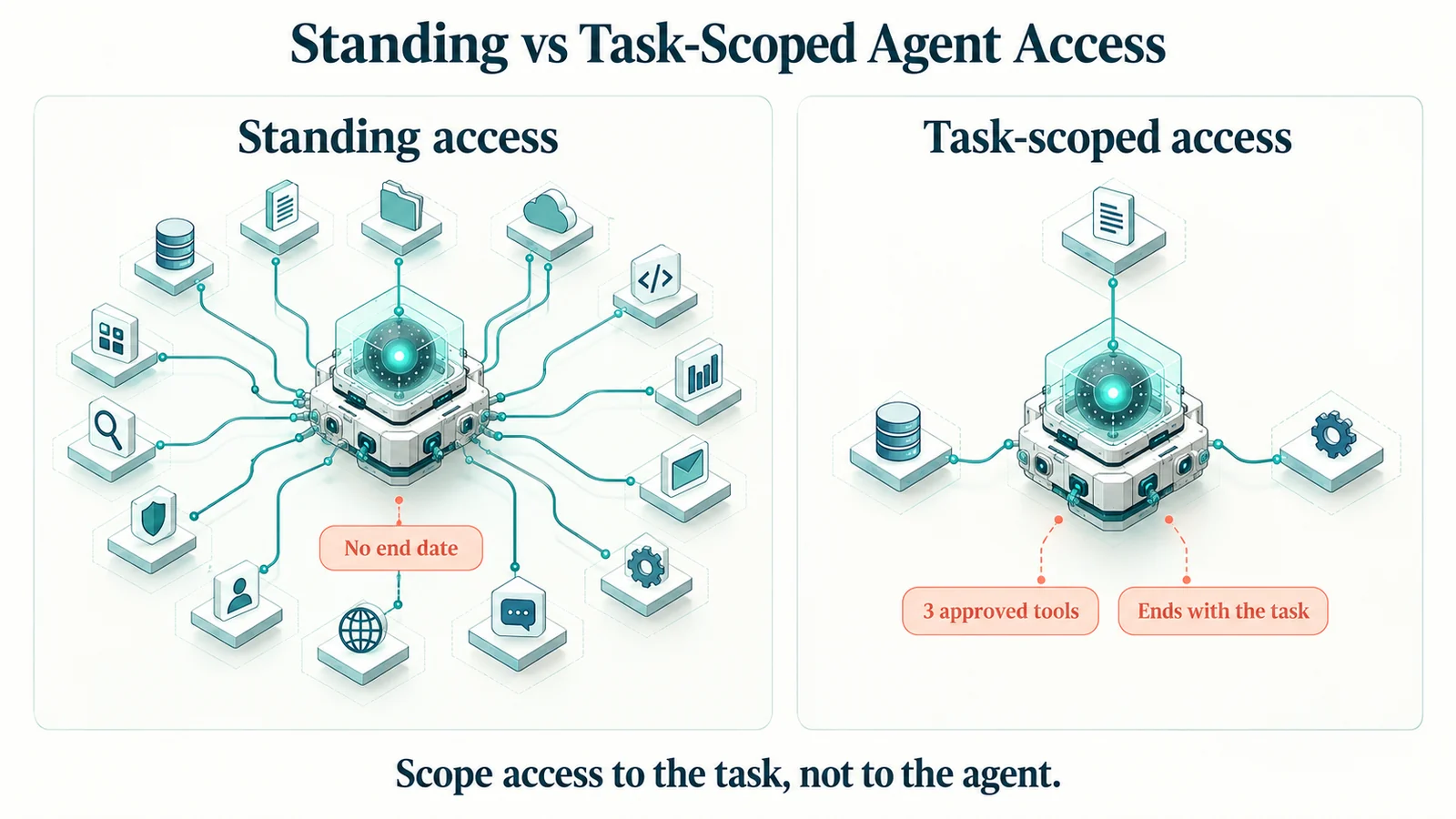 Standing access hands a manipulated agent everything its credential holds. Task-scoped access limits it to a few approved tools, for a bounded window.
How the MCP authorization model supports scoping
MCP does not make an agent least-privileged on its own, but its authorization model gives you useful hooks. These points from the current revision of the specification (2026-07-28) matter most for scoping.
Authorization is optional, and it is defined for HTTP transports. Where authorization is supported, implementations using an HTTP-based transport should conform to the authorization specification. Implementations using the local STDIO transport should not, and instead retrieve credentials from the environment. That distinction matters. A remote server may implement no authorization at all, and for a local server the agent's privilege is whatever credential sits in that environment. In both cases, scoping is your job, not the protocol's.
It builds on OAuth 2.1. A protected MCP server acts as an OAuth 2.1 resource server. The MCP client acts as an OAuth 2.1 client, making requests on behalf of a resource owner, and an authorization server issues the access tokens. Anchor that authorization server in the identity provider you already run, so sign-in, MFA, and offboarding apply before any agent reaches a tool. The OAuth explainer covers the background.
Scope requests should follow least privilege. The spec says servers should include a scope parameter in their authorization challenge to show the scopes an operation requires, "following the principle of least privilege and preventing clients from requesting excessive permissions." Clients should request only the scopes necessary for their intended operations.
Extra scope is requested when needed, not up front. When a token lacks the scope for an operation, the server can answer with an insufficient-scope error naming the scopes it needs. Clients acting for a user should then attempt a step-up authorization flow. The MCP security best-practices guide recommends a progressive, least-privilege scope model: a minimal initial scope set for low-risk discovery and read operations, with targeted elevation when privileged operations are first attempted.
Tokens are meant for one server. MCP clients must implement Resource Indicators for OAuth 2.0 (RFC 8707), and servers must validate that access tokens were issued specifically for them. Servers must not accept or transit any other tokens, and a server calling an upstream API must not pass through the token it received from the client. Done right, one server's token is no skeleton key for the rest of the estate.
A human stays in the loop. The tools specification says there should always be a human in the loop with the ability to deny tool invocations, and that clients should prompt for user confirmation on sensitive operations. The protocol does not mandate what that interaction looks like.
Now the limits. The protocol does not define what a given scope means for identity: who may act on whom, which changes need a second approver, which combinations break separation of duties. If a server's challenge carries no scope, the spec tells clients to fall back to requesting every scope the server lists as supported. A server that lists its full scope catalog there hands out broad tokens from the first sign-in. The spec intends that list to be the minimal set for basic functionality, and the best-practices guide names publishing all possible scopes there as a common mistake, along with wildcard or omnibus scopes and "treating claimed scopes in token as sufficient without server-side authorization logic." The protocol opens a narrow channel. The server and the policy engine behind it have to keep it narrow.
A risk-tier ladder for agent tool permissions
Tiering by action type, from read-only lookups to destructive and identity-changing actions, is covered in how to secure MCP servers. For least privilege, a second lens helps: tier by permission scope, meaning how far a capability reaches beyond the person asking. The same tool can land in different tiers. A password reset on your own account is a self-scoped change. The same reset on a colleague's account is a delegated action that needs a different gate.
| Tier | Permission scope | Example agent capabilities | Minimum gate |
|---|---|---|---|
| 0. Out of bounds | Raw directory or admin access | Arbitrary directory writes, script execution, credential export | Never exposed to agents |
| 1. Read self | The requester's own identity data | View own account status, own recent activity | Allow-list, scoped token, logging |
| 2. Change self | The requester's own credentials and requests | Unlock own account, change own password, request (not grant) access | Tier 1 plus identity verification and a policy check |
| 3. Delegated | People the requester already has authority over | Profile updates for direct reports, help desk assisted reset | Tier 2 plus a delegated-authority check, with verification sent to the affected user |
| 4. Organization-wide or privileged | Access, roles, and groups beyond the requester's own scope | Disable an account, grant a privileged role, change group ownership, bulk changes | Tier 3 plus human approval, a time limit, and full evidence per outcome |
Two rules make the ladder work. First, Tier 0 is a real tier. Some capabilities should not exist as agent tools at all, and "the agent might need it someday" is not a reason to build one. Second, tier assignment follows the permission, not the tool name. When a request moves up a rung, because the target is someone else or the change is privileged, the gate moves up with it, even though the assistant is calling the same tool.
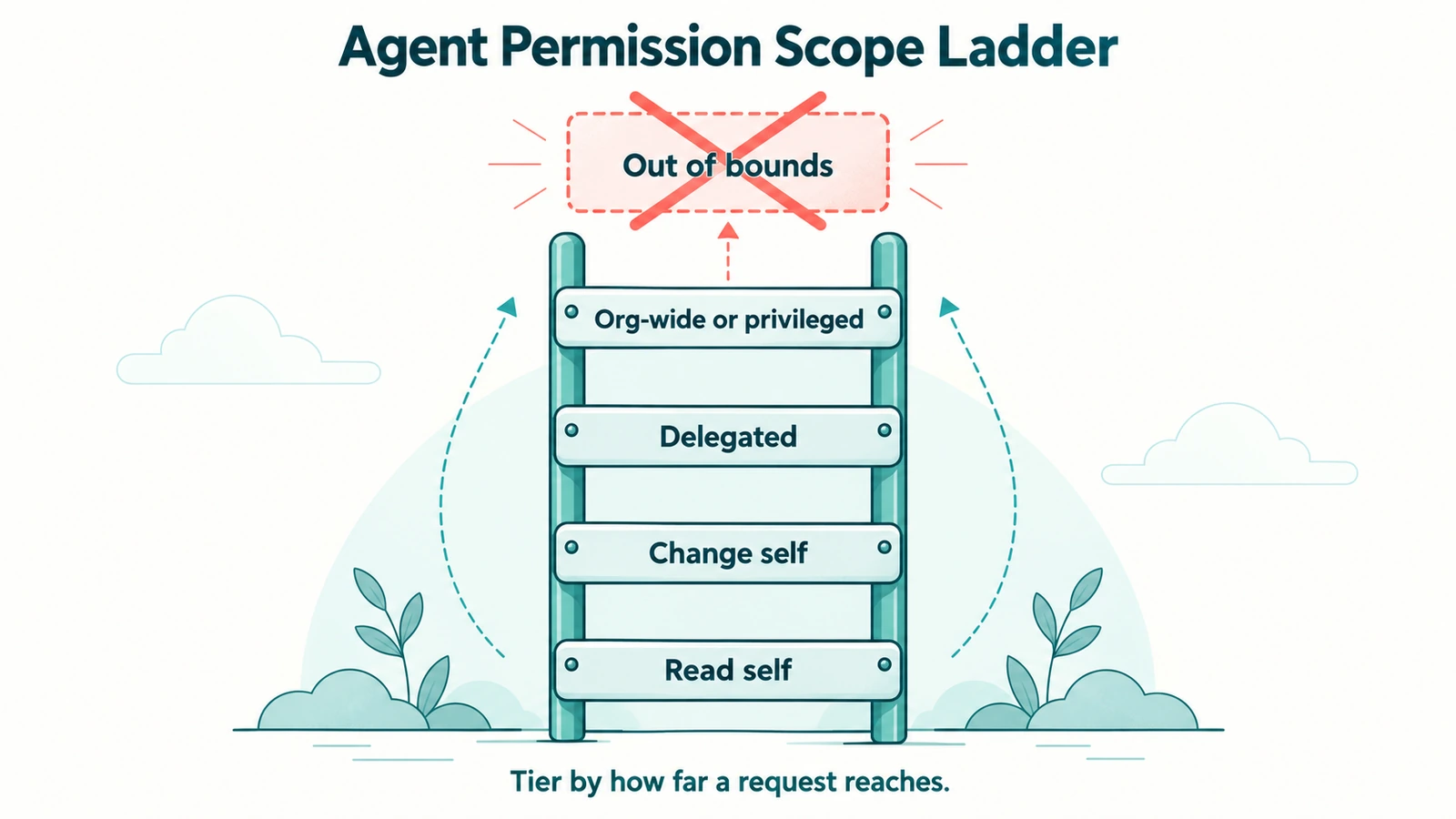 Tier agent requests by how far they reach beyond the requester. The same reset is a Tier 2 change for yourself and a Tier 3 action for someone else.
How to scope MCP tools for AI agents: five steps
Work through these five steps in order. If you tune tokens (step four) before deciding which capabilities exist (step one), you can end up with well-scoped tokens for tools that should never have been exposed.
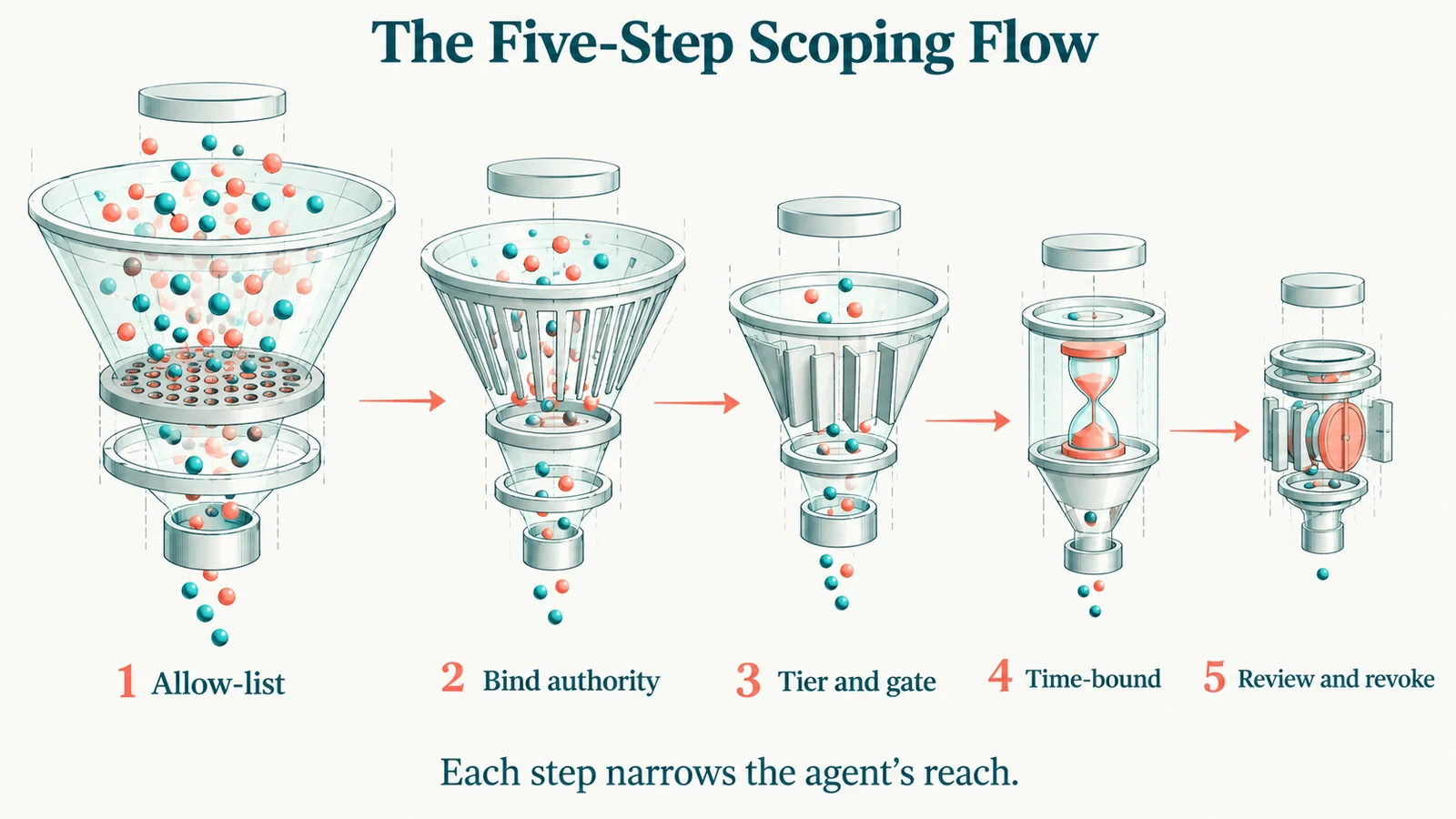 Allow-list, bind, gate, time-bound, review: each step narrows the agent's reach, and review feeds the next allow-list.
1. Define the task and allow-list the capabilities it needs
Write the agent's task in one sentence: "help employees unlock their own accounts and request application access," or "help managers process access changes for their direct reports." Then list the capabilities that sentence requires, and nothing else. Anything off the list is not exposed to that agent.
Prefer purpose-built capabilities over general ones. "Unlock this account" has a defined input, target, and blast radius. "Update any directory attribute" does not. If a task seems to need a general tool, build a narrower one instead of widening the agent.
Apply the allow-list at two levels. At the server level, only approved, vetted MCP servers connect to agents that touch identity. At the tool level, each agent sees only the tools approved for its task. A simple manifest makes the allow-list reviewable. The example below is illustrative only and is not a real product schema:
# Illustrative scoping manifest, not a real product schema
agent: employee-self-service-assistant
task: "Unlock own account; request application access"
owner: it-service-desk-lead
allowed_capabilities:
  - view_own_account_status     # Tier 1
  - unlock_own_account          # Tier 2, verification required
  - request_access_for_self     # Tier 2, creates a request, never a grant
not_exposed:
  - disable_account
  - grant_privileged_role
  - bulk_group_change
review_by: 2026-12-31
2. Bind every call to delegated authority
An agent acting for a person should never hold more authority than that person. Its effective permission for any call is the overlap of what the person is entitled to and what the capability allows. It is never the combined total.
That rules out one broadly privileged service account behind the MCP server, which lets any user reach anything that account can. Instead, resolve the requester from a real authentication event and evaluate each call against that person's existing roles.
Delegation across people should be explicit: a manager acting for a direct report, or a proxy covering for someone on leave, with a defined scope and an end date. Agents that act with no human in the request need their own registered non-human identity, with an owner, a narrow scope, and a review cadence. The service account and non-human identity governance reference covers that population.
3. Tier each capability and gate the sensitive ones
Assign every allow-listed capability a tier from the ladder above, and attach the gate for that tier. For Tier 3 and Tier 4, route the action to the human approval workflows the organization already uses for portal and help desk requests. Don't build a separate, lighter approval path just for agents.
Make approval meaningful: the approver should see the exact action, target, and arguments, not a generic "allow this tool?" prompt. The agent can start the request and report its status. It cannot approve on anyone's behalf or decide which actions skip review. That classification belongs in policy, set in advance.
Where an action depends on verifying a person, send the verification to the affected user, not to whoever is asking. This is the same rule human help desks need, because an agent can be talked into a reset just as a person can.
4. Make the grant time-bound
Every grant an agent holds should have an end. In practice that means four things:
- Short-lived, audience-bound tokens. Lifetimes measured in minutes or hours, issued for the one MCP server that receives them. The MCP security considerations say authorization servers should issue short-lived access tokens.
- Delegations with expiry dates. A proxy arrangement or a cross-team delegation ends on a date, not when someone remembers.
- Elevation tied to the task. When a task needs a Tier 4 capability, grant it for that task or ticket and remove it automatically when the task closes. The patterns in just-in-time access and zero standing privilege apply directly.
- Agent registrations with a review date. An agent's existence should come up for renewal, so a pilot doesn't quietly become permanent.
An over-broad grant that expires in an hour is a much smaller problem than one that lasts a year.
5. Review what agents did, and revoke what they no longer need
Least privilege drifts unless someone compares the grant with the use. On a schedule, pull each agent's activity and ask: which allow-listed capabilities went unused (retire them), which requests were denied and why, and did anything happen outside the declared task?
Put agents and their owners into access certifications alongside people. The AI-assisted access certification guide covers campaign design. Make revocation a single step that removes everything an agent holds at once. And make revocation follow the principal: when a delegating person's access changes or ends, what agents can do on that person's behalf changes with it. Evidence makes this step possible. The AI agent audit trail guide covers what each record should contain.
Common mistakes when scoping agent permissions
Check for these first. Each is easy to introduce during a pilot and easy to leave in place afterward.
| Mistake | Why it breaks least privilege | Fix |
|---|---|---|
| One shared admin credential behind the server | Every request runs with the credential's full reach | Evaluate each call against the requester's own entitlements |
| Wildcard or catch-all scopes | One stolen token reaches unrelated tools | Minimal default scopes, step-up for the rest |
| Treating a token scope as the decision | A scope says a client may call a tool, not that this action is allowed | Server-side policy on every call |
| Pilot grants with no end date | Temporary access becomes permanent | Expiry on every grant and every agent registration |
| A new permissions model built just for agents | A parallel system nobody reviews drifts from the real one | Inherit permissions from the platforms you already govern |
What Avatier ships toward this pattern
Avatier puts the principle this guide keeps returning to in its own words: the assistant is the interface, never the authority. Here is how Avatier's published product claims map to the five steps.
Only approved capabilities (step 1). Avatier Actions is an MCP connector that exposes more than 50 identity outcomes as MCP tools across eight modules: Password Management, Help Desk, Lifecycle Management, User Management, Group Management, Access Governance, Workflow Approval, and Reports. Under Identity Anywhere 2027, AI assistants do not receive unrestricted access: every request must invoke an approved Avatier capability. The action set includes the controls this guide leans on. User Management includes account expiration and proxy of authority. Group Management has twelve actions, from membership and ownership to nesting and expiration. Access Governance covers campaign management and review, and Workflow Approval covers pending requests and history.
Delegated authority and policy outside the model (steps 2 and 3). Every request remains subject to authentication, authorization, delegated authority, policy enforcement, and audit controls. Avatier determines whether an identity action is permitted and records what occurred. Outcomes run through the customer's existing policies, approvals, and roles, and nothing bypasses governance. For help desk actions, Assisted Reset routes every verification challenge to the user, so the help desk agent sees only pass or fail (see the Assisted Reset pillar page).
Permissions inherited, not reinvented. Setup is one administrator connection. Permissions are inherited from the identity platforms customers already run (Microsoft Entra ID, Active Directory, Okta, and Ping), with no per-user setup and no new permissions model. Because permissions are inherited, what an assistant can do follows entitlements the organization already governs. Avatier runs alongside those platforms rather than replacing them, and alongside SailPoint, Saviynt, ServiceNow, and Moveworks where they are in place.
Evidence per outcome (step 5). Each Secure Outcome records the identity involved, the initiating agent or experience, the authorization context, the policy applied, the action taken, and the final result. Avatier Ledger is a separate MCP connector. Avatier CISO Dr. Sam Wertheim describes it as recording who asked, what ran, under whose authority, and what policy allowed it, for every action, human-initiated or agent-assisted. Its Persona Briefings include a security-team briefing built around exposure, dormant and orphaned access, privileged activity, and the vishing surface at the help desk, which is useful input for the review-and-revoke step. As Wertheim put it at the Identity Anywhere 2027 launch in August, "If an organization cannot audit an AI-initiated identity action, it does not fully control it."
Both connectors work inside Claude, Claude Code, Microsoft Copilot, Avabot, and any MCP-compatible assistant, and are available through Avatier Identity Anywhere 2027™ (see the Identity Anywhere 2027 site). Pricing is Pay Per Identity Action™: customers pay only for completed, verified, policy-compliant outcomes. Getting started is free, deployment services are included, and a 45-day money-back guarantee applies. Full commercial terms go to qualified organizations in the invitation-only preview.
The Avatier Trust Center publishes Avatier's security posture: SOC 2 Type II audited with no exceptions noted, and ISO/IEC 27001:2022 certified. For Avatier's credential controls, see the Credential Governance™ home page and the Password Portal pillar page for self-service resets and unlocks. For the wider platform, visit avatier.com.
What least privilege for AI agents does not solve
Scoping narrows what an agent can reach. It does not make everything the agent does safe.
It does not fix entitlements that are already wrong. Delegated authority caps an agent at what the requester holds. If that person has piled up excess access, the agent inherits it faithfully. Inherited permissions are only as good as the roles behind them, which makes privilege creep remediation and certification more important once agents arrive, not less.
It does not stop prompt injection. A manipulated agent can still request actions that are inside its scope and still harmful, read data the user can see and leak it elsewhere, or misreport what it did. Narrow scopes and approvals limit the damage. They don't prevent the manipulation. Input handling, output controls, and monitoring are still needed.
It only covers the path you govern. A local MCP server that reads a credential from its environment, or a third-party server acting on a SaaS application directly, can sit outside your identity tools and your policy engine. Discovery and server allow-listing reduce that gap. They don't close it.
Approvals degrade if they become routine. If approval volume grows until people approve by reflex, the gate stays in place and stops working. Keep Tier 4 small, and watch approval patterns as closely as agent activity.
Within those limits, least privilege turns an agent from a standing risk into a bounded one: a few approved capabilities, on a real person's authority, for a known window, with a record of every outcome. For how agents prove who they are before any of this applies, see the agentic authentication reference.
ABOUT THE AUTHOR

More from Access Management

OAuth vs MCP for Enterprise Access: Where Avatier Governs the Gap
OAuth and MCP aren't rivals. MCP connects AI assistants to tools, and its authorization builds on OAuth 2.1. What each one answers, what scopes miss, and how Avatier governs each action.

How to Secure MCP Servers in the Enterprise: A 2026 Guide
How to secure MCP servers: the enterprise threat model, from tool poisoning to confused deputies, and the step-by-step controls that keep AI tool calls scoped, approved, and audited.
Data Access Governance in 2026: Govern Who Can Reach Sensitive Data
Data access governance is the discipline of controlling who can reach which sensitive data, under what conditions, and proving it to auditors. It is distinct from IAM, which grants access to systems, and from CIEM, which governs cloud infrastructure. The practical 2026 guide to governing access to the data itself.