RACF User Access Control: The Comprehensive Guide on the Mainframe 2026
IBM Resource Access Control Facility (RACF) has been the load-bearing access control for z/OS mainframes since 1976 and remains operationally critical at banking, insurance, government, and Fortune 500 enterprises in 2026. The comprehensive reference on user profiles, group profiles, resource profiles, dataset protection, and modern IAM integration.
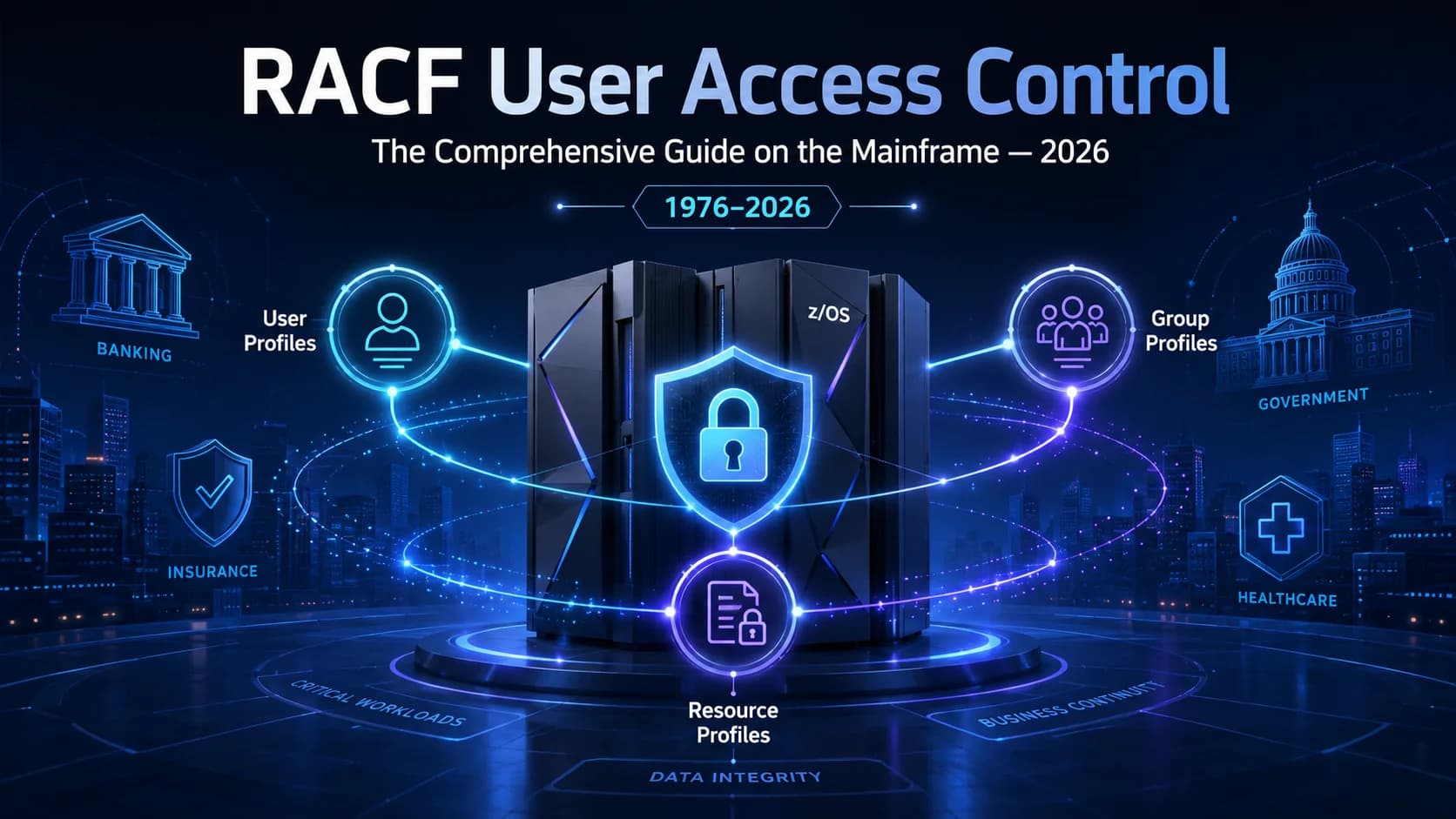
IBM Resource Access Control Facility (RACF) has been the load-bearing access control for z/OS mainframes since 1976 and remains operationally critical at banking, insurance, government, and Fortune 500 enterprises in 2026. The comprehensive reference on user profiles, group profiles, resource profiles, dataset protection, and modern IAM integration.
- IBM Resource Access Control Facility (RACF) has been the load-bearing access control for z/OS mainframes since 1976 and remains operationally critical at banking, insurance, government, and Fortune 500 enterprises in 2026. The mainframe workload is often the highest-value system in the environment; RACF is what protects it.
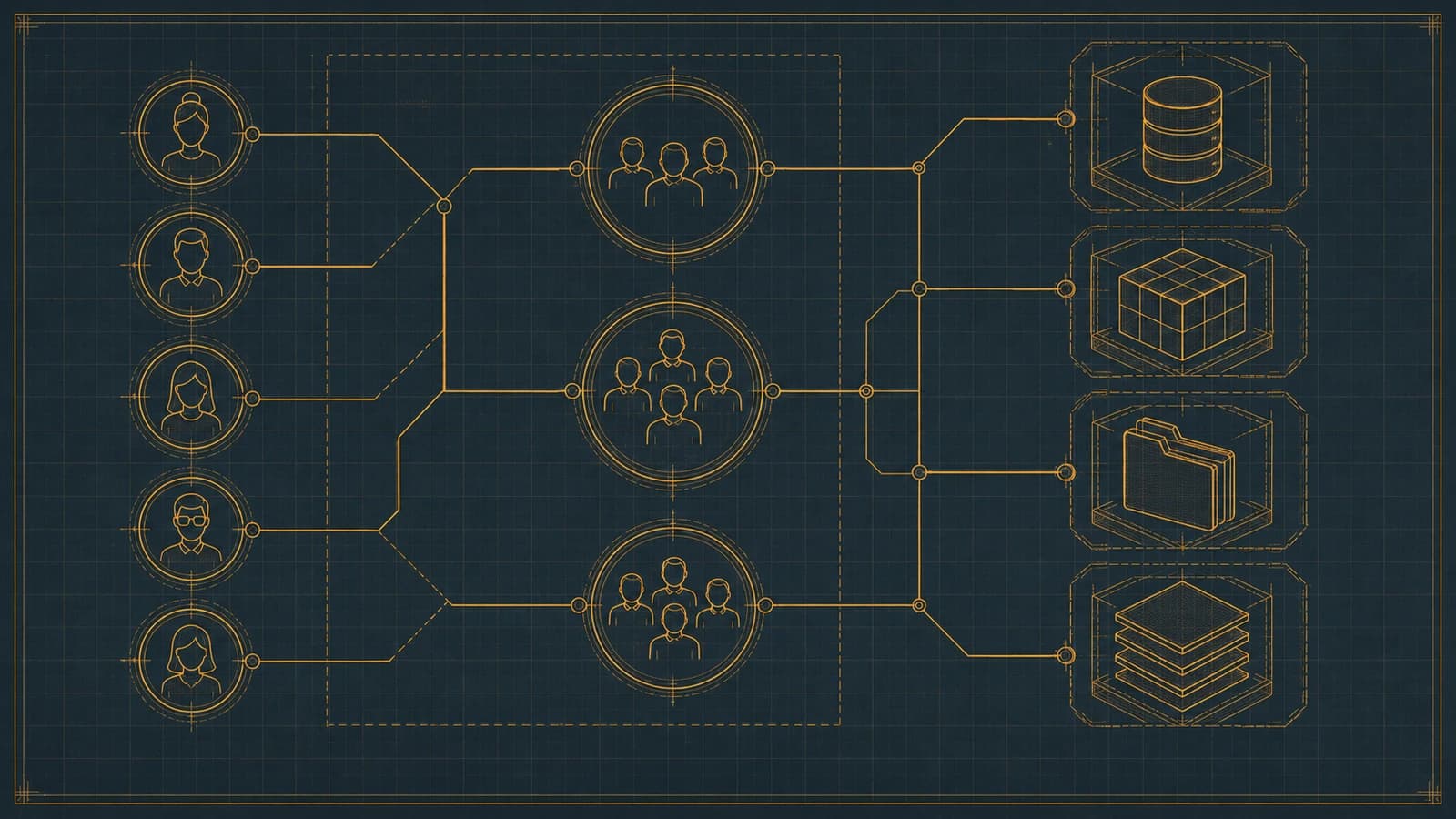
- RACF has three core profile types: user profiles (individual identities), group profiles (organizational structure and inheritance), and resource profiles (what's being protected). The composition produces access-control decisions per user × resource × operation.
- User profiles carry substantial detail — RACF ID, name, class assignment, default group, connect groups (up to hundreds), revoke and resume states, password history, attributes (SPECIAL, OPERATIONS, AUDITOR), and behavioral segments. Understanding the field structure is prerequisite to competent RACF administration.
- Resource profiles use generic vs discrete matching — a discrete profile protects a specific resource; a generic profile uses masks (asterisks, percent signs) to protect classes of resources. The 2026 pattern uses generic profiles for maintainability and discrete profiles only for exceptions.
- Modern IAM integration extends RACF rather than replaces it. HRIS-driven lifecycle events propagate to RACF through connectors. Federation gives RACF users modern MFA. The IGA workflow governs RACF entitlements alongside cloud and SaaS. The [Playbook Legacy IAM to Modern piece](/en/blog/playbook-legacy-iam-to-modern-2026/) covers the integration pattern; Avatier has deep mainframe adjacency.
IBM Resource Access Control Facility (RACF) has protected z/OS mainframes since 1976 and it hasn't lost its job. Banking core systems, insurance claims platforms, government citizen services, healthcare EHR backends, retail supply chain — the workloads that run on mainframes in 2026 are among the highest-value systems in the environments where mainframes still run, and RACF is what stands between those workloads and unauthorized access. Understanding RACF at a level that supports competent administration isn't optional for organizations with mainframe presence; it's operationally load-bearing.
This piece is the comprehensive 2026 reference on RACF user access control — the three core profile types, the field-level detail of user profiles, the resource-protection mechanics, dataset protection specifics, general resource classes, and the modern IAM integration patterns that extend RACF into the federated enterprise. The companion pieces cover adjacent territory. The Demystifying RACF Beginner's Guide piece covers RACF fundamentals for administrators new to the platform. The RACF vs ACF2 piece covers the mainframe access-control landscape comparatively. The Mainframe Identity Modernization piece covers the zero-trust extension. The Playbook Legacy IAM to Modern piece covers the federation-first modernization pattern that preserves mainframe investment.
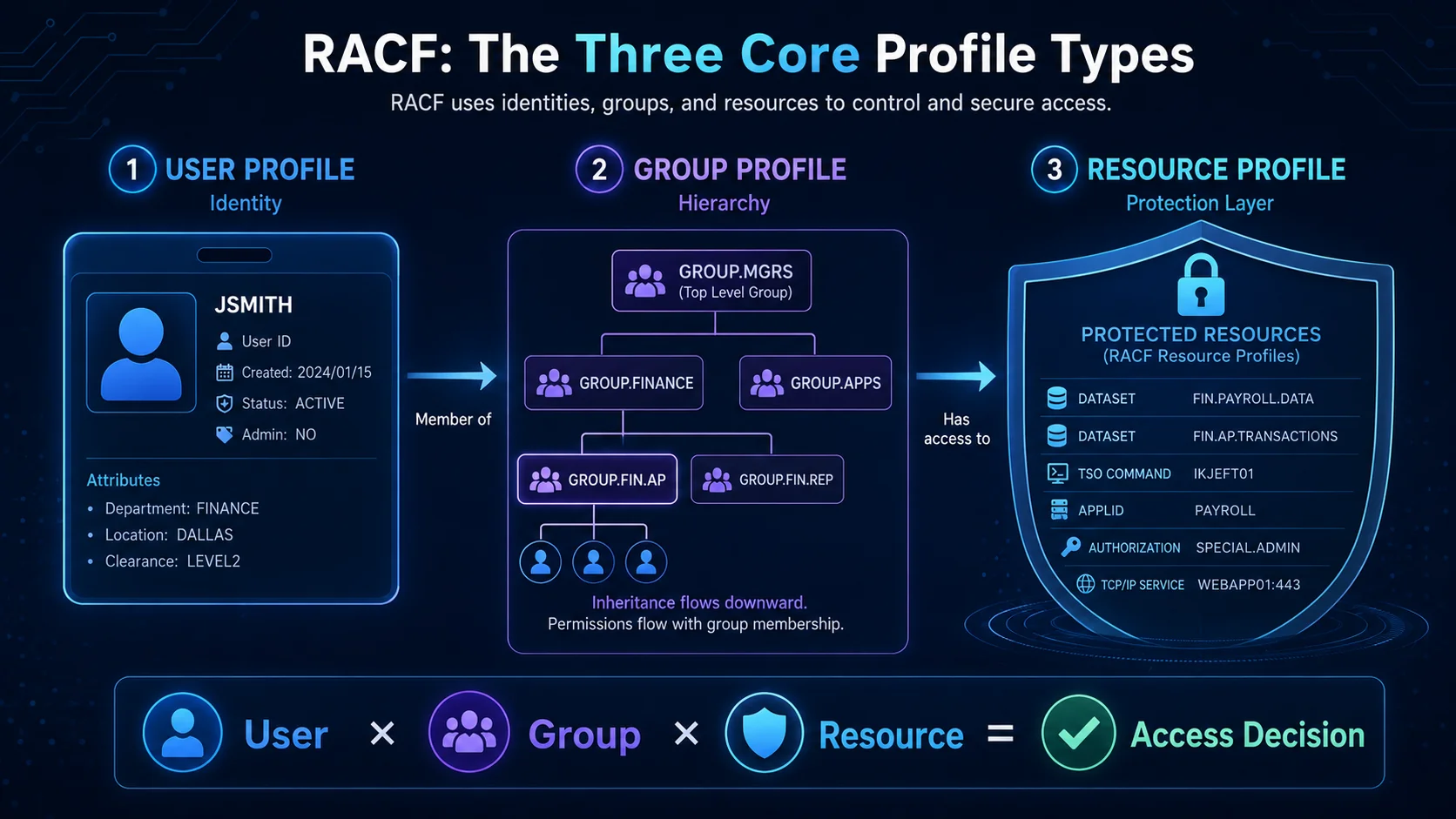 Three profile types, one access-control model. User × group × resource — every RACF decision composes from this triangle.
What RACF actually is
RACF is IBM's software product providing access control services on z/OS (and its predecessors — OS/390, MVS/ESA back to MVS/SP). The product handles two related functions. First, identification and authentication — verifying that the user is who they claim to be (traditionally via password; now increasingly through federated identity + MFA at the enterprise layer). Second, authorization — determining whether the authenticated user has permission to perform a specific operation on a specific resource.
RACF's authorization decisions are always made per user × resource × operation. When any z/OS component needs to know "can user X do Y to resource Z," it calls RACF via the SAF (System Authorization Facility) interface, RACF evaluates the profiles, and returns an allow/deny decision. The pattern is uniform across dataset access, CICS transactions, DB2 tables, IMS commands, TSO commands, MVS console commands, and hundreds of other resource classes.
The "user X" side of the decision is defined by user profiles. The "resource Z" side is defined by resource profiles. The "operation Y" side is defined by the resource class's semantic model (READ vs UPDATE vs CONTROL vs ALTER for datasets, for example). Group profiles provide organizational structure that lets access rights inherit rather than requiring per-user assignment.
User profiles: the identity layer
Every RACF user has a user profile. The profile carries substantial detail across multiple segments, and understanding the field structure is prerequisite to competent administration.
Base segment fields
- USERID (up to 8 characters, uppercase, alphanumeric): the RACF ID, unique per RACF database
- NAME (up to 20 characters): the user's real name for administrative reference
- OWNER (up to 8 characters): the RACF user or group that owns this user profile (has permission to modify it)
- DFLTGRP (up to 8 characters): the default group the user is a member of
- AUTHORITY (USE / CREATE / CONNECT / JOIN): the user's authority level in their default group
- PASSWORD (encrypted): the user's password hash; not directly visible
- PASSDATE (date): last password change
- PASSHIST (list): password history (prior password hashes to prevent reuse)
- CLASS (USER / STARTED / PROTECTED / restricted): the user class determining what the user can do at a fundamental level
- REVOKE (state): the revoked state — user cannot authenticate
- RESUME (state): the resumed state — allows authentication after revoke
Attributes (system-wide privileges)
- SPECIAL: system-wide privilege equivalent to root — can modify any RACF profile
- OPERATIONS: system-wide privilege for dataset operations regardless of dataset protection
- AUDITOR: system-wide privilege to read all audit records and profiles
- CLAUTH classname: privileged to create profiles in a specific class
The three system-wide attributes (SPECIAL, OPERATIONS, AUDITOR) are the highest-risk privileges in RACF. In 2026 audits, the SPECIAL population should be small (under 10 typically), well-documented, actively certified, and JIT-elevated where possible (PAM piece).
Group connections
Beyond the default group, users can be connected to additional groups (CONNECT command). Each connection has its own authority level (USE / CREATE / CONNECT / JOIN) determining what the user can do within that group. Group connections are the primary mechanism for organizational access assignment — instead of granting every user their own access to a resource, grant the group access and connect the user to the group.
Segments
RACF supports optional segments that carry information for specific z/OS components:
- TSO segment: TSO-specific parameters (account number, region size, hold class, etc.)
- CICS segment: CICS-specific parameters (operator ID, timeout, priority)
- DFP segment: SMS (System Managed Storage) parameters
- OMVS segment: z/OS UNIX System Services parameters (UID, home directory, program)
- LANGUAGE segment: language preferences for messages
- NETVIEW segment: NetView operator parameters
- DCE segment: DCE (Distributed Computing Environment) parameters
- KERB segment: Kerberos parameters
- PROXY segment: LDAP/directory-service parameters
- EIM segment: Enterprise Identity Mapping parameters for cross-realm identity mapping
Each segment is optional; add them as the user's role requires interaction with the respective z/OS component. The segment model lets RACF centralize identity information across components without requiring each component to maintain its own user directory.
Group profiles: the organizational layer
Group profiles define the organizational structure that RACF uses for access-right inheritance and administration delegation.
Fields
- GROUP (up to 8 characters, uppercase): the group name, unique per RACF database
- OWNER (up to 8 characters): the RACF user or group that owns this group profile
- SUPGROUP (up to 8 characters): the superior group in the hierarchy
- CREATED (date): when the group was created
- UNIVERSAL (attribute): universal group — any user can be automatically considered a member without explicit CONNECT
Hierarchy and inheritance
Groups form a tree structure — every group has a superior group except SYS1 (the root). The hierarchy affects RACF administration authority: a user with GROUP-SPECIAL attribute in a superior group can administer subordinate groups, allowing distributed administration without requiring system-wide SPECIAL.
Data segment
Groups can carry a data segment (up to 255 characters) for administrative annotations. The data segment is often used to record the business purpose of the group ("Accounts Payable staff") or the owner department ("Finance"). Consistent use of the data segment substantially aids audit and administration.
Universal groups
Groups marked UNIVERSAL treat every user in the RACF database as a member without requiring explicit CONNECT. This is useful for organization-wide access grants (everyone has access to the shared knowledge base) but should be used sparingly — the operational effect of universal group access is broad by definition.
Resource profiles: the protection layer
Resource profiles define what's being protected. Every resource class supported by RACF has its own profile structure, but the common pattern is uniform.
Common fields
- NAME (up to 246 characters): the profile name — the specific resource or resource pattern being protected
- CLASS (per resource class): the resource class (DATASET, CICS transaction class TCICSTRN, DB2 table class DSNADM, TSO account class ACCTNUM, MVS console class OPERCMDS, etc.)
- UACC (NONE / READ / UPDATE / CONTROL / ALTER): universal access — the access anyone gets who isn't explicitly listed elsewhere
- OWNER (up to 8 characters): the profile owner (permission to modify)
- AUDIT (specification): what access attempts are audited (SUCCESS / FAILURE / ALL, per access level)
- NOTIFY (up to 8 characters): the user to notify on access violations
- WARNING (attribute): warning mode — access is allowed but audit records are generated (useful during migration)
Access lists
The access list is where specific access grants are recorded. Each entry is a user or group with a specified access level (NONE / READ / UPDATE / CONTROL / ALTER). RACF evaluates access decisions by checking the access list against the user's identity (direct grants) and the user's group memberships (group grants), and applies the highest access level that matches.
Generic vs discrete matching
Resource profile names can be discrete (specific resource) or generic (mask-based). Generic profiles use ** (matches any qualifiers), * (matches one qualifier), and % (matches one character) as wildcards. When RACF evaluates access, it looks for the most-specific matching profile — specificity is scored by the number of matched qualifiers.
Example dataset profiles:
PROD.PAYROLL.DATA— discrete profile protecting exactly that datasetPROD.PAYROLL.**— generic protecting all datasets starting with PROD.PAYROLL.PROD.**— generic protecting all PROD.* datasets (broader)**— generic protecting everything (broadest — often used as safety net with UACC(NONE))
If a user attempts to access PROD.PAYROLL.SALARY, RACF finds PROD.PAYROLL.** is the most-specific match and applies that profile's access rules.
The 2026 pattern: use generic profiles for maintainability. A single generic profile can protect thousands of resources with consistent access rules; managing thousands of discrete profiles that drift out of sync is a well-known 2026 audit finding. Reserve discrete profiles for exceptions.
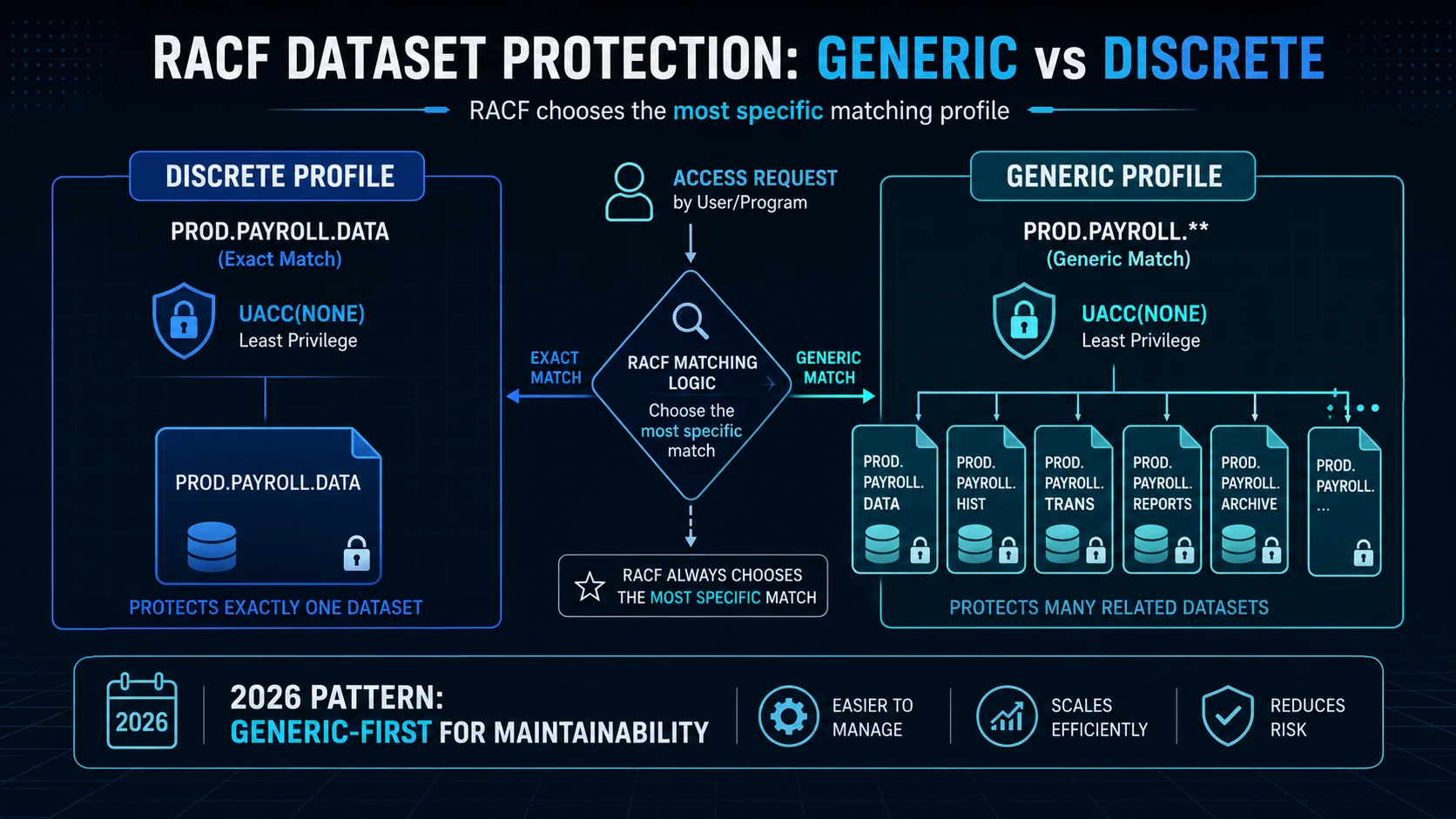 Two matching styles, one specificity rule. Generic profiles scale; discrete profiles are the exception. 2026 mature administration is generic-first.
Dataset protection specifics
The DATASET class in RACF protects z/OS datasets (files, in mainframe parlance). Dataset profiles have the general fields above plus dataset-specific details.
Dataset profile name conventions
Dataset profile names use the high-level qualifier as the ownership root. A profile named PROD.PAYROLL.** typically belongs to the PROD organization or business unit; a profile named DEV.TEST.** belongs to development.
Access levels for datasets
- NONE: no access
- READ: read the dataset
- UPDATE: read and modify the dataset
- CONTROL: read, modify, and delete records within the dataset (for VSAM datasets — has broader implications)
- ALTER: full control including delete the dataset entirely
Common patterns
- Production datasets: UACC(NONE), specific access lists granting READ or UPDATE per role, ALTER limited to a small operational team
- Development datasets: UACC(READ) for developers, UPDATE for the specific development team, ALTER limited to authorized cleanup roles
- Shared reference data: UACC(READ), access lists granting UPDATE to specific data-owner roles
The pattern of UACC(NONE) + specific access lists produces defensible least-privilege posture (Least Privilege piece) for dataset access.
General resource classes
Beyond datasets, RACF protects general resources across many classes. The most common in 2026 deployments:
- TCICSTRN: CICS transactions — the individual transactions users can execute
- DSNADM / DSNR: DB2 administrative privileges and specific database resources
- IMS: IMS transactions and databases
- ACCTNUM: TSO account numbers
- TIMS/GIMS: IMS transactions (general)
- MVS.*: MVS console commands and system controls (extremely privileged)
- OPERCMDS: operator commands
- STARTED: started task authorization
- SURROGAT: surrogate authorization (act on behalf of another user)
- DIGTCERT: digital certificate management
- FACILITY: general-purpose class for RACF-based application security
Each class has its own semantic model. CICS transactions use READ for execute (a legacy artifact); DB2 uses UPDATE for INSERT/UPDATE/DELETE authority; MVS.* commands use specific access levels that map to command semantics. Competent RACF administration requires understanding the semantics of each class in use.
Modern IAM integration: extending RACF, not replacing it
Rip-and-replace of mainframe access control is neither necessary nor desirable in most 2026 environments. The mature 2026 pattern extends RACF into the modern IAM architecture rather than replacing it. Four integration layers.
Layer 1: HRIS-driven lifecycle. Joiner-mover-leaver events from SAP SuccessFactors, Workday, ADP, or other HRIS platforms propagate to RACF through connectors. New employees get RACF IDs at the same moment they get everything else; role changes update RACF group memberships automatically; departures trigger RACF revoke. The RACF user population stays synchronized with the authoritative HRIS record. The HRIS-Driven Lifecycle piece covers the integration patterns.
Layer 2: Federation and modern MFA. RACF users authenticate through the enterprise IdP rather than directly at the mainframe. The IdP applies modern MFA (passkeys, hardware FIDO2 keys, Avatier Identity Challenge Card) and passes the authenticated identity to the mainframe. RACF trusts the federated identity assertion and applies its access-control decisions on top. The result: mainframe access gets modern MFA without requiring changes to mainframe applications. The SSO Architecture piece on ICC covers federation architecture.
Layer 3: IGA workflow for RACF entitlements. Access requests for RACF group memberships and profile permissions flow through the enterprise IGA platform alongside cloud and SaaS entitlements. Approval workflow, certification campaigns, and lifecycle automation apply uniformly. The RACF-scoped catalog integrates with the broader enterprise catalog. Certification campaigns cover RACF entitlements at the same cadence as other entitlements.
Layer 4: ISPM posture audit. RACF entitlements are evaluated in the enterprise posture-audit layer — drift detection, dormant assignments, orphaned profiles, over-privileged accounts. Findings surface into the same remediation workflow as findings from other systems. The ISPM piece covers the posture-audit layer.
The four layers compose. RACF remains the load-bearing access control for mainframe resources; the modern IAM architecture extends over it, bringing lifecycle discipline, MFA, workflow, and posture audit that mainframe-only environments lack. The Playbook Legacy IAM to Modern piece covers the federation-first modernization pattern; the Mainframe Identity Modernization piece covers the zero-trust extension.
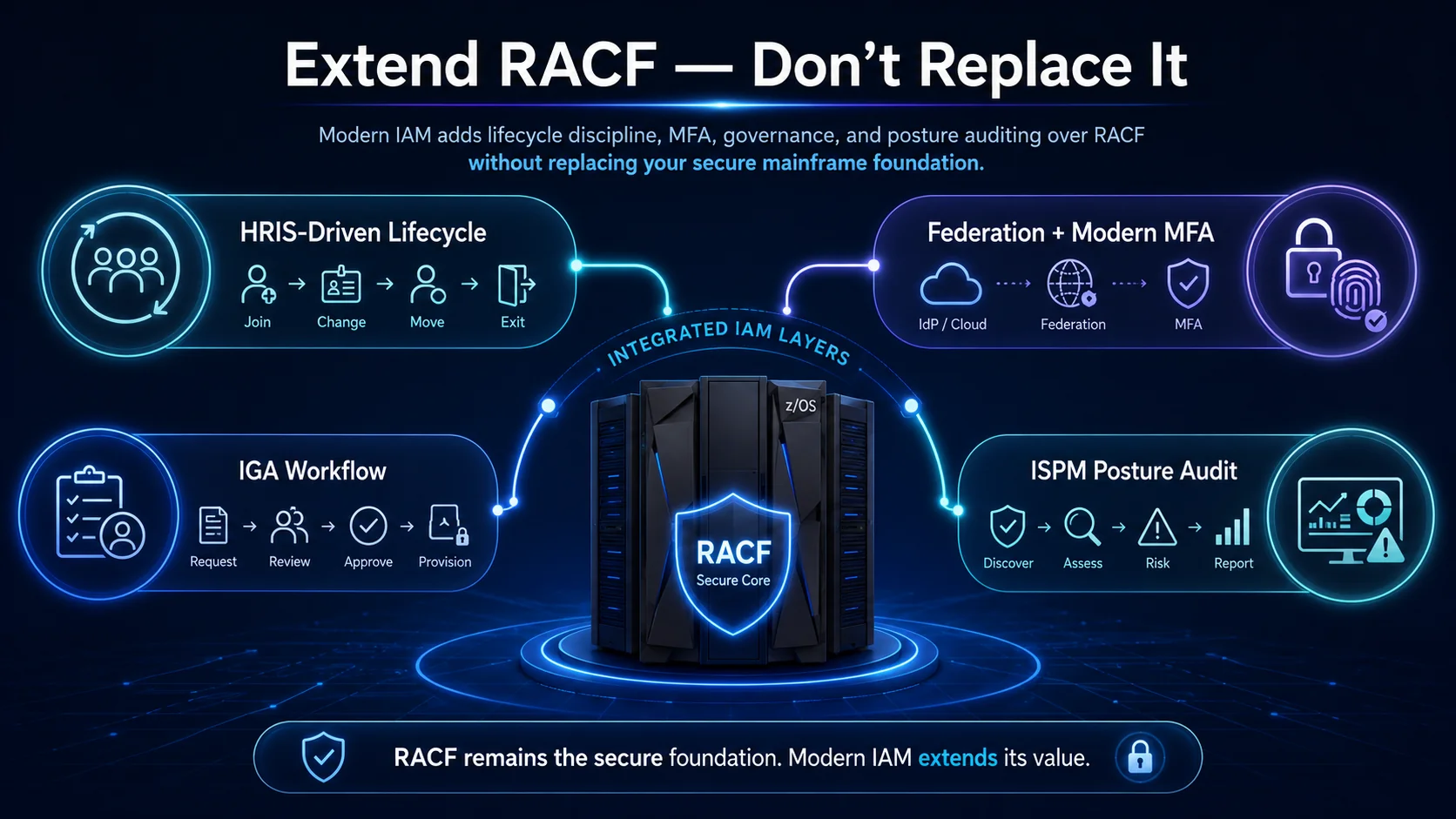 Four integration layers. One preserved foundation. Modern IAM extends RACF; it doesn't replace it.
The 2026 reference path
Master the profile types. User × group × resource is the composition RACF makes access decisions on; competent administration requires understanding all three at the field-level detail this piece covered.
Use generic profiles for maintainability. Discrete profiles multiply administrative overhead and produce drift. Reserve discrete profiles for exceptions.
Extend rather than replace. Modern IAM integration adds HRIS-driven lifecycle, federation with modern MFA, IGA workflow, and ISPM posture audit over RACF without requiring mainframe replacement. The Avatier RACF connector supports the integration pattern.
Point auditors at the Trust Center for Avatier's own posture. The Avatier Trust Center with the SecurityScorecard grade view — SOC 2 Type II with zero exceptions, ISO/IEC 27001:2022, PCI DSS v4.0.1, CSA STAR Level 1, NIST 800-53 Rev. 5 aligned, CISA Secure-by-Design Pledge signatory.
RACF has been the mainframe access control for 50 years and shows no signs of retirement in 2026. The organizations that depend on it will keep depending on it for the foreseeable future. Building competent administration and extending it into modern IAM architecture is the discipline that keeps the mainframe investment producing value while the surrounding IAM landscape evolves.
ABOUT THE AUTHOR

More from RACF & Mainframe
Mastering RACF User-Group Assignments & Permissions 2026
RACF grants access through groups, not users: ADDGROUP builds it, CONNECT enrolls the user, PERMIT binds it to a resource. How assignments, nested membership, and access decisions resolve in 2026.

RACF Password Complexity & Expiration Rules 2026 (SETROPTS)
RACF enforces password complexity, expiration, history, and lockout through SETROPTS PASSWORD suboperands — RULEn, INTERVAL, HISTORY, and REVOKE. The 2026 reference on the exact syntax, why PCI-DSS and SOX still mandate it even as NIST 800-63B moves the industry away from rotation and composition rules, and where RACF-level enforcement alone stops being enough.

Automating RACF Provisioning from HR Events: A 2026 Guide
RACF user provisioning becomes reliable when create, entitle, and deprovision actions trigger directly off HR events instead of tickets — here's how that pattern actually works on the mainframe.