Demystifying RACF: A Beginner's Guide to IBM's Security Product 2026
RACF has been securing IBM mainframes since 1976. In 2026, it's still securing the systems that process most of the world's credit card transactions, airline reservations, government records, and bank settlements. The plain-English beginner's guide to what RACF is, who uses it, why it still matters in 2026, and how it fits with the modern identity stack.
RACF has been securing IBM mainframes since 1976. In 2026, it's still securing the systems that process most of the world's credit card transactions, airline reservations, government records, and bank settlements. The plain-English beginner's guide to what RACF is, who uses it, why it still matters in 2026, and how it fits with the modern identity stack.
- RACF (Resource Access Control Facility) is IBM's mainframe security product, shipping with z/OS since 1976. It's the authentication-and-authorization layer that decides which users can log into the mainframe and which datasets, programs, and resources they can access.
- Who still uses it in 2026: the financial services industry (most major US banks), airlines (most major reservation systems run on z/OS), government (federal and large state agencies), healthcare claims processing, insurance back-office, and any organization running mission-critical workloads that originated before 1990 and still earn their keep.
- RACF organizes security around three primary concepts: users (people or programs that authenticate), groups (collections of users with shared access rights), and profiles (the protection records that govern access to datasets, programs, terminals, and other resources). The model is simpler than modern IAM platforms but covers the mainframe's authorization questions completely.
- Modern IAM integration with RACF is mature in 2026 — the IGA platform provisions users into RACF through standard interfaces, certification campaigns include RACF entitlements alongside cloud entitlements, and the audit trail composes across mainframe and distributed systems.
- Companion pieces cover adjacent territory: the CGov [RACF vs ACF2 piece](/en/blog/racf-vs-acf2-mainframe-access-control-choosing-the-right) compares RACF to its primary competitor for evaluators, and the [Mainframe Identity Modernization piece](/en/blog/mainframe-identity-modernization-racf-zero-trust) covers the integration of RACF into zero-trust architectures. This piece is the 101-level on-ramp.
If you've worked in enterprise identity for any length of time, you've probably encountered RACF — or at least heard the acronym in meetings, seen it referenced in audit reports, or noticed it as a target system in your IGA platform's connector catalog. If you've never had to actually work with it, RACF can feel like an artifact from a different era of computing: enigmatic, command-line-driven, documented in IBM manuals that read like Cold War procurement contracts. The technology dates from 1976, after all. The mental model that comes with it sometimes feels like it dates from then too.
The plain truth is that RACF is straightforward once you understand the three concepts it's built around. The mainframe is still securing the systems that process most of the world's credit card transactions, airline reservations, government records, and bank settlements in 2026. Understanding what RACF is and how it fits with modern IAM is increasingly part of the standard identity-professional toolkit, not the specialty niche it was a decade ago.
This piece is the 2026 plain-English beginner's guide. What RACF actually is, who still uses it, how it works conceptually, and how it composes with the modern identity stack. No assumed mainframe background; no requirement that you've worked with z/OS before. The companion pieces handle the next stages of the learning curve: the RACF vs ACF2 piece compares the two dominant mainframe security products for evaluators; the Mainframe Identity Modernization piece covers the integration of RACF into zero-trust architectures. This piece is the on-ramp.
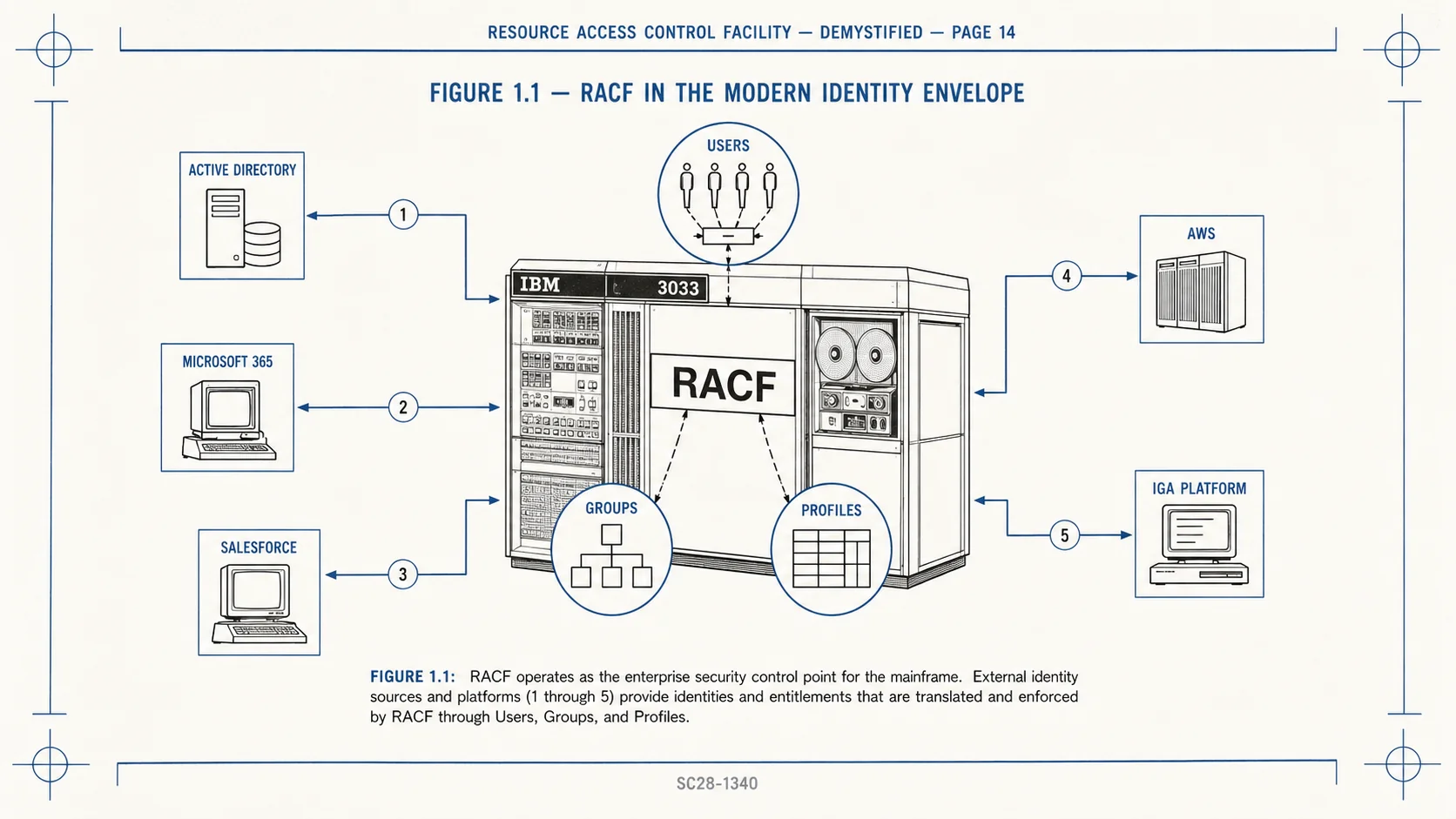 RACF at the center, three concepts surrounding it, modern IAM systems composing around the perimeter. The mainframe didn't go away; it integrated.
What RACF actually is
RACF stands for Resource Access Control Facility. It's the security manager that ships with IBM's z/OS mainframe operating system. When someone tries to log into a z/OS mainframe, or when a program running on z/OS tries to read a dataset, or when a transaction is dispatched to a CICS region, RACF is the component that decides whether the access is permitted.
RACF has been part of the IBM mainframe environment since 1976. The product predates the modern desktop computer, predates Microsoft, predates Linux, predates the World Wide Web. It has been continuously developed and shipped for fifty years across multiple generations of mainframe hardware (from IBM 3033 systems through the modern IBM z16) and multiple major versions of the z/OS operating system (originally MVS, then OS/390, then z/OS).
What's worth understanding is that the longevity isn't a quirk of history. RACF is still the dominant security product on z/OS in 2026 because the mainframes RACF protects are still the dominant transactional infrastructure in industries where reliability, throughput, and security at scale matter more than rapid feature iteration. Banks, airlines, government agencies, healthcare claims processors — the workloads that absolutely cannot fail and absolutely must be auditable run on mainframes, and RACF is the gatekeeper.
The product receives ongoing IBM development. Multi-factor authentication support (RACF Multi-Factor Authentication, integrated since z/OS 2.1), digital certificate handling, SIEM integration through SMF audit records, integration with modern IAM platforms — these features have been added over the years to keep RACF aligned with contemporary security requirements. The product is old; it isn't legacy in the dismissive sense.
Who still uses RACF in 2026
Anyone running production workloads on z/OS mainframes. The list is more substantial than common perception suggests.
Financial services. Most major US commercial banks run core banking workloads on z/OS — transaction processing, settlement, fraud screening, regulatory reporting. The mainframe processes a substantial share of credit card transactions globally; ATM networks largely depend on mainframe back-ends; international wire transfer settlement runs through mainframe systems. RACF gates user and program access to all of it.
Airlines. The major airline reservation systems (Sabre, Amadeus, Travelport) trace their architecture back to mainframe systems originally developed in the 1960s and continue to run substantial workloads on z/OS today. Boarding pass issuance, fare calculation, seat assignment, baggage tracking — much of it routes through mainframes with RACF in the path.
Government. Federal agencies — Treasury, IRS, Social Security Administration, Defense — operate substantial mainframe footprints with RACF as the security layer. Large state government systems (DMV, unemployment insurance, Medicaid administration) commonly run on mainframes. The mainframe's reliability, auditability, and predictable cost structure suit government workloads.
Healthcare. Claims processing operations for major health insurance carriers run on mainframes. The high transaction volume and the need for sustained reliability across decades of historical data make mainframes a natural fit. RACF protects the patient data, the claims records, and the financial settlements.
Insurance back-office. Policy administration, claims processing, actuarial calculation, annuity administration — many insurance back-office workloads originated on mainframes and remain there. The data-retention requirements (insurance records often need to be available for 50+ years) make migration economically unattractive.
Corporate ERP. Some large corporate ERP installations — especially SAP installations originally deployed in the 1990s — continue to run on z/OS, with RACF as the security layer above the SAP application layer.
The pattern across the list: mission-critical, high-volume, long-lived workloads. RACF protects the systems that earn their keep day after day, decade after decade.
How RACF works, conceptually
RACF organizes security around three primary concepts. The model is simpler than modern IAM platforms (RACF predates the concepts of role hierarchies, attribute-based access control, and policy-as-code by decades), but it covers the mainframe's authorization questions completely.
Users. A user is a person or program that authenticates to the mainframe. Each user has a unique user ID (typically 1-8 characters in length — a historical constraint that produces user IDs like JSMITH01, BWINCKEL, SYSPROG2). Each user has an authentication method: a password, a more modern password phrase (longer, more flexible), a digital certificate, a PassTicket (a single-use credential RACF generates and validates), or a multi-factor authenticator. The user has attributes that govern the user's privileges and constraints — SPECIAL (administrative authority), OPERATIONS (operational authority), AUDITOR (audit authority), or restrictions like REVOKE (account disabled) and PROTECTED (cannot log on directly, only callable from other programs).
Groups. A group is a collection of users with shared access rights. Groups are how access is granted at scale — instead of granting every user explicit access to every resource, the administrator grants access to a group and adds users to the group. Groups can be nested (a group can be a member of another group), producing a tree structure that lets organizations model their actual organizational hierarchy. Group memberships drive most of the access decisions RACF makes day to day.
Profiles. A profile is a protection record describing access controls for a resource. Datasets have profiles. Programs have profiles. Terminals have profiles. Transactions have profiles. RACF supports both discrete profiles (one specific resource) and generic profiles (a pattern matching many resources, like PAYROLL.*.DATA matching every dataset starting with PAYROLL and ending with DATA). Each profile lists the users and groups that have access and at what permission level: READ, UPDATE, CONTROL, ALTER.
When a user tries to access a resource, RACF performs the authorization decision. Look up the profile for the resource (the generic profile if no discrete profile exists). Check whether the user (directly or through group memberships) has access at the requested permission level. Permit or deny accordingly. Log the decision to the System Management Facility (SMF) audit trail.
That's it. Conceptually, RACF authentication-and-authorization fits in one paragraph.
RACF in commands
Most RACF administration historically happens through TSO (Time Sharing Option — IBM's interactive command-line environment) or through ISPF (Interactive System Productivity Facility — IBM's menu-driven panel system). A few example commands give the flavor of how RACF actually feels in practice.
Adding a new user: ADDUSER JSMITH01 NAME('John Smith') OWNER(SYSADM) DFLTGRP(USERS) PASSWORD(temppass1). The command creates a user with ID JSMITH01, owned by the SYSADM group, defaulted to the USERS group, with an initial password.
Adding a user to a group: CONNECT JSMITH01 GROUP(PAYROLL). The user is now a member of the PAYROLL group and inherits its access rights.
Listing user details: LISTUSER JSMITH01. The output shows the user's attributes, group memberships, last logon timestamp, password change history, and other administrative details.
Granting access to a dataset: PERMIT 'PAYROLL.MASTER.DATA' ID(PAYROLL) ACCESS(READ). The PAYROLL group is now granted read access to the dataset PAYROLL.MASTER.DATA.
Listing a profile: LISTDSD DATASET('PAYROLL.MASTER.DATA') ALL. The output shows the profile's access list, owner, audit settings, and other details.
Most enterprise RACF administration in 2026 doesn't happen through the command line directly — IGA platforms abstract the RACF commands into workflow operations the administrator performs through web interfaces. But understanding the underlying commands helps when troubleshooting integration issues or reading RACF audit records.
How modern IAM integrates with RACF in 2026
The mainframe didn't disappear; it integrated. Mature 2026 enterprise IAM deployments treat RACF as one target system alongside Active Directory, Microsoft 365, Salesforce, AWS, and dozens of others. The integration patterns are well-understood.
User lifecycle automation. When the HRIS records a new hire, the IGA platform provisions a RACF user ID as part of the onboarding workflow alongside the Active Directory account, the Microsoft 365 mailbox, and the application accesses. The new hire walks in on day one with RACF access already provisioned. When the employee leaves, RACF deprovisioning runs alongside the other target systems — same workflow, same automation, same audit trail. The CGov HRIS-Driven Lifecycle piece covers this layer.
Certification campaigns spanning mainframe and non-mainframe. When the quarterly certification campaign runs, RACF entitlements appear in the same review queue as cloud and distributed-system entitlements. The reviewer sees a unified picture of the user's access across the enterprise. Segregation-of-duty rules can evaluate combinations that span RACF and non-RACF systems — a user with payment-initiation access in a mainframe AP system and payment-approval access in a distributed system gets flagged for review.
Federated authentication for some RACF use cases. Modern RACF supports SAML integration through the z/OS Security Server, allowing users to authenticate through an enterprise IdP and federate into RACF without maintaining a separate password. The federation pattern doesn't fit every mainframe workload (some applications expect direct password authentication), but it's increasingly common for newer mainframe-resident applications.
Audit trail composition. RACF emits SMF audit records for every security-relevant event. The records flow into the enterprise SIEM (Splunk, IBM QRadar, Elastic, Microsoft Sentinel, others), composing with distributed-system audit data into a unified security observability layer. Detection rules can correlate mainframe and distributed-system signals — a failed RACF login attempt followed by suspicious activity in a related distributed system gets flagged as a potential attack pattern.
Multi-factor authentication on the mainframe. RACF Multi-Factor Authentication has shipped since z/OS 2.1 and supports modern factor classes — RSA SecurID, IBM Verify, smart cards, certificates. Administrators can require MFA for specific user populations (privileged operators, finance back-office users, anyone with SPECIAL or OPERATIONS authority). The CGov Mainframe Identity Modernization piece covers the zero-trust architecture this composes into.
The composition matters. A mature 2026 IAM deployment treats the mainframe as part of the unified identity envelope rather than as a separate island that requires its own administration model.
What the beginner should know about RACF security
Five things worth understanding beyond the conceptual basics, especially if you're going to be administering RACF or evaluating it as part of a broader IAM program.
SPECIAL authority is extremely powerful. A user with the SPECIAL attribute has administrative authority over RACF itself — they can create users, modify profiles, grant access, audit any record. Treat SPECIAL like a domain admin in Active Directory: rare, controlled, audited. Mature deployments use the PROTECTED attribute to ensure SPECIAL users cannot log on directly (only callable from controlled administration interfaces), and they audit every SPECIAL command.
The UADS dataset is a backup authentication path. Even with RACF active, the User Authority Definition System (UADS) maintains an emergency authentication path for system programmers. UADS access bypasses RACF for the initial logon. UADS user IDs and passwords should be controlled with the same rigor as RACF SPECIAL accounts — they're functionally equivalent in attack-surface terms.
Generic profiles can produce unintended access grants. A generic profile like **.DATA (matching every dataset ending in DATA) is overly broad and can grant unexpected access if a new dataset is created that matches the pattern. Best practice is to avoid wildcard-heavy generic profiles in favor of more specific patterns.
ACL (Access Control List) ordering matters. RACF evaluates access lists in a defined order, and the first applicable entry wins. An ACL that grants ACCESS(READ) to a group followed by ACCESS(NONE) to a specific user in that group will produce different behavior depending on the ordering. Understanding the order is required for accurate access analysis.
SMF audit records are the source of truth. Every RACF security decision (successful access, failed access, administrative command, attribute change) produces an SMF audit record. The records are timestamped, attributed, and detailed enough to support forensic investigation. Integration with the enterprise SIEM is the standard 2026 pattern — without it, the audit data sits in mainframe-only stores and never composes with the broader identity-security picture.
The 2026 reference path
Understand RACF as the mainframe authentication-and-authorization layer that's still securing high-volume transactional workloads across financial services, government, healthcare, airlines, and insurance. The mainframe didn't go away; the workloads on it didn't either.
Use the three-concept model. Users authenticate. Groups collect users. Profiles protect resources. The model covers the mainframe's authorization questions completely; once you have the three concepts down, the rest is operational detail.
Treat RACF as one target system among many in your enterprise IGA. Provisioning, certification, audit trail, segregation-of-duty enforcement — the same workflows that govern your cloud and distributed systems should govern your mainframe. The integration patterns are mature; the operational overhead of maintaining RACF as a separate island has no upside.
Read the companion pieces when you're ready to go deeper. The RACF vs ACF2 piece covers RACF compared to its primary competitor (ACF2, originally from SKK, later acquired by CA, now part of Broadcom). The Mainframe Identity Modernization piece covers the zero-trust integration patterns for mainframe environments.
RACF is not the future of identity security. But the mainframe isn't going anywhere either, and the workloads that depend on RACF will continue to matter for the entire foreseeable future. Understanding the basics is increasingly part of the standard identity-professional toolkit. Now you have them.
ABOUT THE AUTHOR

More from RACF & Mainframe
Mastering RACF User-Group Assignments & Permissions 2026
RACF grants access through groups, not users: ADDGROUP builds it, CONNECT enrolls the user, PERMIT binds it to a resource. How assignments, nested membership, and access decisions resolve in 2026.

RACF Password Complexity & Expiration Rules 2026 (SETROPTS)
RACF enforces password complexity, expiration, history, and lockout through SETROPTS PASSWORD suboperands — RULEn, INTERVAL, HISTORY, and REVOKE. The 2026 reference on the exact syntax, why PCI-DSS and SOX still mandate it even as NIST 800-63B moves the industry away from rotation and composition rules, and where RACF-level enforcement alone stops being enough.

Automating RACF Provisioning from HR Events: A 2026 Guide
RACF user provisioning becomes reliable when create, entitle, and deprovision actions trigger directly off HR events instead of tickets — here's how that pattern actually works on the mainframe.