Troubleshooting AS/400 and iSeries Access Issues: When Reset Helps and When It Doesn't 2026
iSeries (IBM i, AS/400) access issues concentrate in six diagnostic categories — password expiry, disabled user profiles, object authority, special authority, QSECOFR operations, and federation-integration friction. The 2026 reference on the diagnostic pattern for each, when reset is the right answer, and how federation-first architecture reduces recurrence.
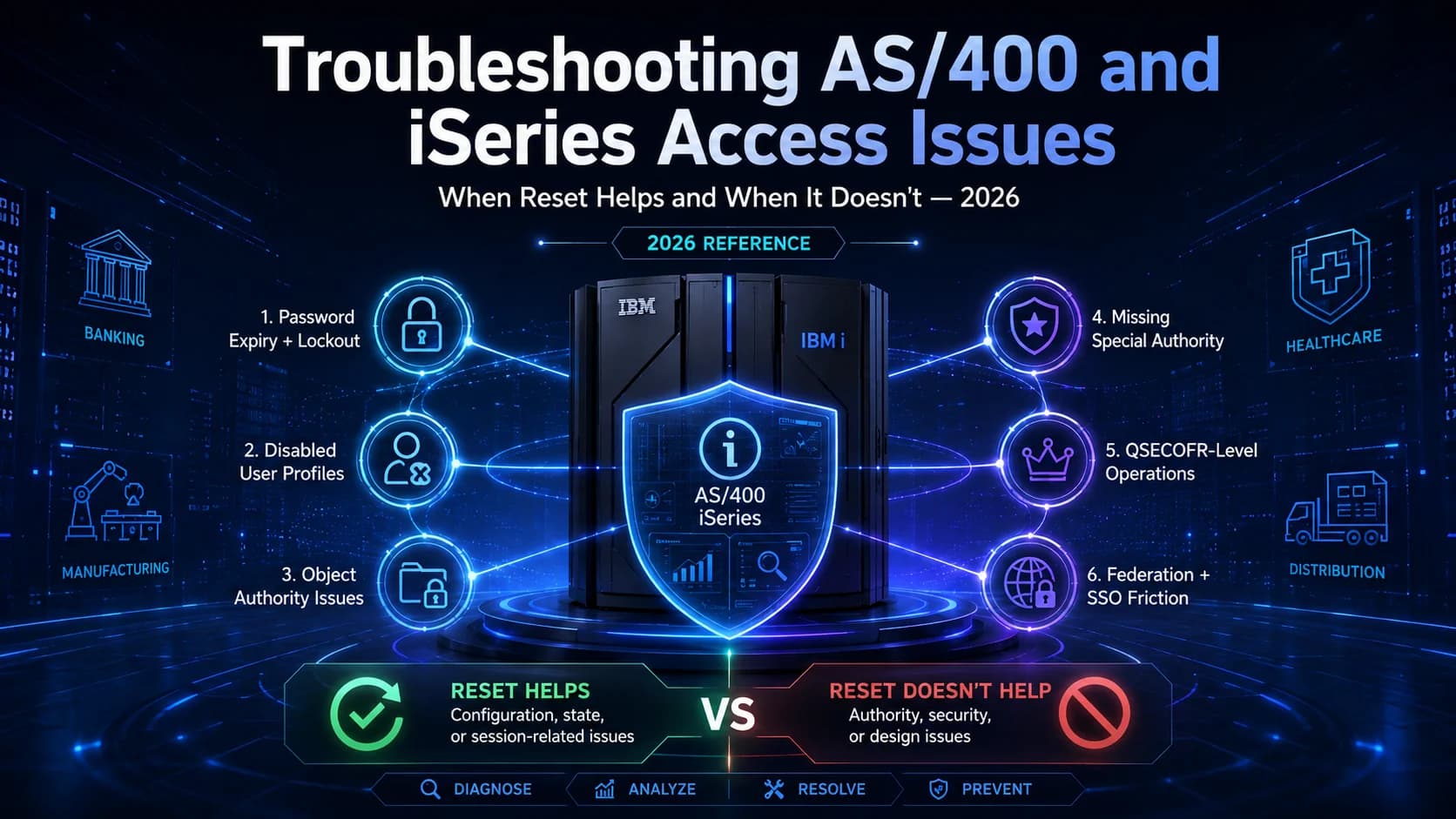
iSeries (IBM i, AS/400) access issues concentrate in six diagnostic categories — password expiry, disabled user profiles, object authority, special authority, QSECOFR operations, and federation-integration friction. The 2026 reference on the diagnostic pattern for each, when reset is the right answer, and how federation-first architecture reduces recurrence.
- iSeries (IBM i, AS/400) access issues concentrate in six diagnostic categories in 2026: password expiry and lockout, disabled user profiles, object-level authority issues, missing special authority, QSECOFR-level operations issues, and federation-integration friction from partially-integrated SSO.
- Password reset is the right answer for maybe a third of these — the ones that actually stem from credential state. For the rest, reset is either ineffective (because the issue isn't credential-state) or masks a deeper problem (because the reset works but the underlying config drift returns days later).
- The diagnostic pattern for each category has specific commands and system-value checks. Understanding which commands surface which state is what distinguishes competent troubleshooting from ticket-cycling.
- Federation-first architecture — where iSeries users authenticate through the enterprise IdP rather than directly at the iSeries — reduces recurrence of password-expiry and lockout issues by moving credential lifecycle to the IdP layer. HRIS-driven lifecycle reduces recurrence of disabled-profile issues by keeping iSeries user population synchronized with the authoritative HRIS record.
- Avatier has deep iSeries integration adjacency — the [RACF/mainframe integration pattern](/en/blog/racf-user-access-control-comprehensive-guide-2026/) extends similarly to iSeries. Modern IAM discipline reduces routine iSeries access-issue volume dramatically while preserving the iSeries application investment.
IBM iSeries (also known as IBM i, and colloquially still AS/400 by administrators who remember the name change) remains load-bearing at banking, insurance, distribution, healthcare, and manufacturing enterprises in 2026. The workloads that run on iSeries in these environments — core transaction processing, ERP, inventory, financial reconciliation — are among the highest-value in the environment, and every access-issue ticket that stops a user from doing their job is operationally expensive. Understanding what actually causes iSeries access issues and when reset is the right answer versus when it masks a deeper problem is the competence gap between organizations that cycle tickets and organizations that resolve them.
This piece is the 2026 reference on iSeries access-issue troubleshooting — the six diagnostic categories that dominate ticket volume, the specific commands and system-value checks that surface each state, when reset works and when it doesn't, and the federation-first architecture that reduces recurrence of the categories that dominate ticket volume. Companion pieces cover adjacent territory. The RACF Comprehensive Guide piece covers z/OS mainframe access-control fundamentals. The Playbook Legacy IAM to Modern piece covers the federation-first modernization pattern. The SSO Architecture piece on ICC covers the federation architecture that extends over iSeries.
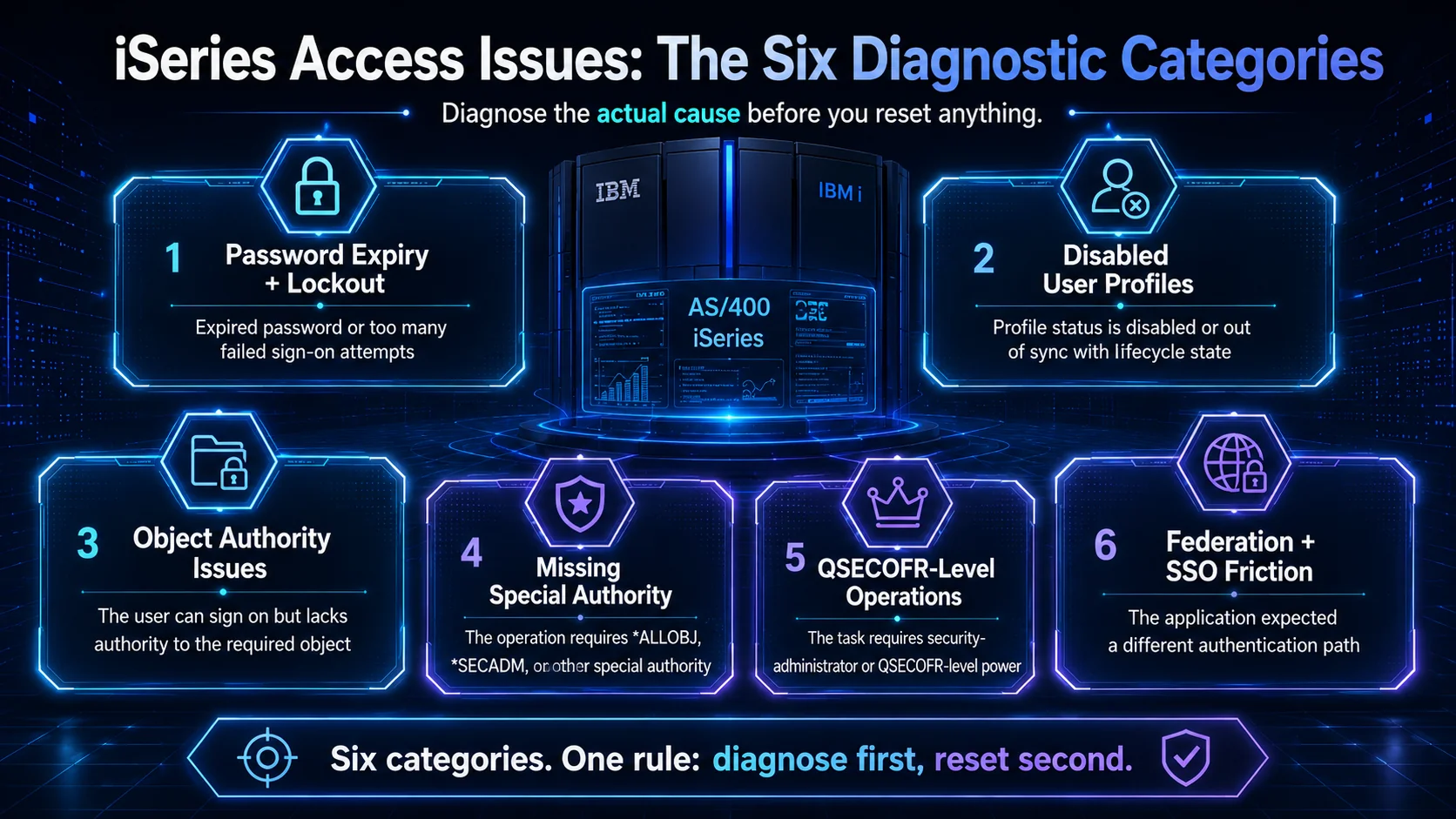 Six categories. One diagnostic discipline. Reset is one tool among many — used when the diagnosis actually points at credential state.
The six diagnostic categories
Six categories dominate 2026 iSeries access-issue tickets. Recognizing which category a ticket belongs to is prerequisite to competent troubleshooting.
Category 1: Password expiry and lockout
Symptom: User can't sign on. Error message includes "password has expired" (CPF2205) or "user profile has been disabled" (CPF2216).
Diagnostic: DSPUSRPRF USRPRF(username) shows the user's profile. Check the STATUS field for *ENABLED vs *DISABLED. Check PWDEXPITV vs PWDCHGDATE to see when the password last changed and when it expires. Compare against system value QPWDEXPITV.
Root cause: Either password expiry threshold reached (QPWDEXPITV) with no change, or too many failed sign-on attempts triggered auto-disable (QMAXSGNACN and QMAXSIGN).
When reset helps: Yes. This is one of the two categories where reset legitimately fixes the issue.
Fix:
CHGUSRPRF USRPRF(username) PASSWORD(newpass) STATUS(*ENABLED)
Recurrence pattern: If the password expires again in 30-60-90 days, the user hits the same issue. Federation moves credential lifecycle to the IdP layer where modern credentials (passkeys, hardware keys) don't expire in the same way.
Category 2: Disabled user profile (non-lockout)
Symptom: User can't sign on. Error indicates disabled profile but the disable wasn't from failed sign-on attempts.
Diagnostic: DSPUSRPRF USRPRF(username) shows STATUS(*DISABLED). Check the audit log (DSPAUDLOG or WRKACTJOB filtered for the profile) to see who or what disabled it. Compare against HRIS termination records to see if this is a legitimate lifecycle disable.
Root cause: Explicit disable via CHGUSRPRF STATUS(*DISABLED), or HRIS-driven lifecycle termination that reached iSeries and disabled the profile.
When reset helps: Depends. If the user is legitimately active and the disable was erroneous, reset (via STATUS(*ENABLED)) fixes it. If the disable was legitimate (user actually terminated, then rehired without going through the rehire process), reset masks a deeper problem — the user's rehire should have gone through the joiner process to re-enable, not through a manual re-enable that bypasses lifecycle.
Fix (if legitimate):
CHGUSRPRF USRPRF(username) STATUS(*ENABLED)
Recurrence pattern: If the HRIS-to-iSeries lifecycle integration isn't reliable, disable-then-re-enable cycles happen repeatedly. HRIS-driven lifecycle (HRIS-Driven Lifecycle piece) with proper joiner-mover-leaver discipline keeps profile status synchronized.
Category 3: Object-level authority issues
Symptom: User can sign on but can't access a specific object (file, program, library). Error indicates "not authorized" (CPF9802, CPF9820, or similar).
Diagnostic:
DSPOBJAUT OBJ(object-name) OBJTYPE(*type)
Shows the object's authority list — public authority (*PUBLIC), specific authorities per user, and group authorities.
Cross-reference with the user's group memberships:
DSPUSRPRF USRPRF(username) *ALL
The user has access to the object if: (a) they have specific authority on the access list, (b) they're a member of a group with authority, or (c) *PUBLIC authority grants access.
Root cause: The object's public authority is insufficient and no specific or group authority grants the user access.
When reset helps: No. Reset addresses credentials, not object authority. This is a common ticket-cycling trap — the help desk resets, the sign-on works, but the underlying object-authority issue persists.
Fix: Grant the necessary authority via GRTOBJAUT or the object-owning application's authority management. Follow the change-management process for authority grants — arbitrary authority additions defeat least-privilege posture.
Recurrence pattern: If authority grants are made ad-hoc without documented business justification, they accumulate as over-privilege (Least Privilege piece). The 2026 mature pattern routes authority requests through the IGA workflow.
Category 4: Missing special authority
Symptom: User can sign on but can't perform an operation that requires special authority. Error indicates the operation requires *ALLOBJ, *SECADM, *IOSYSCFG, *JOBCTL, *SAVSYS, *SERVICE, *SPLCTL, or *AUDIT.
Diagnostic:
DSPUSRPRF USRPRF(username) *ALL
Check SPCAUT field. If the required special authority isn't listed, the user doesn't have it.
Root cause: Legitimate — the user's role doesn't include the special authority needed for the operation.
When reset helps: No. Reset doesn't grant special authority. This is another ticket-cycling trap.
Fix: Either the user's role legitimately needs the special authority (grant via CHGUSRPRF USRPRF(username) SPCAUT(*existing *new) with proper approval), or the user is attempting an operation outside their role (the ticket should route to the role owner for review, not to a help-desk reset).
Recurrence pattern: If special-authority grants happen ad-hoc without documented business justification, the population of over-privileged users grows. The 2026 mature pattern uses JIT elevation for special authority via PAM (PAM piece) — users request elevation for the specific operation, receive it for a defined window, and return to standing baseline.
Category 5: QSECOFR-level operations issues
Symptom: User can't perform an operation that only QSECOFR (or *ALLOBJ + *SECADM) can perform. This includes security policy changes, certain system-value modifications, and specific administrative operations.
Diagnostic: Confirm the operation actually requires QSECOFR-level authority (not just special authority per Category 4). Reference the IBM i Security Reference documentation for the specific operation.
Root cause: The operation requires QSECOFR authority; the user isn't QSECOFR.
When reset helps: No. Reset doesn't elevate to QSECOFR.
Fix: Route to QSECOFR (or equivalent *ALLOBJ + *SECADM population, tightly bounded per audit findings — typically under 5 users). QSECOFR operations should follow strict change control with dual-approval and session recording (PAM piece).
Recurrence pattern: If QSECOFR operations are needed frequently by non-QSECOFR users, the process design is wrong. Either the operations should be automated (avoiding the QSECOFR requirement for routine work) or the role definitions should be revised.
Category 6: Federation-integration friction
Symptom: User can't sign on. The error may indicate authentication failed even though the user's IdP credentials are valid, or the sign-on prompts for iSeries credentials when the user expected federated authentication.
Diagnostic: Determine which authentication path the specific application uses. Green-screen 5250 sessions typically use direct iSeries authentication (the user needs a working iSeries credential). Web-based IBM i Access Client Solutions and Navigator for i can use federated authentication if configured. Bespoke line-of-business applications vary — check with application ownership.
Root cause: The application expected one authentication path and the user's session is going through a different one. Common triggers include partial federation rollout (some paths federated, some not), federation configuration errors (mapping between IdP identity and iSeries USRPRF is broken), or session-token misconfiguration.
When reset helps: Depends on the specific path. If the user needs an iSeries credential for a direct-authentication path, reset works. If the federated path is broken, reset doesn't fix the federation.
Fix: For federated-path issues, diagnose the mapping between IdP identity and iSeries USRPRF. Common issues: mapping table missing the user, mapping mismatch (IdP identity doesn't map correctly to a valid iSeries USRPRF), or federation trust configuration errors.
Recurrence pattern: Federation-integration friction reduces substantially when federation coverage is comprehensive rather than partial. The Playbook Legacy IAM to Modern piece covers the federation expansion pattern.
When reset is the right answer, and when it isn't
Password reset is a specific tool for a specific problem — credential state. Not every access issue is a credential-state problem. The competent 2026 help desk distinguishes:
| Category | Reset addresses? | Correct action |
|---|---|---|
| 1: Password expiry / lockout | ✓ Yes | Reset via CHGUSRPRF |
| 2: Disabled profile (legitimate rehire) | ✓ Yes | Re-enable via CHGUSRPRF STATUS(*ENABLED) after joiner process |
| 2: Disabled profile (HRIS drift) | ✗ No | Fix HRIS-iSeries lifecycle integration; don't re-enable manually |
| 3: Object authority | ✗ No | Route to object owner; grant authority per change management |
| 4: Special authority | ✗ No | Route to role owner; consider JIT elevation |
| 5: QSECOFR operations | ✗ No | Route to QSECOFR population with strict change control |
| 6: Federation friction | Depends | Diagnose specific path; may be reset OR federation config fix |
The ticket-cycling pattern (reset first, diagnose later) works for Category 1 and legitimate Category 2 only. For the other categories, reset either accomplishes nothing (the underlying issue remains) or masks a deeper problem (the reset "works" but the issue recurs days later).
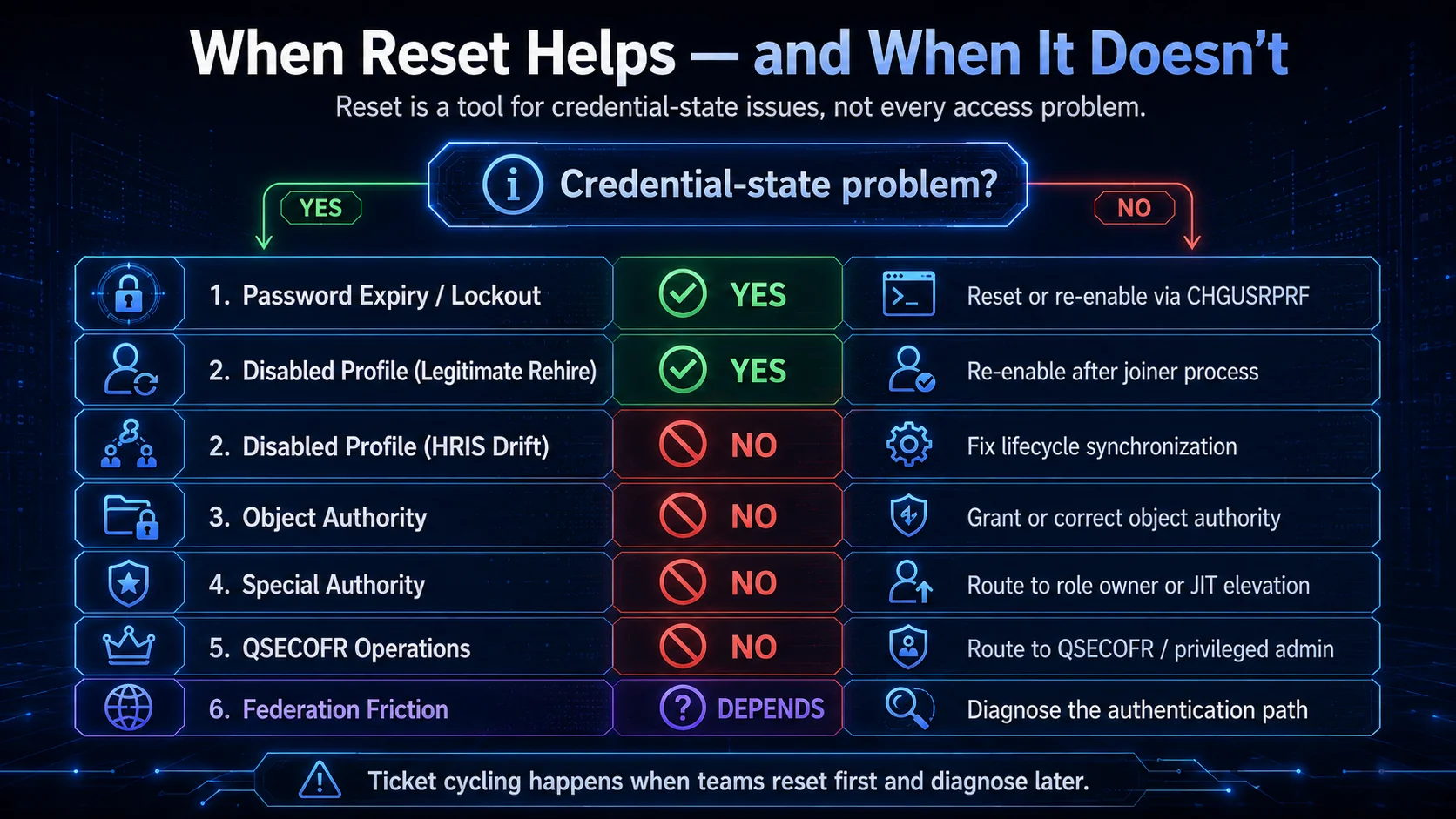 Two of six. That's the ratio of iSeries access tickets that reset actually addresses. The other four are routing decisions dressed up as reset requests.
Federation-first architecture reduces recurrence
The categories that dominate iSeries access-issue ticket volume — password expiry, lockout, disabled profiles from lifecycle drift — all reduce dramatically when the iSeries is federated with the enterprise IdP and integrated with HRIS-driven lifecycle.
Federation moves credential lifecycle to the IdP. iSeries users authenticate through the enterprise IdP with modern credentials (passkeys, hardware keys, Avatier Identity Challenge Card for deviceless segments). Password expiry doesn't happen because the primary credential isn't a password. Lockout at the iSeries becomes rare because failed sign-on attempts land at the IdP where they're handled by risk-based account protection (Adaptive Authentication piece) rather than hard lockout at the iSeries.
HRIS-driven lifecycle keeps profile state synchronized. New hires get iSeries profiles at the same moment they get everything else; role changes update iSeries authorities automatically; departures trigger iSeries profile disable. The disabled-profile ticket volume from lifecycle drift drops to near-zero.
Object and special authority still require iSeries administration. Federation and lifecycle don't eliminate Categories 3, 4, and 5 — but with Categories 1 and 2 largely eliminated, the residual ticket volume shifts to the categories that legitimately need iSeries expertise. The help desk stops cycling password resets and starts routing appropriate tickets to appropriate owners.
Federation friction (Category 6) becomes rare when federation coverage is comprehensive. Partial federation is the source of most Category 6 tickets. Full federation eliminates the "which authentication path is this session using" ambiguity that produces the friction.
The Playbook Legacy IAM to Modern piece covers the federation-expansion architecture; the HRIS-Driven Lifecycle piece covers the lifecycle integration.
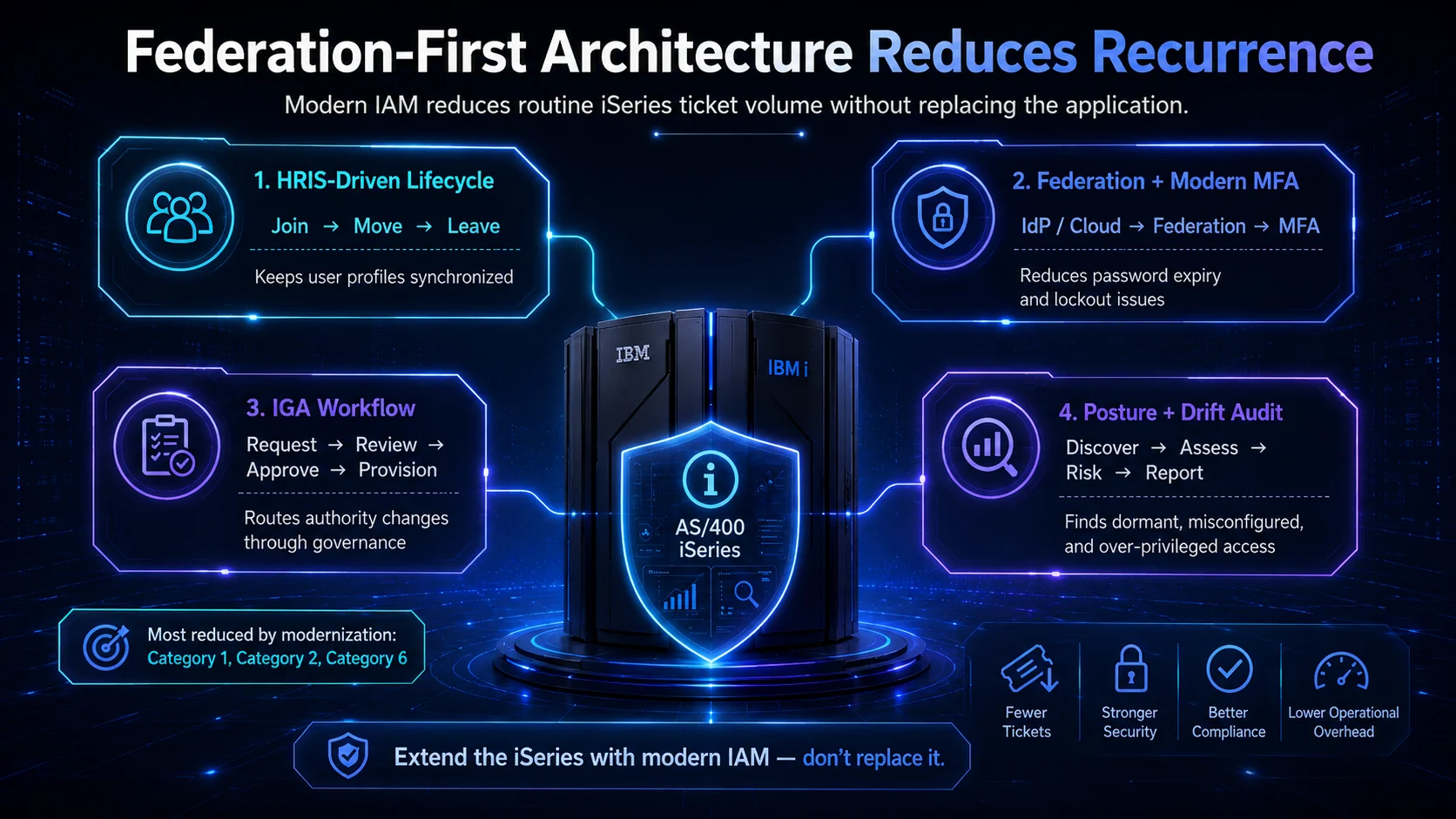 Federation-first isn't about replacing the iSeries — it's about routing credential lifecycle to the place that handles it best. Categories 1, 2, and 6 shrink; Categories 3, 4, 5 stay where they belong.
The 2026 reference path
Diagnose before resetting. The six-category framework distinguishes credential-state issues (Categories 1, 2 legitimate) from other issues (Categories 3, 4, 5, and 6 misconfig). Reset the credential state; route the rest.
Track ticket volume by category. If Category 1 and Category 2 dominate ticket volume, the fix is federation and HRIS-driven lifecycle — that's where the recurrence is coming from. If Categories 3, 4, 5 dominate, the fix is authority-management discipline and JIT elevation.
Federate the iSeries. Modern MFA reduces Category 1 and 2 volume; HRIS integration reduces Category 2 volume from lifecycle drift; federation coverage reduces Category 6 volume. The SSO Architecture piece on ICC covers the federation architecture.
Point auditors at the Trust Center for Avatier's own posture. The Avatier Trust Center with the SecurityScorecard grade view — SOC 2 Type II with zero exceptions, ISO/IEC 27001:2022, PCI DSS v4.0.1, CSA STAR Level 1, NIST 800-53 Rev. 5 aligned, CISA Secure-by-Design Pledge signatory.
iSeries access issues will keep happening — the workloads that run there aren't going anywhere in 2026. Competent diagnosis plus federation-first architecture reduces the volume and shifts the residual to categories that legitimately need iSeries expertise. That's the difference between organizations that cycle tickets and organizations that resolve them.
ABOUT THE AUTHOR

More from RACF & Mainframe
Mastering RACF User-Group Assignments & Permissions 2026
RACF grants access through groups, not users: ADDGROUP builds it, CONNECT enrolls the user, PERMIT binds it to a resource. How assignments, nested membership, and access decisions resolve in 2026.

RACF Password Complexity & Expiration Rules 2026 (SETROPTS)
RACF enforces password complexity, expiration, history, and lockout through SETROPTS PASSWORD suboperands — RULEn, INTERVAL, HISTORY, and REVOKE. The 2026 reference on the exact syntax, why PCI-DSS and SOX still mandate it even as NIST 800-63B moves the industry away from rotation and composition rules, and where RACF-level enforcement alone stops being enough.

Automating RACF Provisioning from HR Events: A 2026 Guide
RACF user provisioning becomes reliable when create, entitle, and deprovision actions trigger directly off HR events instead of tickets — here's how that pattern actually works on the mainframe.