Passwordless Login: The Future is Here — 2026 Enterprise Reference on Passkey Adoption, FIDO2, and the Path Beyond Passwords
Passwordless is no longer future-tense. Passkey adoption reached mainstream enterprise deployment in 2025, hardware FIDO2 keys are the AAL3 credential across regulated industries, and platform-native passkey systems (iCloud Keychain, Google Password Manager, Microsoft Entra ID) cover the majority of workforce devices. The 2026 enterprise reference on where passwordless actually lives operationally, the sync-vs-device-bound trade-offs, the recovery-account problem that determines whether the deployment succeeds, and the cross-device UX patterns that make passwordless work at workforce scale.
Passwordless is no longer future-tense. Passkey adoption reached mainstream enterprise deployment in 2025, hardware FIDO2 keys are the AAL3 credential across regulated industries, and platform-native passkey systems (iCloud Keychain, Google Password Manager, Microsoft Entra ID) cover the majority of workforce devices. The 2026 enterprise reference on where passwordless actually lives operationally, the sync-vs-device-bound trade-offs, the recovery-account problem that determines whether the deployment succeeds, and the cross-device UX patterns that make passwordless work at workforce scale.
- Passwordless reached mainstream enterprise deployment in 2025. Platform-native passkey systems (iCloud Keychain for Apple ecosystems, Google Password Manager for Android/Chrome, Microsoft Entra ID for Windows-centric environments) cover the majority of workforce devices. Hardware FIDO2 keys serve AAL3 use cases in regulated industries. The credential architecture is production-ready; the operational patterns are what determine deployment success.
- The WebAuthn credential architecture is what makes 'passwordless' cryptographically meaningful rather than cosmetic. The private key lives in a hardware-isolated cryptographic store (Apple Secure Enclave, Android StrongBox, Windows TPM, hardware FIDO2 authenticator's secure element). Authentication is a cryptographic challenge-response ceremony where the relying party verifies the signature against the enrolled public key. The pattern is phishing-resistant by construction because the credential is bound to the specific relying party's origin.
- The sync vs device-bound trade-off shapes deployment decisions. Synced passkeys (iCloud Keychain, Google Password Manager, third-party credential managers like 1Password) provide cross-device recovery and continuity — the same passkey works across the user's iPhone, iPad, Mac. Device-bound passkeys and hardware FIDO2 authenticators provide stronger cryptographic assurance but harder recovery — losing the device or the key requires reenrollment. Most enterprise deployments compose both patterns across different use cases.
- The recovery-account problem is the operational reality that determines whether passwordless deployment succeeds or produces a support-burden crisis. When a user loses their primary passkey device, the recovery path has to be both usable (the user can actually complete it under stress) and secure (the recovery path can't itself be phishing-abused to bypass the passwordless architecture). Recovery architecture that satisfies both requirements typically combines synced passkey ecosystems with hardware-key backup and administrator-mediated recovery for edge cases.
- The migration architecture from the legacy password-first environment is a phased rollout by risk tier rather than a big-bang cutover. High-value applications and privileged accounts move first; general workforce follows across quarters. The password-and-passwordless coexistence phase can last years; the goal is reducing password reliance over time rather than eliminating passwords immediately. Most 2026 enterprises are somewhere in the middle of this migration.
Passwordless is no longer future-tense. The transition from "passwordless is coming" to "passwordless is deployed in production across mainstream enterprise environments" happened through 2024 and 2025 as platform-native passkey systems reached maturity, hardware FIDO2 keys became standard issue for privileged accounts across regulated industries, and WebAuthn support became ubiquitous across major enterprise applications. The 2026 operational reality is that most enterprises have passwordless capability enabled somewhere in their environment. The question shifted from "should we adopt passwordless?" to "how do we operationalize passwordless at workforce scale?"
The credential architecture is production-ready. The remaining hard problems are operational — the sync-vs-device-bound trade-off that shapes deployment decisions, the recovery-account problem that determines whether the deployment succeeds or produces a support-burden crisis, the cross-device UX patterns that address the fundamental multi-device reality of enterprise workforce, and the migration architecture from the legacy password-first environment every enterprise still operates.
This piece is the 2026 enterprise reference on where passwordless actually lives operationally. What the WebAuthn credential architecture is and why it makes passwordless cryptographically meaningful. How the platform-native passkey systems work (iCloud Keychain, Google Password Manager, Microsoft Entra ID) and where the hardware FIDO2 keys fit for AAL3 use cases. How the sync vs device-bound trade-off shapes deployment decisions. How the recovery-account problem gets solved without producing a phishing-abuseable backdoor. What the migration architecture looks like in the multi-year phased rollout that most enterprises are somewhere in the middle of. Companion pieces cover adjacent layers: the Phishing-Resistant MFA piece on ICC covers the WebAuthn credential-class foundation; the Hardware FIDO2 Keys vs Passkeys piece on ICC covers the hardware-vs-synced comparison in depth; the Biometric Authentication Mobile piece on ICC covers the mobile-biometric integration; the Password Policy piece covers what the residual password discipline should look like during the coexistence period.
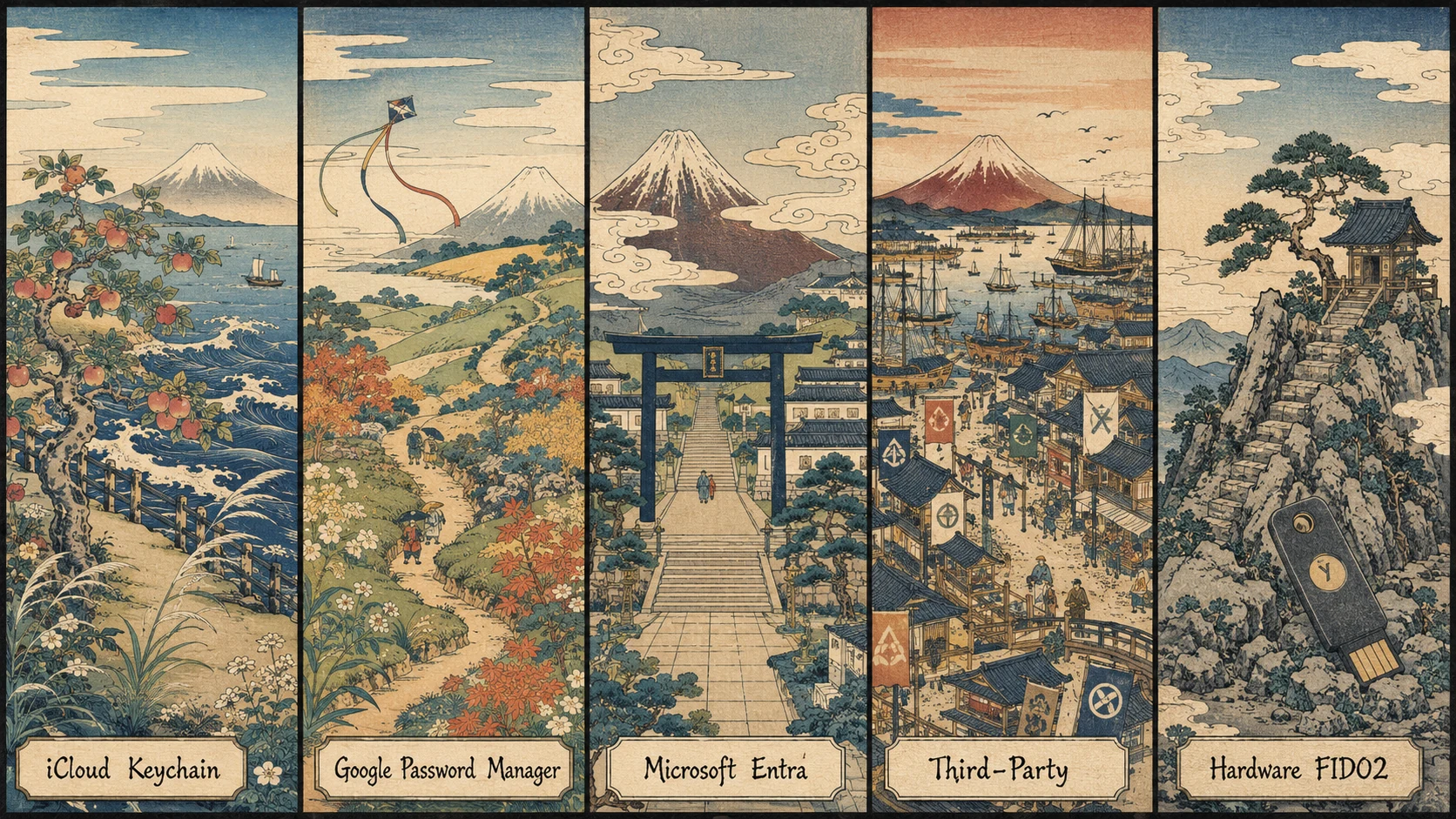 Five platforms, one architectural foundation. Each platform stores cryptographic keys in hardware-isolated secure elements; WebAuthn binds the credential to the specific relying party's origin; the composition covers the operational range from general-workforce synced passkeys to AAL3 hardware-bound authenticators.
What makes passwordless cryptographically meaningful
The word "passwordless" describes the user experience — the absence of a memorized-secret entry step in the authentication flow — but it doesn't describe what makes the authentication secure. Many implementations that could technically be called "passwordless" don't produce cryptographically meaningful security; they just move the credential-compromise attack surface without reducing it. An email magic-link authentication is technically passwordless but as vulnerable to email compromise as any password-plus-email-recovery flow. An SMS one-time-code authentication is technically passwordless but as vulnerable to SIM swap as any SMS-based MFA.
What makes 2026 passwordless cryptographically meaningful is the WebAuthn standard and the FIDO2 authenticator architecture that underlies platform-native passkey systems and hardware FIDO2 keys. The architecture has four properties that produce genuine security.
Property one: the private key lives in a hardware-isolated cryptographic store. Apple's Secure Enclave, Android's StrongBox or Trusted Execution Environment, Microsoft's TPM 2.0, or the hardware FIDO2 authenticator's own secure element. The isolation is enforced by hardware, not by software. An attacker who compromises the operating system doesn't automatically get the private key. An attacker who compromises the browser doesn't automatically get the private key. The key is architecturally protected from a large class of compromise scenarios that would defeat password-based authentication.
Property two: the authentication ceremony is a cryptographic challenge-response, not a credential transmission. The relying party issues a challenge; the authenticator signs the challenge with the private key; the relying party verifies the signature against the enrolled public key. The private key never leaves the authenticator. There's no credential to steal in transit. There's no credential to log accidentally. There's no credential to phish through a spoofed page — because the private key can't sign a challenge for a different origin.
Property three: the credential is bound to the specific relying party's origin. When a passkey is created for example.com, it can sign challenges issued by example.com — and only by example.com. An attacker who spoofs a login page at examp1e.com (with a lowercase L instead of an I) can't get the authenticator to sign a challenge for the spoofed page because the origin doesn't match the credential binding. This is what makes passwordless phishing-resistant by construction — the resistance is a property of the cryptographic architecture, not a property of user vigilance.
Property four: the user verification step is local and unlinkable. The biometric or PIN that unlocks the private key happens on the authenticator device; the relying party learns only that the user verification succeeded, not the specific biometric data or PIN. The biometric data doesn't traverse networks. The biometric data doesn't sit in the relying party's database. The biometric is a local authentication factor that composes with the cryptographic ceremony.
The four properties compose into an authentication architecture that resists a large class of attacks that consistently succeed against password-based authentication. Phishing is defeated by property three. Credential replay is defeated by property two. Credential-database breach is defeated by properties one and two. Session hijacking still requires additional treatment through session-level controls, but the primary authentication is on much stronger cryptographic ground.
The platform-native passkey systems
Platform-native passkey systems are what put passwordless in reach for mainstream enterprise workforce. The three dominant platforms each provide passkey infrastructure integrated with their broader identity and device management ecosystems.
Apple's implementation lives in iCloud Keychain. Passkeys created on any Apple device — iPhone, iPad, Mac — are stored in the Secure Enclave and replicated across the user's other Apple devices through iCloud Keychain's end-to-end encrypted sync. The replication key is protected by the user's iCloud account authentication and 2FA. The user experience is that a passkey created on one device is present on the user's other devices after brief iCloud sign-in, and Face ID or Touch ID performs the local user verification on each device. The developer-side integration for the enterprise application is standard WebAuthn — the application requests a passkey creation or authentication, the browser or platform hands the request to the passkey system, and the passkey system handles the storage and replication transparently.
Google's implementation lives in Google Password Manager, which handles passkeys alongside passwords across Android devices and Chrome browsers. Passkeys created on an Android device are stored in the device's StrongBox or Trusted Execution Environment and replicated through Google Password Manager to the user's other Android devices and Chrome browser instances signed in with the same Google account. The replication is end-to-end encrypted with keys protected by the Google account authentication. Cross-device passkey use is supported — a user can authenticate to a website on a Windows laptop's Chrome browser by using the passkey stored on their Android phone through a BLE-mediated ceremony that produces the cryptographic attestation from the phone.
Microsoft's implementation lives in Microsoft Entra ID (formerly Azure AD) for enterprise workforce scenarios, with additional passkey capability in Windows Hello for personal Microsoft accounts. Passkeys enrolled through Windows Hello for Business are backed by the device's TPM 2.0 for cryptographic operations. Microsoft Entra ID adds directory-service integration — passkeys are enrolled through the enterprise identity provider, subject to enterprise policy on which authenticator types are permitted, and available across the user's Microsoft 365 applications and any relying parties integrated with the Entra ID identity provider. The cross-device story matures through 2025 and 2026 with device-to-device passkey use ceremonies.
Third-party credential managers — 1Password, Bitwarden, Dashlane — provide cross-ecosystem coverage for users whose device fleet spans multiple platforms. A single passkey created through 1Password can be used on the user's iPhone (through the 1Password extension), on their Windows work laptop (through the 1Password browser extension), and on their personal Android device. The third-party credential managers store the passkeys in encrypted vaults synced through the credential manager's infrastructure, with the vault's master password or hardware key protecting the sync. For enterprises with mixed device fleets, the third-party credential managers are often the practical answer to the cross-ecosystem interop problem that the platform-native systems don't fully solve.
The hardware FIDO2 authenticator path
Hardware FIDO2 keys serve the use cases where synced passkeys aren't sufficient — AAL3 authentication for high-privilege accounts, regulated industries with strict credential-storage requirements, and workforce segments where device-bound cryptographic material is required by policy.
The dominant hardware authenticators are the YubiKey family (YubiKey 5 series with USB-A, USB-C, NFC, and Lightning variants; YubiKey Bio with fingerprint sensor for user verification), Google Titan (USB and USB-C variants with NFC), Feitian (multiple form factors including USB and NFC), and a few smaller manufacturers producing FIDO2-certified authenticators. Each authenticator stores private keys in a hardware secure element that never exposes the key material.
The authentication ceremony with a hardware FIDO2 key involves inserting the key (USB) or tapping it to the device (NFC), providing user verification (PIN entry on the connected device, biometric on YubiKey Bio, or presence detection through a button press for lower-verification-strength ceremonies), and completing the cryptographic challenge-response. The full ceremony takes 3-5 seconds — comparable to platform-native passkey ceremonies once the physical interaction is factored in.
The assurance-level advantage of hardware FIDO2 keys is that they satisfy AAL3 under NIST 800-63B Rev. 4. The credential is hardware-bound (property one: private key in secure element that can't be exported), the user verification is a strong authenticator (PIN with rate limiting, or biometric with cryptographic verification), and the authentication ceremony produces cryptographic proof of possession. Synced passkeys typically satisfy AAL2 but not AAL3 because the sync architecture provides a recovery path that could be characterized as a device-independent authentication path.
The operational trade-off is that hardware FIDO2 keys are device-bound — losing the key requires reenrollment on a new key. Enterprise deployments typically issue two keys per user (a primary and a backup) so a lost key doesn't produce a lockout. The Hardware FIDO2 Keys vs Passkeys piece on ICC covers the hardware-vs-synced comparison and the enterprise deployment patterns in depth.
The sync vs device-bound trade-off
The trade-off between synced credentials and device-bound credentials shapes most 2026 passwordless deployment decisions. The trade-off isn't one-vs-the-other; it's the composition of both patterns across different use cases within the same enterprise.
Synced credentials provide operational continuity. The user who upgrades from an iPhone 15 to an iPhone 17 finds their passkeys present on the new device after iCloud sign-in. The user who loses their phone can restore their credentials on a replacement device through the same iCloud sign-in flow. The user whose device is damaged can still authenticate from other devices in their ecosystem. The operational continuity substantially reduces the support burden of the passwordless deployment — help desk doesn't get a flood of tickets for lockouts caused by device changes.
The security profile of synced credentials is that the sync system's authentication becomes part of the credential's security. If the attacker compromises the user's iCloud account (through a phishing attack that captured the iCloud password and defeated the 2FA), the attacker can enroll a new device with the compromised iCloud credentials, and the passkeys sync to the attacker's device. The synced-credential architecture is only as strong as the sync system's authentication. In practice this is quite strong — Apple, Google, and Microsoft have substantial security investment in the sync-system authentication — but it's not the same as the pure hardware-bound assurance.
Device-bound credentials provide stronger cryptographic isolation. A hardware FIDO2 key's private key can't be extracted; the attacker who wants that credential has to have physical possession of the specific device. The security profile matches AAL3 under NIST 800-63B Rev. 4. The operational trade-off is that lost keys mean lockouts requiring administrator-mediated recovery, damaged keys mean support burden for replacement, and the enterprise has to manage the physical logistics of key distribution and lifecycle.
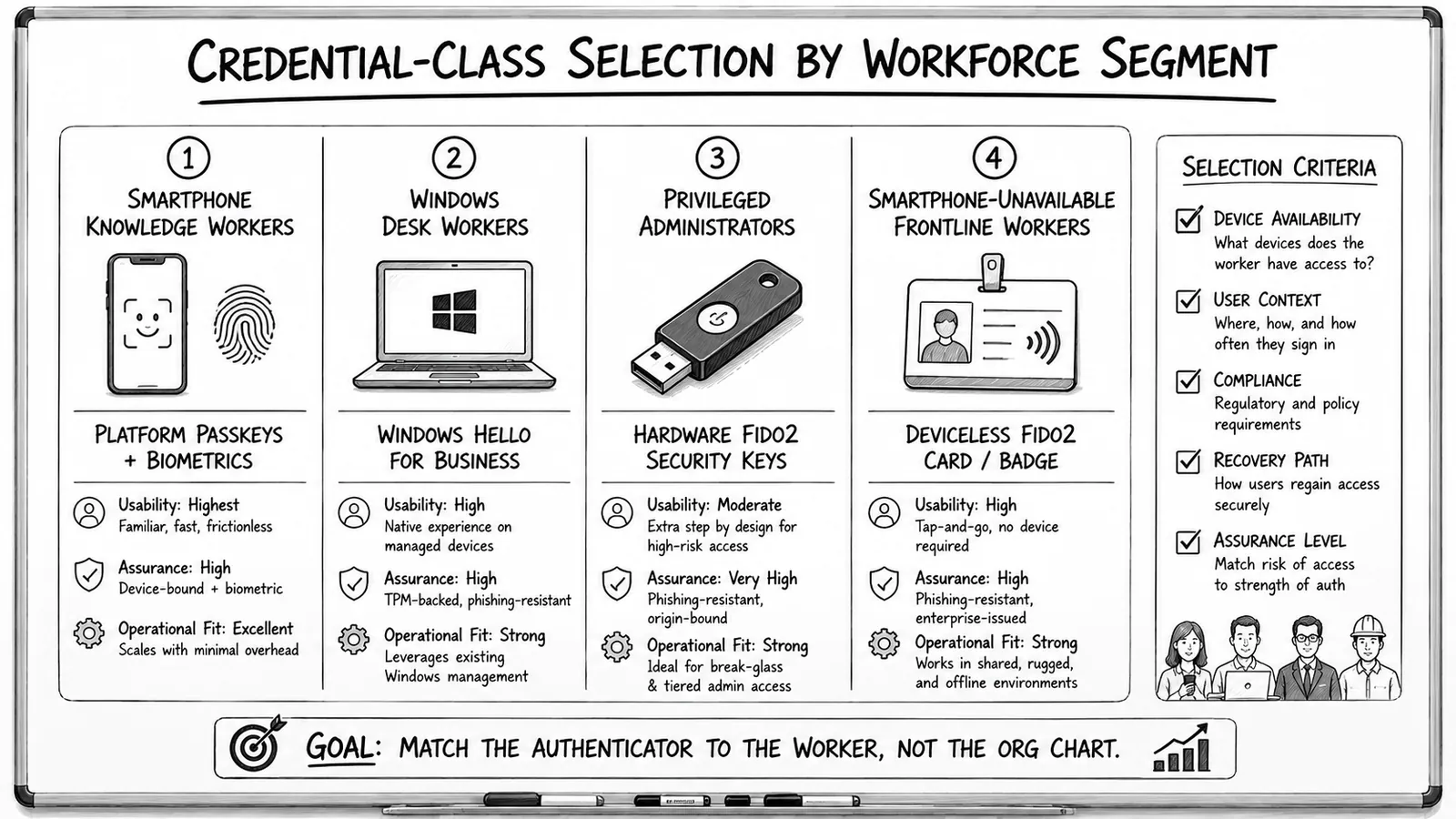
Most enterprise deployments compose both patterns. Synced passkeys for the general workforce covering the majority of applications — the operational continuity is worth the sync-system risk profile because the applications are AAL2 use cases. Hardware FIDO2 for privileged accounts, high-value applications, and AAL3 use cases — the additional assurance is worth the operational overhead because the impact of compromise is substantially higher. The composition is what most 2026 enterprises are actually running.
The recovery-account problem
The recovery-account problem is the operational reality that determines whether a passwordless deployment succeeds or produces a support-burden crisis. When a user loses their primary passkey device — the phone was stolen, the laptop was destroyed, the hardware key was misplaced — the recovery path has to satisfy two requirements that are in tension.
Usability requires that the user can actually complete recovery under stress. The user is on a business trip in an unfamiliar city and just had their phone stolen. The user is at home on a weekend and can't reach the office. The user is a frontline worker whose primary authenticator was their work-issued device that just failed. The recovery flow needs to be completable in these operational conditions — not "come into the office Monday and we'll help you."
Security requires that the recovery path can't itself be phishing-abused to bypass the passwordless architecture. If an attacker can trigger the recovery flow for a target user and complete it as the user, the passwordless architecture is defeated by the recovery flow. The recovery has to have sufficient verification that impersonation is hard, without being so burdensome that users can't complete it under legitimate lost-device conditions.
The naive recovery flows fail one requirement or the other. Recovery via email one-time-link is easy to use but vulnerable to email compromise. Recovery via SMS is easy to use but vulnerable to SIM swap. Recovery via help desk phone call is secure with strict verification but slow and expensive at workforce scale. Recovery via security questions is neither usable (users don't remember the answers reliably) nor secure (the answers are often discoverable through social media).
The recovery architecture that satisfies both requirements combines three patterns. First, synced passkey ecosystem — the recovery through the platform sync is the primary path. The user gets a new iPhone, signs into iCloud, and the passkeys restore automatically. This handles the majority of lost-device scenarios without any support interaction. Second, hardware-key backup — the user has a physically stored FIDO2 key kept in a safe (home safe, safe deposit box, employer-provided secure storage) as a backup authenticator. The backup key doesn't get used routinely, so it doesn't accumulate the drift patterns that break-glass credentials do, and it provides an authentication path independent of the sync ecosystem. Third, administrator-mediated recovery for edge cases — a documented workflow with dual authorization, strict identity verification (video call with government ID, employer's HR verification of employment status, additional secret shared only between the user and the enterprise), and audit logging. The administrator-mediated path handles cases where both the primary device and the backup hardware key are unavailable.
The specific combination depends on the enterprise's threat model, workforce distribution, and risk tolerance. Enterprises with high-mobility workforces (field sales, consultants, remote workers) put more weight on the synced-passkey path because it handles lost-device scenarios without location dependency. Enterprises with high-security requirements (financial services, defense, healthcare with sensitive PHI) put more weight on the administrator-mediated path because it provides the highest verification strength for the recovery ceremony. Most enterprises need all three patterns available and can select the appropriate path per situation.
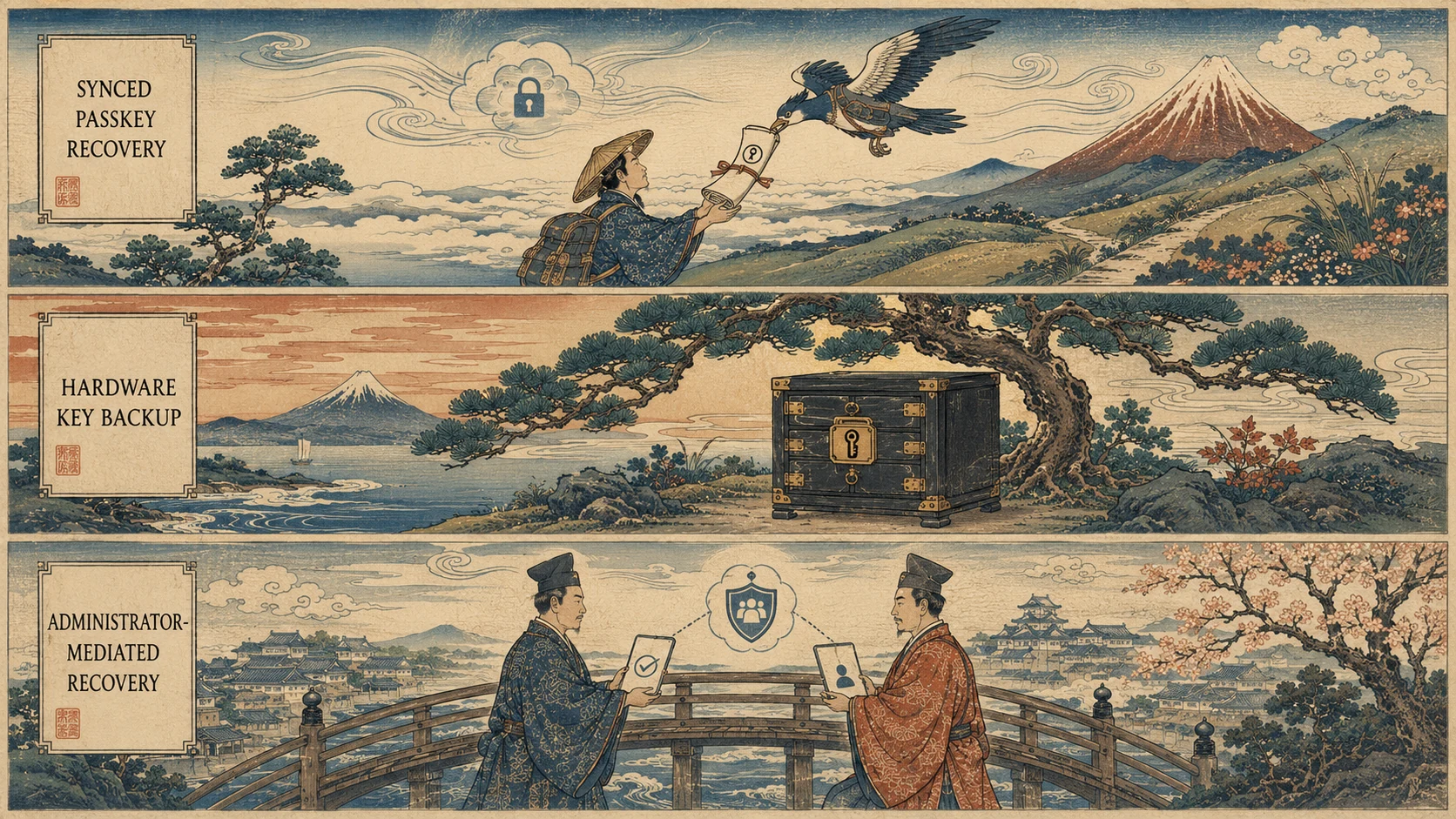 Three recovery patterns, one composed architecture. Each path handles a specific scenario; the composition covers the operational range while satisfying both usability and security requirements.
The cross-device UX patterns
Enterprise workforce is fundamentally multi-device. The average employee interacts with a corporate-issued laptop, a personal smartphone that may or may not have corporate applications on it, a corporate-issued mobile device that may or may not be their primary phone, and occasionally with shared workstations, kiosks, or specialty devices. The cross-device UX patterns for passwordless have to handle this reality.
The dominant pattern in 2026 is the phone-as-authenticator ceremony. The user is at their laptop and the application prompts for passwordless authentication. The user selects "use my phone" (or the application detects a nearby phone through Bluetooth or QR code). The user's phone displays a prompt confirming the authentication attempt with the application's details. The user completes local user verification on the phone (biometric or PIN). The phone signs the WebAuthn challenge and transmits the response through the paired channel (BLE, or via the platform's synced-credential infrastructure). The laptop's application completes the authentication. The whole ceremony takes 5-15 seconds and works across ecosystems because the phone is the credential source and the laptop is just the display surface.
The QR-code-mediated ceremony is a fallback when the phone-as-authenticator direct pairing isn't available. The application displays a QR code; the user scans it with their phone; the phone-side flow completes the authentication and signals success back through a secondary channel (typically the phone's platform-native sync infrastructure notifying the laptop). This works cross-ecosystem — an Android phone can authenticate a session on a Windows laptop through QR code even when neither ecosystem has direct pairing with the other.
The passkey-on-laptop ceremony is the pattern where the user has enrolled a passkey directly on their laptop (through Windows Hello for Business, through iCloud Keychain on Mac, through a third-party credential manager). The authentication happens entirely on the laptop with local user verification (Touch ID on Mac, Windows Hello facial recognition, PIN entry) unlocking the passkey stored in the laptop's TPM or equivalent secure store. This is the fastest UX and works even when the phone isn't available.
The hardware-key ceremony is the pattern for AAL3 use cases. The user has a hardware FIDO2 key on their keyring or in a badge holder. When high-privilege authentication is required, the user inserts or taps the key, enters a PIN, and completes the ceremony. The UX is more physical but provides the strongest cryptographic assurance.
Most enterprise workforce members use multiple patterns depending on which device is convenient and which application requires which authentication strength. The Biometric Authentication Mobile piece on ICC covers the phone-as-authenticator flows in depth.
Migration architecture
The migration from a password-first environment to a passwordless-primary environment is a multi-year phased rollout, not a big-bang cutover. The typical sequence follows a risk-tier prioritization.
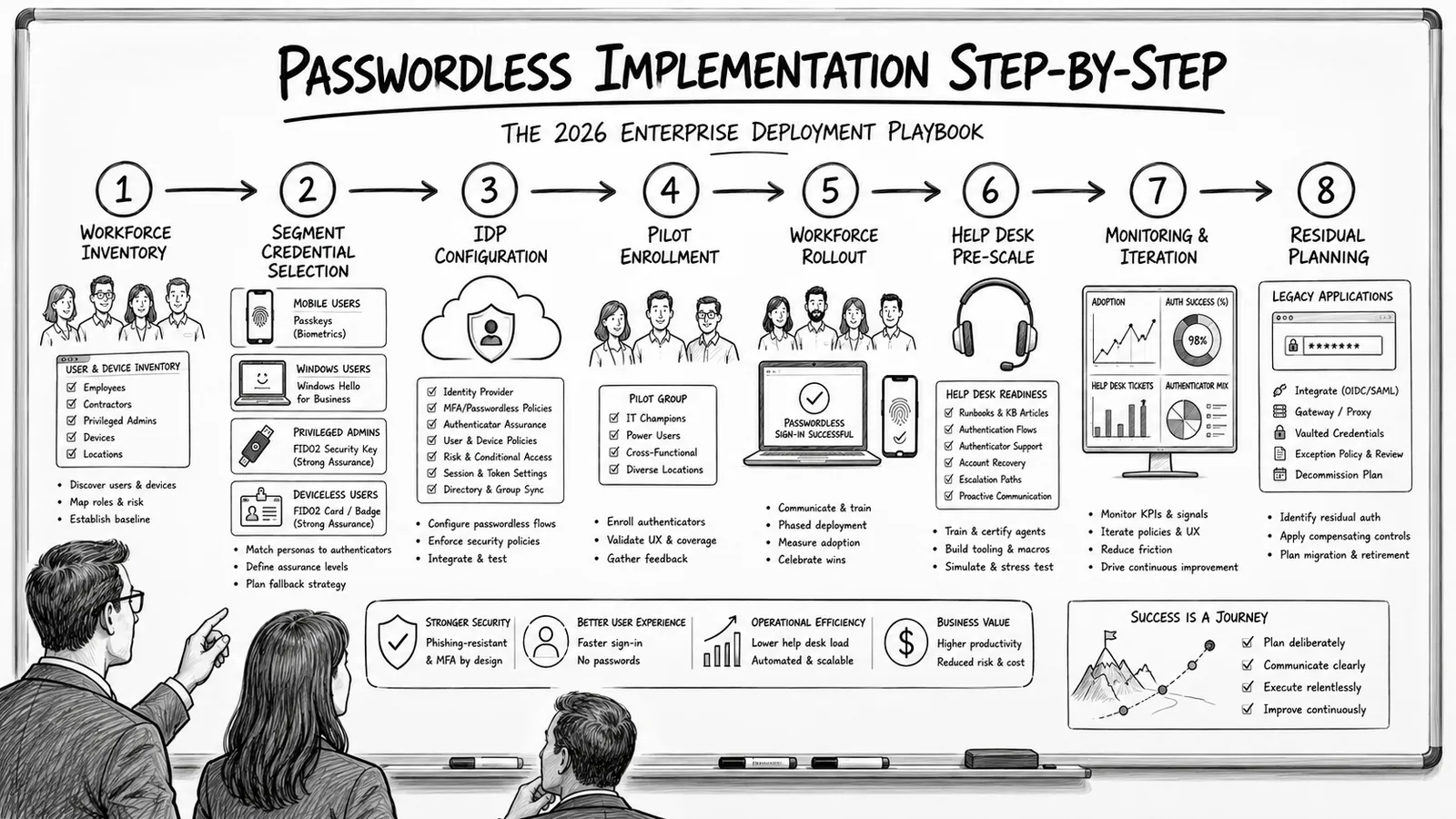
Phase one is opt-in enablement. Passwordless is enabled as an option for all users on all applications that support WebAuthn. Power users, security teams, and early adopters enroll passkeys and start using them. The password remains available for anyone who hasn't enrolled a passkey. This phase produces the operational learning about which applications support WebAuthn cleanly, which have quirks, and where the support-burden hot spots are. Timeline: 2-4 months.
Phase two is privileged-account hardening. Hardware FIDO2 keys are deployed to privileged accounts — administrators, SREs, security responders, executives with access to sensitive systems. High-privilege actions require the hardware key. This closes the highest-risk credential compromise vector first and establishes the operational patterns for hardware-key logistics (distribution, backup keys, lifecycle management). Timeline: 3-6 months, often overlapping with phase one.
Phase three is default passwordless for supported applications. Application-specific policies prefer passwordless when available — users who have enrolled a passkey authenticate via passkey by default; password is used only as a fallback for users who haven't enrolled. New enrollments continue driving passkey adoption. The password gradually becomes a background credential rather than the primary authentication path. Timeline: 6-12 months.
Phase four is onboarding-first passwordless. New hires enroll passkeys as part of onboarding and never routinely use passwords. Existing employees continue on the coexistence path, but the new-hire cohort is passwordless-native. Over years, this shifts the workforce demographic toward passkey users. Timeline: continuous.
Phase five is workforce-wide enrollment campaigns. Structured enrollment for the workforce segments that haven't opted in. Engineering and security teams first — they can absorb the friction of a formal enrollment session. Then general workforce through manager-facilitated enrollment or all-hands training. Then hard-to-reach segments (frontline workers, remote employees with intermittent connectivity, contractors) through targeted programs. Timeline: 6-18 months.
Phase six is application-class deprecation of password authentication. High-value applications where the passwordless adoption is above a threshold (typically 85-95%) can deprecate password authentication for the remaining stragglers, forcing enrollment through the recovery-account architecture. The threshold varies by application — highly-adopted internal applications can deprecate faster than externally-facing applications with less adoption discipline. Timeline: 12-24 months for the first application classes.
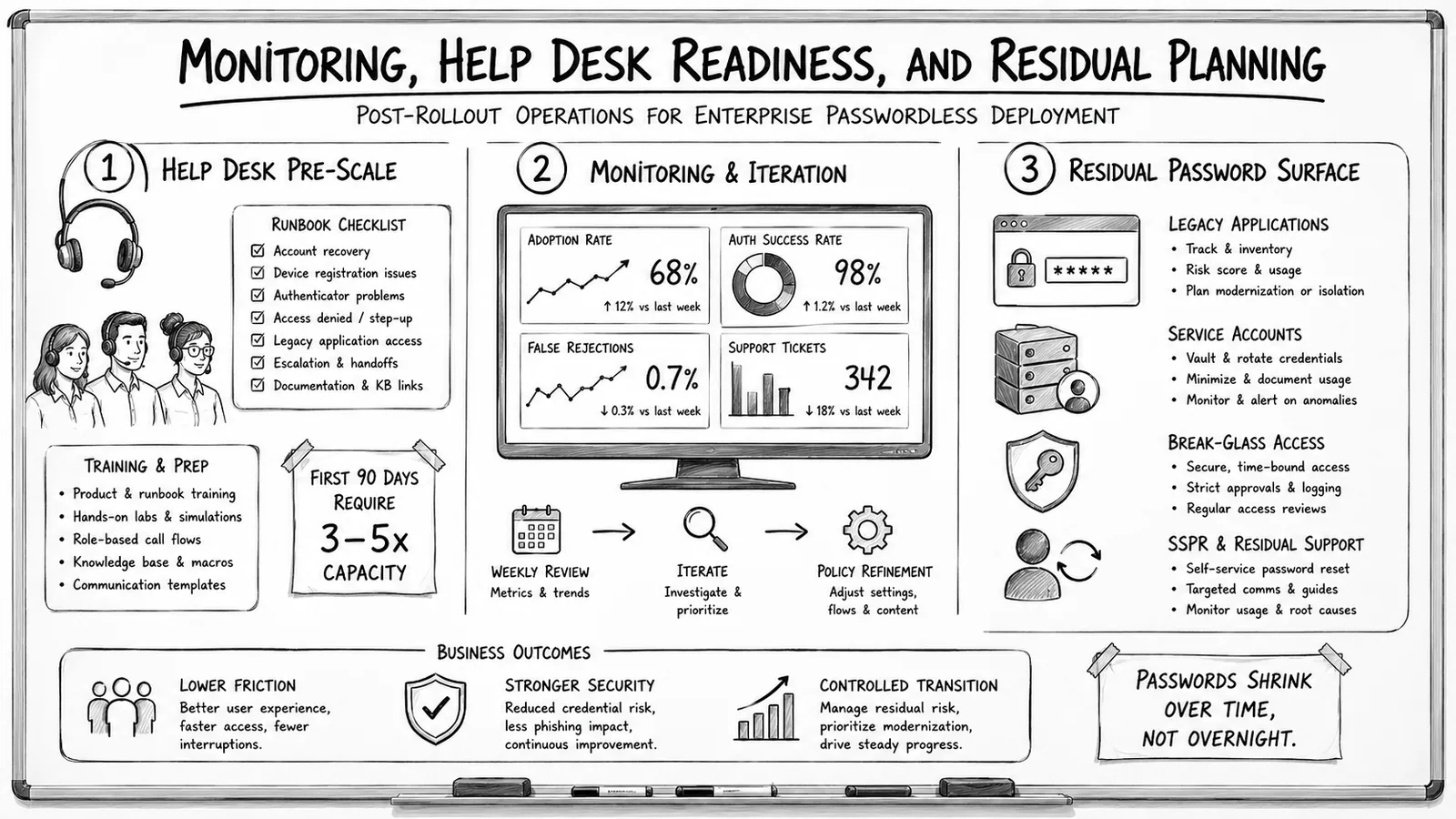
Phase seven is residual password treatment. Some applications never get WebAuthn support and continue requiring password authentication. Some workforce segments never get the primary authenticators to work reliably and continue relying on password-plus-MFA. The residual password population needs the modern password policy discipline as the appropriate treatment. Timeline: indefinite; the residual is unlikely to reach zero in most enterprises.
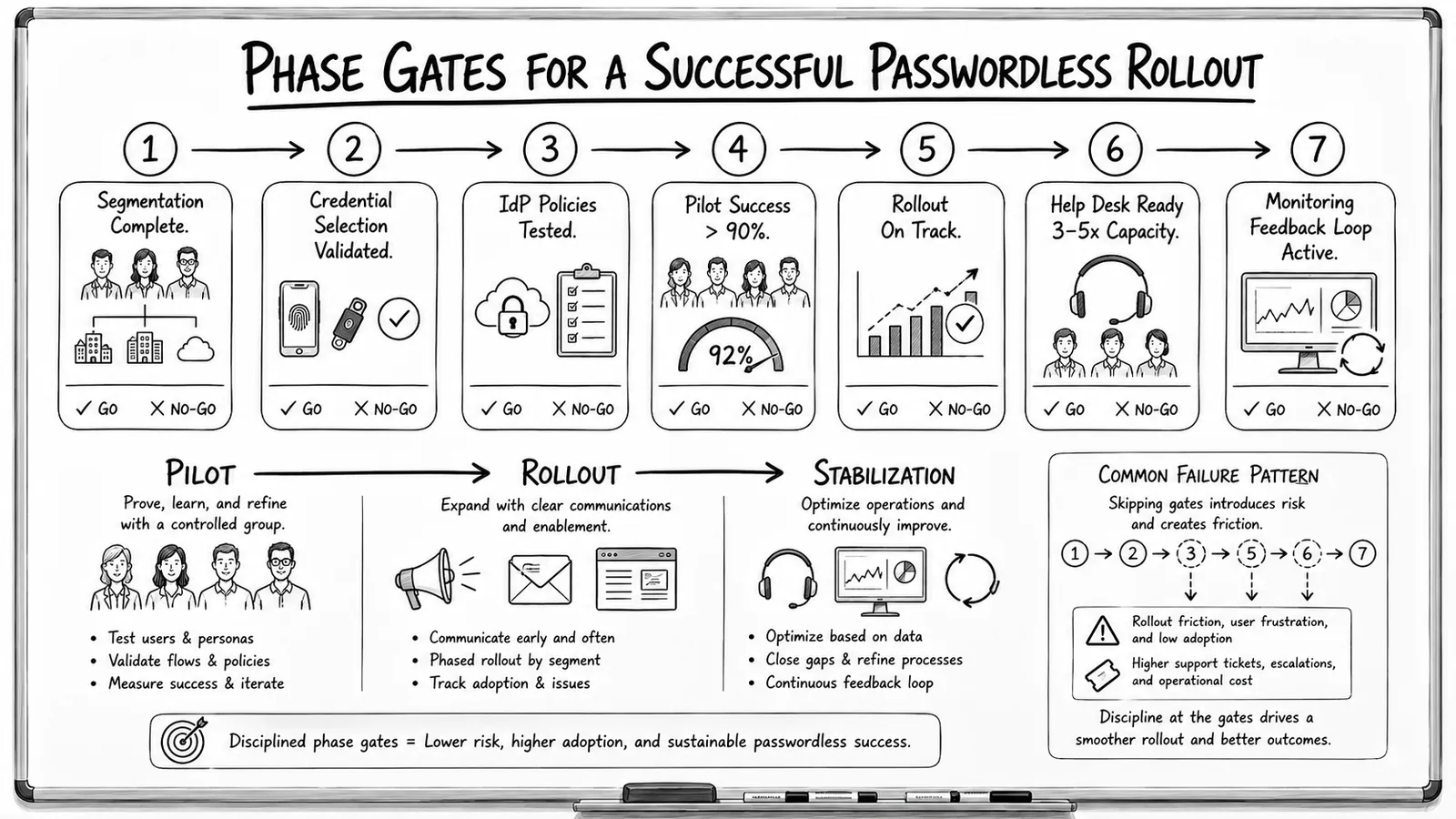
The multi-year timeline is normal. Most 2026 enterprises are somewhere in phases 3-5 of this migration. The goal of the migration is reducing password reliance over time rather than eliminating passwords immediately — a permanent 5-15% residual password population is realistic and acceptable if the primary workforce authentication path is passwordless.
Closing
Passwordless reached mainstream enterprise deployment in 2025. The WebAuthn credential architecture provides the cryptographic foundation that makes passwordless meaningful rather than cosmetic. Platform-native passkey systems from Apple, Google, and Microsoft cover the majority of workforce devices. Hardware FIDO2 keys serve the AAL3 use cases in regulated industries. The credential-class architecture is production-ready.
The remaining hard problems are operational. The sync vs device-bound trade-off shapes deployment decisions and typically resolves as a composition of both patterns across different use cases. The recovery-account problem determines whether the deployment succeeds or produces a support-burden crisis, and it gets solved through the composition of synced-passkey recovery, hardware-key backup, and administrator-mediated recovery. The cross-device UX patterns address the fundamentally multi-device workforce reality through phone-as-authenticator, QR-code-mediated, passkey-on-laptop, and hardware-key ceremonies. The migration architecture is a multi-year phased rollout that most 2026 enterprises are in the middle of.
The password isn't disappearing overnight. The 5-15% residual population that continues on password-plus-MFA for various operational reasons is normal and acceptable. The modern password policy discipline covers that residual population appropriately. The primary workforce authentication path is moving to passwordless, and that's the meaningful shift. Passwordless login isn't the future anymore; it's the present, deployed at workforce scale, running the primary authentication for the majority of enterprise applications. The future is here.
ABOUT THE AUTHOR

More from Access Management
PIM vs PAM vs PUM: Privileged Access Defined for 2026
PIM, PAM, and PUM get used interchangeably and mean three different things. PIM manages who holds privileged identity and which roles carry it. PAM controls how privilege is exercised through vaulting, session control, and just-in-time elevation. PUM manages the shared privileged accounts nobody personally owns. The 2026 reference on distinguishing the three terms, where they overlap, and where to start.
DNS as Identity Infrastructure: A 2026 Reference
DNS resolution, DNSSEC integrity, and DNS poisoning as a credential-harvesting vector — the 2026 reference on treating DNS as identity infrastructure, not network plumbing.
Password Hash Synchronization in 2026: Hybrid AD to Entra ID
Password hash synchronization keeps on-prem Active Directory and Microsoft Entra ID authoritative together — how the sync cycle works, its security tradeoffs, and where it fits against federation.