Deprovisioning AI Agents: Governed Offboarding with Avatier
Deprovisioning an AI agent retires its identity, credentials, and tool access when its purpose ends. The triggers, a seven-step offboarding runbook, and how Avatier supports it.

Deprovisioning an AI agent retires its identity, credentials, and tool access when its purpose ends. The triggers, a seven-step offboarding runbook, and how Avatier supports it.
- Deprovisioning an AI agent means retiring everything that lets it act: its credentials and tokens, its tool and capability access, and its identity, while preserving the evidence of what it did and who approved its removal.
- Agents outlive their purpose for ordinary reasons: the owner leaves, the project ends, or the pilot is abandoned. Unlike a dormant human account, an orphaned agent can keep acting on its own schedule.
- Five events should trigger deprovisioning: owner offboarding, purpose ended, inactivity, scope drift, and a security incident. They map closely to the account-disable conditions in NIST SP 800-53 Rev. 5 AC-2(3).
- A seven-step runbook covers it: inventory, attribute an owner, revoke tokens and credentials, remove tool and capability access, disable the identity, preserve the evidence, and confirm with a review.
- Avatier Actions exposes Lifecycle Management and User Management actions (remove access and roles, transfer, disable, delete) as MCP tools, and Avatier Ledger records the evidence for actions that run through Avatier. Agents created outside governed channels remain your discovery problem.
Deprovisioning an AI agent is the governed retirement of everything that lets the agent act: its credentials and tokens, its tool and capability access, and its identity, carried out when its purpose ends and recorded so you can prove it happened. AI agent offboarding is the leaver process for software that acts, and the gap it closes is simple to state: an agent nobody owns can still act.
Offboarding people is a well-worn process. The mechanics of a leaver event that cascades revocation across every connected system are covered in Automated Deprovisioning, and the residue that builds up when offboarding misses something is covered in Orphaned and Dormant Accounts. This piece is about the population those playbooks were not built for. An AI agent has no HR record and no last day, and it may have no manager. It can borrow authority from people, be created in an afternoon, and keep running after everyone has forgotten it.
It is a spoke of the Agentic AI pillar in the Avatier Identity Anywhere 2027™ series. The hub, What Is Agentic Identity?, defines the four-stage agent lifecycle: create, scope, monitor, revoke. This post is the operational detail behind the last stage: the triggers that should start it, the seven steps that complete it, and how to wire human offboarding to the agents a person leaves behind.
Why AI agents outlive their purpose
An agent does not need anyone's mistake to become orphaned. It becomes orphaned because nothing in the normal course of business forces a retirement decision. Three patterns show how it happens.
The owner leaves. An engineer builds an agent that triages access requests, or an analyst wires one up to pull weekly reports. The person moves teams or leaves the company. Their own accounts are disabled on schedule, because HR sends that signal. The agent they built has no HR record, so no signal reaches it. It keeps its API key, its schedule, and its connections.
The project ends. An agent is stood up to support a migration, a quarter-end close, or a one-off data cleanup. The project finishes and the team celebrates. Nobody files a ticket to retire the agent, because nobody thinks of it as an account. It was a tool, and tools do not get offboarded.
The pilot is abandoned. A team evaluates an agent framework, connects it to a few systems with a borrowed credential "just for the pilot," and then chooses a different direction. The pilot is abandoned; the credential is not.
Two structural habits make all three worse. Agents are sometimes given an existing service account or a shared key rather than their own identity, which means they never appear in an inventory as themselves. And agent credentials get copied: into a configuration file, into a second tool, into a colleague's test environment. Revoking the one copy you know about leaves the others alive.
The underlying issue is the same one the agentic identity hub names for the whole lifecycle: revocation is the stage nothing forces, so it tends to be skipped until something goes wrong.
The risk: orphaned agents that still act
An orphaned human account is a latent risk. It does nothing until someone finds the credential and logs in. An orphaned agent is different in kind, because it does not need anyone to log in. It can keep acting on its own.
Consider what a forgotten agent may still have:
- A schedule or trigger. An agent may run on a timer, a webhook, or an inbound event. They wake up whether or not anyone remembers them.
- Refreshing credentials. If the agent holds a long-lived refresh token, it can keep obtaining fresh access tokens without any human involvement.
- Standing reach. Group memberships, roles, and tool connections granted for the original purpose stay in place after the purpose is gone.
- Delegated authority that nobody re-checked. An agent that acted on a person's behalf may still carry that person's scope after the person has changed roles.
The consequences follow directly. Attribution degrades: when an unowned agent acts, there is nobody to ask why. Detection weakens: nobody is watching its output, so a misconfiguration or a prompt-injection that steers it off course can run for weeks before anyone looks. And the blast radius is set by whatever access it accumulated, which for a pilot running on a borrowed credential can be far more than the pilot needed.
This is the same shape of problem as the broader non-human population. The inventory, ownership, and credential-rotation disciplines in Service Account Governance and Non-Human Identity and Machine Identity Management are the foundation. What agents add is autonomy and delegated authority, which is why an agent that is orphaned is not merely untidy. It is an actor with no principal.
Five triggers for deprovisioning an AI agent
Human offboarding has one familiar trigger: the person leaves. Agent offboarding needs several, because no single system of record knows when an agent's reason for existing has ended. Five triggers cover the practical cases.
| Trigger | What it looks like | Default response |
|---|---|---|
| Owner offboarding | The agent's accountable owner leaves or changes roles, and nobody accepts ownership | Suspend the agent, then transfer or retire it by a set deadline |
| Purpose ended | The project, pilot, or workflow the agent served is closed | Retire through the full runbook |
| Inactivity | No actions within a defined period | Confirm with the owner, then retire |
| Scope drift | The agent touches systems or performs actions outside its declared purpose | Suspend, review, and re-scope or retire |
| Incident | The agent, its credentials, or its owner is involved in a security event | Revoke credentials immediately, then complete the runbook |
These triggers are not new inventions. They line up with the account-disable conditions in NIST SP 800-53 Rev. 5, control enhancement AC-2(3), which calls for disabling accounts that have expired, are no longer associated with a user or individual, are in violation of organizational policy, or have been inactive for a defined period. Purpose ended is expiry. Owner offboarding is "no longer associated." Scope drift and incidents are policy violations. Inactivity is inactivity. The difference for agents is that each of those conditions has to be detected by something other than an HR feed.
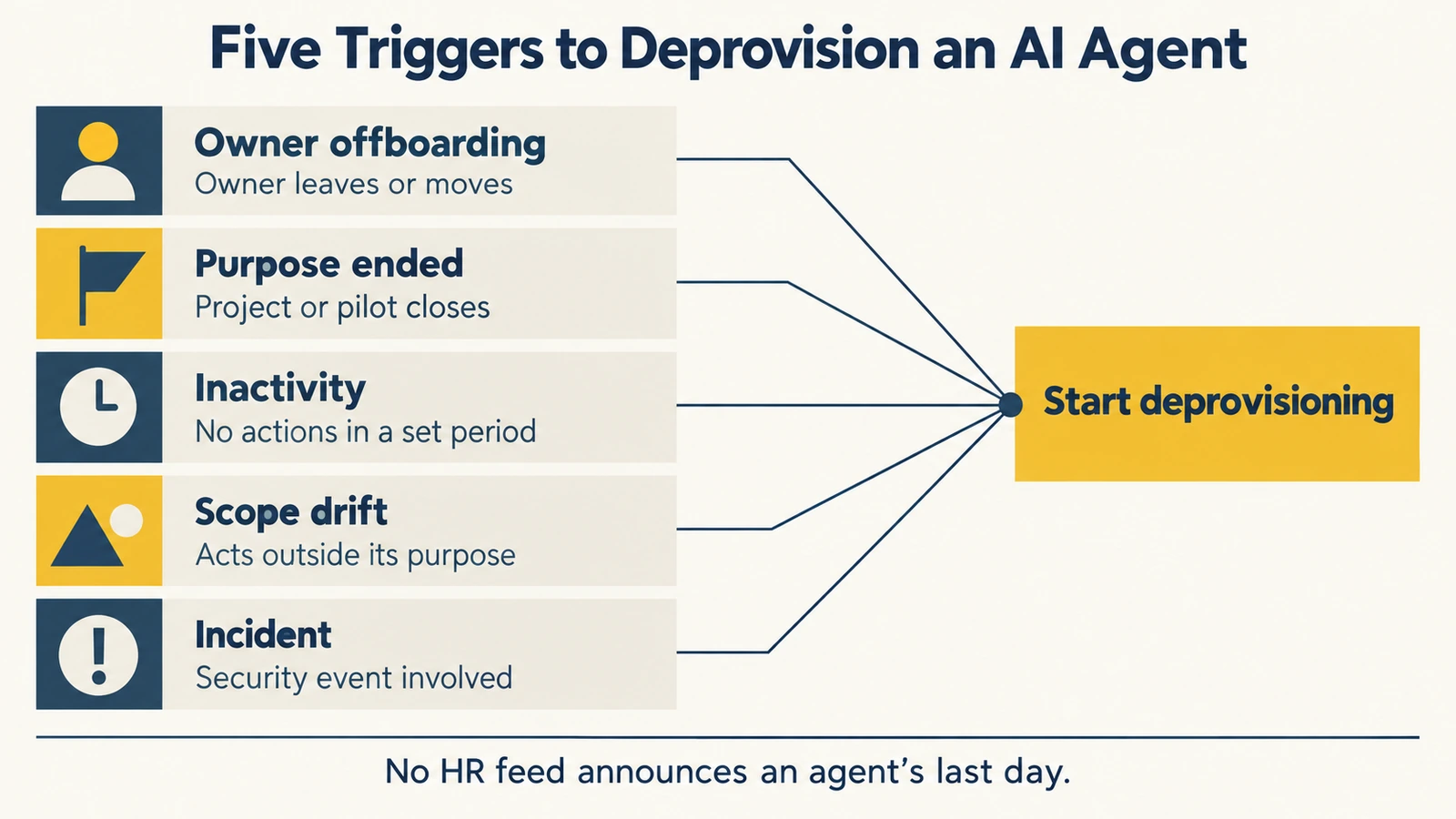 No HR feed announces an agent's last day, so five triggers have to do the job that one leaver event does for a person.
Two policy decisions make the triggers work without debate. First, set the inactivity period in writing, so "has it been idle long enough?" is a lookup rather than a meeting. Second, set an owner-transfer deadline: when an owner leaves, the agent is suspended at once, and if no successor accepts ownership within the deadline, it is retired automatically.
How to deprovision an AI agent: seven steps
The order matters. Each step closes a path the next step depends on being closed, and the last two steps turn the work into evidence.
-
Inventory the agent. Confirm the agent exists as a distinct identity and record what it touches: the systems it connects to, the MCP servers and tools it can call, the credentials it holds, the schedules or webhooks that wake it, and any groups or roles it belongs to. If the agent was running under a shared service account, record that too, because it changes step 5. You cannot revoke a path you have not listed.
-
Attribute an owner. Identify the accountable human for this agent: the current owner, or the successor who has inherited the decision. The owner approves the retirement and confirms nothing downstream still depends on the agent. If no owner can be found, the agent is orphaned by definition, and the decision escalates to whoever owns the system it touches. Never skip this step because the agent "is obviously dead." The owner is the person who knows about the second copy of the key.
-
Revoke tokens and credentials. Revoke every API key, client secret, certificate, and OAuth token the agent holds, and rotate any secret it shared with something else. Revoke refresh tokens, not just access tokens: RFC 7009, OAuth token revocation, requires authorization servers to support revoking refresh tokens, and says a server that also supports access-token revocation should invalidate the access tokens issued under the same grant. For agents that reach tools through the Model Context Protocol over HTTP, the MCP authorization specification is based on OAuth 2.1, so the same token hygiene applies. For local servers, the specification has credentials come from the environment instead, which is one more place a secret can sit. This step comes early for a reason: it stops the agent from authenticating while you do the rest.
-
Remove tool and capability access. Disconnect the agent from every MCP server and tool it could call, remove it from allow-lists, and strip the roles and group memberships that gave it reach into systems. This is distinct from step 3. A revoked token stops today's session; a standing group membership or tool registration is what would let a newly issued credential work again tomorrow.
-
Disable the identity. Disable the agent's identity so no new credential can be issued to it and nothing can re-enable its access by accident. Disable first and delete later: deletion before the evidence is secured breaks attribution for everything the agent did. If the agent was running under a shared service account, you cannot disable the account without breaking the other users of it, which is the strongest argument for giving every agent its own identity at creation.
-
Preserve the evidence. Keep the record of what the agent did while it was active and how it was retired: who approved the retirement, which credentials were revoked, which access was removed, and when the identity was disabled. Apply your retention policy to it. This is the answer to the auditor who later asks what that agent did, on whose behalf, and whether it was cleanly shut down.
-
Confirm with a review. Verify that each path is actually closed: the credentials fail, the tool connections are gone, the schedules no longer fire, and no group or role still lists the agent. Then record the confirmation in your next access review, so the retirement is attested rather than assumed. Only after this step, and after the evidence is kept, should the identity be deleted.
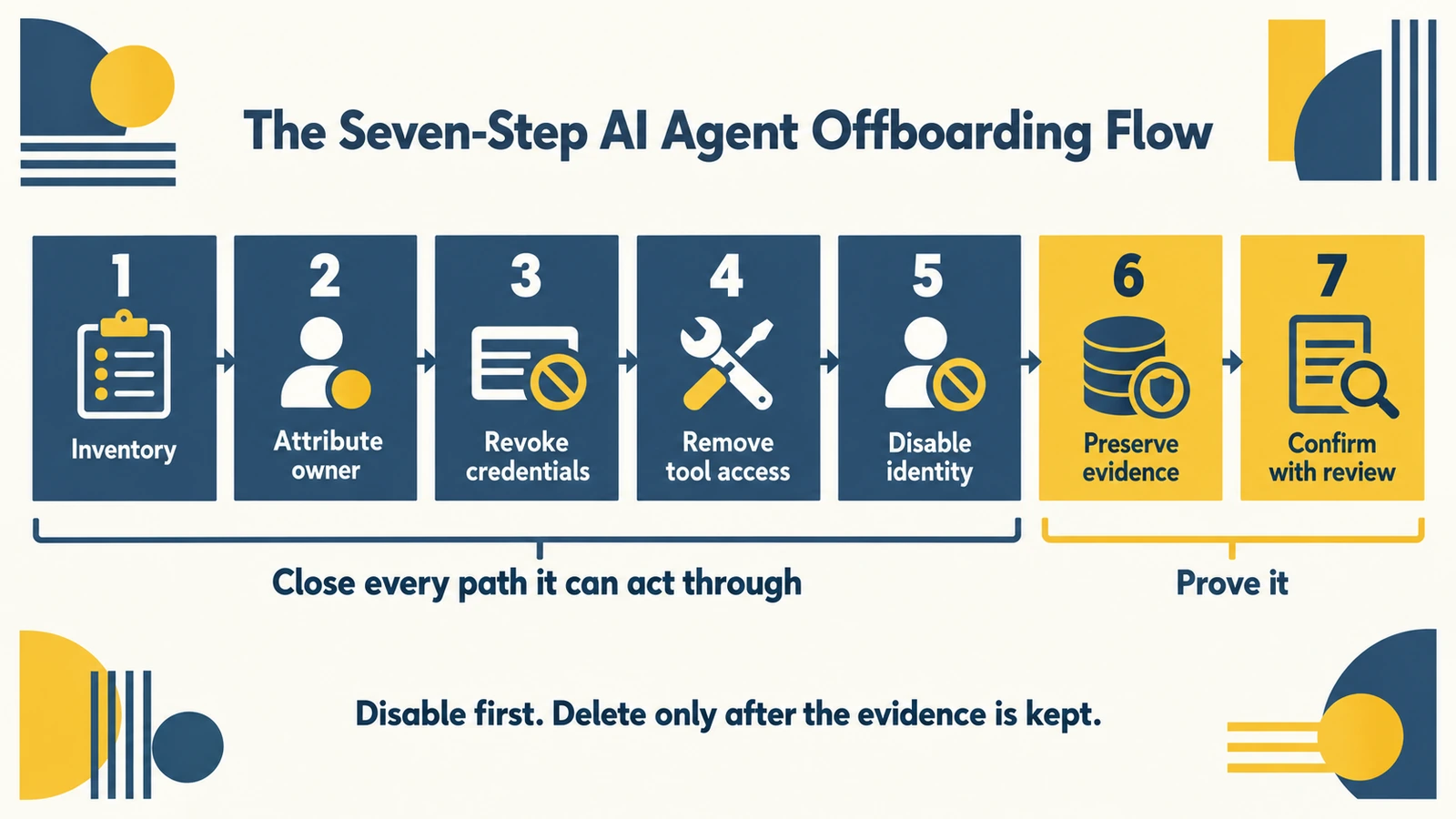 Close the credentials, then the reach, then the identity, and finish with evidence and a review, deleting only after the record is kept.
A useful test of the runbook is to run it backwards in your head. If the agent were reactivated tomorrow, which step would stop it? If the answer is "none, because we only revoked one key," the runbook is incomplete.
Tie human offboarding to the agents that person owns
A strong control for orphaned agents is not an agent-specific tool. It is a change to the human leaver process: when a person leaves, the workflow should also find and act on every agent that person owns or sponsors.
That requires one precondition, which is ownership recorded at creation. If every agent is registered with a named owner, the leaver workflow can query "which agents does this person own?" in the same pass that disables the person's accounts. For each agent it finds, the workflow forces an explicit decision:
- Transfer. A named successor accepts ownership, re-certifies the agent's purpose and scope, and becomes accountable for it. The transfer itself should be recorded.
- Retire. The agent goes through the seven-step runbook.
- Suspend until decided. If neither happens at once, the agent is suspended so it cannot act, and the owner-transfer deadline starts.
Delegated authority adds a second, automatic layer. An agent acting on a person's behalf can only borrow authority that person holds. When the person's access is removed, what the agent can do on their behalf should shrink with it, without anyone having to remember. This is why the agentic identity model binds delegated actions to the principal's own authority: revocation follows the principal.
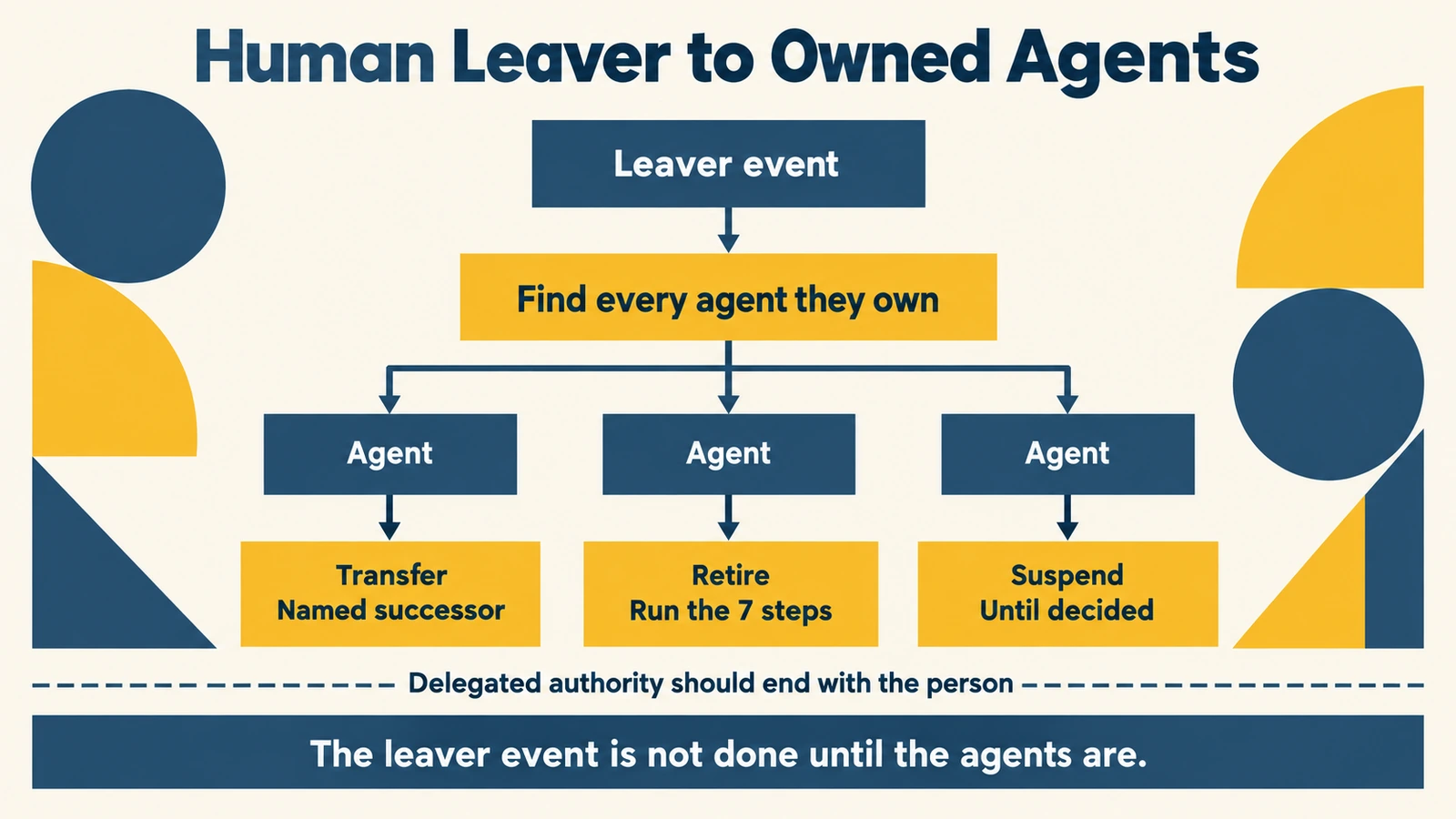 When a person leaves, the leaver event should find every agent they own and force a transfer or a retirement.
The human side of this cascade is the familiar one, and Automated Deprovisioning covers it in depth. The only change is scope: the leaver event is not finished until the agents are accounted for as well as the accounts.
What Avatier ships toward this pattern
Avatier Identity Anywhere 2027™ is designed to govern people, applications, machines, credentials, and AI agents, and to generate audit evidence for human, machine, and AI-agent identity actions. For deprovisioning, the relevant pieces are two MCP connectors announced on September 24, 2026: Avatier Actions and Avatier Ledger.
Avatier Actions: the lifecycle actions a runbook needs. Avatier Actions exposes more than 50 identity outcomes as MCP tools across eight modules: Password Management, Help Desk, Lifecycle Management, User Management, Group Management, Access Governance, Workflow Approval, and Reports. Several of them are the verbs of an offboarding runbook:
- Lifecycle Management includes requesting and removing access and roles, workflow participation, rehire, and transfer.
- User Management includes enable, disable, delete, rename, profile and direct-report updates, organizational-unit moves, account expiration, and proxy of authority.
- Group Management spans twelve actions, from membership and ownership to nesting and expiration.
- Access Governance covers campaign management and review, the same kind of review step 7 relies on.
- Workflow Approval covers pending requests and history, the kind of approval trail step 2 calls for.
Each request runs through the customer's existing policies, approvals, and roles, and nothing bypasses governance, because the assistant is the interface, never the authority. AI assistants do not receive unrestricted access: every request must invoke an approved Avatier capability and remains subject to authentication, authorization, delegated authority, policy enforcement, and audit controls. Setup is one administrator connection, and permissions are inherited from the platforms customers already run, such as Microsoft Entra ID, Active Directory, Okta, and Ping. Avatier runs alongside those platforms rather than replacing them. The live demonstration named in the announcement is a human deprovisioning: a termination executed by asking, with the audit evidence printing at the end.
Avatier Ledger: the evidence behind steps 6 and 7. Avatier Ledger turns every outcome into evidence and every report into a question. It records who asked, what ran, under whose authority, and what policy allowed it, for actions that run through Avatier, whether human-initiated or agent-assisted. Each Secure Outcome records the identity involved, the initiating agent or experience, the authorization context, the policy applied, the action taken, and the final result. Persona Briefings then shape that evidence for the person asking, and the security team's briefing is built around exposure, dormant and orphaned access, privileged activity, and the vishing surface at the help desk. Dormant and orphaned access is the category a forgotten agent's access falls into, so it is a sensible place to start looking, for access Avatier can see. How the record is structured is covered in AI Agent Audit Trail with Avatier Ledger.
The commercial unit matches the work. Under Pay Per Identity Action™, customers pay only for completed, verified, policy-compliant outcomes, so a completed action such as a disable is an outcome that already carries its receipt. Getting started is free, deployment services are included, and a 45-day money-back guarantee applies. The actions run as MCP tools, so the controls discussed in MCP Identity Governance are relevant to them.
The credential side. The Credential Governance™ home page describes managing passwords, keys, tokens, and service accounts from birth to retirement across Active Directory, Entra ID, and legacy systems. On the human side of the leaver cascade, the Assisted Reset pillar page lists an Unenroll User action for when users change or leave.
The compliance posture behind the platform is published on the Avatier Trust Center: SOC 2 Type II audited with no exceptions noted and ISO/IEC 27001:2022 certified. Preview details are on the Avatier Identity Anywhere 2027™ site, and the wider company is at avatier.com.
What agent deprovisioning does not solve
A deprovisioning runbook closes the paths you know about. Being precise about where it stops is part of running it honestly.
It cannot retire agents it cannot see. Agents created outside governed channels, wired straight to a system with a pasted API key or built on a personal account in a third-party tool, do not appear in the inventory. No runbook retires them. Discovery (credential scanning, reviewing OAuth grants and app consents, watching for unregistered clients) remains your job, and so does making the governed path the easiest one to use, so fewer agents are built outside it.
It only governs actions that run through governed capabilities. Evidence and policy apply to actions that flow through approved capabilities. Avatier's materials describe Ledger recording the actions that run through Avatier; an agent's direct calls to systems Avatier does not govern are outside that record.
It depends on the credential issuer. You can only revoke a token through the authorization server that issued it, and only as completely as that server supports. Agent platforms, SaaS vendors, and cloud providers each hold their own copies. Some revocation will happen in someone else's console.
It does not recall what already left. Retiring an agent stops future actions. It does not undo data the agent already copied, messages it already sent, or changes it already made. Those need their own review.
It does not set your policy. Inactivity periods, owner-transfer deadlines, and retention windows are decisions your organization has to make. A governance layer enforces the rules you define; it does not choose them.
Standards for how agent identities are represented and retired across vendors are also still emerging. The durable part is the discipline: register every agent with an owner, give it its own identity, trigger its retirement on the five events that matter, run the seven steps in order, and keep the evidence. Build to that, and the tooling can change underneath without the accountability changing with it.
ABOUT THE AUTHOR

More from IAM & Identity Governance

What Is Pay Per Identity Action™? Outcome-Based Identity, Explained
Pay Per Identity Action™ is Avatier's outcome-based identity pricing model: you pay only for completed, verified, policy-compliant identity outcomes, not for seats, modules, or services hours.

What Is Agentic Identity? Governing AI Agents as Identities
Agentic identity is the governed identity an AI agent acts under. How it differs from human and machine identity, how delegated authority works, and the lifecycle that keeps agents accountable.

MCP Identity Governance: Securing AI-Agent Actions in 2026
MCP identity governance controls which identity, through which AI assistant, may invoke which identity tool, under what policy, and with what evidence. How it works and how to put it in place.