Active Directory User Management, Governed with Avatier
Enable, disable, rename, move, expire: everyday Active Directory account changes add up. How to run each one through policy, approval and a record with Avatier User Management.

Enable, disable, rename, move, expire: everyday Active Directory account changes add up. How to run each one through policy, approval and a record with Avatier User Management.
- Active Directory user management is the everyday work of changing accounts: enable, disable, delete, rename, update profiles and managers, move OUs, and set expiration.
- Each change is small, but each one changes who can sign in or what they can approve, so each needs a policy, an approver and a record.
- NIST SP 800-53 Rev. 5 control AC-2 asks organizations to create, enable, modify, disable and remove accounts in line with defined policy and criteria.
- Avatier User Management covers enable, disable, delete, rename, profile and direct-report updates, organizational-unit moves, account expiration and proxy of authority.
- Each change runs through the customer's existing policies, approvals and roles, and Avatier Ledger turns every outcome into evidence.
Active Directory user management is the everyday work of changing user accounts after they exist: enabling and disabling them, deleting and renaming them, updating profiles and managers, moving them between organizational units, setting expiration dates, and delegating authority to a proxy. Avatier User Management runs each of those changes through the organization's existing policies, approvals and roles, and Avatier Ledger turns each one into evidence.
None of these changes is dramatic. Together they decide who can sign in, which policies apply to an account, and whose approval a request goes to. That makes each one an access change, and each one deserves the same three things: a policy, an approver and a record.
The everyday account changes admins make
Creating an account is one event. Changing it goes on for as long as the account exists. Here is the task list, with the part of each change that is easy to get wrong:
| Change | What it does | What to get right |
|---|---|---|
| Enable | Turns an account on, for a start date or a return from leave | Confirm the person and the date before sign-in works |
| Disable | Stops sign-in without removing the account | Do it on the day access should end, not when someone notices |
| Delete | Removes the account | Disable first; delete after the retention period your policy sets |
| Rename | Changes the name on an account, such as after a legal name change | Keep the same person behind the account and record the old name |
| Profile and direct-report update | Changes title, department, phone, location or who reports to whom | Attributes can drive policy and group rules, and the manager field can decide who approves requests |
| OU move | Moves the account to another organizational unit | Policies assigned by OU change with the move |
| Account expiration | Sets a date when the account stops working | Set it at creation for contractors and temporary staff |
| Proxy of authority | Lets another person approve on someone's behalf for a period | Give the proxy an end date and name who granted it |
The right-hand column is not about the click itself. It is about timing, authority and consequences: when the change should happen, who decided it, and what else moves when it does.
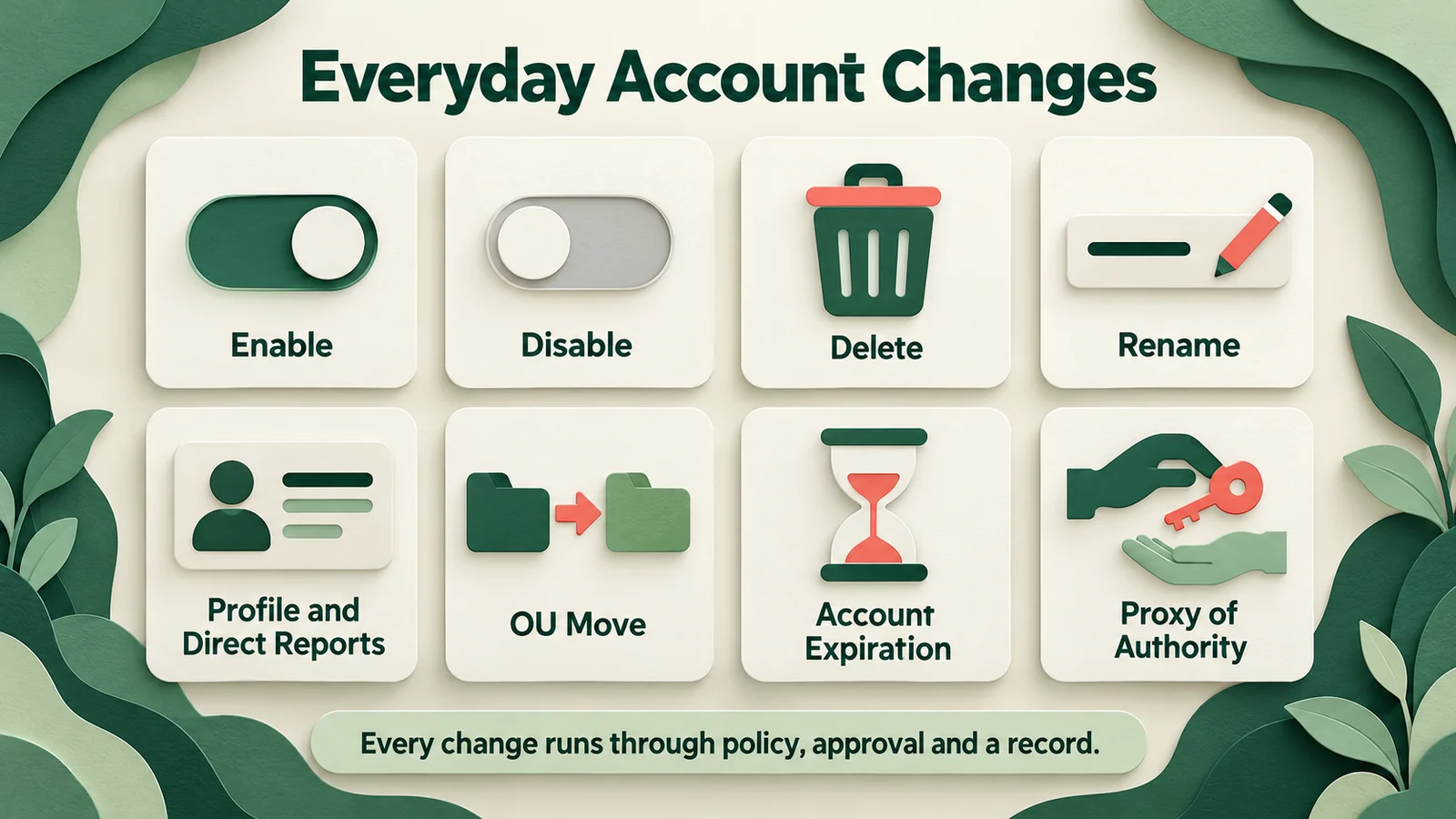 Eight everyday account changes, each a small access decision that needs a policy, an approver and a record.
NIST treats these changes together. SP 800-53 Rev. 5 control AC-2, Account Management, asks organizations to "create, enable, modify, disable, and remove accounts" in accordance with organization-defined policy, procedures, prerequisites and criteria. Its enhancement AC-2(4) asks them to "automatically audit account creation, modification, enabling, disabling, and removal actions." The control does not single out the big events. It covers the routine ones too.
Why small account changes need governance
Each change on the list fails in its own quiet way.
- A late disable leaves an account working after the reason for it has gone. Left long enough, it becomes an orphaned account; see Orphaned & Dormant Accounts for finding and fixing them.
- A stale manager field sends approvals to the wrong person. The request is approved by someone who no longer knows the requester's work, and the record says the process was followed.
- An OU move can change which policies apply to an account. The move itself takes seconds; the consequences sit in whatever is assigned to the new OU.
- A proxy with no end date turns cover for a vacation into standing authority that nobody remembers granting.
- An account with no expiration for a contractor or temporary worker depends on someone remembering to disable it later.
NIST names the expiration case directly: control AC-2(3) asks organizations to disable accounts that "have expired" or "are no longer associated with a user or individual." An expiration date set on the account is how the first condition takes care of itself.
Some of these changes arrive together as part of a bigger event. A transfer brings a manager change, an OU move and new access at once. For that lifecycle view, see Joiner-Mover-Leaver Automation. If your accounts live in both Active Directory and Microsoft Entra ID, Hybrid Active Directory and Entra ID covers governing the two as one.
One path for every account change
The fix is not a separate process for each change type. It is one path that every change takes, whoever starts it. As general practice:
- Request. Name the person, the change, the reason and, for anything temporary, the end date.
- Policy. Check whether this change is allowed for this account, from this requester, and who must approve it.
- Approval. The right person decides: the manager, the account owner, or security for privileged accounts.
- Change. Apply what was approved, no more.
- Record. Keep who asked, what changed, under whose authority, which policy allowed it, and the result.
The record closes the loop. When the next request or access review comes for the same account, the reviewer can see what changed last time and why, instead of rebuilding it from tickets.
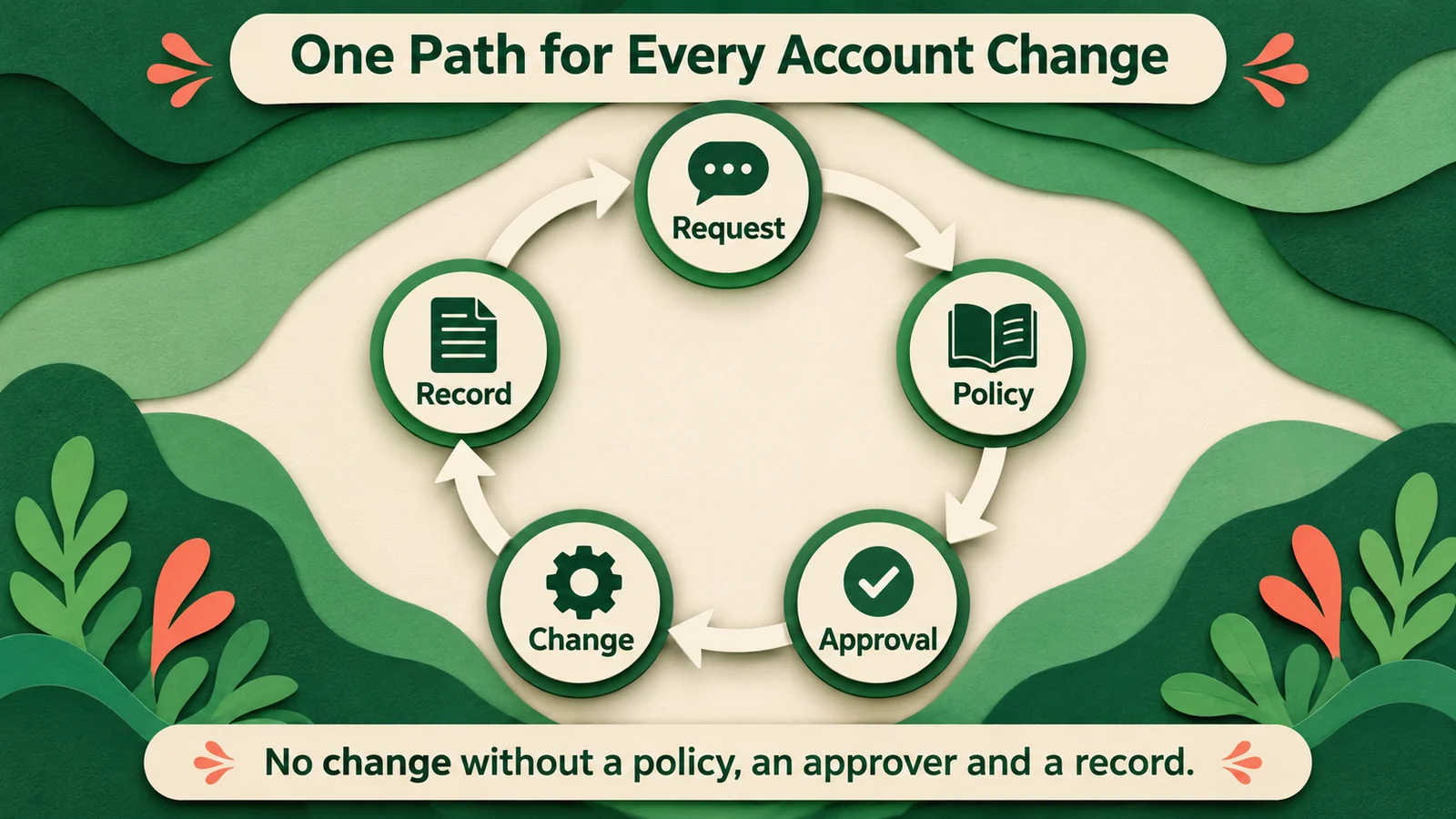 Request, policy, approval, change, record: one loop for every account change, with each record informing the next decision.
The request can come from anywhere: a ticket, an admin console, or a question typed into an AI assistant. The entry point changes how fast a routine request gets started. It should not change the path. Group membership changes follow the same loop; our post on Avatier Group Management covers that side.
What Avatier ships for user management
Avatier has protected the world's workforce since 1997. In Avatier Identity Anywhere 2027™, access approvals, policy enforcement and lifecycle changes are among the Secure Outcomes: completed, verified, policy-compliant activities.
Across eight modules, Avatier Actions makes more than 50 identity outcomes available as MCP tools. User Management maps one to one onto the task list above: enable, disable, delete, rename, profile and direct-report updates, organizational-unit moves, account expiration, and proxy of authority. The modules around it include:
- Lifecycle Management: request and remove access and roles, workflow participation, rehire and transfer.
- Group Management: twelve actions, from membership and ownership to nesting and expiration.
- Workflow Approval: pending requests and history.
- Reports.
An employee or manager asks in Teams, Outlook, Claude or Copilot, and the outcome runs through the customer's existing policies, approvals and roles. Every request must invoke an approved Avatier capability and remains subject to authentication, authorization, delegated authority, policy enforcement and audit controls. Permissions are inherited from Microsoft Entra ID, Active Directory, Okta and Ping, and Avatier operates alongside them rather than replacing them.
Avatier Ledger turns every outcome into evidence. Each Secure Outcome records the identity involved, the initiating agent or experience, the authorization context, the policy applied, the action taken and the final result. That is the "Record" step of the loop, created with the change rather than after it.
For password and passwordless governance across the same directories, see Credential Governance™. For compliance details, see the Avatier Trust Center: SOC 2 Type II audited with no exceptions noted, and ISO/IEC 27001:2022 certified.
Getting started with Avatier
User management runs through the policies, approvals and roles that already exist in your environment. With Pay Per Identity Action™ pricing, customers pay only for completed, verified, policy-compliant outcomes. There is no cost to get started, deployment comes included, and a 45-day money-back guarantee applies. Pricing is shared with qualified organizations during the invitation-only preview. For the preview, see the Avatier Identity Anywhere 2027™ site; for the wider company, see avatier.com.
ABOUT THE AUTHOR

More from IAM & Identity Governance

What Is a Secure Outcome? Avatier's Unit of Identity Work
A Secure Outcome is a completed, verified, policy-compliant identity activity. The categories, the six fields each one records, and why it is the unit Avatier customers pay for.

Group Changes by Conversation: Avatier Group Management
A group membership request is routine work that leaves sprawl behind when nobody sets an end date. How to run each change with an owner, a policy, and a record, and how Avatier does it.
OAuth 2.0 for Identity Governance: A 2026 Enterprise Security Guide
OAuth 2.0 in 2026 enterprise identity governance — scope attestation, token lifecycle, consent-grant phishing, and the architectural choices Storm-2949 made visible.