Contractor and Third-Party Access Governance with Avatier
Contractors and vendors need real access for a limited time, and their accounts outlive the engagement. How to bound third-party access to the engagement and prove it ended, with Avatier.

Contractors and vendors need real access for a limited time, and their accounts outlive the engagement. How to bound third-party access to the engagement and prove it ended, with Avatier.
- Contractor and third-party access governance gives vendors and contractors the access an engagement needs, only for as long as it lasts.
- Contractor accounts have no natural expiry: no resignation, no payroll stop, and a sponsor who may have moved on.
- In California AG filings from Jan 2023 to Sep 30, 2026, 10 of 53 incidents naming a vector (18.9%) name third-party or contractor access.
- Treat each engagement as a bounded box: a start date, an end date, and an access window that never crosses either edge.
- Avatier Actions covers requesting and removing access, account and group expiration, and access reviews, and Avatier Ledger records the evidence.
Contractor and third-party access governance means giving vendors, contractors and service providers the access an engagement needs, for only as long as the engagement lasts, and keeping evidence that it ended when the work did. Granting the access is the easy half. Ending it is the hard half.
A contractor's account has no natural expiry. Nobody files a resignation, payroll does not stop, and the sponsor who asked for the access may be three projects away by the time the statement of work closes. Unless someone wrote the end date onto the account itself, the account keeps working.
Why contractor access outlives the engagement
An employee departure starts in HR. A contractor or vendor exit can start almost anywhere: a purchase order that lapses, a vendor that rotates its staff, a project that winds down without a formal close. Each of those leaves a gap in a predictable place:
- No end date on the account. The engagement has one in the contract. The directory does not.
- A sponsor who moved on. The person who approved the access is no longer watching it.
- The vendor's own staffing changes. The firm swaps one engineer for another, and the first account stays.
- Shared credentials. A vendor login used by a whole support team survives every individual who knew the password.
NIST names both halves of the problem. SP 800-53 Rev. 5 control PS-7, External Personnel Security, asks organizations to "require external providers to notify" designated personnel "of any personnel transfers or terminations of external personnel who possess organizational credentials and/or badges, or who have system privileges" within a defined time period. Notification is the provider's half. Acting on it is yours, and control AC-2 asks you to "align account management processes with personnel termination and transfer processes."
What the breach letters show
Avatier's Identity Attack Ledger reads 2,242 breach notifications filed with the California Attorney General from January 1, 2023 to September 30, 2026. Of the 53 incidents whose letters name how the attacker got in, 10, or 18.9%, name third-party or contractor access, meaning "the path in belonged to a vendor, contractor, or service provider rather than to the filing organization." That is the subset of California filings that name a vector, not a national rate.
Two details in that group matter for vendor access governance. First, by the ledger's definition, the path in for all ten belonged to someone outside the filing organization. Your exposure includes your vendors' access, not only your own.
Second, the ledger finds that orphaned or dormant accounts, "accounts that outlived the person or the purpose," appear zero times as a named vector. The page is explicit that this is about what notification letters disclose, not about how often those attacks happen: "Anyone sizing these risks from public disclosure alone will size them at zero." A stale contractor account is exactly that kind of account, and the letters are not where you will find it.
Treat every engagement as a bounded box
This is general guidance, whatever tooling you use. A useful model for contractor access management is a box: a start date on one side, an end date on the other, and an access window that never crosses either edge.
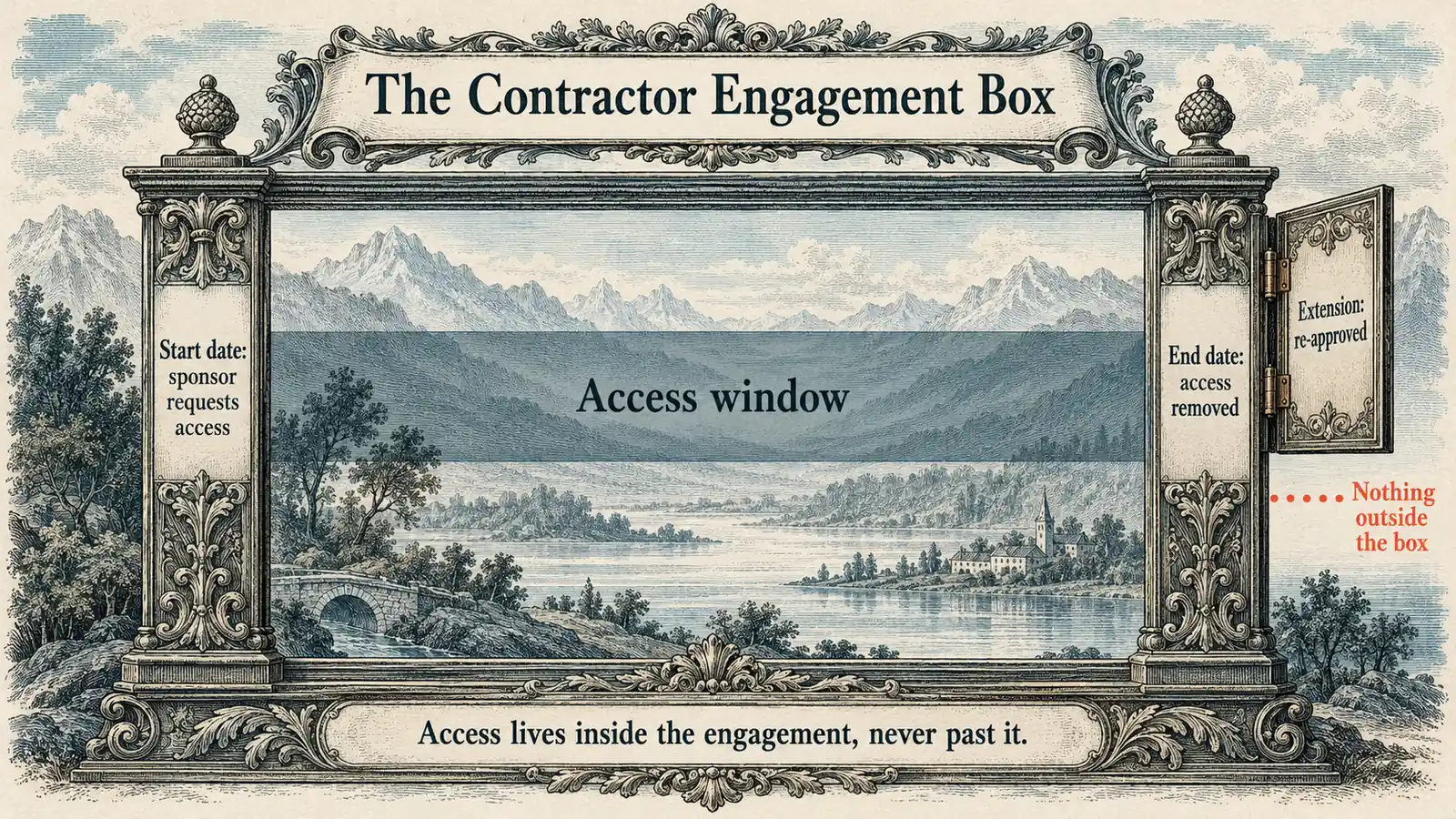 The engagement as a bounded box: access starts with a sponsored request, ends on the end date, and never runs past the frame.
What each moment in the box should produce:
| Engagement moment | What good looks like |
|---|---|
| Start | A named sponsor requests the access, with an end date attached |
| During | Changes run as new requests, and the access is in scope for reviews |
| Extension | The sponsor re-approves, and the new end date goes on the record |
| End | Accounts are disabled, group memberships expire, shared credentials change |
| After | Evidence shows what was removed, when, and under whose authority |
The end row lines up with NIST. Control AC-2(3) asks organizations to disable accounts when they "have expired" or "are no longer associated with a user or individual," and AC-2 asks for a process "for changing shared or group account authenticators (if deployed)" when people leave the group.
Extensions deserve extra care, because they are where a box loses its edges. An engagement renewed month to month without a fresh approval turns a bounded grant into standing access with a contract number attached. Treat each extension as a new request: the sponsor confirms the work is still needed, the scope is checked against what the contractor actually uses, and the new end date replaces the old one on the account, not only in the purchase order. For the revoke side of the employee lifecycle, see Automated Deprovisioning.
Where third-party access hides
Contractor offboarding can close the main account and still leave access standing in the corners around it. A useful audit walks the whole floor plan:
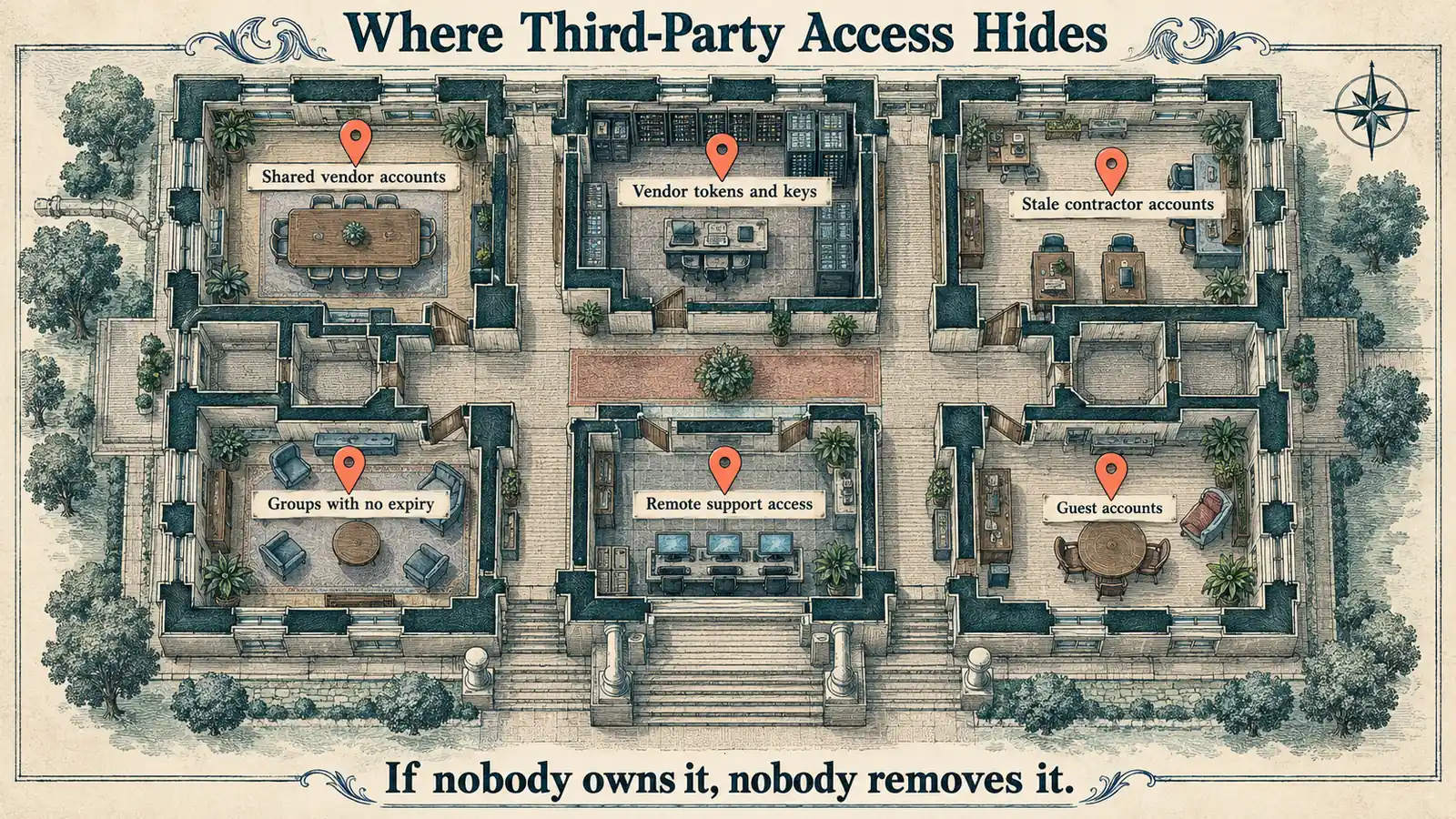 Six places third-party access can outlast the engagement, from shared vendor logins to group memberships with no expiry date.
- Shared vendor accounts used by a support team, where no single departure triggers a credential change.
- Vendor tokens and keys issued for an integration and left in place after the project.
- Stale contractor accounts with no end date and no active sponsor.
- Groups with no expiry, which keep granting access after the reason for membership is gone.
- Remote support access opened for one incident and never closed.
- Guest accounts in collaboration tenants, covered in B2B External Identity & Guest Access.
When one of these turns up with no live engagement behind it, it is an orphaned account by another name. Orphaned & Dormant Accounts covers finding and fixing them.
The fix for every room on the map is the same pair of attributes: an owner who is still in the building and an end date that the system will act on. Access with both can be reviewed and retired on schedule. Access missing either one is the access that can end up on next year's audit list.
What Avatier ships toward this pattern
Avatier's Credential Governance™ site says it "serves employees, contractors, frontline, and remote teams in 34 languages." In Avatier Identity Anywhere 2027™, Avatier Actions exposes more than 50 identity outcomes as MCP tools across eight modules. The ones that map to the engagement box:
- Lifecycle Management: request and remove access and roles, workflow participation, rehire and transfer.
- User Management: includes enable, disable and account expiration.
- Group Management: twelve actions, from membership and ownership to nesting and expiration.
- Access Governance: campaign management and review.
- Workflow Approval: pending requests and history.
An employee or manager asks in Teams, Outlook, Claude or Copilot, and the outcome runs through the customer's existing policies, approvals and roles. Nothing bypasses governance, because "the assistant is the interface, never the authority." Setup is one administrator connection, with permissions inherited from Microsoft Entra ID, Active Directory, Okta and Ping.
Avatier Ledger turns every outcome into evidence. Each Secure Outcome records the identity involved, the initiating agent or experience, the authorization context, the policy applied, the action taken and the final result. That maps to the "After" row: what was removed, and under whose authority. Through Persona Briefings, the security team receives a briefing built around exposure, dormant and orphaned access, privileged activity, and the vishing surface at the help desk.
Compliance details are on the Avatier Trust Center: SOC 2 Type II audited with no exceptions noted, and ISO/IEC 27001:2022 certified.
Getting started
Under Pay Per Identity Action™, customers pay only for completed, verified, policy-compliant outcomes. Getting started is free, deployment services are included, and a 45-day money-back guarantee applies. Full commercial terms are available to qualified organizations in the invitation-only preview. For the preview, see the Avatier Identity Anywhere 2027™ site; for the wider company, see avatier.com.
ABOUT THE AUTHOR

More from IAM & Identity Governance

Joiner-Mover-Leaver Automation: Governed Changes with Avatier
Joiner-mover-leaver automation runs every lifecycle change as a governed identity action. Why movers are where access piles up, and how Avatier runs changes through policy.

Identity Reporting for CISOs and CFOs: Avatier Persona Briefings
Identity reporting for executives means one evidence set, answered three ways. What the CISO, CFO and security team each need, and how Avatier Ledger's Persona Briefings deliver it.

Group Changes by Conversation: Avatier Group Management
A group membership request is routine work that leaves sprawl behind when nobody sets an end date. How to run each change with an owner, a policy, and a record, and how Avatier does it.