Hybrid Passwordless: How Avatier's True Hybrid Model Works
Hybrid passwordless lets users stop typing passwords where they can while the passwords legacy systems still need stay governed. Here is how Avatier's True Hybrid Model is described.

Hybrid passwordless lets users stop typing passwords where they can while the passwords legacy systems still need stay governed. Here is how Avatier's True Hybrid Model is described.
- Hybrid passwordless is a migration model: users stop typing passwords where they can, while the passwords legacy systems still need stay in place and stay governed.
- All-or-nothing passwordless stalls because a passkey only works where the app or website has implemented it, and directory passwords persist underneath.
- Avatier's True Hybrid Model, marked patent pending, unifies passwordless authentication with active password governance.
- In Avatier Hybrid Passwordless Login, users enroll on first sign-in; the existing password is captured, encrypted and synchronized once, and later logins are passwordless.
- Password Firewall™ keeps the passwords beneath synchronized, validated and breach-checked across AD, Entra ID and legacy systems.
Hybrid passwordless is a migration model in which users stop typing passwords wherever they can, while the passwords that legacy systems still need stay in place and stay governed. Avatier's True Hybrid Model, marked patent pending, is described as one that "unifies passwordless authentication with active password governance, keeping modern and legacy systems compliant."
The point is the end state. A passwordless program that only changes the login screen leaves a layer of passwords nobody is watching. A hybrid program retires the password from the user's day and keeps governing it underneath until the systems that need it are gone.
Why all-or-nothing passwordless stalls
Passkeys are the FIDO Alliance's path to passwordless sign-in. The FIDO Alliance defines a passkey as "an authentication credential based on FIDO standards" that lets a user "sign in to apps and websites with the same process that they use to unlock their device." It also explains who has to do the work: "RPs use the built-in WebAuthn API (for websites) and platform FIDO APIs (for apps) to exercise passkeys for sign-in."
That last sentence is the migration problem. A passkey works where the relying party, the app or website, has implemented it. An application that was never built with those APIs has no passkey sign-in to offer. It still expects a password, and so does the directory account behind it.
Avatier's pillar page names the wider pattern the passwordless illusion: "the login screen modernized, the credential layer untouched." It makes three points that apply to any all-or-nothing plan:
- The passwords do not leave. "Beneath the surface, passwords still exist in Active Directory, Entra ID, and legacy systems."
- Hiding them is not removing them. "Eliminating it from the login screen does not eliminate it from the attack surface."
- Some users are left out. For device-bound passwordless, the page says "Shared workstations, virtual desktops, kiosks, contractors, and phone-restricted facilities fall outside the rollout."
For where device-bound sign-in stops on Windows, see Windows Hello Limitations 2026.
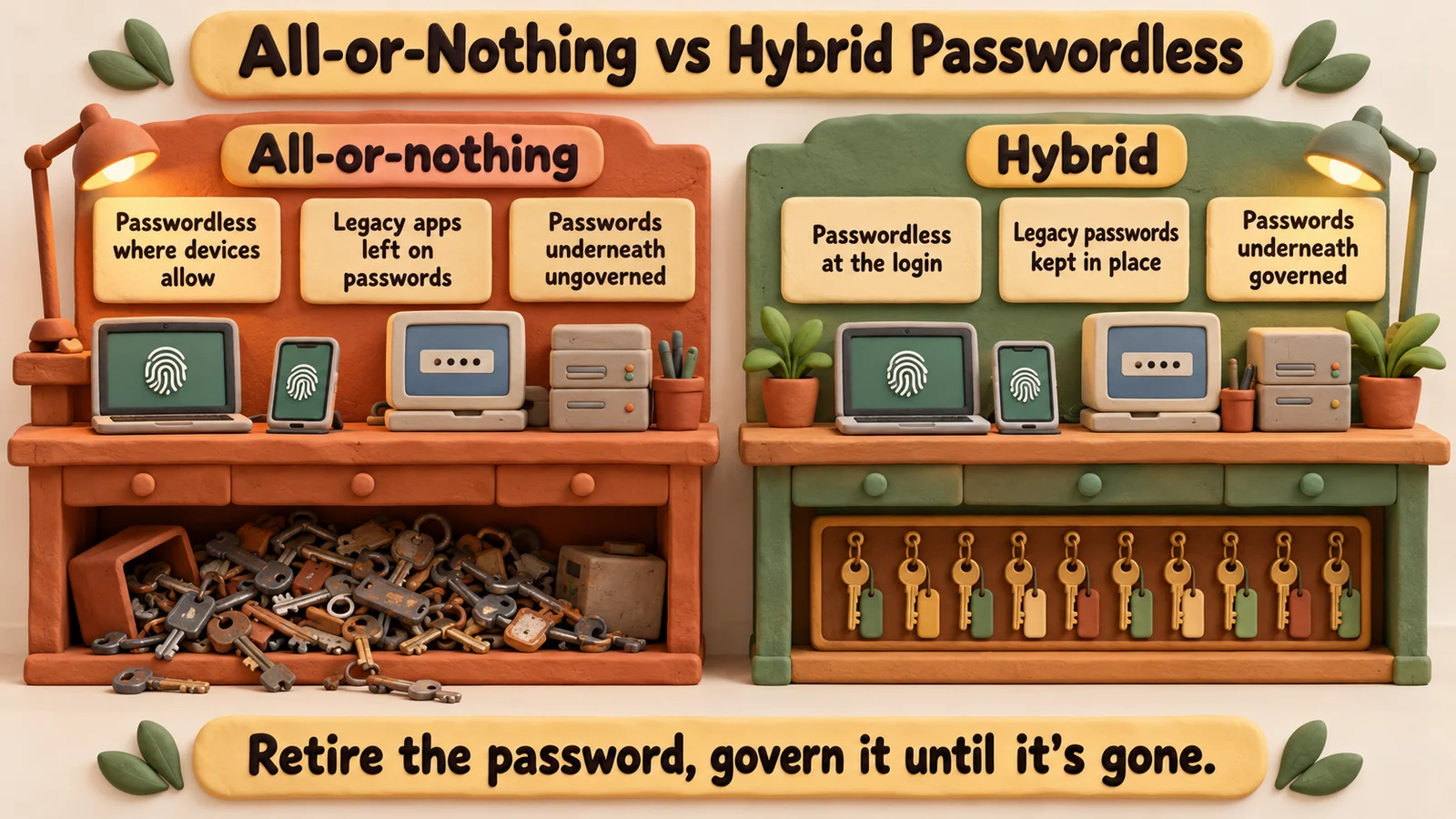 Both models leave legacy passwords in place. The difference is whether anyone governs them while users go passwordless above.
What hybrid passwordless changes
Hybrid passwordless does not argue with the goal. It changes what "done" means while old and new systems run side by side. This comparison is general:
| All-or-nothing passwordless | Hybrid passwordless | |
|---|---|---|
| Daily login | Passwordless for users whose devices and apps support it | Passwordless wherever the login can be replaced |
| Legacy app passwords | Still exist, outside the program | Still exist, inside the program |
| Directory passwords | Hidden from users, outside the program | Synchronized, validated and breach-checked |
| Users the rollout cannot reach | Stay on the old login | Planned for by segment |
| Definition of done | No password field | No ungoverned password |
The last row is the useful one. "No password field" can be reached while the riskiest passwords sit unmonitored. "No ungoverned password" can be measured today.
In practice, the passwordless program and the password program become one program. The team that moves users off typed passwords also owns the policy for the passwords that remain, so no credential falls between two projects. Avatier's pillar page says a partial rollout means, for IT leaders, "running two login systems indefinitely." A hybrid plan accepts that both layers exist for a while and runs them under one set of rules.
How Avatier's True Hybrid Model works
The True Hybrid Model is listed as a feature of Avatier Hybrid Passwordless Login, which is Pillar 6 of Avatier Credential Governance™. The pillar describes the product as "a browser-based, zero-trust Windows credential provider" and states its stance plainly: "Hybrid Passwordless owns the destination. It does not pretend the password is gone. It governs the password while retiring it."
The pillar lays out the rollout in four phases. In its own words:
- Push the credential provider. "Deploy the lightweight browser-based credential provider to Windows endpoints and virtual desktops via MSI, GPO, or Intune."
- Connect MFA and identity systems. "Register your existing MFA providers as the passwordless factor and connect the identity environments the credential provider authenticates against — Active Directory, Entra ID, and connected systems."
- Enable automatic first-login enrollment. "Users enroll invisibly on their next sign-in: the existing password is captured, encrypted, and synchronized once, and every login after that is passwordless — no QR codes, no app downloads, no help desk tickets."
- Govern the credentials beneath. "Keep the buried passwords synchronized, validated, and breach-checked through Password Firewall so the credential layer stays governed and audit-ready while the workforce moves passwordless above it."
The pillar does not tie the True Hybrid Model to particular phases, but phases 3 and 4 show the two halves it names. The user stops typing the password after enrollment, and the password itself keeps living, under Password Firewall™, in the directories and systems that need it.
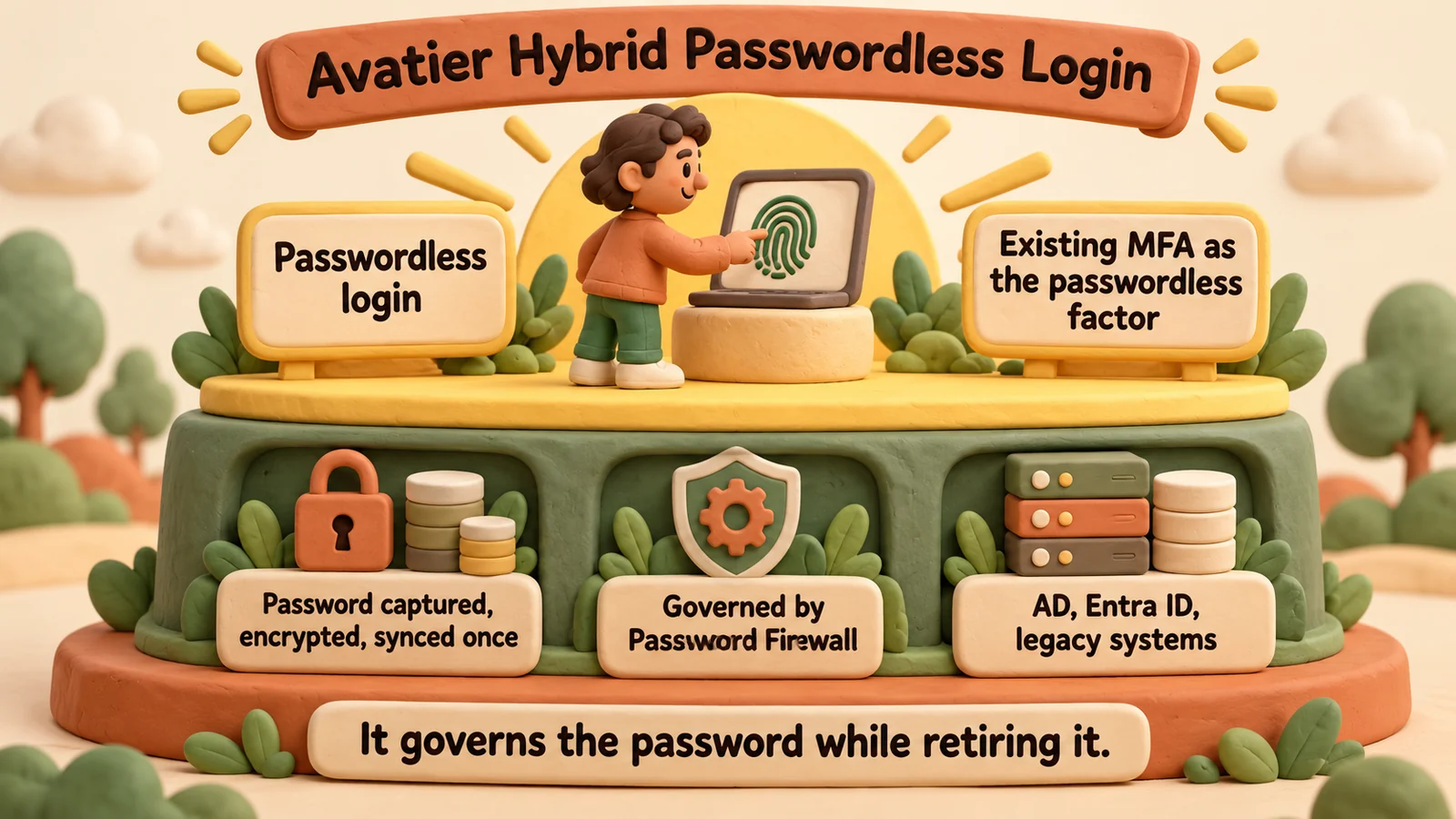 Hybrid Passwordless Login as the pillar describes it: passwordless login above, the password governed by Password Firewall beneath.
Planning a passwordless migration that keeps legacy apps working
This is general guidance for any hybrid plan, whichever products you use:
- Inventory where passwords still live. Directories, legacy applications and anything that authenticates against them. In a mixed AD and Entra ID estate, sync drift is part of the picture; see Hybrid Active Directory and Entra ID.
- Segment users by device reality. Shared workstations, virtual desktops and sites without phones need a plan of their own, not an exception list.
- Pick the passwordless factor per segment. Reuse factors people already have where you can.
- Govern every password that remains. Policy, breached-password checks and synchronization apply to passwords users no longer type.
- Retire passwords system by system. When an application gains passkey support or is decommissioned, remove its password then, not before.
- Report on both layers. Track who logs in without a password and how many remaining passwords are governed, so progress shows before the last password goes.
For a wider view of the vendor landscape, see 15 Best Passwordless Authentication Solutions for Enterprises in 2026.
What Avatier ships toward this pattern
The Hybrid Passwordless Login pillar page describes these capabilities alongside the True Hybrid Model:
- Universal Passwordless Access: "Browser-based login for any Windows device — works on shared workstations, VDI, and Citrix with no TPM or hardware lock-in."
- Existing MFA as the factor: Microsoft Authenticator, Okta Verify, Duo, RSA and Google Authenticator are named.
- Password Firewall enforcement: "Every credential is breach-checked and policy-compliant in real time." For the enforcement layer itself, see Password Firewall.
- Deviceless MFA: "Passwordless access via the Identity Challenge Card in defense, healthcare, and manufacturing sites where phones are banned." For the card, see Identity Challenge Card™.
- Unified Recovery: "Integrated Self-Service Reset applies the same MFA and compliance policies for instant, secure account recovery."
- Languages: the login experience and enrollment flow cover 34 languages.
Compliance details are on the Avatier Trust Center: SOC 2 Type II audited with no exceptions noted, and ISO/IEC 27001:2022 certified. For the invitation-only preview, see the Avatier Identity Anywhere 2027™ site.
ABOUT THE AUTHOR

More from Pillar 5: Passwordless Login
MFA for Windows Login and RDP: Avatier Strong MFA Login
MFA at the SAML layer leaves Windows login, RDP and server logons on a password alone. Avatier Strong MFA Login binds the factor you already own to every password authentication event.

Password Spraying Defense: Blocking Guessable Passwords with Avatier
Password spraying tries a few common or breached passwords across many accounts, spread thinly enough to dodge lockout. The defense is to screen every new password before it can be set.

Introducing the Avatier MCP Server: Identity Actions Inside Your AI Assistant
The Avatier MCP server is live at mcp.avatier.com. Connect Claude, Claude Code, GitHub Copilot, Cursor or Gemini CLI and run governed identity actions in plain language, with the same verification, policy and approvals as the Avatier console.