Password Spraying Defense: Blocking Guessable Passwords with Avatier
Password spraying tries a few common or breached passwords across many accounts, spread thinly enough to dodge lockout. The defense is to screen every new password before it can be set.

Password spraying tries a few common or breached passwords across many accounts, spread thinly enough to dodge lockout. The defense is to screen every new password before it can be set.
- Password spraying tries one or a few common, breached or predictable passwords across many accounts, so no single account hits its lockout limit.
- MITRE ATT&CK notes that a sprayed password may match the domain's complexity policy, so format rules alone do not stop it.
- A core defense is to keep guessable passwords from being set: screen each new password against breached and banned-password lists when it is created or changed.
- Avatier's Identity Attack Ledger counts 31 of 53 incidents in California breach filings that name a vector (58.5%, Jan 2023 to Aug 14, 2026) as phished or stolen credentials.
- Avatier Password Firewall validates passwords in real time against breached and banned-password intelligence before they reach Active Directory or Entra ID.
Password spraying is a credential attack that tries a few common, breached or predictable passwords across many accounts, spread thinly enough that no single account reaches its lockout limit. The defense that holds up is to keep guessable passwords from being set at all: screen each new password against breached and banned-password lists at the moment it is created, before it reaches the directory.
Lockout policy cannot do that job on its own. A spray is designed to stay under it.
What password spraying is
MITRE ATT&CK lists password spraying as technique T1110.003. Its description says adversaries "may use a single or small list of commonly used passwords against many different accounts to attempt to acquire valid account credentials." Logins are tried "against many different accounts on a network to avoid account lockouts that would normally occur when brute forcing a single account with many passwords."
The same entry notes that a sprayed password "may match the complexity policy of the domain." MITRE's own example, 'Password01', has an uppercase letter, lowercase letters and digits. It passes a format check and is still an obvious early guess.
Avatier's Password Firewall page puts the pattern in one line: "Password spraying tests breached, reused, and predictable passwords at low volume to avoid lockouts."
Brute force vs password spraying
Both attacks guess passwords. They differ in where the guesses land.
| Brute force | Password spraying | |
|---|---|---|
| Target | One account | Many accounts |
| Guesses per account | Many | One or a few |
| Password list | Large | Short: common, breached or predictable |
| Effect of lockout | Locks the account and stops the attack | Rarely triggers, because each account sees few failures |
| What success needs | Time against one account | One user, anywhere, with a guessable password |
The last row matters most. A spray does not have to crack a strong password. It needs one account in the directory whose password is already on the attacker's short list.
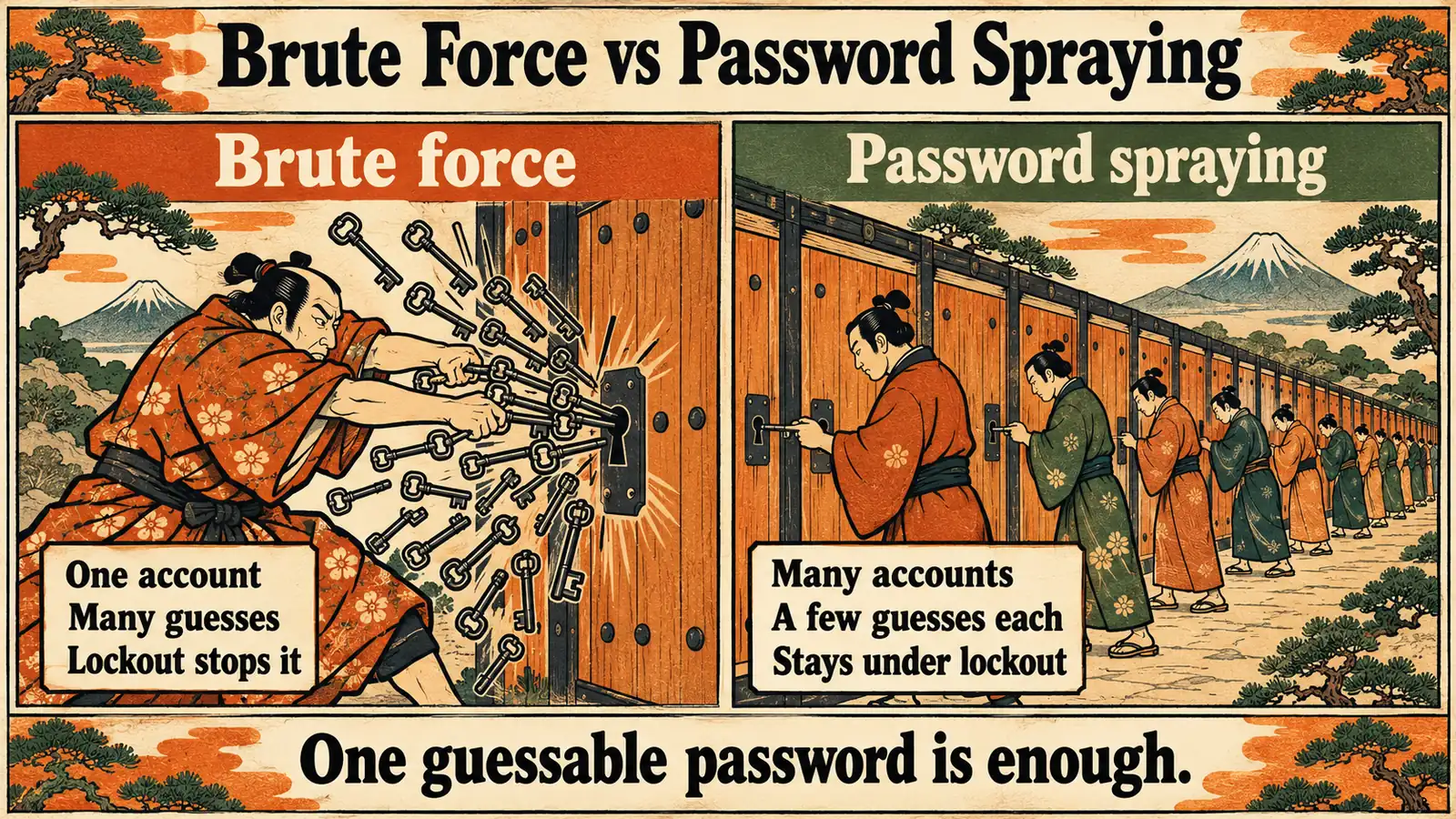 Brute force hammers one account until lockout ends it. A spray spreads a few guesses across many accounts and waits for one match.
Why lockout and complexity rules miss it
Lockout counts failures per account. Spraying spreads its failures across accounts, so the count on each one stays low. MITRE adds that adversaries "may deliberately throttle password spraying attempts to avoid triggering security alerting."
Tightening lockout has a cost of its own. MITRE's mitigation guidance for this technique warns: "Too strict a policy may create a denial of service condition and render environments un-usable, with all accounts used in the brute force being locked-out."
Complexity rules check the shape of a password, not whether attackers already have it. Avatier's Password Firewall page states the gap in native controls directly: "Default AD policy checks format, not real-world exposure." A password can satisfy every composition rule and still sit in a breach corpus. Why composition rules measure the wrong thing is covered in Password Complexity vs Password Strength.
That changes the defender's question. It is less about how many guesses to allow, and more about which passwords should never exist in the directory.
Screen passwords at the moment they are created
The current NIST SP 800-63B sets the general rule: "When processing a request to establish or change a password, verifiers SHALL compare the prospective secret against a blocklist that contains known commonly used, expected, or compromised passwords." Its examples include passwords "obtained from previous breach corpuses," dictionary words, and context-specific words such as the name of the service or the username.
NIST ties that blocklist to online guessing. It "SHOULD be of sufficient size to prevent subscribers from choosing passwords that attackers are likely to guess before reaching the attempt limit." That is the spraying defense in a sentence: if the passwords on the attacker's short list cannot be set, the spray has nothing to match. The wider policy picture is in Password Policy for Enterprise Authentication 2026.
As a general pattern, a screen at creation or change runs in order:
- Password typed. A user, help desk agent, administrator or connected system submits a new password.
- Breached list. Is it in known breach data? If yes, reject it.
- Banned list. Is it a common password, or a banned term such as the company name? If yes, reject it.
- Policy. Does it meet length and pattern rules? If not, reject it.
- Accepted. Only now is it written to the directory.
Rejections should explain themselves, so the user picks something new instead of adding a digit. NIST says the CSP "SHALL provide the reason for rejection."
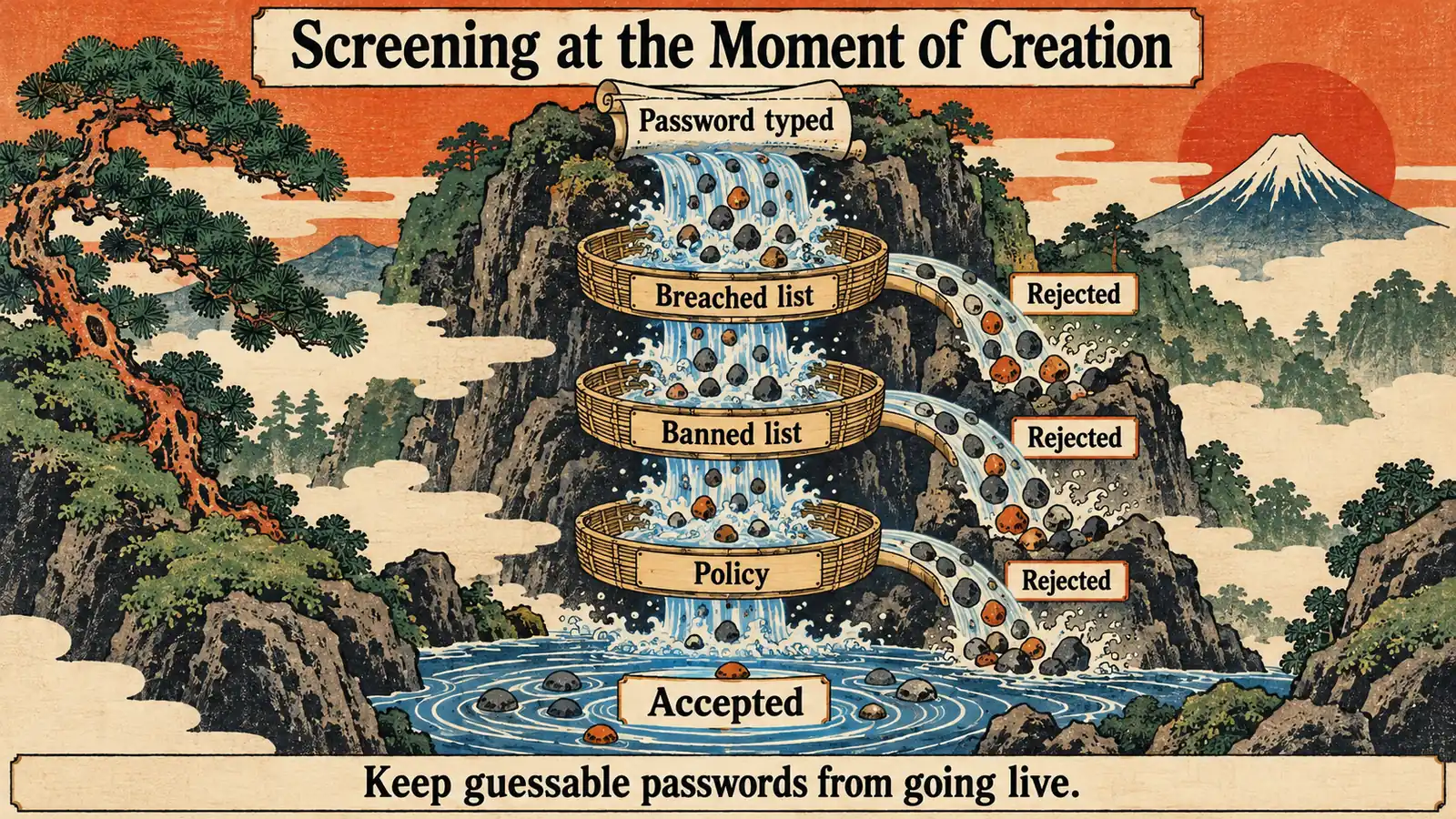 Each new password passes the breached list, the banned list and policy before it is accepted. A failure at any gate sends it back.
Every path that writes a password needs the same screen. A password set by a help desk agent or an admin script is no less guessable than one set in self-service.
Stolen and reused credentials also show up in breach disclosures. Avatier's Identity Attack Ledger reads every breach notification filed with the California Attorney General from January 1, 2023 through August 14, 2026. Of the 53 incidents whose letters name how the attacker got in, 31, or 58.5%, name phished or stolen credentials: a valid username and password that was "phished, reused, purchased, or taken from an earlier breach." Those figures describe the letters that name a vector, not all breaches, and they are California filings, not a national rate. They do not single out spraying.
What Avatier ships toward this pattern
Password Firewall is Pillar 1 of Avatier Credential Governance™. It installs as a lightweight agent on every Active Directory domain controller and intercepts every password-change request, "from end users, administrators, APIs, or third-party systems." Each change is validated in real time against enterprise policy, NIST Common Passwords and Have I Been Pwned before it is accepted.
- Breached and banned-password intelligence. The page says Password Firewall "validates passwords in real time, checks against breached and banned-password intelligence."
- Before the directory. Every password is validated "before it ever reaches Active Directory or Entra ID."
- Custom banned terms. An uploadable custom dictionary can block company names, product names, slang or previously breached terms, alongside the default word list.
- Predictable patterns. Rules detect and block palindromes, repeats and predictable substitutions beyond basic complexity.
- Stricter policy where it counts. Policy can be assigned by OU, connector, connector group or user, and administrators, service accounts and high-risk users can get stricter requirements.
- Records. Validation, rejection, change and synchronization events are tracked for audit and SIEM workflows.
For the breach check, the feature list says Password Firewall checks every password against breach data "via HIBP k-anonymity — the password never leaves the domain controller." The page's in-browser rule tester, a separate demo, states: "Your password never leaves this browser. The HIBP check sends only the first 5 characters of its SHA-1 hash via k-anonymity."
Password Portal, Login Reset and Assisted Reset use Password Firewall "to stop weak credentials before they reach the directory," so self-service, login-screen and help desk resets are screened too.
For the full rule list, see the Password Firewall pillar page; for all six pillars, see Credential Governance. Compliance details are on the Avatier Trust Center: SOC 2 Type II audited with no exceptions noted, and ISO/IEC 27001:2022 certified. For the invitation-only preview, see the Avatier Identity Anywhere 2027™ site; for the wider company, see avatier.com.
ABOUT THE AUTHOR

More from Pillar 1: Password Firewall

Password Complexity vs Password Strength: What 2026 Got Right
Complexity rules don't measure what attackers actually exploit. Strength does. The architecture that produces strong workforce passwords without the 'Spring2026!' rotation theater that wastes everyone's time.

Password Aging Policies in 2026: What NIST Actually Says
Mandatory password rotation on a fixed calendar is no longer best practice — NIST SP 800-63B favors length and breach screening over forced expiration, and here's what to do instead.

Password Policy for Enterprise Authentication 2026: The NIST 800-63B Rev. 4 Reference
The password policy that actually reduces risk is not the password policy most enterprises still enforce. NIST 800-63B Rev. 4 (finalized 2025) dismantles the composition rules and periodic-reset mandates that defined the 2000s and codifies a fundamentally different discipline — length over complexity, breach-corpus screening, banned-list enforcement, no forced periodic rotation. The 2026 enterprise reference on the modern password policy, the AAL1/2/3 assurance-level mapping, the enforcement architecture that operationalizes it, and the migration path from the legacy policy every enterprise still carries.