Password Aging Policies in 2026: What NIST Actually Says
Mandatory password rotation on a fixed calendar is no longer best practice — NIST SP 800-63B favors length and breach screening over forced expiration, and here's what to do instead.

Mandatory password rotation on a fixed calendar is no longer best practice — NIST SP 800-63B favors length and breach screening over forced expiration, and here's what to do instead.
- NIST SP 800-63B no longer recommends mandatory periodic password rotation absent evidence of compromise — the guidance shifted years ago, but most enterprise password policies haven't caught up.
- Forced rotation measurably degrades password quality: users under a fixed-interval mandate gravitate toward small, predictable transformations of a prior password, which is easier for an attacker to model than it is for a defender to prevent.
- The replacement isn't 'never change passwords' — it's condition-based rotation: change on evidence of compromise (breach-list match, credential-stuffing hit, suspicious authentication event), not on a calendar.
- Length and breach-list screening at creation time do more for password strength than composition rules or forced expiration ever did, and they don't carry rotation's behavioral cost.
- Password aging policy still has to answer to auditors and frameworks that predate the NIST shift — the practical fix is documenting a risk-based rotation policy explicitly, not silently ignoring the control.
If a password hasn't been touched by a breach, hasn't shown up on a known-compromised-credential list, and isn't tied to an account behaving anomalously, NIST's current guidance says leave it alone — don't force a change just because a certain number of days elapsed. That's a reversal of the enterprise default most organizations still run, where a password ages out on a fixed interval (commonly 60 or 90 days) regardless of whether anything happened to it. NIST Special Publication 800-63B has recommended against mandatory periodic rotation absent evidence of compromise since its 2017 revision, and the current guidance reaffirms it. The reason isn't laxity — it's that forced rotation, tested against real user behavior, made passwords measurably worse.
This piece is the 2026 update of Avatier's original password aging policies coverage. The earlier piece leaned into the traditional framing — set an interval, warn before expiration, force the change, repeat — as a best practice to configure and enforce. That framing predates where the guidance has actually landed. This update centers on what NIST's modern position argues instead: stop forced rotation without cause, screen continuously against breach lists, and lean on length and MFA to do the work composition rules and calendars used to be asked to do.
How password aging actually works, mechanically
Before getting into why the model is changing, it's worth being precise about what a traditional password aging policy does, because the mechanism is exactly what creates the problem.
A password aging policy is a five-step cycle enforced at the directory or application layer: a password is set, a maximum-age interval starts counting down, the system issues a warning as the interval nears its end, the password expires if no action is taken, and the user is forced to change it before regaining access. Active Directory implements this natively through maxPwdAge and related Group Policy settings; most SaaS identity platforms have an equivalent. The mechanism is calendar-driven by design — it has no concept of whether the password has actually been exposed. It fires on schedule whether the account is completely untouched or was compromised the day after the last rotation.
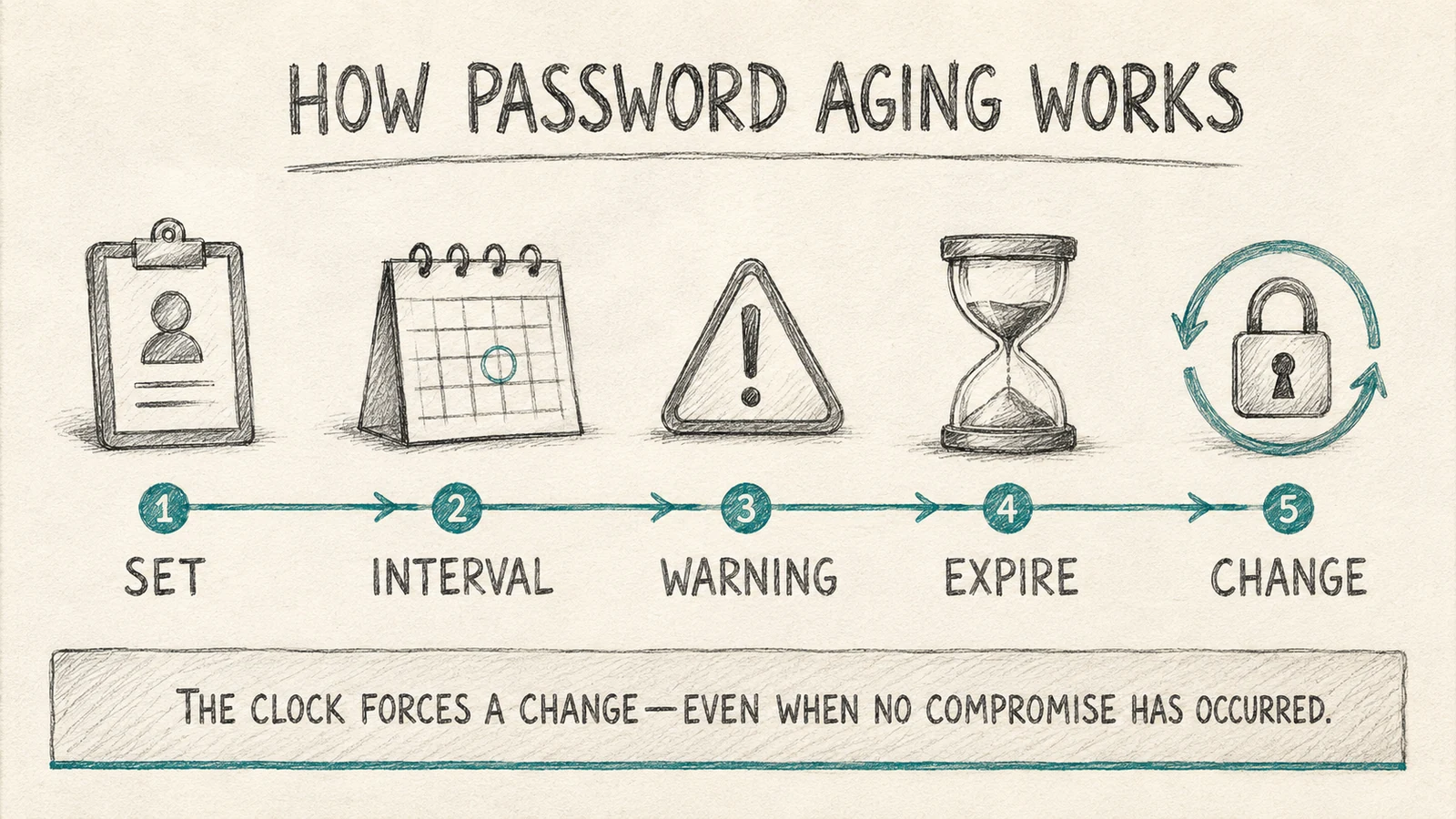 The traditional mechanism in five steps — and the structural gap in all five: nothing in the cycle checks whether the password was actually exposed.
That gap is the whole argument against the model. A calendar can't distinguish a password that's sitting safely unused from one that leaked in a breach dump three weeks ago. It treats both identically: valid until the clock says otherwise. An attacker holding a breached credential gets, on average, most of the rotation interval to use it before the policy would have forced a change anyway — and a compromised account that gets rotated on schedule looks, from the policy's point of view, exactly the same as one that was never touched.
The behavioral problem: what forced rotation actually does to passwords
The case against mandatory rotation isn't theoretical. When researchers have studied how people actually respond to forced password changes, the pattern is consistent: most users don't generate a genuinely new password when the system forces a change on an interval — they take the password they already have memorized and apply a small, predictable transformation to it. A number gets incremented. A season or year gets swapped for the current one. A punctuation character gets appended or moved. The core of the password — the part carrying the actual memorability, and not coincidentally the part most resistant to brute-force guessing — stays the same across "changes."
That transformation behavior is precisely what undermines the security case for rotation. An attacker who has seen one password from a rotation-governed account has a meaningfully easier time guessing the next one than they would cracking an unrelated fresh password, because human transformation patterns are far more predictable than random generation. Forced rotation without any actual compromise event doesn't reset the attacker's knowledge — it hands the defender's predictable behavior pattern to anyone who's already seen a prior password in that cycle.
There's a second cost that shows up operationally rather than cryptographically: friction. Every forced rotation is a moment where a user might get locked out, might fall back to a weaker password just to get through the reset flow faster, or might generate a help-desk ticket. None of that friction buys anything if the password being rotated was never actually at risk. The Temporary Password Best Practices piece covers the related failure mode in more depth — how reset-flow friction itself becomes an attack surface when it's handled carelessly.
What NIST SP 800-63B actually says
This is the section that matters most, because it's the one most enterprise policy documents still get wrong by citing outdated guidance or no guidance at all.
NIST SP 800-63B, the digital identity guideline governing authenticator and verifier requirements, states that verifiers "SHOULD NOT require" that memorized secrets be changed on a periodic, arbitrary basis. The recommended trigger for a forced password change is evidence — specifically, evidence that the authenticator has been compromised. That's a meaningfully different standard than "90 days have passed." Compromise evidence includes things like the credential appearing in a breach dump, a confirmed phishing incident tied to the account, or a pattern of failed authentication attempts consistent with a credential-stuffing or brute-force attack against that specific account.
The same guidance also moves away from composition complexity rules — mandatory mixes of uppercase, lowercase, numbers, and symbols — in favor of length. NIST's position is that length does more to raise the actual difficulty of guessing or cracking a password than composition rules do, while composition rules push users toward the same predictable substitution patterns that undermine forced rotation (capital letter first, number and symbol at the end). The current guidance recommends a minimum of 8 characters, encourages 15 or more, and explicitly supports allowing much longer passphrases — the length ceiling should be generous, not restrictive.
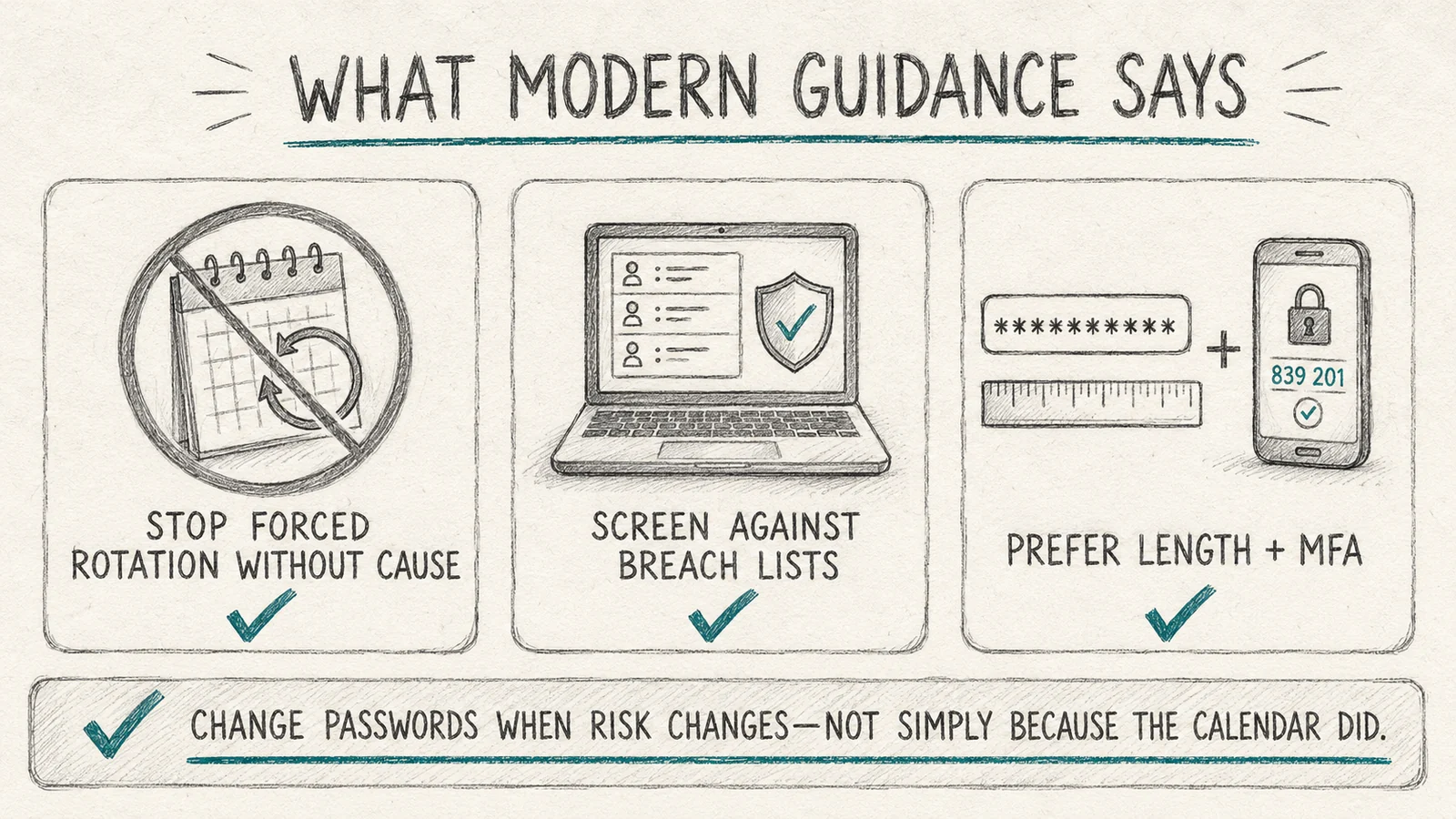 The core reframe this piece is built around: rotation triggered by evidence of risk, not by a date on a calendar — and length plus MFA carrying the weight composition rules used to.
It's worth being precise about what NIST is not saying. It isn't saying passwords should never be changed, and it isn't saying rotation is inherently bad. It's saying the trigger should be evidence of compromise rather than elapsed time, and that the resources previously spent enforcing a calendar are better spent on continuous breach screening and strong authentication. That's a stricter standard in some ways — continuous screening catches compromise faster than a 90-day window ever would — and a more permissive one in others, since an untouched password doesn't get forced through the friction and behavioral degradation of a scheduled change it didn't need.
Why this shift matters for compliance, not just security
A predictable objection: "our compliance framework requires password expiration." Some do, in older or more literally worded control language, and that's a real operational constraint — but it's less absolute than it's often treated. PCI DSS v4.0.1 explicitly allows an alternative to fixed-interval password changes for organizations that implement continuous authentication-risk analysis and dynamically deny access in response to detected risk, which is functionally the condition-based model NIST describes. SOC 2 evaluates whether a control achieves its intended objective, not whether it's implemented via a specific mechanism, so a documented risk-based rotation policy with breach screening as the enforcement mechanism can satisfy the underlying control.
The failure mode to avoid isn't following NIST's guidance — it's following it silently. An auditor testing a password policy control needs something concrete to test against. If forced rotation is dropped without a documented replacement (what triggers a forced change, how breach screening runs, how the decision was made and by whom), that reads as a missing control, not a modernized one. The fix is to write the policy down explicitly: rotation is condition-based, here are the conditions, here's the screening mechanism that detects them, here's the escalation path when one fires. That documentation is what turns "we stopped forcing 90-day resets" from a compliance gap into a compliant modernization.
This is also where password aging policy connects to the broader authentication policy an organization runs. The Password Policy for Enterprise Authentication piece covers how rotation rules sit inside the larger set of authentication requirements — length, screening, lockout, and MFA — that together define whether a policy is actually defensible under audit, versus one that looks thorough on paper but concentrates all its assumptions in a calendar.
Building a sensible password policy in practice
Putting the guidance into an actual enterprise policy comes down to four moves, in rough order of impact.
Set a length floor, not a complexity mandate. Require a minimum of at least 8 characters, push toward 15+ where the user population and systems support it, and allow long passphrases without an arbitrary upper ceiling. Drop mandatory special-character and case-mixing rules — they don't meaningfully raise cracking difficulty and they push users toward the same predictable patterns that undermine rotation. The Password Complexity vs. Password Strength piece goes deeper on why these aren't the same thing and why enterprises have historically optimized for the wrong one.
Screen continuously against known-breached-credential lists. This is the control that actually catches compromise, and it has to run continuously — at creation, and on an ongoing basis against newly disclosed breach data — not as a one-time check when a password is first set. A password that was clean at creation and shows up in a breach feed six months later needs to trigger a forced change at that point, which is the condition-based model in practice.
Rotate on evidence, not on a date. The trigger list: a breach-list match, a credential-stuffing or brute-force pattern against the account, a confirmed phishing incident, an admin-initiated reset after suspected compromise, or a role change that materially changes what the account can reach. Anything outside that list shouldn't force a password change.
Pair every password with MFA. This is the control that limits the damage when a password is compromised despite everything else — a stolen or guessed password alone shouldn't be sufficient for account takeover. Phishing-resistant methods matter here more than the specific factor count; ICC's Phishing-Resistant MFA piece covers which MFA implementations actually hold up against modern credential-theft techniques versus which ones (SMS OTP, push notifications without number matching) leave a meaningful gap.
The Psychology of Password Creation piece is worth pairing with this list — it explains the user behavior underlying why length and screening outperform complexity and rotation, which is the same behavioral evidence NIST cited in making the shift. And for the threat model this policy is actually defending against, the Risks of Weak Passwords piece covers what a compromised credential actually enables once an attacker has it — the reason breach screening and MFA matter isn't abstract.
What Avatier ships toward this pattern
Avatier's Password Firewall pillar is built around condition-based rotation rather than calendar-based expiration as the default posture. Passwords are screened against known-breached-credential feeds continuously, not just at creation, so a credential that was clean when set but later surfaces in a breach dump triggers a forced change tied to that specific evidence rather than waiting for the next scheduled interval. Length and passphrase support are configured as the primary strength control, with composition rules available but not defaulted to the complexity-mandate pattern NIST's guidance argues against.
Policy configuration is built to be documented as it's enforced — the triggers that drive a forced reset (breach match, anomalous authentication pattern, admin action) are visible as explicit policy rules rather than implicit behavior, which is what an auditor needs to test a risk-based rotation control instead of flagging its absence. MFA enrollment ties into the same policy engine so a password event and an authentication-factor requirement are evaluated together rather than as separate, disconnected controls.
The Avatier Trust Center publishes the compliance posture behind the platform: SOC 2 Type II audited with zero exceptions noted, ISO/IEC 27001:2022 certified, PCI DSS v4.0.1 compliant, CSA STAR Level 1 attestation, NIST 800-53 Rev. 5 aligned, and a CISA Secure-by-Design Pledge signatory.
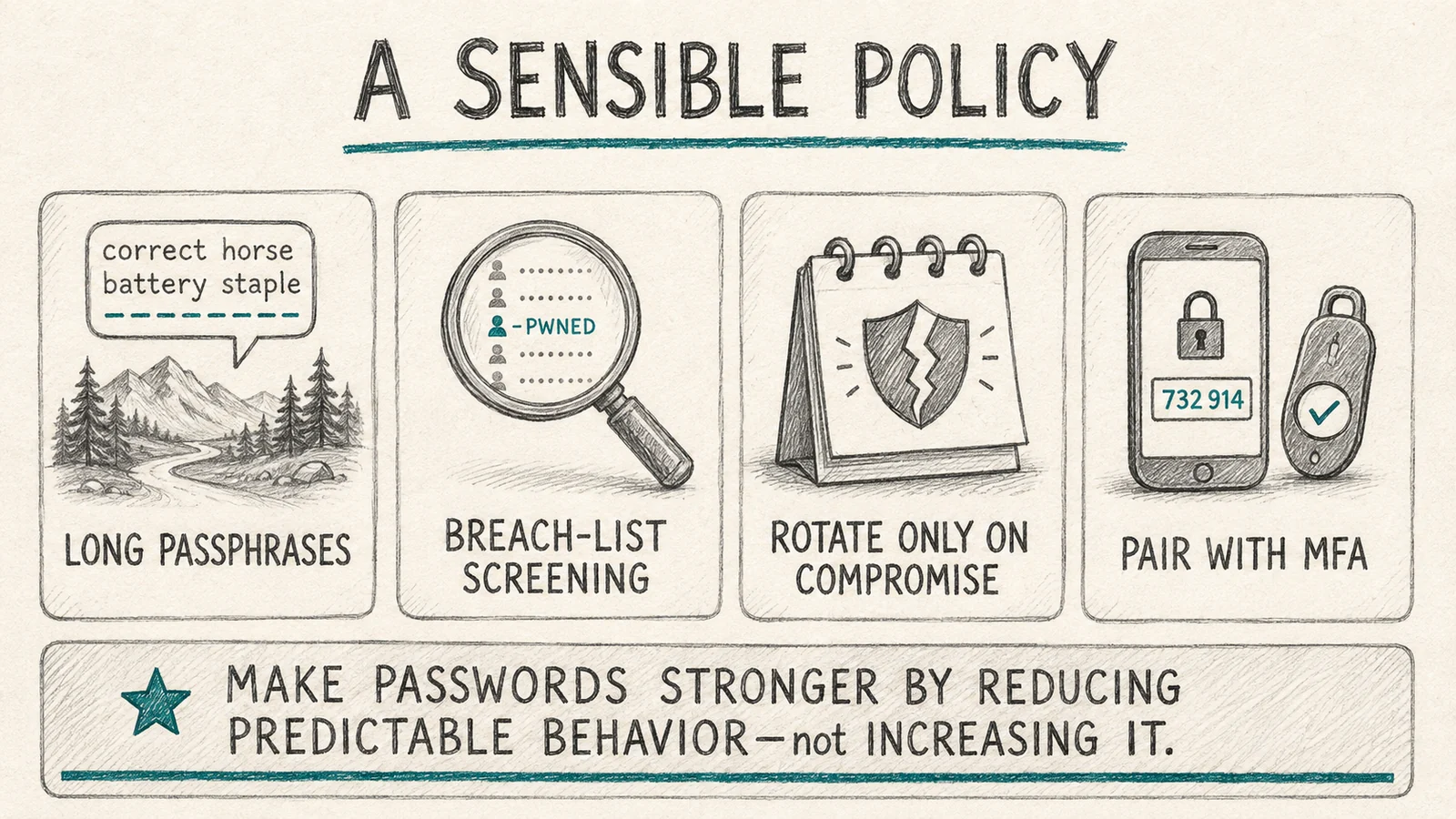 Four controls that replace the calendar: length over complexity, continuous breach screening, rotation triggered by evidence, and MFA as the backstop when a password fails anyway.
ABOUT THE AUTHOR

More from Pillar 1: Password Firewall

Weak Passwords in 2026: Architecture, Not Awareness
Why weak passwords persist in 2026 despite decades of training — and the policy-enforcement, credential-firewall, and lifecycle controls that eliminate them at scale.

Password Policy for Enterprise Authentication 2026: The NIST 800-63B Rev. 4 Reference
The password policy that actually reduces risk is not the password policy most enterprises still enforce. NIST 800-63B Rev. 4 (finalized 2025) dismantles the composition rules and periodic-reset mandates that defined the 2000s and codifies a fundamentally different discipline — length over complexity, breach-corpus screening, banned-list enforcement, no forced periodic rotation. The 2026 enterprise reference on the modern password policy, the AAL1/2/3 assurance-level mapping, the enforcement architecture that operationalizes it, and the migration path from the legacy policy every enterprise still carries.

Password Complexity vs Password Strength: What 2026 Got Right
Complexity rules don't measure what attackers actually exploit. Strength does. The architecture that produces strong workforce passwords without the 'Spring2026!' rotation theater that wastes everyone's time.