How to Secure MCP Servers in the Enterprise: A 2026 Guide
How to secure MCP servers: the enterprise threat model, from tool poisoning to confused deputies, and the step-by-step controls that keep AI tool calls scoped, approved, and audited.

How to secure MCP servers: the enterprise threat model, from tool poisoning to confused deputies, and the step-by-step controls that keep AI tool calls scoped, approved, and audited.
- Securing an MCP server means treating every tool it exposes as a privileged API that an AI model can call on someone's behalf: authenticate the caller, authorize each call, approve sensitive actions, validate inputs and outputs, and log every call to an identity.
- The MCP threat model has seven recurring risks: over-privileged tools, token and credential exposure, prompt injection through tool outputs, tool poisoning in server descriptions, unvetted third-party servers, confused-deputy problems, and missing audit.
- The controls are well understood: an allow-listed server inventory, least-privilege scopes, OAuth 2.1-based authorization per the MCP spec, short-lived tokens, no secrets in prompts, human approval gates, validation, network isolation, per-call logging, pinned versions, and a kill switch.
- Identity-changing actions such as password resets, access grants, and deprovisioning belong in the strictest risk tier, because a single wrong call changes who can reach everything else.
- A governed identity MCP connector can enforce these controls for its own tools, but you still own the security of every other MCP server in your estate.
Securing an MCP server means treating every tool it exposes as a privileged API that an AI model can call on someone's behalf. In practice that comes down to five things: authenticate the caller, authorize each call against least-privilege scopes, require human approval for sensitive actions, validate what goes in and what comes out, and log every tool call to a real identity. Everything else in this guide is detail on how to do those five things well across an enterprise estate.
The Model Context Protocol (MCP) is an open standard, originally introduced by Anthropic in November 2024, that lets AI assistants connect to tools and data through MCP servers. A server exposes tools (actions the model can invoke), resources (data it can read), and prompts (reusable templates). That design is why MCP spread so quickly: one connector works across many assistants. It is also why security teams are nervous. A tool that was once reachable only through a UI, with a human clicking a button, is now reachable by a model that reads untrusted text and decides for itself when to act.
This guide is the practical reference for security and IT leaders rolling out MCP at enterprise scale. It covers the threat model, a numbered step-by-step control plan, a risk-tiering approach for tool actions, and why identity actions such as password resets and access grants deserve the strictest tier. For the governance side of the same problem, see the companion piece on MCP identity governance. For the commercial model behind governed identity outcomes, start with the series hub, what is Pay Per Identity Action™.
Why MCP changes the security model
Traditional integrations have a fixed caller. A script calls an API the same way every time, and a reviewer can read the script to know what it will do. MCP inverts that. The caller is a language model, and what it calls depends on the conversation, the documents it has read, the tool descriptions it has been shown, and whatever other servers are connected to the same session.
Three properties make this a new security problem rather than a rebranded API problem.
The decision-maker reads untrusted input. An assistant that summarizes an inbox, a ticket queue, or a web page is ingesting text written by people you do not control. Any of that text can contain instructions. Models are good at following instructions and bad at knowing whose instructions they are.
Tools compose. A session might combine a read-only document server, a messaging server, and an admin server. Each one looks safe alone. Together, a model can read sensitive data with one tool and send it somewhere with another, and no single server sees the whole chain.
Authority is delegated, and often blurred. When an assistant calls a tool, it acts for a user, through a client, using a server that holds its own credentials to a downstream system. If those layers are not bound together cleanly, it becomes unclear whose authority actually executed the action. That ambiguity is exactly what attackers exploit and what auditors ask about.
None of this means MCP is unsafe. It means the security boundary moves. The model is not the boundary; it is an untrusted participant. The boundary is the server, the authorization layer behind it, and the policies that decide whether a given call should run at all.
The MCP threat model: seven risks to plan for
Most MCP security incidents trace back to a small set of recurring failures. Naming them gives you a checklist for design reviews and vendor assessments.
1. Over-privileged tools. A server built for convenience often runs with an admin credential and exposes broad tools like "run query" or "execute command." The model only needs to look up one record, but it holds the power to change thousands. Whatever the model can be tricked into doing, it can do at the full scope of that credential.
2. Token and credential exposure. API keys and OAuth tokens end up in local config files, environment variables, prompt text, tool descriptions, and logs. Local MCP servers are a particular concern because they often store long-lived credentials on developer laptops. A stolen token grants everything the server can do, with no login event to flag.
3. Prompt injection through tool outputs. A tool returns content, such as an email body, a support ticket, or a scraped page, that contains instructions. The model treats them as part of its task and calls another tool to carry them out. This is the most discussed MCP risk because it cannot be fully fixed at the model layer.
4. Tool poisoning and malicious descriptions. The model reads tool names, descriptions, and parameter schemas to decide what to call. A malicious server can hide instructions in those descriptions, shadow the name of a trusted tool, or change its descriptions after it has been approved. The user rarely sees any of this text.
5. Unvetted third-party servers. MCP servers are easy to publish and easy to install. Many are small open-source projects with one maintainer and no security review. Installing one is a software supply-chain decision, even when it feels like adding a browser extension.
6. Confused-deputy problems. A server holds its own powerful credential to a downstream system and performs actions for whoever calls it, without checking that the specific user is allowed to perform that specific action. The caller borrows the server's authority. The MCP specification's own security guidance calls out confused-deputy and token-passthrough patterns for this reason.
7. Missing audit. Many servers log little or nothing. When an assistant changes a record, the downstream system sees only the server's service account. Nobody can say which human asked, which agent acted, which tool ran with which arguments, or which policy allowed it.
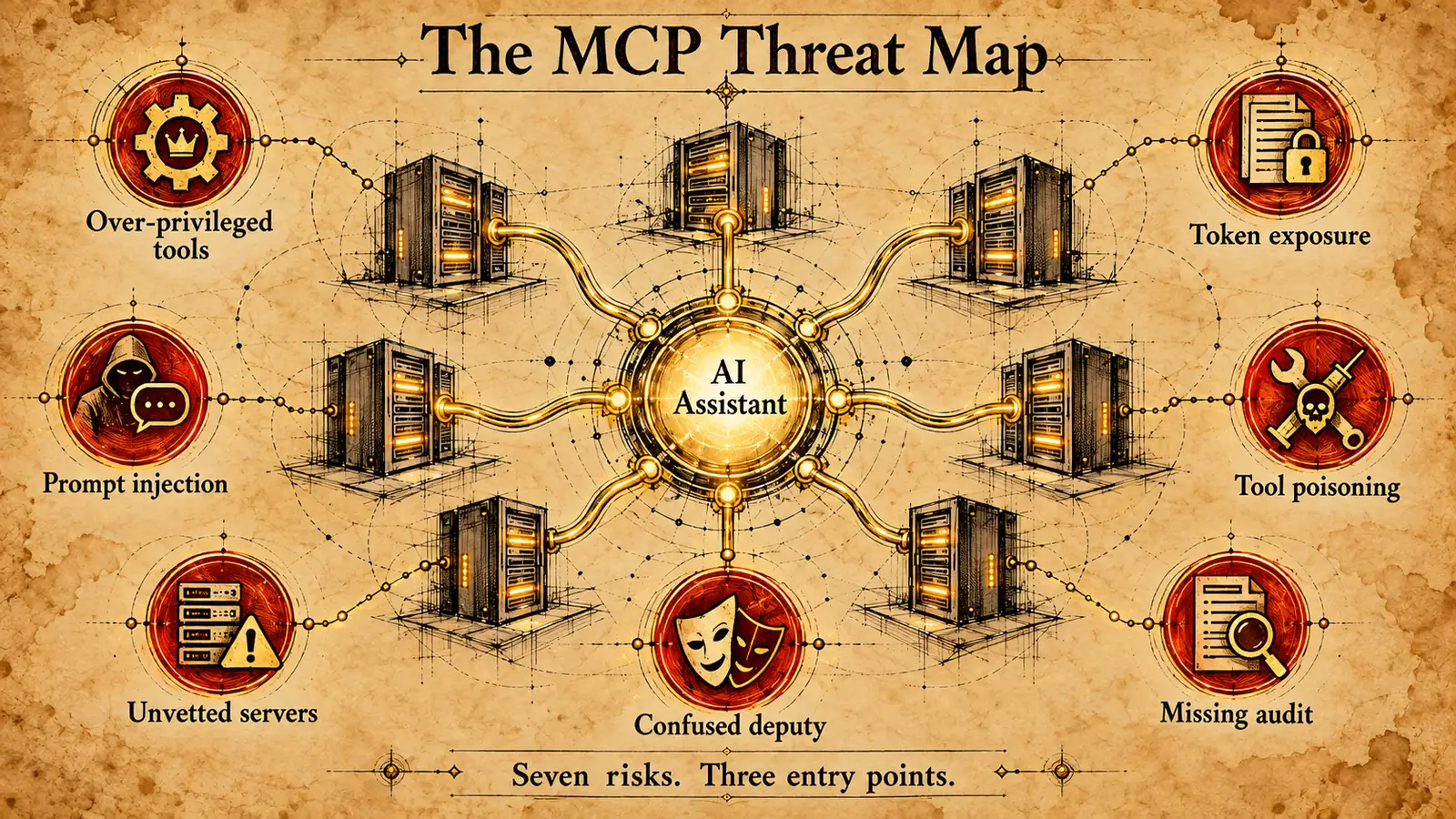 Seven risks, three entry points: what the model reads, what the server can reach, and what nobody records afterward.
These risks compound. A realistic incident looks like this: an assistant reads a poisoned ticket (prompt injection), calls an over-privileged admin tool (excess scope), the server executes using its own service account (confused deputy), and the only log entry is a generic API call (missing audit). Breaking any one link helps. Breaking several is the goal.
How to secure MCP servers: a step-by-step guide
The controls below are ordered roughly the way an enterprise rolls them out, from visibility to enforcement to response. They layer together: discovery and allow-listing decide what connects, identity and scopes decide what each connection may do, approvals and validation decide whether a specific call runs, and logging and revocation make the whole thing accountable.
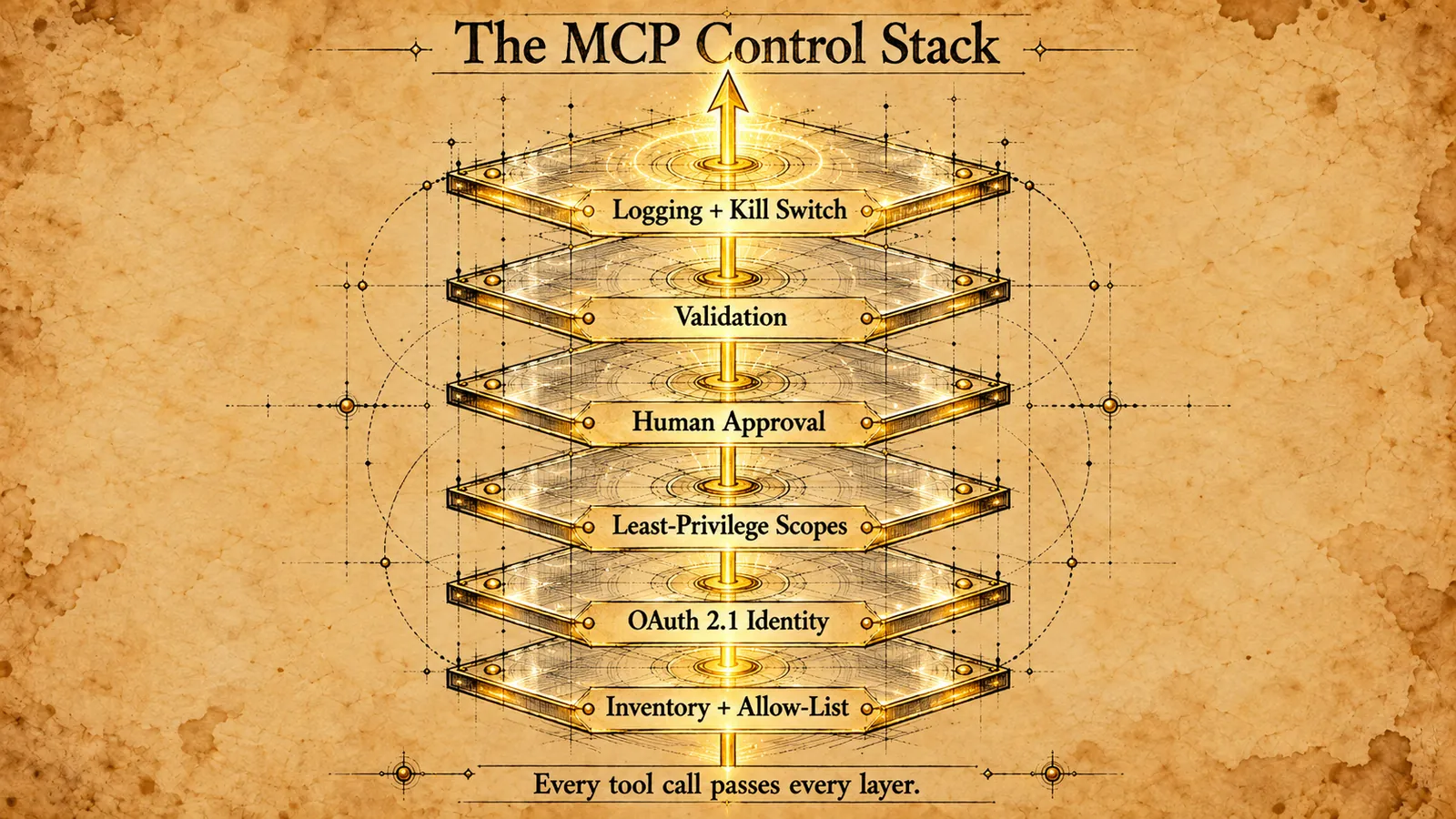 No single control stops MCP abuse. Each layer catches what the one below it misses, and every call passes through all of them.
1. Inventory every MCP server and client
Find out what is already running. Survey developer machines, IDE configurations, approved assistants, and any remote servers teams have stood up. Record the owner, the publisher, the version, what systems each server can reach, and which credential it uses. Shadow MCP servers on laptops are common, and you cannot govern what you have not found.
2. Allow-list approved servers and versions
Publish an approved list and enforce it where your clients allow. New servers go through a review before they connect: who maintains it, what it can reach, how it authenticates, and what its tool descriptions actually say. Default-deny is the only posture that scales once dozens of teams start experimenting.
3. Vet and pin server versions
Treat each server like any other dependency. Pin to a specific reviewed version, verify its source, and scan it. Re-review when the version changes, and pay particular attention to changes in advertised tools and descriptions, since that is where tool poisoning appears. Alert if a server's tool list changes without a matching approved update.
4. Authenticate with OAuth 2.1 per the MCP authorization spec
For remote servers over HTTP, use the MCP authorization specification, which builds on OAuth 2.1. The server acts as a protected resource, and clients obtain tokens from an authorization server on the user's behalf. Connect that authorization server to your existing identity provider, so MCP access inherits the roles, MFA, and offboarding you already manage. Check the current spec revision as you implement, because details continue to evolve.
5. Issue short-lived, scoped, audience-bound tokens
Tokens should expire in minutes to hours, carry the narrowest scopes that work, and be valid only for the server they were issued to. A server should reject tokens meant for something else, and it should not forward a client's token to downstream APIs. Short lifetimes shrink the value of a stolen token, and audience binding keeps one compromised server from becoming a skeleton key.
6. Enforce least privilege per tool, not per server
Split read tools from write tools, and write tools from destructive ones. Scope each tool to the specific records and operations it needs. Where possible, have the server act with the calling user's own permissions rather than a shared admin account, which directly addresses the confused-deputy risk. This is the principle of least privilege applied at the tool level, and just-in-time access patterns fit naturally for rare, high-impact tools.
7. Keep secrets out of prompts and descriptions
Never place API keys, passwords, or tokens in prompts, system instructions, tool descriptions, or tool outputs. Anything in the model's context can be repeated, logged, or exfiltrated. Store server credentials in a secrets manager, inject them at runtime, and scrub them from logs. The same discipline that governs service accounts and non-human identities applies to every credential an MCP server holds.
8. Require human approval for sensitive and destructive actions
Define which tools need a person to confirm before they run, and make the confirmation meaningful. The approver should see the exact action, the target, and the arguments, not a vague "allow tool?" prompt. For the highest tiers, route approval to someone other than the requester through a real workflow, so a hijacked session cannot approve itself.
9. Validate inputs and treat outputs as untrusted
Validate every tool argument on the server side against strict schemas and business rules, regardless of what the model sent. Treat everything a tool returns as untrusted data, not instructions. Where possible, avoid mixing tools that ingest untrusted external content with high-impact tools in the same session, and strip or flag instruction-like content in outputs before it returns to the model.
10. Isolate servers on the network
Run MCP servers with only the network paths they need. Separate servers that touch sensitive systems from servers that browse the open web or read external content. Restrict egress so a compromised or poisoned server cannot send data to arbitrary destinations. Containerize or sandbox local servers where practical.
11. Log every tool call to an identity
Record, for every call: the human user, the agent or client, the server and tool, the arguments, the authorization decision, the policy that applied, and the result. Send it to your SIEM. This is the record that turns an MCP incident from a mystery into an investigation, and it is what auditors will ask for. The companion guide on the AI agent audit trail covers what that evidence should contain.
12. Build a kill switch and test revocation
Know how to cut off a server, a client, a user, or a token in minutes. That means central revocation at the authorization server, the ability to remove a server from the allow-list and have clients honor it, and a runbook your on-call team has actually rehearsed. The worst time to discover you cannot disconnect a misbehaving server is during the incident.
Tier MCP tool actions by risk
Not every tool deserves the same controls. A read-only directory lookup and an account deletion should not share an approval policy. Tiering tool actions lets you apply strict controls where they matter without smothering low-risk tools in friction.
| Tier | Example MCP tool actions | Minimum controls |
|---|---|---|
| 1. Read-only, non-sensitive | Look up an office location, list public docs | Allow-listed server, scoped token, logging |
| 2. Read sensitive data | View a user's group memberships, run an access report | Tier 1 plus per-user authorization and data minimization |
| 3. Reversible writes | Update a profile field, add a ticket comment | Tier 2 plus input validation and user confirmation |
| 4. Destructive or bulk | Delete records, bulk changes, disable accounts | Tier 3 plus explicit approval and rate limits |
| 5. Identity-changing | Password reset, access grant, role change, deprovisioning | Tier 4 plus identity verification, policy enforcement, and full evidence per action |
Identity actions sit at the top for a simple reason: they change who can reach everything else. A wrong password reset hands an attacker an account. A wrong access grant opens a system that every other control assumed was closed. A wrong deprovisioning locks a real employee out mid-shift. The help desk has been learning this lesson for years, which is why controls like Assisted Reset route the identity challenge to the user rather than trusting the agent's judgment. An AI assistant asking for a reset deserves at least the same scrutiny as a human agent on the phone.
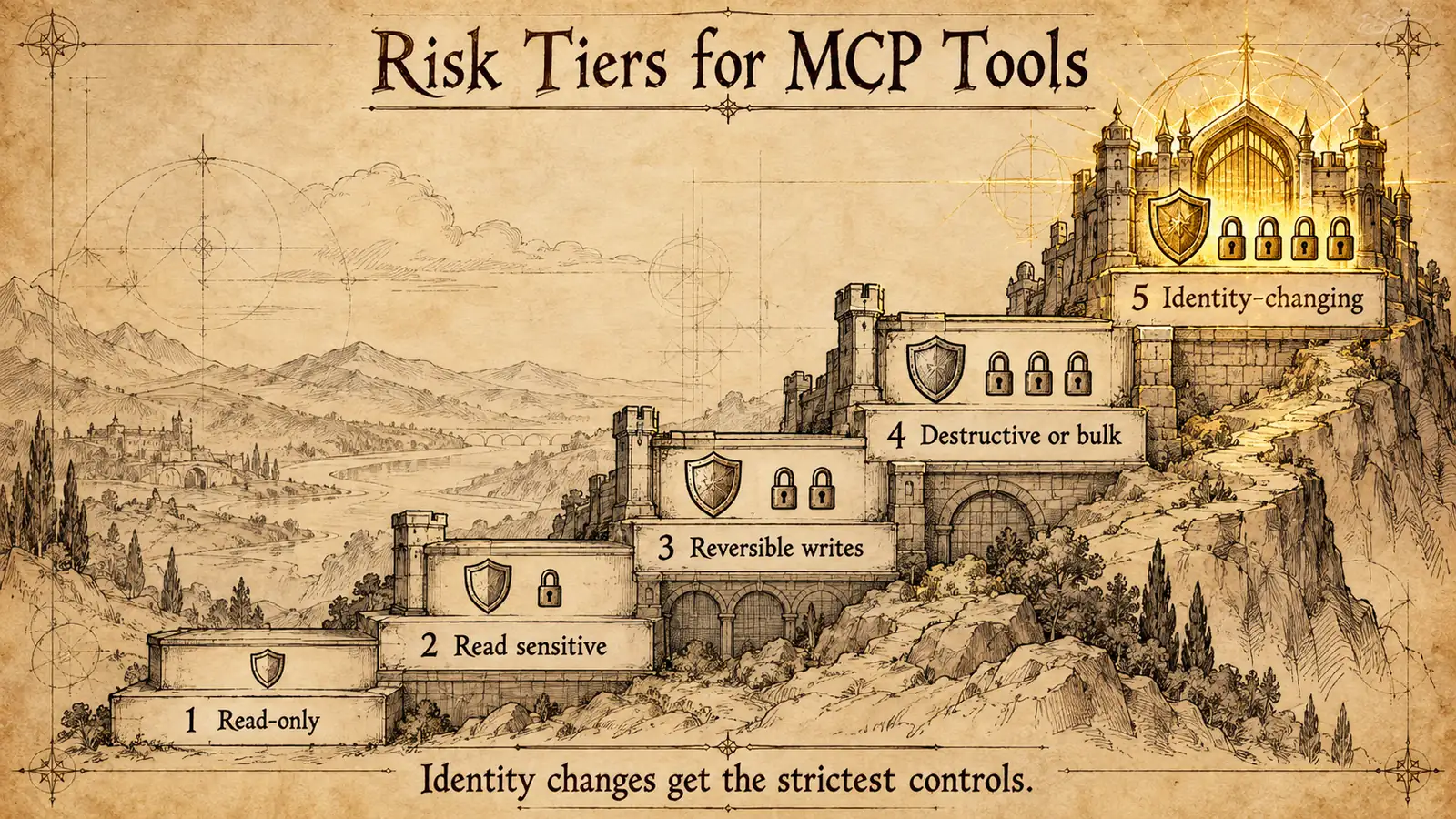 Controls should accumulate as impact rises. Identity-changing actions sit at the top because they decide who can reach everything else.
For identity tools, three extra requirements apply. First, the identity platform, not the assistant, must decide whether the action is allowed, using existing roles, policies, and approval workflows. Second, the person affected must be verified independently of the conversation. Third, every action must produce evidence of who asked, what ran, under whose authority, and which policy allowed it. If a platform exposes identity tools to agents without all three, it is creating a faster path to the same help-desk compromises security teams already fight. The broader question of how agents get and hold identity is covered in what is agentic identity.
What a governed identity tool call looks like
It helps to see the shape of a well-governed call. The example below is illustrative only. It is not a real product schema; it shows the fields a security team should expect a governed identity tool to evaluate and record.
{
  "tool": "request_access",
  "requested_by": "jordan.lee (human user)",
  "via_agent": "assistant session in Microsoft Teams",
  "target": { "user": "jordan.lee", "application": "finance-reporting" },
  "authorization": {
    "token_audience": "identity-mcp-server",
    "scopes": ["access.request"],
    "delegated_authority": "self-service request"
  },
  "policy_check": "role eligible; manager approval required",
  "approval": { "status": "pending", "approver": "manager" },
  "result": "request created; access not yet granted",
  "evidence_recorded": true
}
Notice what is absent. The model does not decide eligibility. It does not hold an admin credential. It cannot grant access directly. It submits a request, and the platform evaluates it against policy, routes it for approval, and records every step. The assistant is a convenient front door, and the governance sits behind it. That is the pattern to demand from any MCP server that touches identity, whether you build it or buy it. Teams comparing approaches to AI agent authentication more broadly can also read the agentic authentication reference.
What Avatier ships toward this pattern
Avatier builds identity MCP connectors around the controls above, and it is worth being specific about which ones they cover.
Only approved capabilities. Avatier Actions exposes more than 50 identity outcomes as MCP tools across eight modules: Password Management, Help Desk, Lifecycle Management, User Management, Group Management, Access Governance, Workflow Approval, and Reports. AI assistants do not receive unrestricted access. Every request must invoke an approved Avatier capability, which addresses the over-privileged-tool problem by design. There is no generic "run anything" tool.
Governance on every request. Every request remains subject to authentication, authorization, delegated authority, policy enforcement, and audit controls. Avatier determines whether an identity action is permitted and records what occurred. Actions run through the customer's existing policies, approvals, and roles, and nothing bypasses governance, because the assistant is the interface, never the authority. For identity-changing tools, that is the Tier 5 requirement from the table above.
Permissions you already manage. Setup is one administrator connection. Permissions are inherited from the identity platforms customers already run, including Microsoft Entra ID, Active Directory, Okta, and Ping, and Avatier runs alongside them rather than replacing them. There is no per-user setup and no new permissions model to secure, which removes one of the most common sources of drift in MCP deployments: a parallel permission system nobody reviews.
Evidence on every outcome. Each Secure Outcome records the identity involved, the initiating agent or experience, the authorization context, the policy applied, the action taken, and the final result. Avatier Ledger, the companion MCP connector, turns every outcome into evidence and every report into a question. It records who asked, what ran, under whose authority, and what policy allowed it, for both human-initiated and agent-assisted actions. Persona Briefings then shape that evidence for a CISO, a CFO, or the security team.
Aligned incentives. Under Pay Per Identity Action™, customers pay only for completed, verified, policy-compliant outcomes. The unit that gets billed is the same unit that gets audited, so every charge already carries its receipt.
The connectors work inside Claude, Claude Code, Microsoft Copilot, Avabot, and any MCP-compatible assistant. The underlying platform runs as a private cloud instance, which Avatier's architecture describes as isolation by design. The Avatier Trust Center publishes the security posture behind it: SOC 2 Type II audited with zero exceptions noted, ISO/IEC 27001:2022 certified, PCI DSS v4.0.1 compliant, CSA STAR Level 1, NIST 800-53 Rev. 5 aligned, FedRAMP-aligned, and a signatory to CISA's Secure-by-Design Pledge.
What this approach does not solve
A governed identity connector secures its own tools. It does not secure your MCP estate.
It does not vet the other servers your teams install. The document server, the code-search server, and the open-source web scraper a developer added last week are still your responsibility. The allow-list, version pinning, network isolation, and review process in this guide apply to all of them, and a well-governed identity connector sitting next to a poisoned third-party server is still exposed to what that server tells the model.
It does not stop prompt injection at the model layer. Server-side policy enforcement means an injected request to reset a password or grant access still has to pass authorization and approval, which limits the damage sharply. But a model reading hostile content can still be steered into misusing whatever read tools and non-identity tools it holds elsewhere. Output handling and session design remain your job.
It does not replace your identity provider, your SIEM, or your secrets manager. Permissions are only as good as the roles in Entra ID, Active Directory, Okta, or Ping that they inherit. If those roles are over-broad, an inherited model faithfully reproduces the over-breadth. Logs are only useful if someone reviews them, and credentials for other MCP servers still need a vault.
And it does not make policy decisions for you. Which actions require approval, who approves them, and how fast a server can be revoked are governance choices your organization has to make and rehearse. The tooling can enforce and evidence those choices. It cannot make them. For a deeper look at how evidence and review close that loop, see the AI agent audit trail with Avatier Ledger, and for the market context on agentic identity, the recap from Ai4 2026 on agentic AI identity security.
ABOUT THE AUTHOR

More from Access Management
Data Access Governance in 2026: Govern Who Can Reach Sensitive Data
Data access governance is the discipline of controlling who can reach which sensitive data, under what conditions, and proving it to auditors. It is distinct from IAM, which grants access to systems, and from CIEM, which governs cloud infrastructure. The practical 2026 guide to governing access to the data itself.

B2B External Identity & Guest Access: The 2026 Enterprise Guide
B2B external identity and guest access is the discipline of governing partner, vendor, contractor, and guest identities that are not employees. The 2026 enterprise guide to what external access is, the controls that keep it safe, and the lifecycle that keeps it from becoming a breach path.

Identity Federation Explained: The 2026 Foundational Guide
Identity federation is a trust relationship between separate identity providers so that one login works across domains and organizations. The foundational 2026 reference on what federation is, how it differs from SSO, and the protocols that carry it.