LDAP Implementation for Identity Management: The 2026 Reference
LDAP is the read-optimized directory protocol still sitting under most enterprise IAM stacks — here is how its structure, bind and search, LDAPS, replication, and schema actually work in production.
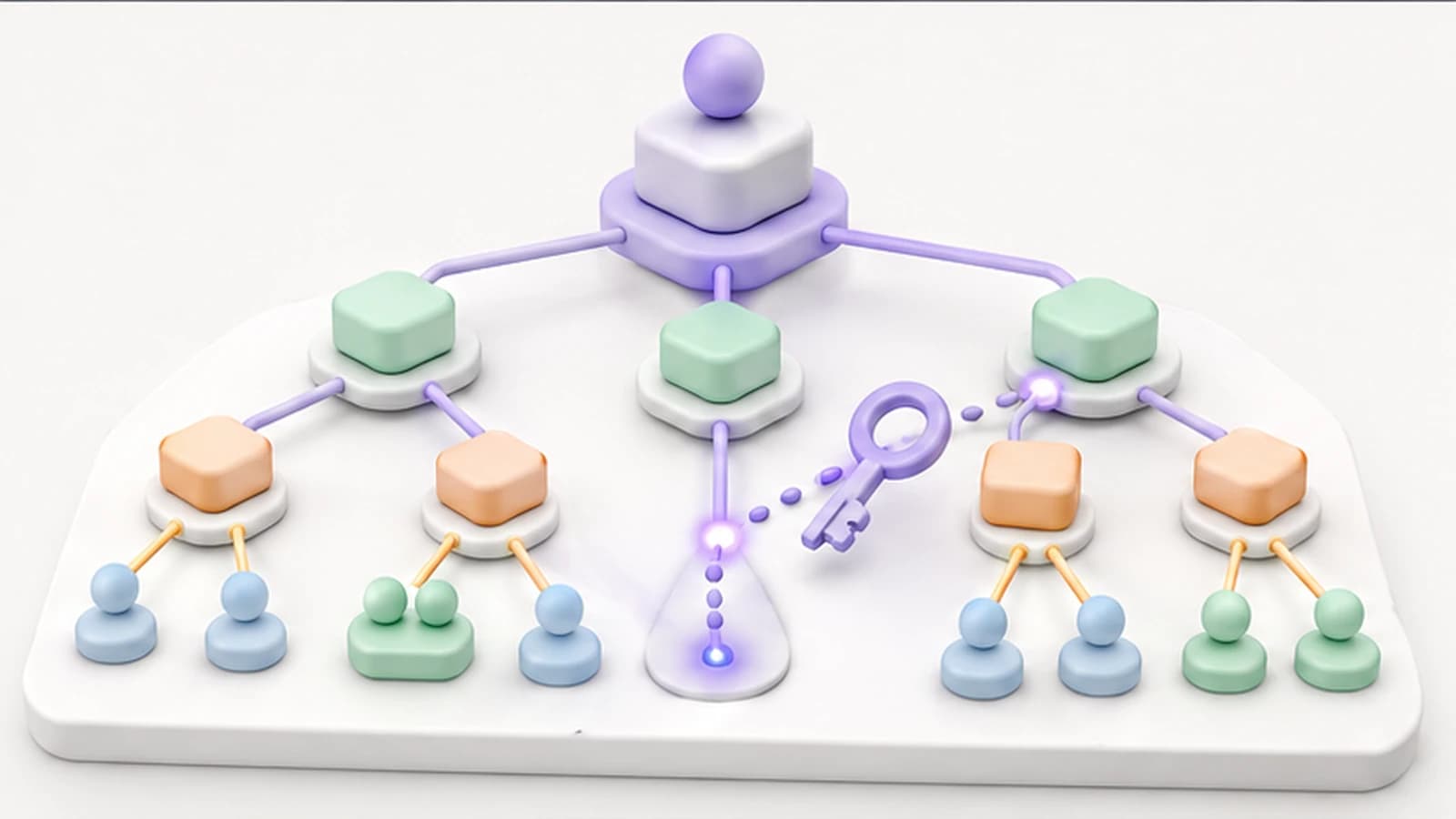
LDAP is the read-optimized directory protocol still sitting under most enterprise IAM stacks — here is how its structure, bind and search, LDAPS, replication, and schema actually work in production.
- LDAP is an open, vendor-neutral protocol for reading and maintaining directory data — it is read-optimized, widely supported, and still the foundation most enterprise authentication and authorization sits on.
- Everything in an LDAP directory is addressed by its Distinguished Name (DN), built from domain components (dc), organizational units (ou), and a common name or user id (cn/uid) — get the tree design right and the rest of the implementation follows.
- Authentication happens through a bind, and lookups happen through a search with a base DN, a scope, and a filter — understanding both is enough to reason about most LDAP integration behavior.
- Security is not optional: run LDAPS or StartTLS so credentials never cross the wire in the clear, bind with least-privilege service accounts, and audit access. Plan replication and failover before you depend on the directory, not after an outage.
- In a 2026 stack LDAP rarely stands alone — it feeds SSO, SCIM provisioning, and cloud identity, so the implementation question is how the directory integrates, not whether to replace it.
LDAP (Lightweight Directory Access Protocol) is an open, vendor-neutral protocol for accessing and maintaining distributed directory information — the store of users, groups, and service accounts that most enterprises authenticate and authorize against. Introduced in the early 1990s, it has outlasted a long parade of successor technologies for one unglamorous reason: it is very good at the specific thing identity systems need most, which is answering a high volume of read queries about who exists, who belongs to what, and whether a given credential is valid. A login form, a VPN concentrator, a Linux host, and a business application all ask the directory the same kinds of questions thousands of times an hour, and LDAP is built to answer them quickly.
This is the 2026 refresh of Avatier's LDAP implementation reference, rewritten around the mechanics a practitioner actually has to reason about — how the tree is addressed, how a bind differs from a search, why the transport has to be encrypted, and how the directory fits into a stack that now includes SSO, SCIM, and cloud identity — rather than restating that LDAP exists. The protocol has not changed much. What has changed is its role: LDAP is no longer the whole identity picture, it is the foundation the rest of the picture is built on, and implementing it well now means implementing it as one integrated layer rather than a standalone silo.
What LDAP is and why it persists
It helps to separate two things that get conflated. LDAP is a protocol — a defined way to query and modify directory data over a network. A directory server — OpenLDAP, 389 Directory Server, or the LDAP interface that Active Directory exposes, among others — is the software that stores the data and speaks that protocol. When someone says "we use LDAP," they usually mean both: a directory server holding identity data, accessed by applications over the LDAP protocol.
The reason LDAP has persisted through decades of identity evolution comes down to a few durable properties. It is standardized, so an application written to speak LDAP can talk to directories from different vendors without custom code per directory. It is read-optimized, matching the access pattern of authentication and authorization, where reads vastly outnumber writes. It is widely supported — an enormous installed base of operating systems, network devices, and enterprise applications already knows how to authenticate against it. And its hierarchical model maps naturally onto how organizations actually structure themselves, into domains, units, and members.
What LDAP is not is a complete identity management system. It stores and serves directory data; it does not, on its own, give you single sign-on, multi-factor authentication, lifecycle automation, access certification, or compliance reporting. Those are the layers a modern IAM program adds on top. Treating the directory as the whole solution is a common early mistake — it is the foundation, and a foundation is necessary but not sufficient.
The directory tree: DN, dc, ou, and cn
Everything in LDAP is organized as a tree, formally the Directory Information Tree (DIT), and every entry in that tree has a unique address called its Distinguished Name (DN). Understanding the DN is the single highest-leverage thing to understand about LDAP, because every other operation refers to entries by their DN.
A DN is read from the specific entry upward to the root of the tree, with each level separated by a comma:
uid=jsmith,ou=People,dc=company,dc=com
Each comma-separated piece is a component:
- dc (domain component) anchors the tree to a domain.
dc=company,dc=comcorresponds to company.com and typically forms the root, or base DN, of the directory. - ou (organizational unit) is a container used to group entries —
ou=Peoplefor users,ou=Groupsfor groups,ou=Servicesfor service accounts. Organizational units give the tree its structure. - cn (common name) or uid (user id) identifies the leaf entry itself — an individual user, group, or account.
A typical directory laid out this way looks like the tree below: a single domain root branching into organizational units, each holding the entries that belong to it.
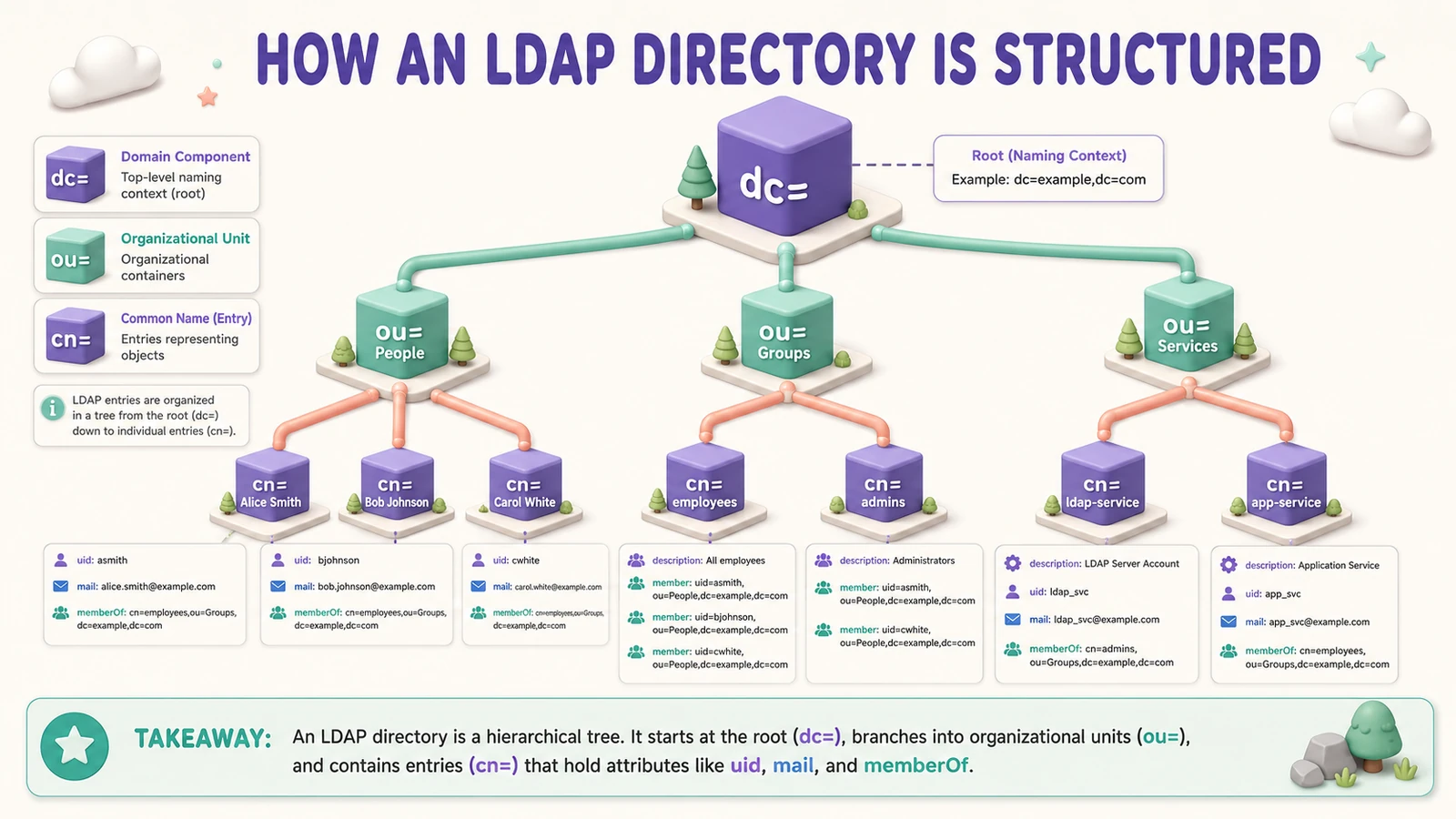 The tree is addressed top-down by domain, unit, and entry — the full path to any object is its Distinguished Name.
Each entry is more than its name — it carries a set of attributes defined by its objectClasses. A user entry built on the standard inetOrgPerson objectClass, for example, carries attributes like cn, sn (surname), mail, uid, and often group membership references. The design work in an LDAP implementation is mostly this: deciding how deep the tree should go, which organizational units to create, and which attributes each kind of entry needs.
A few design principles keep a directory maintainable. Use a consistent naming strategy so the same kind of object is named the same way everywhere. Keep the hierarchy reasonably shallow — deep nesting looks tidy but makes searches and moves harder, and organizations reorganize more often than directory trees should. Standardize on the attributes you actually use, and document why the structure is the way it is, because the people maintaining the directory in three years will not be the people who built it.
Bind and search: how LDAP actually answers a login
Two operations account for most of what an LDAP directory does day to day, and understanding both is enough to reason about nearly all integration behavior.
A bind is authentication. The client presents a DN and a credential — usually a password — and the directory confirms whether they match. A bind either establishes an authenticated session for that identity or fails. An anonymous bind (no credentials) is sometimes allowed for limited read access, but for anything sensitive the client binds as a real account.
A search is a query, and it takes three inputs that are worth committing to memory:
- a base DN, the point in the tree where the search starts (for example
ou=People,dc=company,dc=com); - a scope, which says how far down to look — just the base entry, its immediate children (one level), or the entire subtree beneath it;
- a filter, which describes the entries to return, written in LDAP filter syntax such as
(uid=jsmith)or(&(objectClass=person)(mail=*@company.com)).
The reason both operations matter is that a real authentication flow uses them together. When a user logs into an application backed by LDAP, the application typically does not know the user's full DN in advance — it only has the username the person typed. So it runs a small choreography: bind as a low-privilege service account, search for the user's entry by username to discover their DN, then attempt a second bind as that DN using the password the user supplied. If the second bind succeeds, the password is valid and the login proceeds; group memberships can then be read to make authorization decisions.
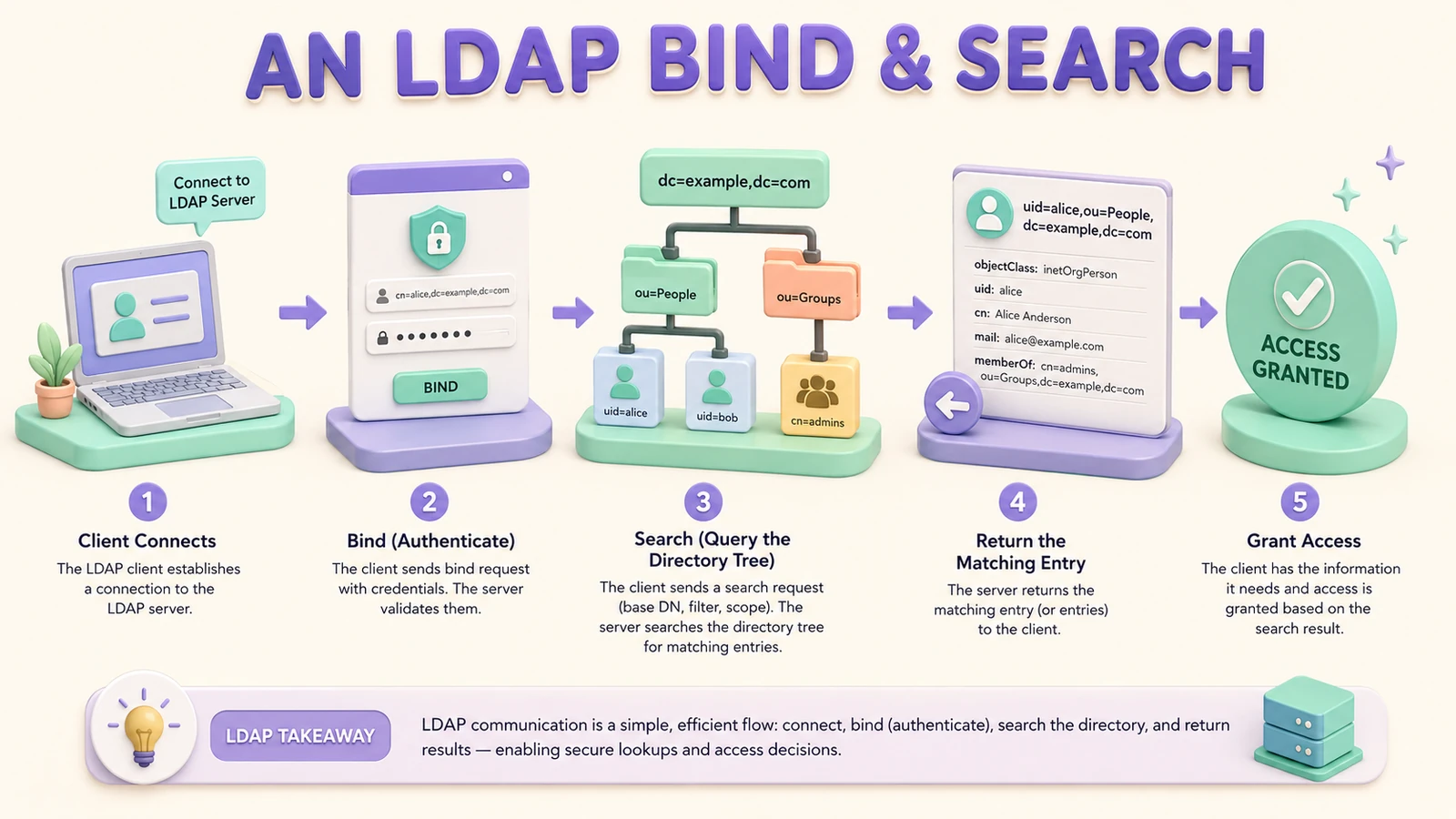 Connect, bind, search, return, grant — the sequence behind almost every LDAP-backed login.
This bind-search-bind pattern is why an application can authenticate users without hard-coding where in the tree each user lives. It also explains a lot of real-world troubleshooting: a service account with the wrong bind DN or an expired password breaks the first step, an overly narrow base DN or wrong filter breaks the search, and a mismatched user credential breaks the final bind — three distinct failure points that produce three different symptoms.
Securing LDAP: LDAPS, TLS, and least privilege
Plain LDAP is a cleartext protocol. Bind credentials and query results travel over the network unencrypted, which means anyone able to observe the traffic — on a compromised segment, a misconfigured network, or a hostile Wi-Fi link — can capture passwords and read directory contents directly off the wire. Because the directory holds the credentials protecting everything downstream of it, an unencrypted directory is one packet capture away from a very bad day.
Encrypting the transport is therefore a baseline control, not an optional hardening step. There are two standard ways to do it: LDAPS, which wraps the LDAP session in an SSL/TLS tunnel on a dedicated port (conventionally 636), and StartTLS, which begins on the standard port 389 and upgrades the connection to TLS before any credentials are sent. Either one protects the whole session; the choice between them is mostly about environment conventions and firewall layout. What is not optional is running one of them.
Encryption is necessary but not sufficient. A well-secured directory also:
- Binds with least-privilege service accounts. The account an application uses to bind and search should have exactly the read access it needs and nothing more — never a directory-administrator credential embedded in an application config.
- Enforces strong authentication and password policy on the accounts the directory itself holds, since those credentials are high-value targets.
- Audits access. Logging binds, searches, and modifications gives you the trail to investigate a compromise and the evidence a compliance review expects.
- Rate-limits and hardens the server. Limiting query rates blunts credential-stuffing and enumeration attempts, and a hardened server configuration reduces the attack surface the directory exposes.
These directory-level controls sit underneath the broader authentication story. Where the directory backs interactive logins — Windows domain sign-ins, for example — the same least-privilege and auditing discipline extends into the environments described in our Active Directory login reset reference, where the directory and the desktop authentication flow have to be reasoned about together.
Replication and failover: designing for the outage
A directory that everything authenticates against is, by definition, critical infrastructure — when it is down, logins fail across every dependent system at once. Replication is how you keep a single server failure from becoming an enterprise-wide authentication outage, and it has to be designed before you take a dependency on the directory, not improvised during the incident.
Replication keeps synchronized copies of the directory across multiple servers. Two broad topologies are common. In multi-master replication, more than one server accepts writes and propagates changes to its peers, so both reads and writes survive the loss of a node — at the cost of having to resolve conflicting simultaneous writes. In a provider-consumer (single-master) topology, one server owns all writes and read-only replicas fan out to absorb query load, which is simpler to reason about but means write availability depends on the master.
Whichever topology fits, a few practices separate a resilient directory from a fragile one:
- Design the topology deliberately for your geography and load — replicas near the applications that query them, and enough of them to lose one without losing capacity.
- Monitor replication health, especially replication lag. A replica that has silently fallen behind serves stale data — an old password, a group membership that was already revoked — which is a security problem, not just an availability one.
- Plan disaster recovery so a full-site loss has a defined path back, including backups of the directory data and schema.
- Test failover procedures regularly. A failover plan that has never been exercised is a hypothesis, and the middle of an outage is the wrong time to test it.
The payoff is that the directory keeps answering binds and searches through the loss of an individual node, which is the whole point of putting identity data behind a protocol built for high-availability reads.
Schema design: extend standards, sparingly
The schema is the set of rules defining what objectClasses exist and which attributes each one may hold. It is tempting to treat the schema as a blank canvas, but the better instinct is restraint, because every schema decision is effectively permanent — every replica inherits it, and every dependent application is written against it.
Start from the standard schemas the directory ships with. Well-established objectClasses like inetOrgPerson for users and groupOfNames for groups already model the vast majority of what an enterprise needs, and building on them means applications and migration tools already understand your data. Extend the schema only where a genuine, documented requirement is not met by a standard attribute — and when you do, treat each custom attribute or objectClass as a commitment that comes with obligations:
- Document every extension with its purpose and an owner, so a future administrator does not find a mysterious attribute with no explanation.
- Test outside production first. Schema changes are hard to reverse cleanly once entries depend on them, so validate them in a non-production directory before rolling them out.
- Review and clean up periodically. Attributes added for a project that ended, or a system that was retired, accumulate as clutter that makes the directory harder to audit and migrate. Prune them.
A minimal, standards-based, well-documented schema is dramatically easier to integrate, replicate, migrate, and defend in an audit than a sprawling custom one. The schema you do not extend is the schema you never have to explain.
Integrating applications with the directory
The value of a directory is realized when applications actually use it, and integration is where an LDAP implementation meets the messy reality of an enterprise estate. The good news is that the interface is standardized: an application configured with a directory host, a bind service account, a base DN, and a search filter can authenticate users and read group memberships without any directory-specific code.
Group membership is where authorization usually lives. Rather than granting access to individual users, applications commonly map directory groups to application roles — membership in cn=Finance-Admins,ou=Groups,dc=company,dc=com grants the finance-admin role, and adding or removing a user from that group changes their access everywhere the group is honored. This is exactly the point where directory design meets access governance: groups are only as clean as the process that maintains them, which is why LDAP group membership so often becomes the raw material for a formal role-based access control model rather than the end of the story.
Two integration realities are worth naming. First, not every application should get its own high-privilege bind account with broad read access — scope each integration's service account to what it genuinely needs, so a compromised application config does not become a directory-wide read. Second, group sprawl is a real failure mode: directories accumulate overlapping, stale, and orphaned groups over years, and an integration that reads them faithfully inherits that mess. Periodic cleanup of groups and memberships is part of running the directory, not a one-time project.
LDAP in the 2026 identity stack: SSO, SCIM, and cloud
The most important shift since LDAP's early days is that the directory is no longer the destination — it is the foundation other layers build on. A 2026 implementation is defined less by how you stand up the directory and more by how you integrate it upward into the rest of the identity program.
Single sign-on frequently authenticates against an LDAP directory behind the scenes. A user sees a web login and a token, but the identity provider issuing that token is often validating credentials or reading group memberships from the directory underneath. Federation protocols carry the user experience; the directory remains the authority on who the user is. The role and durability of those federation layers are exactly the subject of our assessment of whether SAML 2.0 is still relevant — the directory feeds them, and their staying power is what keeps the directory relevant too.
SCIM handles a job LDAP was never designed for: provisioning and deprovisioning structured user accounts into cloud applications that speak a REST API rather than the LDAP protocol. LDAP is superb at answering "does this user exist and what groups are they in"; it is not the mechanism for pushing a new-hire account into a dozen SaaS applications. That is SCIM's role, and our SCIM provisioning standard piece covers how the two coexist — the directory as authoritative source, SCIM as the fan-out to systems that live outside it.
Cloud identity platforms synchronize with or federate against the on-premises directory rather than replacing it wholesale. The realistic posture for almost every enterprise is hybrid: the directory stays authoritative for the systems that depend on it — Linux and Unix hosts, VPNs, network appliances, and legacy business applications that authenticate against LDAP and are not moving this year — while cloud identity, SSO, and SCIM extend modern identity to everything new. Deciding which of those modern layers to adopt now and which to defer is precisely the calculus our guide to integrating AI into your IAM strategy works through: the directory is the stable base, and the newer layers are the investments you sequence on top of it.
The throughline is that "should we still run LDAP?" is usually the wrong question. The systems that depend on the directory rarely all migrate at once, so the directory endures — and the real work is running it well (encrypted, replicated, cleanly designed) and integrating it into the layers that reach the systems LDAP cannot talk to directly.
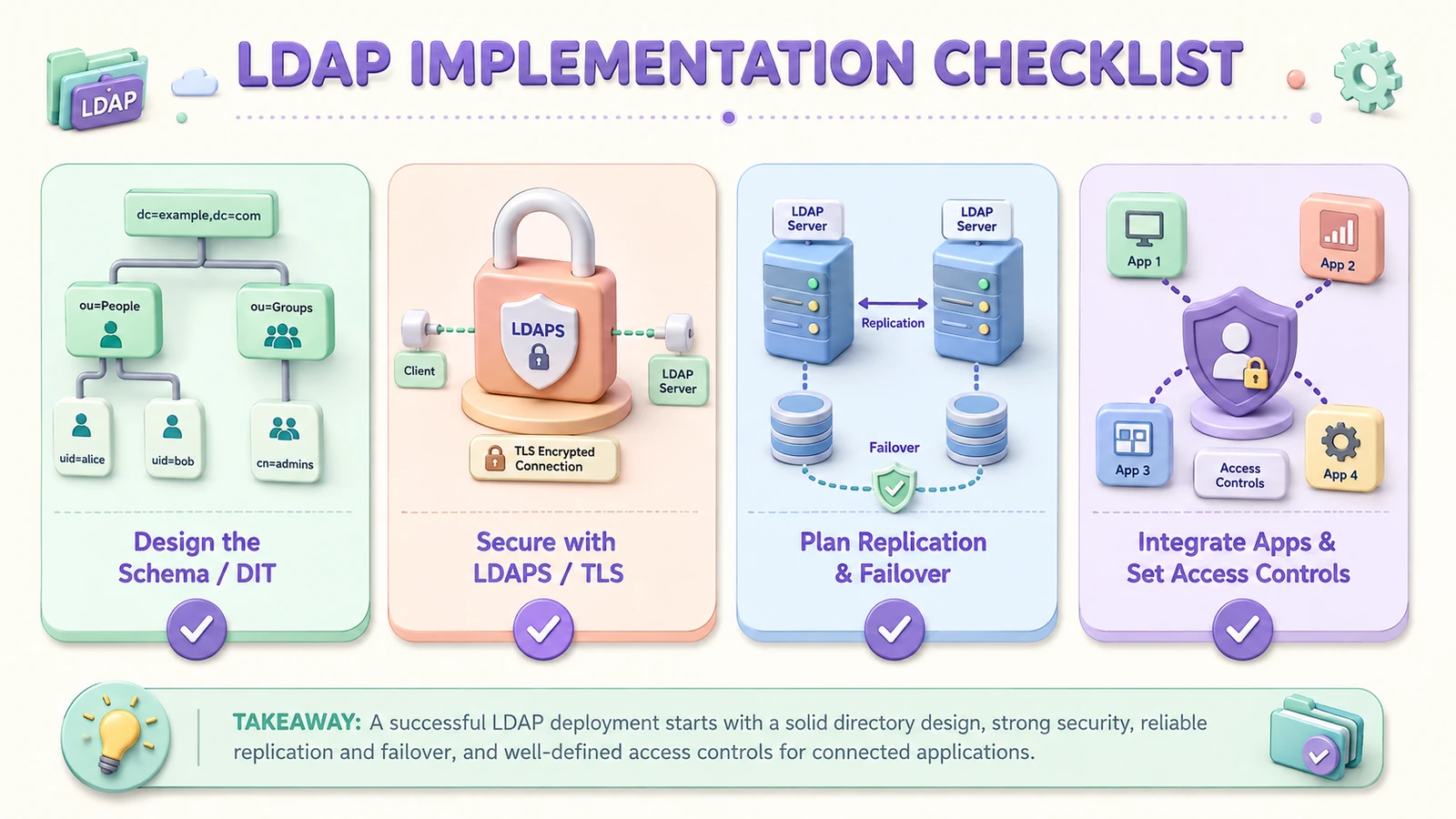 A durable LDAP implementation comes down to four disciplines — design the tree, encrypt the transport, engineer for failover, and integrate under least privilege.
Where Avatier fits
Avatier's identity platform is built to sit on top of directories like these rather than demand you replace them. Identity Anywhere synchronizes with LDAP and Active Directory as authoritative sources, extends self-service password management and modern MFA to the accounts they hold, and drives provisioning and deprovisioning outward through SCIM and directory connectors so a single authoritative change propagates across both on-premises and cloud systems. The directory keeps doing what it is good at — fast, standardized, high-availability reads — while the governance layers above it handle the lifecycle automation, access certification, and compliance reporting that LDAP was never meant to provide on its own.
That is the pattern this reference argues for: a well-run directory as a durable foundation, secured with LDAPS and least-privilege binds, made resilient with replication and tested failover, kept clean with disciplined schema and group hygiene, and integrated upward into SSO, SCIM, and cloud identity rather than left as an island. The Avatier Trust Center publishes the compliance posture behind the platform for teams that need to verify it before a deployment decision. LDAP is not the thing you are trying to get away from — it is the thing worth building on correctly.
ABOUT THE AUTHOR

More from IAM & Identity Governance
Integrating IAM With Existing and Legacy Applications (2026)
Connecting a modern IAM platform to the applications you already run is a connector problem before it's a strategy problem — SCIM, LDAP/AD, SAML/OIDC, and API or agent connectors, matched to what each app can actually speak.
What AI-Driven Provisioning Actually Does in Enterprise IAM (2026)
AI-driven provisioning replaces manual tickets and static rules with policy-based access grants triggered by HRIS and identity-graph signals — but only inside guardrails a human still has to own.

Insider Threat Red Flags: Indicators to Watch in 2026
Malicious, negligent, and compromised insiders each leave distinct behavioral and access-pattern red flags — and identity governance, not perimeter security, is what actually contains the resulting blast radius.