How to Implement Self-Service Access Requests: The 2026 Guide
Self-service access requests only work when the full workflow is designed as one governed loop — request capture, policy-driven approval routing, automated provisioning, and closed-loop access confirmation. This is the 2026 practitioner guide to implementing an access request system that is fast for users and defensible under audit: the request-to-access pipeline, the design decisions that keep self-service from becoming rubber-stamp risk, and the operational discipline that makes it hold up.

Self-service access requests only work when the full workflow is designed as one governed loop — request capture, policy-driven approval routing, automated provisioning, and closed-loop access confirmation. This is the 2026 practitioner guide to implementing an access request system that is fast for users and defensible under audit: the request-to-access pipeline, the design decisions that keep self-service from becoming rubber-stamp risk, and the operational discipline that makes it hold up.
- Implementing self-service access requests means designing four stages as one continuous, governed loop: request capture against a resource catalog, policy-driven approval routing, automated provisioning to the target system, and closed-loop confirmation that writes the grant back as an audited record. Skipping any stage is where either the speed benefit or the audit defensibility falls apart.
- Start with the resource catalog and the request experience. Users can only self-serve access to resources that are cataloged, described in business language, and mapped to an owner and an approval policy. A thin, well-described catalog beats an exhaustive catalog of cryptic entitlement names that nobody can request meaningfully.
- Approval is where self-service earns or loses its governance. Route on policy — manager approval for context, resource-owner approval for authorization, segregation-of-duty checks inline before the grant, and role-based birthright that bypasses approval for access every user in the role should already have. Approval that is a single rubber-stamp click is self-service theater.
- Automated provisioning and closed-loop confirmation are what separate a real access request system from a faster ticket queue. The grant must execute in the target system automatically and be written back to the identity platform so certification, lifecycle deprovisioning, and audit all see it. Access provisioned outside the loop becomes the shadow entitlement nobody can certify or revoke.
- Self-service without governance is a risk amplifier, not an efficiency win. Time-box elevated grants, tie requests to current lifecycle state, feed every grant into certification, and keep an immutable audit trail. Fast wrong access at scale is worse than slow wrong access — the governance layer is not optional overhead, it is the point.
Implementing self-service access requests means building four stages as one continuous, governed loop rather than bolting a request form onto your help desk. A user finds a resource in a catalog and submits a request with business justification. The request routes through policy-driven approval — manager for context, resource owner for authorization, a segregation-of-duty check inline. Automated provisioning executes the grant in the target system. And a closed-loop confirmation writes that grant back to the identity platform as an audited record. Get all four stages right and self-service is both faster for users and more defensible under audit than the ticket queue it replaces. Skip any one of them and you get either a prettier help desk or ungoverned access sprawl.
This is the 2026 update to our original guide on implementing self-service access requests, rewritten around the practitioner question that actually matters: how do you stand up an access request system that stays governed as it scales? The stages below are ordered the way you should build them — catalog first, then request experience, then approval, then provisioning and confirmation — and each section names the design decisions that separate a real access request management system from a faster way to file tickets.
Why self-service, and why the workflow is the hard part
The reason to move access requests to self-service is not that it is trendy — it is that the alternative does not scale and does not govern. When access is requested through help-desk tickets, a user writes free text describing the access they think they need, an administrator interprets that text, manually grants something in a target system, and closes the ticket. There is no consistent approval policy, no segregation-of-duty check, no structured record of what was actually granted, and no automatic path to revoke it later. The queue optimizes for closing tickets, not for granting the right access.
Self-service fixes this by turning an unstructured message into a structured, governed transaction. But the trap — and the reason so many self-service rollouts disappoint — is treating self-service as just a new front door on the same manual back end. If a user submits a slick request form and an administrator still manually grants access in the target system and there is still no write-back to certification and lifecycle, you have built a faster ticket queue with a governance gap. The workflow is the hard part. The portal is the easy part.
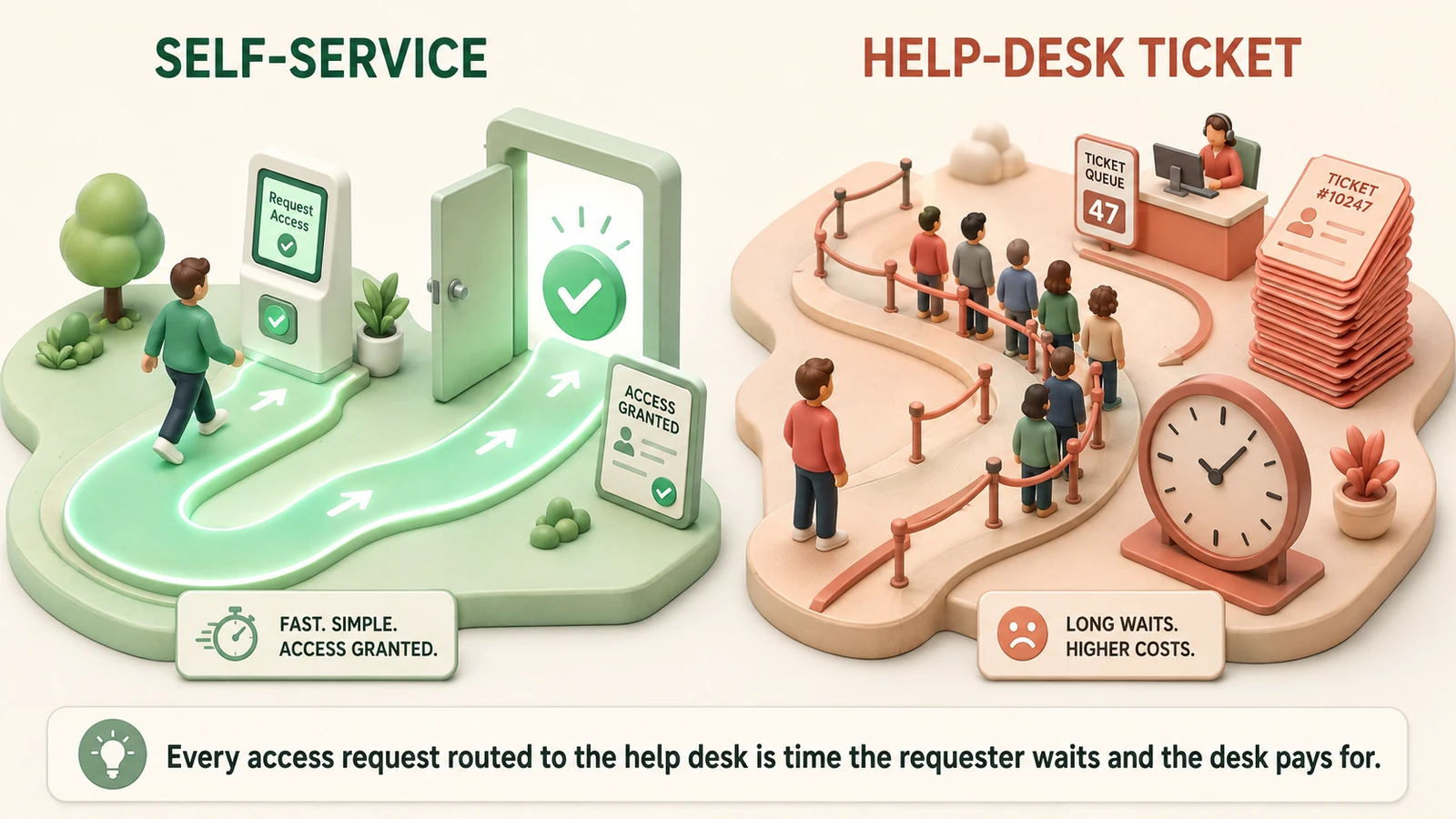 The help-desk queue optimizes for closing tickets; the self-service request system optimizes for granting the right access, provably.
The rest of this guide is about building the workflow so that the speed benefit and the governance benefit arrive together, because in a well-designed system they are the same thing: structured requests, evaluated by policy, provisioned automatically, and recorded as evidence.
Stage zero: build the resource catalog first
You cannot implement self-service access requests without a resource catalog, and the quality of the catalog sets the ceiling on everything downstream. The catalog is the structured inventory of what a user can request — applications, roles, groups, shared folders, data sets, infrastructure entitlements — with each item described in business language and mapped to an owner and an approval policy.
The single most common failure here is cataloging entitlements by their technical identifiers. A catalog full of entries like APP_PRD_RW_GRP_0447 is useless to the business user who needs Salesforce access, because they cannot tell which cryptic string corresponds to what they need. They give up and file a help-desk ticket, and your self-service investment sits unused. A good catalog entry describes the resource by what it lets someone do — "Salesforce — Sales Representative access" — names the owner who is accountable for authorizing it, and carries the policy that governs how it is approved and how long the grant lasts.
Three design decisions make or break the catalog:
- Describe resources by capability, not identifier. Users request what they can understand. Map the human-readable capability to the underlying technical entitlement behind the scenes.
- Assign an owner to every requestable resource. The owner is who authorizes access and who certifies it later. A resource with no owner has no accountable approver, which means no real approval.
- Keep it thin and curated, not exhaustive. A focused catalog of the resources people actually request, described well, beats a dump of every entitlement in every system. You can expand coverage over time; you cannot recover users who bounced off an unusable catalog.
A well-built catalog is also the foundation for role-based access control: the same resource definitions that users request individually are the building blocks you compose into roles for birthright provisioning, which is the next lever for keeping request volume governable.
Stage one: the request experience
With a catalog in place, the request experience is where the user actually interacts with the system. The goal is a portal where a user can find the resource they need, understand what it grants, provide a business justification, and submit — in less time and with less friction than messaging a colleague or filing a ticket. If the self-service path is slower or more confusing than the informal path, users route around it, and you have recreated the shadow IT provisioning problem the system was supposed to solve.
Design the request experience around a few principles. Make the resource discoverable — search and browse against the catalog, with the capability descriptions doing the work. Capture structured justification — a business reason tied to the request, because that justification becomes part of the approval decision and the audit record. Show the user what happens next — who approves, roughly how long it takes, and how they will know it is done. And request on behalf of others where appropriate — a manager provisioning a new team member, a project lead onboarding a contributor — because a large share of real requests are delegated, not self-originated.
The request is structured data from the moment it is submitted. That is the quiet but decisive difference from a ticket: the system knows exactly which cataloged resource is being requested, by whom, for what stated reason, and against what policy. Everything downstream — approval routing, provisioning, audit — operates on that structured record rather than re-interpreting free text.
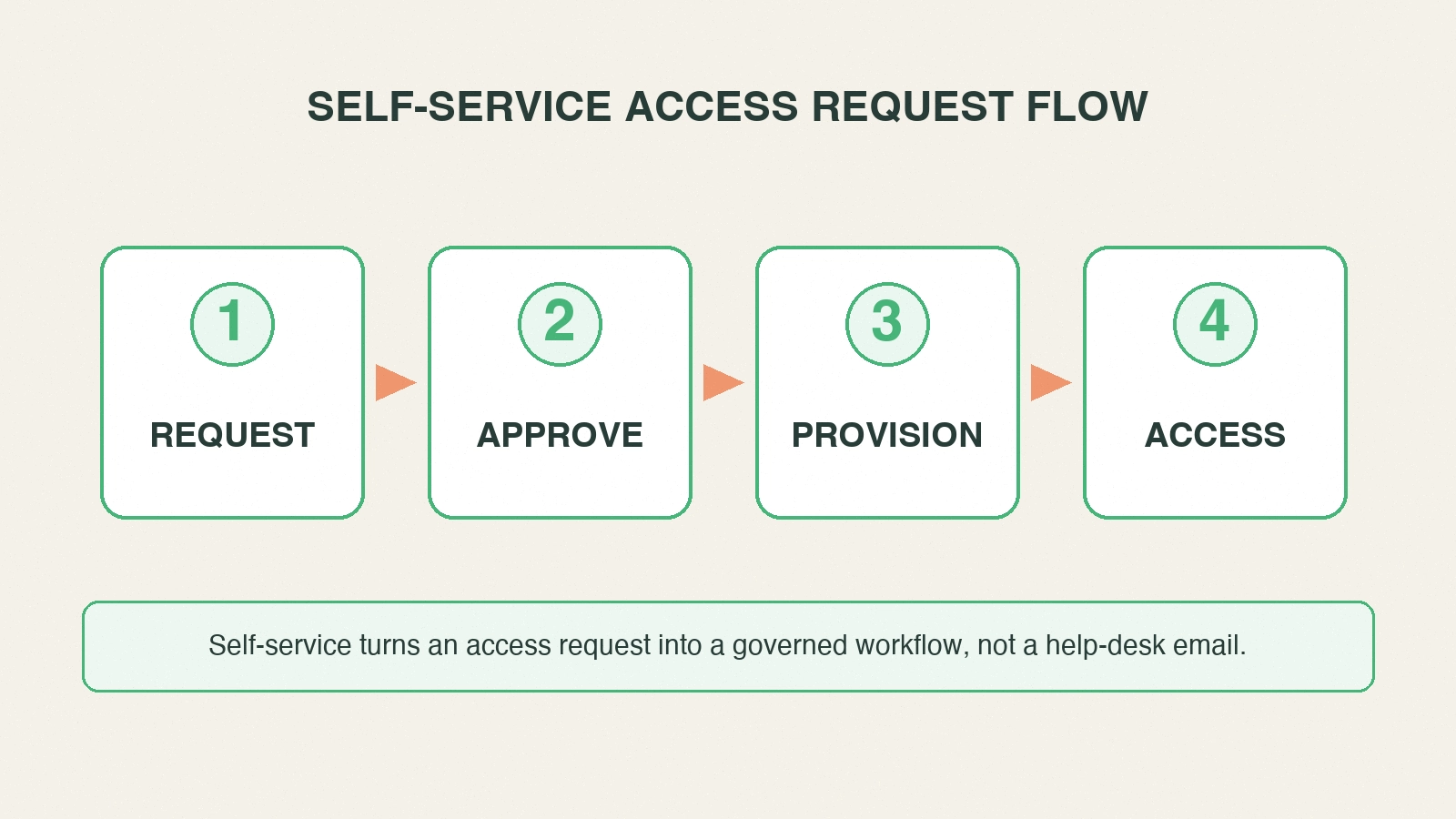 The request-to-access pipeline. Each stage produces evidence — a structured submission, a policy-driven approval, an automated grant, a closed-loop record.
Stage two: approval routing on policy
Approval is where a self-service access request system earns or loses its governance. The instinct is to route every request to the requester's manager and call it approved. That produces self-service theater — a single rubber-stamp click that satisfies the form but validates nothing. Real approval routing is driven by policy and typically layers more than one kind of check.
Manager approval provides organizational context. The manager knows whether this person, on this team, doing this work, plausibly needs this resource. That context is valuable, but a manager usually cannot judge whether the specific entitlement is appropriate for the resource — that is the resource owner's job.
Resource-owner approval provides authorization. The owner of the target application or data set is accountable for who has access to it. Routing the authorization decision to the owner — not just the manager — is what makes the approval meaningful. The owner can see whether this grant, for this stated justification, is appropriate.
Segregation-of-duty checks run inline, before the grant. The system evaluates whether the requested access, combined with what the user already holds, creates a toxic combination — someone who can both create and approve payments, for instance. When it does, the system blocks the grant or routes it for explicit exception approval with documented justification. An SoD check that runs after provisioning is a detective control; run inline, it is preventive.
Birthright bypasses approval where appropriate. Access that every user in a role should already have does not belong in the approval queue at all — it should be granted automatically through RBAC at the joiner or role-change event. Routing birthright access through self-service approval buries reviewers in requests that never needed a decision, which erodes the scrutiny available for the requests that do. This is the tight coupling between self-service and role-based access control: the stronger your roles, the smaller and more meaningful your discretionary request volume.
The design goal for approval is that every routed decision is a real decision. Approvers should see the requester, the resource, the justification, and any SoD flag, and their approval should be recorded as an accountable, attributable act. When approval is a real decision made by the right person with the right context, the audit trail that results is defensible.
Stage three: automated provisioning
Once a request is approved, automated provisioning is what separates a real access request system from a faster ticket queue. Provisioning means the system executes the grant in the target application — through a connector or API integration — without an administrator manually clicking through the target system's admin console. The approval outcome triggers the grant directly.
This matters for three reasons. It is faster and eliminates the queue behind the administrator's manual work, which is usually where ticket-based access spends most of its elapsed time. It is consistent — the grant that gets provisioned is exactly the entitlement the catalog specified and the owner approved, with no interpretation drift between what was approved and what was granted. And it is recordable — because the system executed the grant, the system knows precisely what was granted and can write it back.
Practical implementation notes for provisioning:
- Connector coverage determines self-service coverage. A resource can only be truly self-serviced end-to-end if the system can provision it automatically. Prioritize connectors for the highest-volume, highest-value target systems first, and be honest in the catalog about which resources are automated versus still manual behind the scenes.
- Handle provisioning failures explicitly. A target system can reject a grant. The workflow needs to detect the failure, surface it, and not silently mark the request complete — a request marked done that did not actually provision is both a user-experience failure and an audit-record lie.
- Prefer least-privilege, scoped grants. The entitlement you provision should be the narrowest access that satisfies the request, consistent with the principle of least privilege. Broad admin grants requested through self-service and provisioned automatically are how standing privilege accumulates at machine speed.
Stage four: access confirmation and closing the loop
The final stage is the one most often skipped, and skipping it is what turns self-service into a governance liability. Closing the loop means writing the provisioned grant back to the identity platform as an audited record, notifying the user that their access is live, and making the new entitlement visible to every downstream governance process.
Why the write-back is non-negotiable: an entitlement that was provisioned but never recorded in the identity platform is invisible to certification, invisible to lifecycle deprovisioning, and invisible to audit. It is the definition of an orphaned entitlement — access that exists in a target system that no governance process knows about. When the employee moves roles or leaves, lifecycle deprovisioning cannot remove what it cannot see. When a certification campaign runs, it cannot review what it does not know exists. When an auditor asks who has access to a system and why, the answer is incomplete. Every self-service grant that does not close the loop becomes a future audit finding.
Closing the loop delivers the payoff that makes the whole workflow worth building:
- The user gets confirmation and knows their access is ready.
- Certification campaigns see the grant and review it against current role — increasingly with AI-augmented access certification focusing reviewer attention on the anomalous grants rather than the routine ones.
- Lifecycle deprovisioning can revoke the grant when the user moves or leaves, because the identity platform knows it exists.
- The audit trail records the full transaction — who requested, who approved, what justification, what was granted, when, and through what policy.
That end-to-end evidence chain is the actual product of an access request management system. The request form is the interface; the closed-loop audited record is the value.
The governance layer that keeps self-service safe
Everything above describes a system that is fast. This section is about keeping it defensible, because self-service without governance is a risk amplifier — it makes it faster to grant the wrong access at scale, which is worse than the slow process it replaced. Four governance checkpoints wrap the workflow.
Least privilege as the default. Requestable resources should be scoped rather than broad, and the default grant should be the narrowest access that does the job. The catalog is where you enforce this — do not offer a broad admin bundle as a requestable resource when a scoped role would serve. The principle of least privilege is a catalog-design discipline as much as a runtime control.
Time-boxed grants for elevated and sensitive access. Access that is elevated, sensitive, or project-specific should expire rather than persist. Standing privilege — access that was granted once and never removed — is exactly the risk that just-in-time access and zero standing privilege exist to eliminate. Self-service makes it easy to grant; time-boxing makes sure the grant does not become permanent by default. For sensitive resources, the right design is often a time-boxed, self-service, just-in-time grant that provisions on approval and de-provisions automatically at expiry.
Requests tied to current lifecycle state. A self-service request must be evaluated against the requester's current role and status, and any access it grants must be revocable through the same lifecycle deprovisioning that removes birthright. This is the integration point with access governance and user lifecycle management — the request system feeds the lifecycle, it does not run parallel to it. Access requested through self-service but invisible to lifecycle deprovisioning is the orphaned entitlement that accumulates through movers and leavers.
An immutable audit trail. Every stage produces evidence, and that evidence must be tamper-resistant and complete: who requested, the justification, who approved and when, any SoD flag and its disposition, what was provisioned, and when the grant expires or was revoked. This is what makes the system answer an auditor's questions instead of raising them.
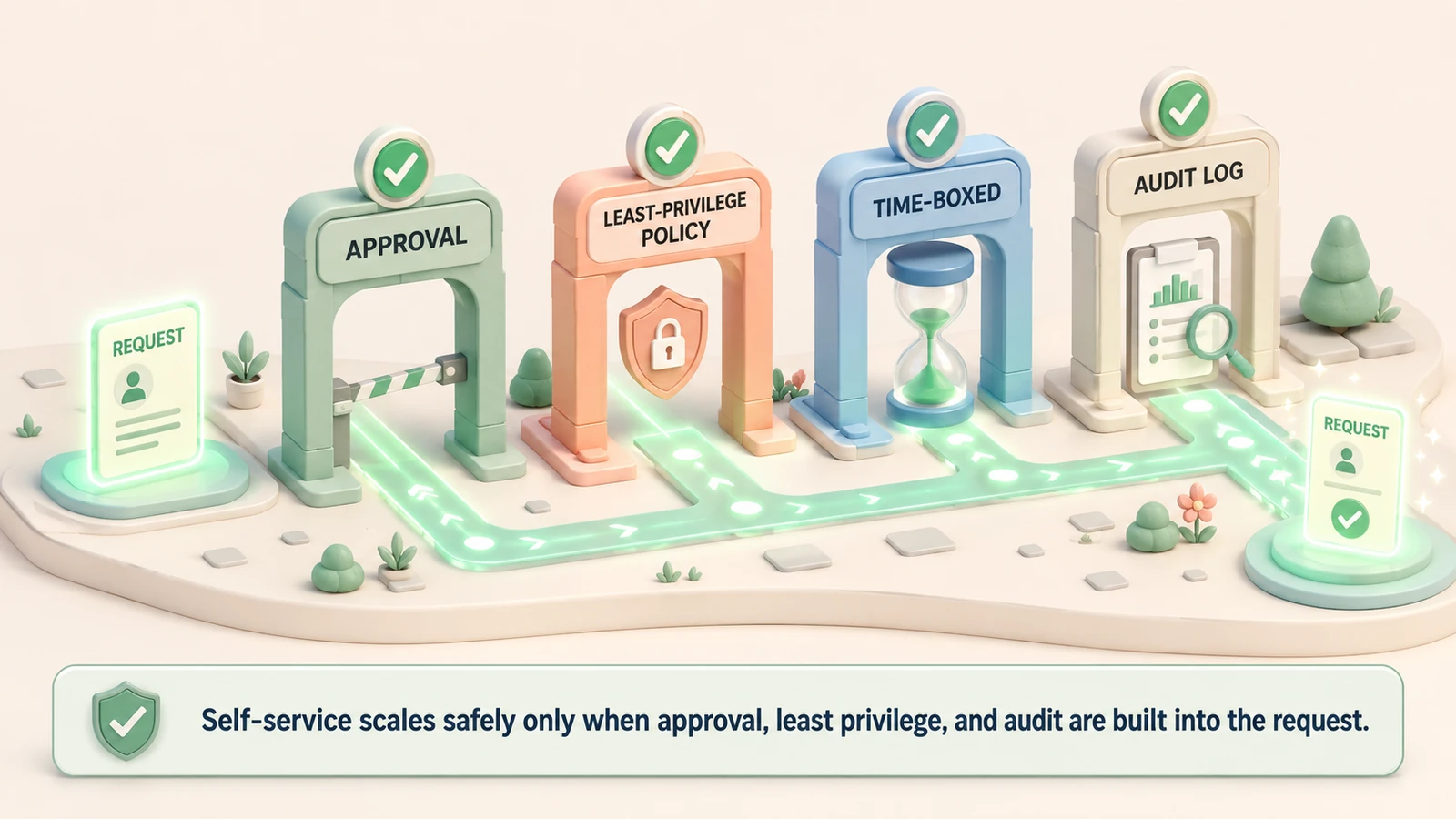 Four checkpoints wrap the workflow: least privilege, time-boxed grants, lifecycle-tied requests, and an immutable audit trail — keeping self-service safe.
What Avatier ships toward this pattern
Avatier Identity Anywhere is built around the governed request-to-access loop this guide describes. The self-service portal presents a business-language resource catalog that end users and delegating managers can search, browse, and request against, with structured justification captured at submission. Approval routing is policy-driven — manager context, resource-owner authorization, and inline segregation-of-duty evaluation before any grant, with role-based birthright provisioned automatically so the approval queue carries only genuinely discretionary requests. Automated provisioning executes approved grants in target systems through connectors rather than manual administrator action, and every grant is written back into the identity platform so it is immediately visible to certification, lifecycle deprovisioning, and the audit trail. Elevated and sensitive access can be time-boxed and provisioned just-in-time, de-provisioning automatically at expiry. The all-inclusive licensing folds the request workflow, provisioning automation, certification, and lifecycle together rather than metering them separately.
The compliance posture behind the platform is published on the Avatier Trust Center: SOC 2 Type II with zero exceptions, ISO/IEC 27001:2022, PCI DSS v4.0.1, CSA STAR Level 1, NIST 800-53 Rev. 5 aligned, FedRAMP-aligned controls, CISA Secure-by-Design Pledge signatory, and FIDO2-compatible authentication.
The honest closing
Self-service access requests are one of the highest-leverage things an identity program can implement — done right, they make access faster for users, cheaper for the service desk, and more defensible for the auditor, all at once. But the qualifier "done right" is carrying real weight. Self-service without governance is not a partial win; it is a net risk. A system that lets thousands of users request access quickly, and grants it without policy-driven approval, without segregation-of-duty checks, without time-boxing, and without closing the loop back to certification and lifecycle, is a machine for producing ungoverned entitlements at scale. Fast wrong access is worse than slow wrong access, because there is more of it and nobody is watching it accumulate.
The four-stage loop — request, approve, provision, access — is what delivers the speed. The four governance checkpoints — least privilege, time-boxed grants, lifecycle-tied requests, and an immutable audit trail — are what keep the speed from becoming sprawl. Build both together. The governance layer is not overhead you add once the workflow is running; it is the reason the workflow is worth running at all.
ABOUT THE AUTHOR

More from Access Management

How to Secure MCP Servers in the Enterprise: A 2026 Guide
How to secure MCP servers: the enterprise threat model, from tool poisoning to confused deputies, and the step-by-step controls that keep AI tool calls scoped, approved, and audited.
Data Access Governance in 2026: Govern Who Can Reach Sensitive Data
Data access governance is the discipline of controlling who can reach which sensitive data, under what conditions, and proving it to auditors. It is distinct from IAM, which grants access to systems, and from CIEM, which governs cloud infrastructure. The practical 2026 guide to governing access to the data itself.

B2B External Identity & Guest Access: The 2026 Enterprise Guide
B2B external identity and guest access is the discipline of governing partner, vendor, contractor, and guest identities that are not employees. The 2026 enterprise guide to what external access is, the controls that keep it safe, and the lifecycle that keeps it from becoming a breach path.