Delegate Approval Authority While Away with Avatier Proxy My Authority
How to hand your access approvals to a named proxy for a set window, with a record of every change, and how to take an approver off workflows for good when their job changes.

How to hand your access approvals to a named proxy for a set window, with a record of every change, and how to take an approver off workflows for good when their job changes.
- To delegate approval authority while you're away, name one or more people, set a start and end date, and keep a record of every change.
- If the approver changed jobs, don't extend a proxy: remove them from the approval workflows, with a justification on the record.
- Avatier Proxy My Authority saves each proxy with its dates, logs every add and removal, and drops expired proxies off the list.
- Avatier Workflow Participation files the removal as a request, always in Avabot and MCP, recorded in Request History with a Request ID.
- Both are Identity Actions in the Avatier MCP Server, with identity verification first in Avabot and MCP.
To delegate approval authority while you're away, name one or more people to approve on your behalf, set a start date and an end date, and keep a record of every proxy added or removed. If the approver has changed jobs rather than taken time off, don't delegate: take them off the approval workflows they no longer belong in, with a justification on the record.
Avatier handles the first case with Proxy My Authority and the second with Workflow Participation, both Lifecycle & Access Governance actions. For the absent person's own accounts during a leave, see Leave of Absence and Rehire. For mover events in general, see Joiner-Mover-Leaver Automation.
Why approvals stall when the approver is away
The points in this section and the next are general practice, not product behavior. An access request routed to a named approver waits on that person. A two-week vacation, a conference or a medical leave becomes a queue of requests nobody else can decide, and requesters start asking the help desk for updates.
Workarounds add risk: a workflow edited by hand that someone must remember to revert, or a shared mailbox that blurs who decided what. Avatier's Proxy My Authority page puts the manual path in one line: "Without a proxy, requests wait until you are back, or someone edits workflows by hand and has to remember to change them back."
Job changes are different: there is no return date, so temporary cover is the wrong fix. In Avatier's words, "When an approver changes jobs or leaves a team, the workflows that route requests to them should change too."
What a safe approval delegation needs
The checklist below is general guidance for out-of-office approval delegation, whatever tool runs it.
- A named delegate. One or more specific people, not a team alias.
- A fixed window. A start date and an end date, set up front, so it ends without anyone having to remember.
- Verification before the grant. Handing over approval authority is a sensitive change; confirm who is granting it.
- Scope and conflict checks. Pick delegates who know the requests involved, and keep a delegate from approving their own requests. A delegation to your own direct report deserves a second look.
- A record. Log every proxy added or removed, and keep a list of current and future proxies an auditor can read.
- A permanent path. If the absence is really a job change, remove the approver from the workflow instead of extending a proxy.
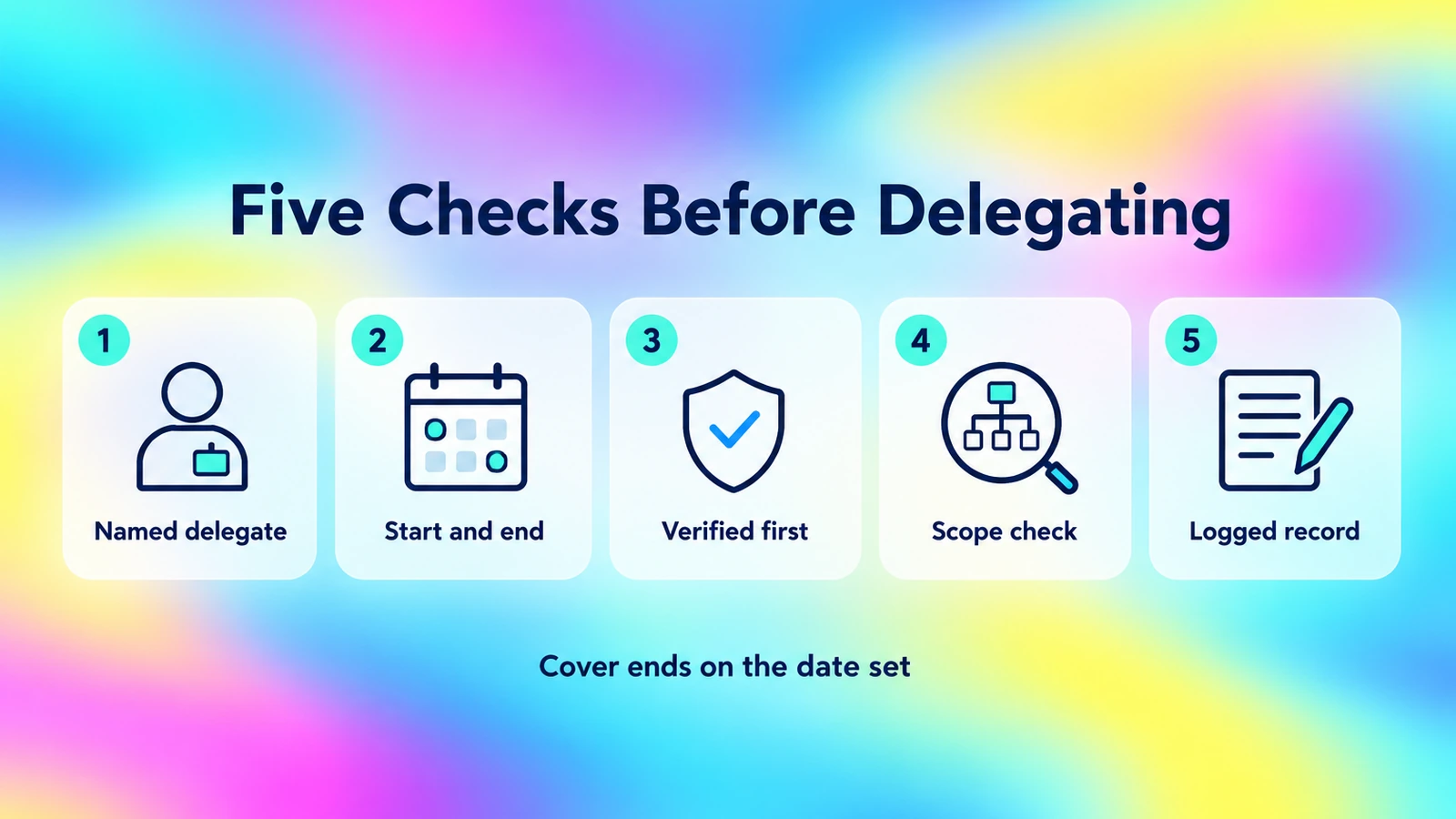
Name the delegate, fix the window, verify first, check scope and log every change, so the cover ends on the date you set.
Delegation covers who approves. Asking for access is a separate flow; for that, see Access Request Portal Adoption.
How Avatier Proxy My Authority delegates approvals
Proxy My Authority lets you "Lend your approval authority to someone for a set period, so requests keep moving while you're away." A delegation needs "One or more people to approve on your behalf, a start date and an end date." On the Group & User Self-Service pillar it sits among the account tasks managers handle themselves: "Delegate approvals during time away."
On the web, it runs in four steps:
- Open your proxies. See current and future proxies, with search, date filters, sorting and export.
- Pick the people. Choose Add, then search for and select one or more people. By default the picker is limited to your Lifecycle Management request scope; an admin can turn on unrestricted search, and workflow admins can always search everyone.
- Set the dates. Enter a Proxy Start Date and a Proxy End Date; the start must be before the end.
- Save. Review on the Result tab and save; each person shows success or a reason.
To end a proxy early, choose Edit, select the proxies and Remove. Proxying to your own direct report shows a warning, and depending on tenant settings, the proxy may be prevented from approving their own requests.
Proxies are saved straight away, with no approval and no justification. Each proxy is saved with its start and end dates, every add and removal is written to the activity log, and expired proxies drop off the list. The evidence is that activity-log entry plus the list of current and future proxies, exportable to PDF or Excel on the web and mobile. Proxy My Authority changes who can approve Lifecycle Management requests on your behalf, in Avatier only; directory accounts stay as they are.
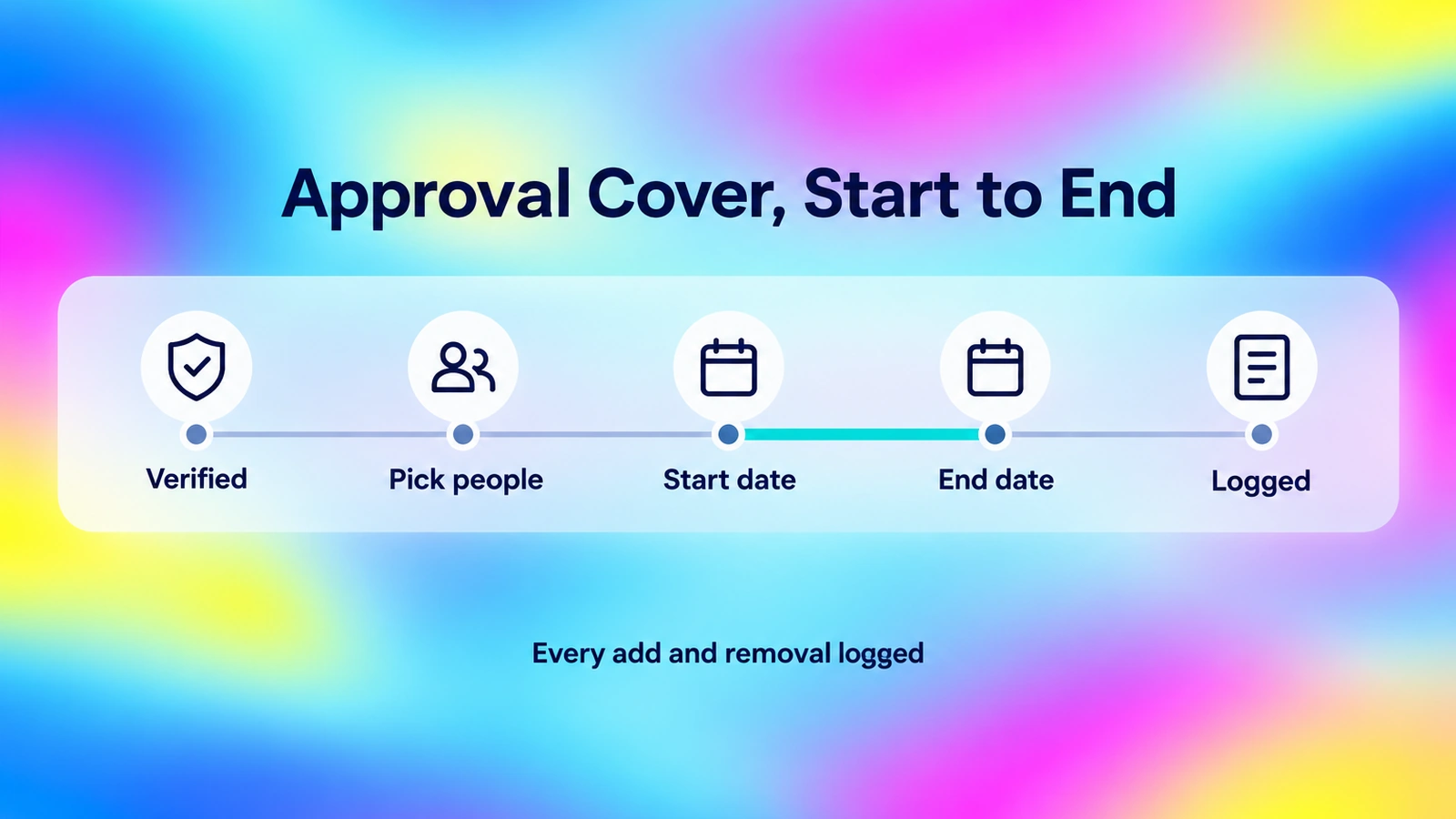
In Avabot and MCP you verify first; a proxy is then saved with its start and end dates, every add and removal is logged, and expired proxies drop off the list.
When the approver is already out. On the web, an admin can set up a proxy for someone who is out of office when the tenant turns on "Assign Authority to Delegated Users" and the admin is in the group allowed to change proxy authority.
From Avabot or an AI assistant. Proxy My Authority is also an Identity Action in the Avatier MCP Server, and the MCP page lists "Delegate Approval Authority" among its example actions. In Avabot chat and MCP it starts with identity verification in the conversation, with the methods your policy already allows. Because it is high-risk, by default it starts only if you verified in the last 5 minutes. There you manage your own authority: grant, review or cancel. The page's illustrative request reads, "Give Jamie Park my approval authority from 3 November to 14 November." Avabot chat and MCP require the current (.NET 10) Avatier server. Deciding the requests themselves is a separate action, Pending Requests: "Approve or deny the requests waiting on you, with a comment on the record." For the full action page, see Proxy My Authority.
Approver changed jobs? Remove them with Workflow Participation
When the change is permanent, Workflow Participation lets you "Take an approver off the approval workflows they no longer belong in, with a justification on the record." The action page draws the line: "Proxy lends your approval authority to someone for a set period. Workflow Participation removes a person as an approver from the selected workflows."
| Proxy My Authority | Workflow Participation | |
|---|---|---|
| Use when | The approver is away for a set period | The approver changed jobs or left a team |
| You provide | People, start date, end date | Approver, workflows, time, justification |
| Approval | None; saved straight away | On the workflow path, your Lifecycle Management approval workflow |
| Timing | From start date to end date; expired proxies drop off the list | Now or a chosen date, after approval |
| Evidence | Activity-log entry, exportable proxy list | Request ID in Request History, activity-log entry |
It lists the workflows where the person is an approver, by name, item type and resource, and files one removal request for the ones you pick. You choose now or a date and enter a justification. On the workflow path, the removal is recorded in Request History with a Request ID and goes through your Lifecycle Management approval workflow, taking effect after approval. Removing yourself and removing others are separate tenant settings. In Avabot chat and MCP, the removal is always filed as a request.
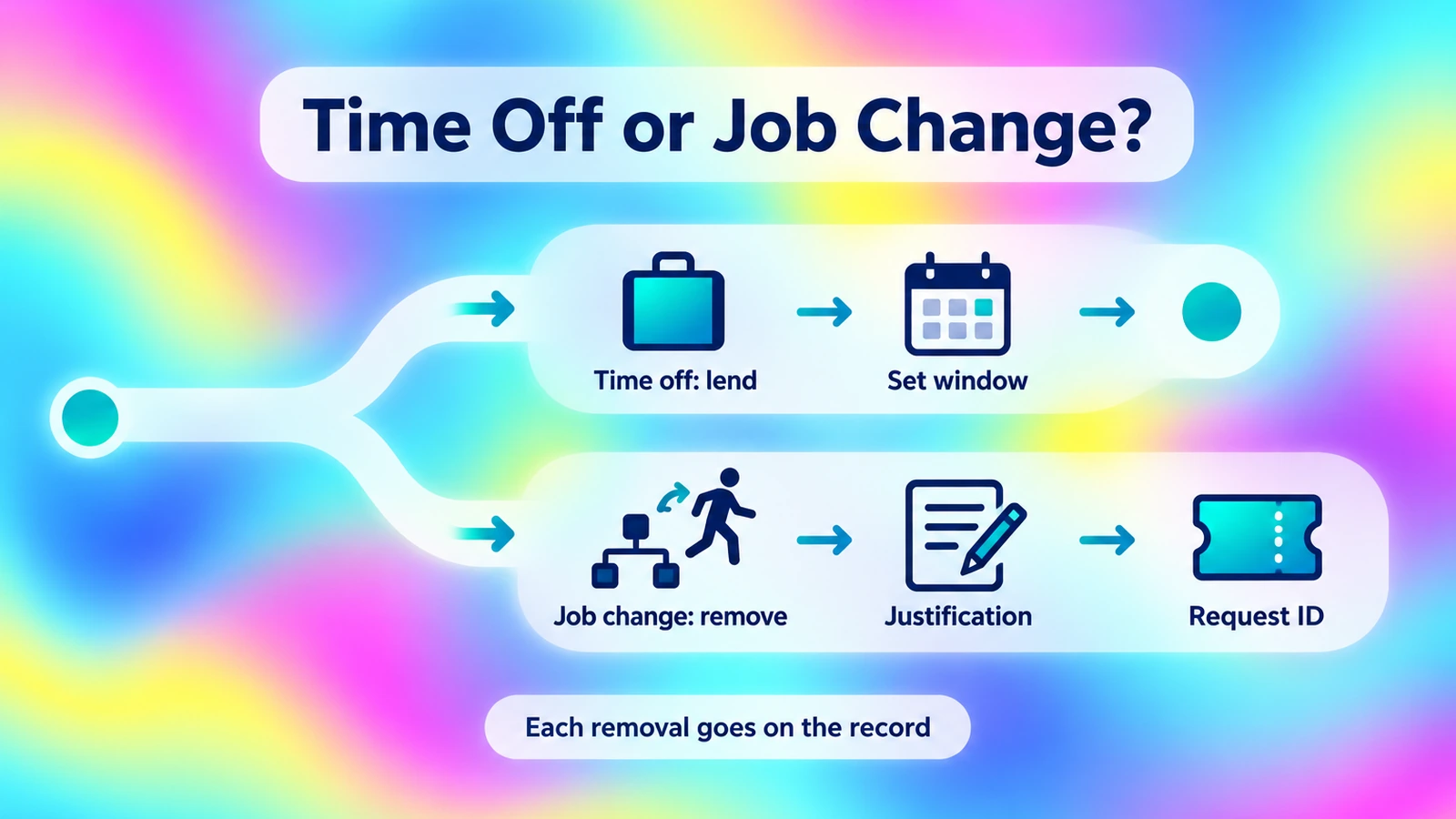
Time off calls for a proxy with an end date; a job change calls for a removal request with a justification and a Request ID.
That record is the point. Avatier's page notes that editing workflows by hand "leaves no request, no approval and no record of who removed them or why." Its illustrative request: "Take me off the Finance Share approval workflow. Justification: moving to the Sales team."
For the self-service pillar these tasks belong to, see Group & User Self-Service.
Getting started
Each completed delegation and each completed participation removal is one Secure Outcome. Under Pay Per Identity Action™, which is in invitation-only preview, each completed, verified action is one Secure Outcome, and attempts, failures and retries are never billed. Getting started is free, deployment services are included, and a 45-day money-back guarantee applies.
Avatier is SOC 2 Type II audited with no exceptions noted and ISO/IEC 27001:2022 certified; for security documentation, see the Avatier Trust Center. For password, reset and MFA governance, see Credential Governance™. For the preview, see the Avatier Identity Anywhere 2027™ site; for the company, see avatier.com.
ABOUT THE AUTHOR

More from Lifecycle & Access Governance

AD Group Expiration: How Avatier Retires Temporary Groups on Schedule
Active Directory group expiration gives project, M&A and contractor groups an end date and a named owner at creation. What a policy should cover, and how Avatier retires groups on schedule.

Leave of Absence and Rehire: Suspend and Restore Access with Avatier
What to do with an employee's accounts during a leave of absence, and how to rehire someone without bringing back their old access. The decisions, and how Avatier runs both from HR.

Approve Access Requests from Copilot or Claude with Avatier MCP
Clear your access-request queue from Microsoft Copilot Studio, Claude Code or OpenAI Codex. Avatier verifies you first, reads back five requests at a time and saves each decision on the request.