Self-Service Account Unlock with Avatier: No Reset, No Ticket
A locked-out user who still knows the password needs the lock cleared, not a new password. How Avatier handles self-service account unlock in the portal, at the login screen and in AI assistants.

A locked-out user who still knows the password needs the lock cleared, not a new password. How Avatier handles self-service account unlock in the portal, at the login screen and in AI assistants.
- Self-service account unlock lets a locked-out user who still knows the password verify identity and clear the lockout, without a reset or a help desk ticket.
- Microsoft's lockout policy documentation says a locked account can't be used until it is reset or the lockout duration expires.
- Avatier treats unlock as its own action, separate from forgot password, in Password Portal and Avatier Actions, and Login Reset brings unlock to the login screen.
- Unlock runs MFA-verified in Password Portal and at the Windows and Mac login screen, and can be asked for in Teams, Outlook, Claude or Copilot.
- Account unlocks are one of Avatier's Secure Outcomes: completed, verified, policy-compliant activities that each record their own evidence.
Self-service account unlock lets a locked-out user who still knows the password verify identity and clear the lockout without a password reset or a help desk ticket. In Avatier, unlock is its own action, available in Password Portal, at the Windows and Mac login screen through Login Reset, and in Teams, Outlook, Claude or Copilot through Avatier Actions.
The user's password is fine. Their account is locked. Those are two different problems, and treating every lockout as a forgotten password turns a quick fix into a reset and a new credential to remember.
Unlock or reset: two different problems
A lockout is a policy outcome, not a lost secret. Microsoft's documentation for the account lockout threshold setting says the setting "determines the number of failed sign-in attempts that will cause a user account to be locked. A locked account can't be used until you reset it or until the number of minutes specified by the Account lockout duration policy setting expires."
The same page points to lockouts the user never meant to cause: "if a connection drops repeatedly when a user is running the app, all subsequent failed sign-in attempts count toward the account lockout threshold." The person at the keyboard may know the password perfectly well.
As general guidance, the first question for any lockout is what the user still knows. If they know the password, the fix is to clear the lock. If they don't, or it expired, the fix is a reset.
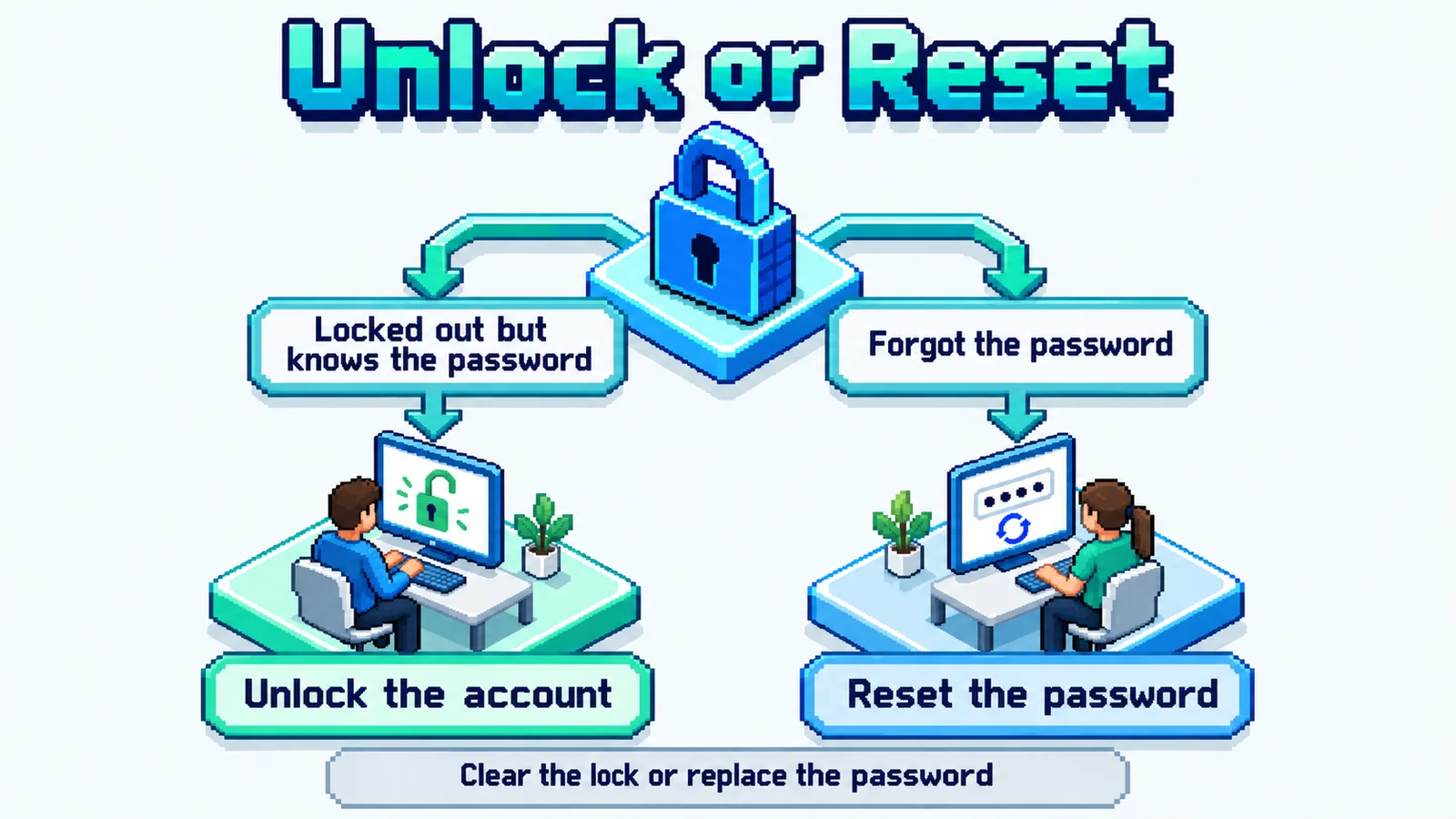 One lockout, one question first: does the user still know the password? If yes, clear the lock. If not, reset the password.
Avatier's actions follow the same split:
| Situation | What the user needs | Avatier action |
|---|---|---|
| Locked out, knows the password | Clear the lockout | Unlock (Password Management) |
| Forgot the password | A new password that meets policy | Forgot password (Password Management) |
| Password expired at the login screen | Reset before sign-in | Unlock & Reset (Login Reset) |
| Called the help desk instead | An agent-run unlock | Assisted unlock (Help Desk) |
Why lockouts still land on the help desk
Microsoft is direct about the cost of a lockout policy. On the same page it says that using such a policy "must be accompanied by a process to unlock locked accounts," and that "Enabling this setting will likely generate many more Help Desk calls."
Avatier's Password Portal page describes what the status quo looks like when that unlock process lives somewhere else: "Password reset is treated as the main event; account unlock lives in a separate workflow." Status can be hard to read, too. The page notes that "Account status may be unclear — locked, expired, disabled, or out of sync."
A phone call for an unlock is also a verification decision made by a person. In Avatier's Identity Attack Ledger of 2,242 breach notifications filed with the California Attorney General from January 1, 2023 to September 30, 2026, 79% of the 53 incidents that name a vector name a credential or a deceived person. Social engineering of a person, one of those vectors, "Includes vishing and help-desk pretexting." These are the California filings that name a vector, not a national rate.
Three places a user can unlock with Avatier
Avatier puts unlock where the locked-out user already is: in a browser, at the login screen, or in the assistant they use at work.
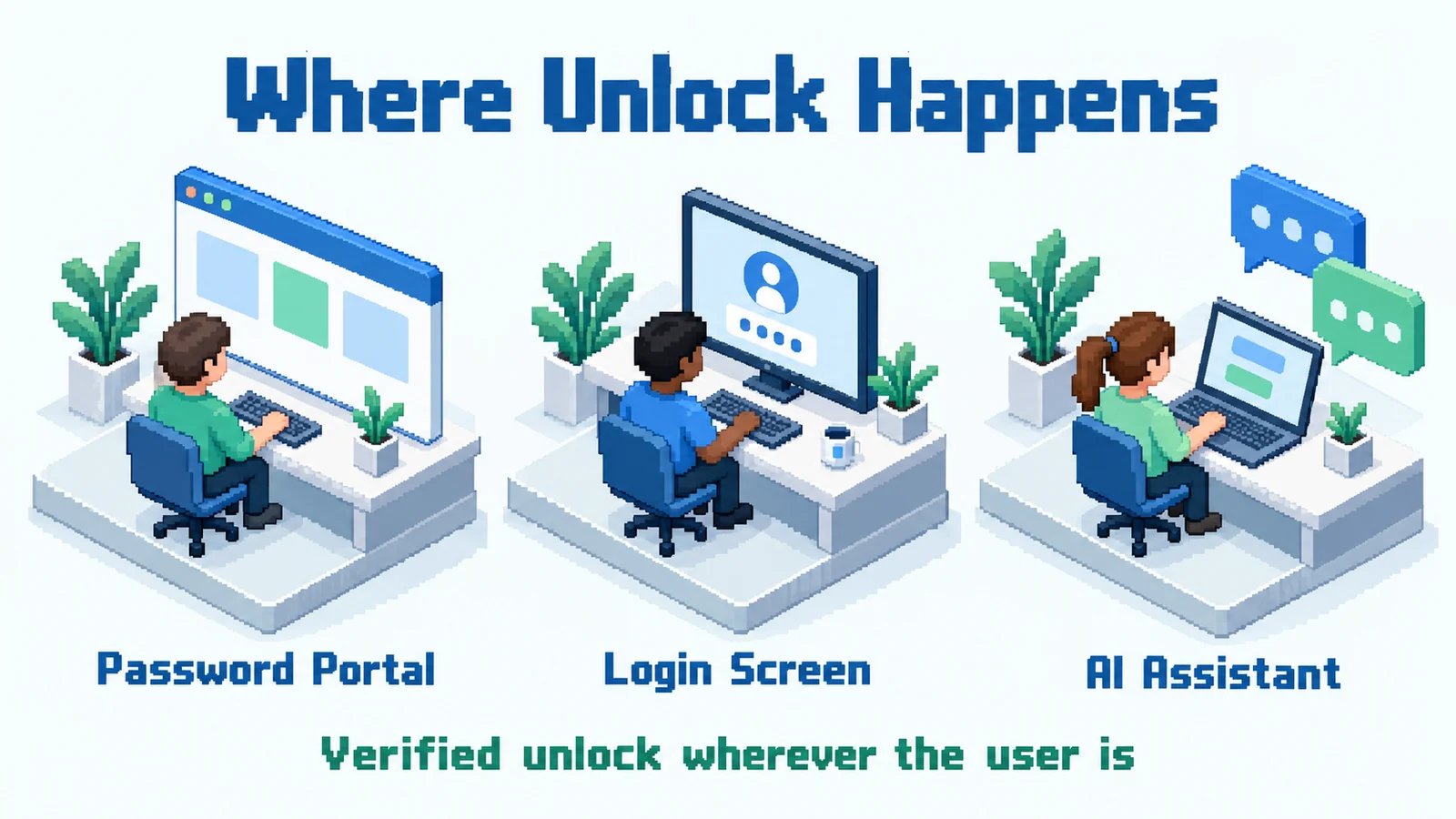 Three doors to the same outcome: the portal and the login screen verify with MFA, and the assistant runs under existing policies, approvals and roles.
Password Portal. Avatier's Password Portal gives users "one governed place to unlock accounts, recover forgotten passwords, change passwords, enroll recovery methods, view account status, review activity, link accounts, and return to work." Users "reset forgotten passwords, unlock accounts, and enroll themselves — anytime, on any channel, without calling the help desk." Real-time account visibility "Shows users their lockout, expiration, and password status before they contact IT," so a user can see that the account is locked, not forgotten. Every action is "MFA-verified, enforced by Password Firewall, synchronized across required systems, and logged for compliance."
The login screen. When the lockout hits before the desktop loads, Avatier Login Reset brings unlock to the login screen. "A secure Windows and Mac credential provider adds a self-service Unlock & Reset option right at the login screen," and Login Reset "supports MFA verification before account unlocks or password resets are completed from the login screen." A locked-down browser "connects only to Avatier's verified portal — no other sites, no keyboard-shortcut bypass," and the "Session terminates on completion, MFA failure, or timeout." For a remote user who has forgotten the password entirely, see Locked Out Off VPN: Remote Password Reset with Avatier Login Reset.
The AI assistant. Avatier Actions is an MCP connector that exposes more than 50 outcomes across eight modules. Its Password Management module includes "unlock," and its Help Desk module includes "assisted unlock" for the agent-run path. "An employee or manager asks in Teams, Outlook, Claude, or Copilot; the outcome runs through the customer's existing policies, approvals, and roles; nothing bypasses governance, because the assistant is the interface, never the authority." Setup is one administrator connection, and permissions are inherited from Entra ID, Active Directory, Okta or Ping. For how this works across the wider ticket queue, see AI Service Desk Automation: Resolving Identity Requests with Avatier.
Every unlock is a Secure Outcome
In Avatier Identity Anywhere 2027™, Avatier calls completed, verified, policy-compliant activities Secure Outcomes, and its published examples include "password resets, account unlocks, identity verification." An unlock is therefore something the platform records, not just something that happens.
Each Secure Outcome records six fields:
- The identity involved
- The initiating agent or experience
- The authorization context
- The policy applied
- The action taken
- The final result
For an unlock, that record shows whose account opened, whether the request came from the portal, the login screen or an assistant, and whether it completed. Avatier Ledger, the companion MCP connector, "turns every outcome into evidence and every report into a question." For the full definition, see What Is a Secure Outcome? Avatier's Unit of Identity Work.
What Avatier ships toward this pattern
Password Portal and Login Reset are Pillars 2 and 4 of Avatier's Credential Governance™ framework. The pieces that map to self-service unlock:
- Unlock as its own action: separate from forgot password in Password Portal and in Avatier Actions.
- Account status first: users see lockout, expiration and password status before they contact IT.
- MFA before access returns: in the portal, at the login screen, and with adaptive authentication by geo, user, group or OU.
- Granular delegation: "Per-function control over reset, unlock, and view rights across your organization."
- Conversational unlock: asked in Teams, Outlook, Claude or Copilot through Avatier Actions, under existing policies, approvals and roles.
- 34 languages: Password Portal and Login Reset are both available in 34 languages.
The Credential Governance site says Password Portal, Assisted Reset and Login Reset "deploy via MSI, GPO, or Intune in hours." Customers of Avatier's credential governance report that help-desk password tickets have fallen by as much as 70 percent.
Security and compliance documentation is on the Avatier Trust Center: SOC 2 Type II audited with no exceptions noted, and ISO/IEC 27001:2022 certified.
Getting started
Under Pay Per Identity Action™, customers pay only for completed, verified, policy-compliant outcomes. Getting started is free, deployment services are included, and a 45-day money-back guarantee applies. Full commercial terms are available to qualified organizations in the invitation-only preview. For the preview, see the Avatier Identity Anywhere 2027™ site; for the wider company, see avatier.com.
ABOUT THE AUTHOR

More from Pillar 2: Password Portal

Self-Service Password Management: The 2026 Expert Guide
Self-service password management lets workforce users reset and recover their own credentials through a verified, audited workflow instead of a help-desk call. This 2026 expert guide is the orienting evaluation lens — what the category actually is, what 'good' looks like, the questions to ask when you evaluate it, and the failure modes to screen for — with deployment mechanics, general how-to, and vendor comparison handled in dedicated companion pieces.

Active Directory User Management, Governed with Avatier
Enable, disable, rename, move, expire: everyday Active Directory account changes add up. How to run each one through policy, approval and a record with Avatier User Management.

Locked Out Off VPN: Remote Password Reset with Avatier Login Reset
A remote worker forgets or resets a domain password off VPN and is stuck at the login screen with stale cached credentials. How Avatier Login Reset brings MFA-verified recovery home.