AS/400 (IBM i) Password Reset: The 2026 Credential Operations Guide
How password reset works on AS/400 (IBM i) — QSECOFR, user profiles, CHGUSRPRF, the QPWDxxx system values, disabled-profile recovery, and the hardening that keeps reset from becoming the weakest link.
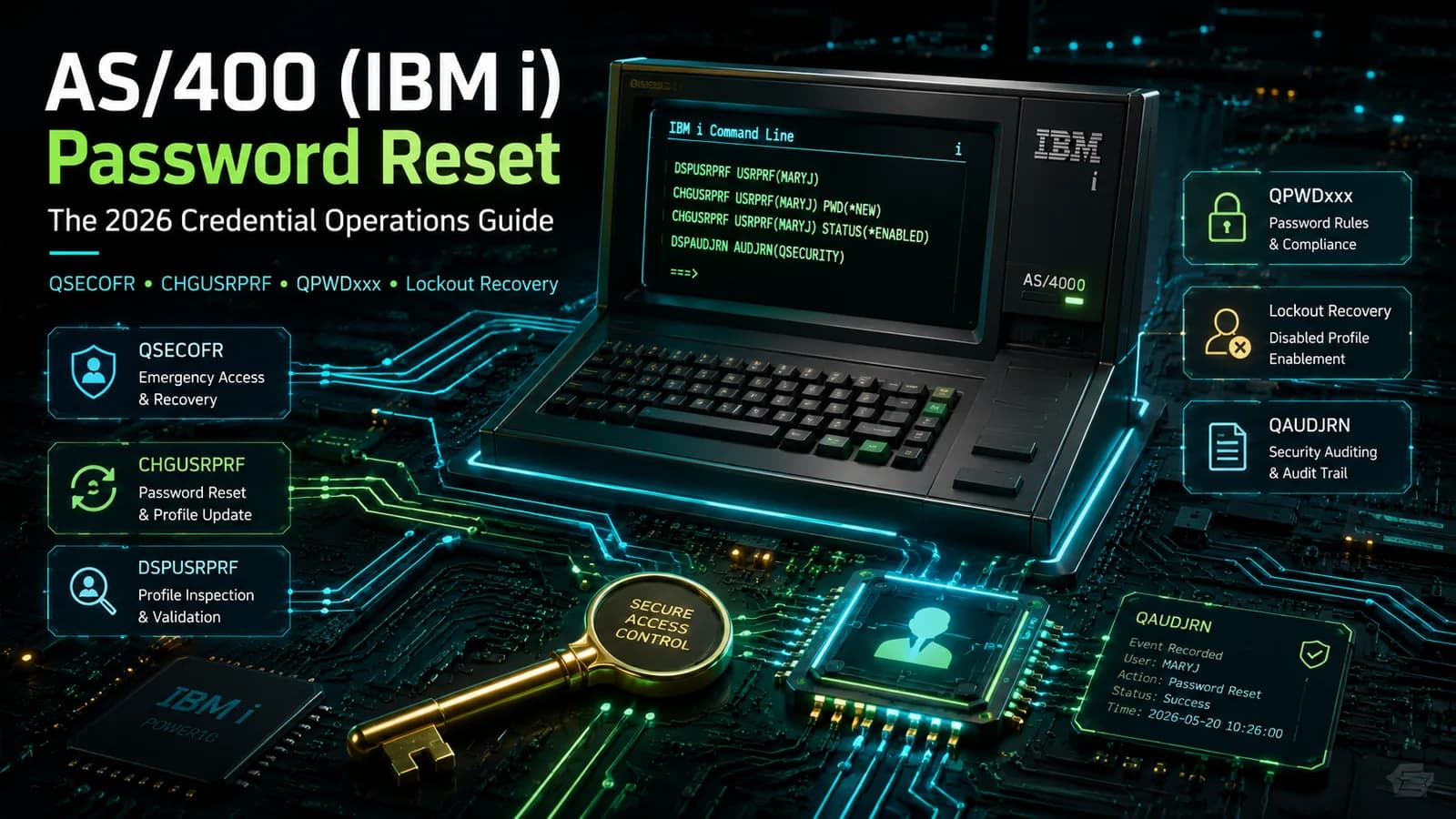
How password reset works on AS/400 (IBM i) — QSECOFR, user profiles, CHGUSRPRF, the QPWDxxx system values, disabled-profile recovery, and the hardening that keeps reset from becoming the weakest link.
- To change a password on AS/400 (IBM i), an administrator runs CHGUSRPRF USRPRF(name) PASSWORD(newvalue) PWDEXP(*YES) — which sets a temporary password and forces the user to choose their own at next sign-on. A user who still knows their current password changes it themselves with CHGPWD. There is no native self-service reset for a forgotten password; that requires an external identity layer.
- The platform recognizes four reset paths: self-service (via an external IAM/SSPR layer after identity proofing), help-desk CHGUSRPRF, automated reset through an IAM connector on an approved workflow, and QSECOFR recovery through Dedicated Service Tools (DST) as a last resort. The first three are preferred and journaled; QSECOFR/DST recovery is a high-privilege operation reserved for a lost security officer.
- Password rules are governed by system values, not per-user settings: QPWDLVL (0-3) sets the overall regime and maximum length, QPWDMINLEN/QPWDMAXLEN set length, QPWDRQDDIF controls reuse, QPWDRULES sets composition, QPWDEXPITV sets expiration, and QMAXSIGN/QMAXSGNACN control sign-on lockout. Changing QPWDLVL requires an IPL to take effect.
- A profile is disabled — not deleted — after QMAXSIGN invalid sign-on attempts when QMAXSGNACN is set to disable the profile. The fix is CHGUSRPRF USRPRF(name) STATUS(*ENABLED), often paired with a password reset, after verifying the person. DSPUSRPRF shows the status, the password-expired flag, and the last-change date.
- Reset is a security-remediation surface, not just a convenience. Verify identity before any reset, give the help desk a least-privilege profile rather than QSECOFR or *ALLOBJ, journal every reset to QAUDJRN, and lock down shipped default profiles. This guide is the credential-reset companion to the [factory reset guide](/en/blog/as400-iseries-factory-reset-guide-2026/) and the [access troubleshooting guide](/en/blog/troubleshooting-as400-iseries-access-issues-2026/) — it does not overlap them.
Changing a password on AS/400 (IBM i, iSeries) is an everyday administrative task with a specific, well-defined mechanism: an administrator runs CHGUSRPRF USRPRF(name) PASSWORD(newvalue) PWDEXP(*YES) to set a temporary password and force the user to choose their own at next sign-on, while a user who still knows their current password changes it themselves with CHGPWD. What the platform does not ship with is a self-service portal for a forgotten password — that capability comes from an identity layer connected to IBM i. Around those few commands sits a set of system values, a lockout mechanic, and a security discipline that determine whether reset is a routine convenience or the weakest link in your mainframe access.
This piece is the 2026 update of the original Avatier guide, Beyond the Password: Resetting Various Aspects of Your AS/400 iSeries. The original covered the general shape of the problem; this version is the practitioner reference — the actual commands, the QPWDxxx system values and QPWDLVL that govern the rules, the disabled-profile recovery path, the QSECOFR/DST last resort, and the hardening that turns reset into a security-remediation control rather than a soft spot.
It is deliberately scoped to credential reset and does not duplicate its companions. The AS/400 iSeries factory reset guide covers the destructive whole-system operation that is almost never the right answer to a password problem. The troubleshooting AS/400 iSeries access issues guide covers diagnosing why a user cannot sign on, of which a forgotten password is only one cause. This guide picks up when the cause is credential-related and the fix is a reset.
How password reset actually works on IBM i
IBM i organizes identity around the user profile — an object of type *USRPRF that holds a user's password, special authorities, group memberships, and account status. Two profiles matter before any others. QSECOFR is the shipped security officer, carrying *ALLOBJ, *SECADM, and the rest of the special authorities; it is the most powerful account on the box. The customer's own users are ordinary *USRPRF objects created with CRTUSRPRF and maintained with CHGUSRPRF.
Three commands do the day-to-day credential work:
CHGPWD— a user changes their own password. It prompts for the current password and a new one, and the new value must satisfy the password rules in force. This is the only native "self-service" action, and it requires the user to already know their password.CHGUSRPRF— an administrator changes another user's profile. The reset form isCHGUSRPRF USRPRF(name) PASSWORD(newvalue) PWDEXP(*YES).PWDEXP(*YES)marks the new password expired, forcing the user to pick their own at next sign-on so the administrator never holds the standing credential.DSPUSRPRF— displays a profile's state: status (*ENABLED/*DISABLED), whether the password is expired, the date the password was last changed, and the special authorities. It is the first command to run when someone reports they cannot sign on, because it tells you whether the cause is a forgotten password, an expired password, or a disabled profile.
One nuance worth stating plainly: an administrator resetting a password is not the same as knowing it. Best practice is to set an unguessable temporary value, always attach PWDEXP(*YES), and let the user establish their own credential at first sign-on. A profile with PASSWORD(*NONE) — common for service and group profiles — has no password and cannot sign on interactively at all, which is a deliberate hardening choice rather than a problem to fix.
The reset paths: self-service, help desk, DST, and automated
There are four ways a credential gets reset on IBM i, and they are not equally safe. Knowing which path a given situation calls for is most of the operational discipline.
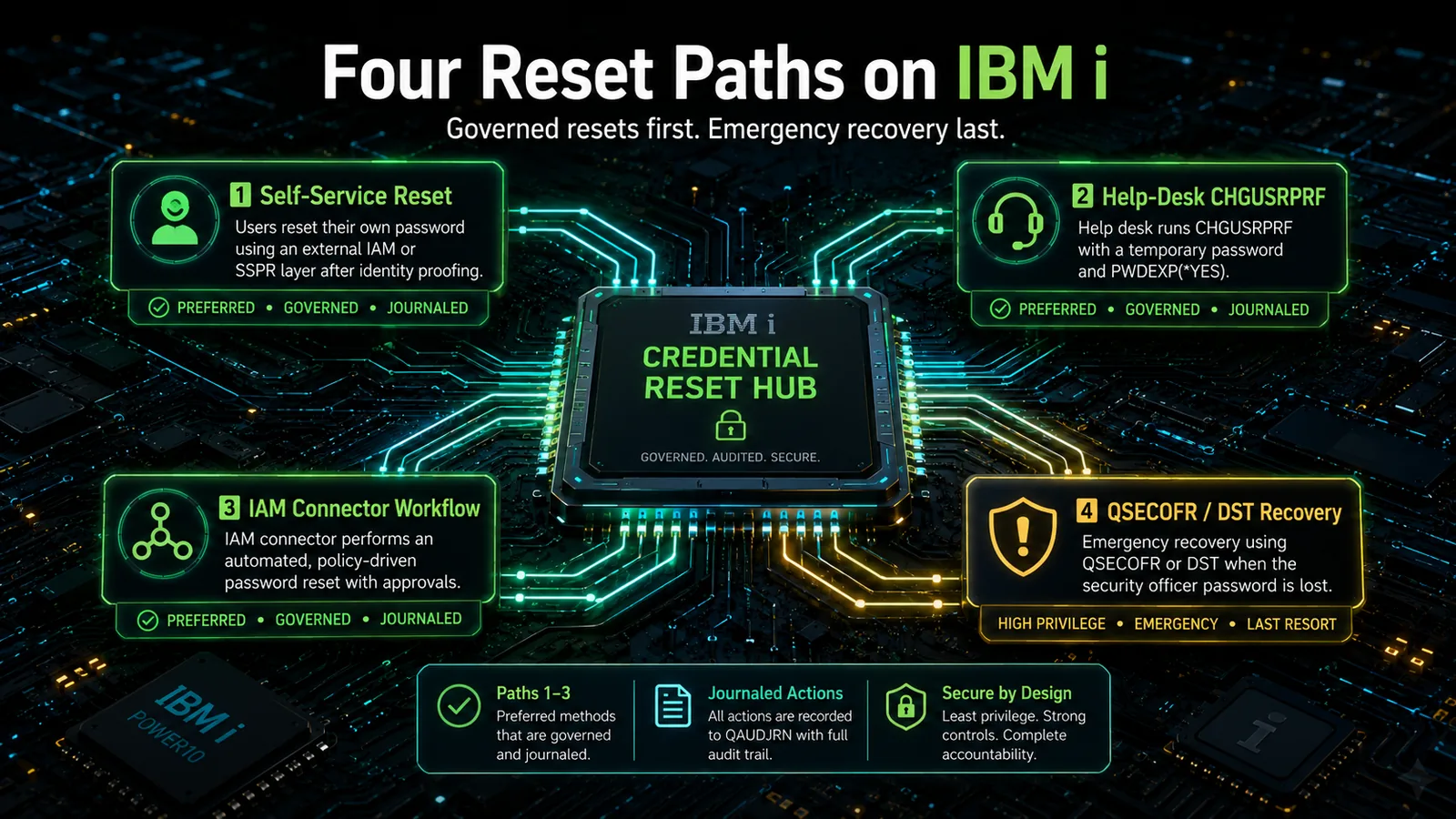 Green paths verify identity first and leave a journaled record. QSECOFR/DST recovery is the red last resort, reserved for a lost security officer — not a routine forgotten password.
Self-service. The user proves identity through a strong factor and resets without a ticket. Because IBM i has no native forgotten-password portal, this path is delivered by an external identity layer that resets the profile through a connector after proofing. It is the highest-volume, lowest-cost path when it exists — the same economics that drive enterprise SSPR deployment on every other platform.
Help-desk CHGUSRPRF. An analyst runs CHGUSRPRF USRPRF(name) PASSWORD(newvalue) PWDEXP(*YES) after verifying the caller. This is the native fallback and the correct manual path for a forgotten password. Its safety depends entirely on the identity check before the command and on the analyst's profile being least-privilege rather than QSECOFR.
Automated / API. The IAM platform resets the profile through a connector as part of an approved workflow. This is the same mechanism as self-service without the end-user front end — used for scripted resets, joiner-mover-leaver events, and integrations. It is consistent and audited by construction.
QSECOFR / DST recovery. When the QSECOFR password itself is lost and no other privileged profile can reset it, IBM's supported path is Dedicated Service Tools. It is a physically-gated, high-privilege operation and belongs at the bottom of the list — a genuine last resort, not a routine reset. Reaching for it to solve an ordinary forgotten user password is a category error; that is what CHGUSRPRF is for.
The system values that govern IBM i passwords
Password rules on IBM i are set system-wide, through a family of QPWD system values, not per user. That is a strength — the whole platform gets one coherent policy — and a trap, because a weak value weakens every account at once. These values are the heart of any AS/400 security remediation effort, and getting them right is higher-leverage than any single reset.
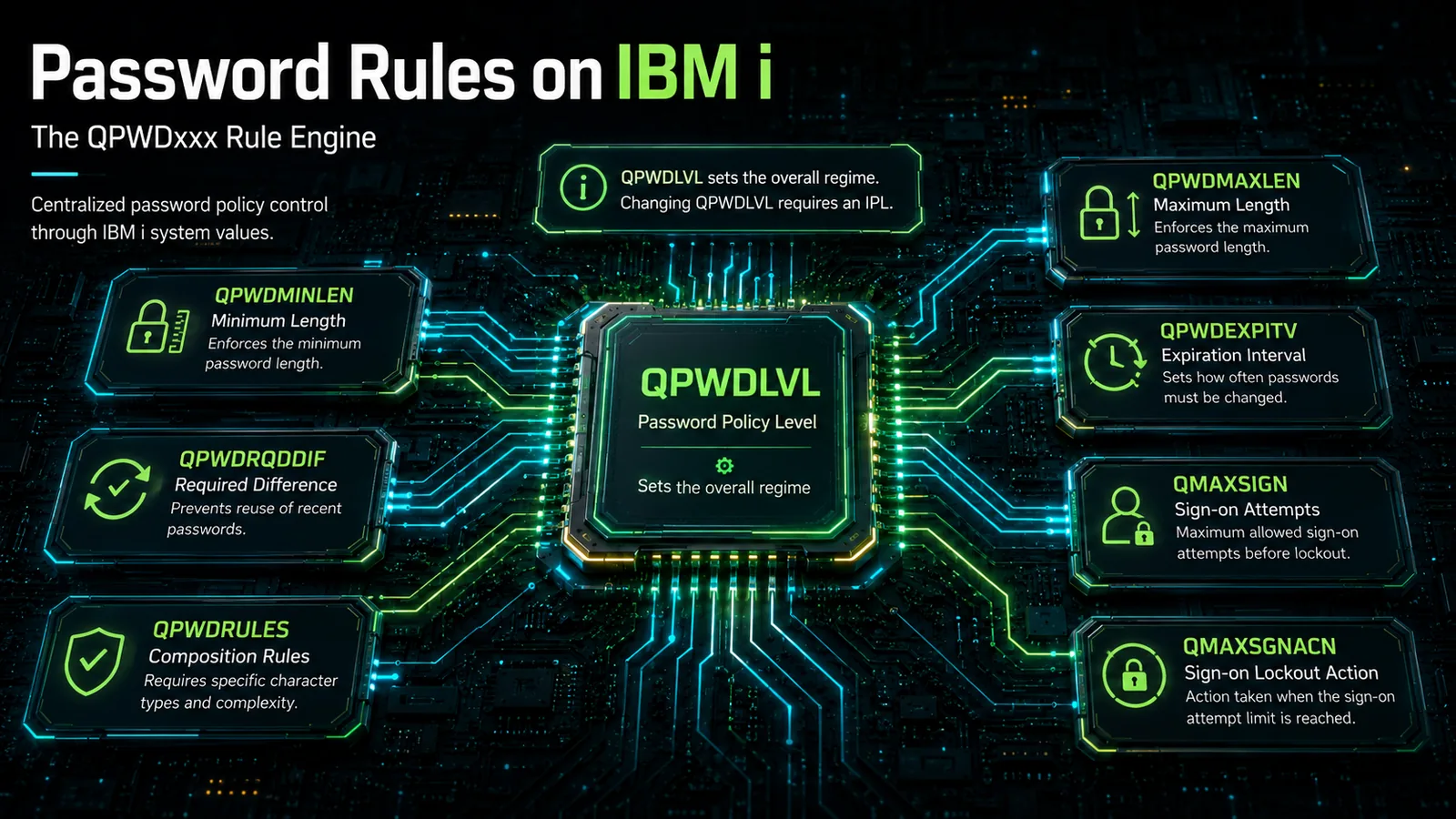 Password policy on IBM i is a set of system values, not per-user flags. QPWDLVL sets the whole regime; raising it from a legacy 10-character level to a 128-character passphrase level requires an IPL.
The governing value is QPWDLVL, the password level, which takes values 0 through 3:
- Level 0 — the legacy default: passwords up to 10 characters, uppercased, from a restricted character set, with older-format password hashes kept for backward compatibility.
- Level 1 — like level 0, but the iSeries NetServer passwords used by legacy Windows clients are removed when they are no longer needed.
- Level 2 — enables case-sensitive passphrases up to 128 characters; it is a compatibility level, so the system still maintains older-format passwords where it can, letting you fall back to level 0 or 1 if necessary.
- Level 3 — the same 128-character passphrase capability as level 2, but the legacy short and NetServer password formats are dropped entirely, closing the backward-compatibility door.
Changing QPWDLVL requires an IPL to take effect, which makes moving from a legacy level to a passphrase-capable one a planned change with a fallback plan — typically 0 → 2, run at level 2 to confirm nothing breaks, then 2 → 3 once you are confident. Around QPWDLVL sit the rest of the levers: QPWDMINLEN/QPWDMAXLEN for length, QPWDRQDDIF for how many prior passwords must differ before reuse, QPWDRULES for composition (a single modern value that supersedes several older individual ones), QPWDEXPITV for the expiration interval, and QMAXSIGN/QMAXSGNACN for sign-on lockout. A password validation exit program (QPWDVLDPGM) can add custom checks — for example, screening against a breached-password list — when the built-in rules are not enough.
Disabled profiles and the QMAXSIGN lockout mechanic
The most common "I can't log in" call is not a forgotten password at all — it is a disabled profile, and the two are easy to confuse. IBM i disables a profile automatically when a user exceeds QMAXSIGN consecutive invalid sign-on attempts and QMAXSGNACN is configured to disable the profile. QMAXSGNACN has three settings: disable the device only, disable the user profile only, or disable both. Environments that disable the profile trade a few more help-desk calls for materially better protection against online password-guessing.
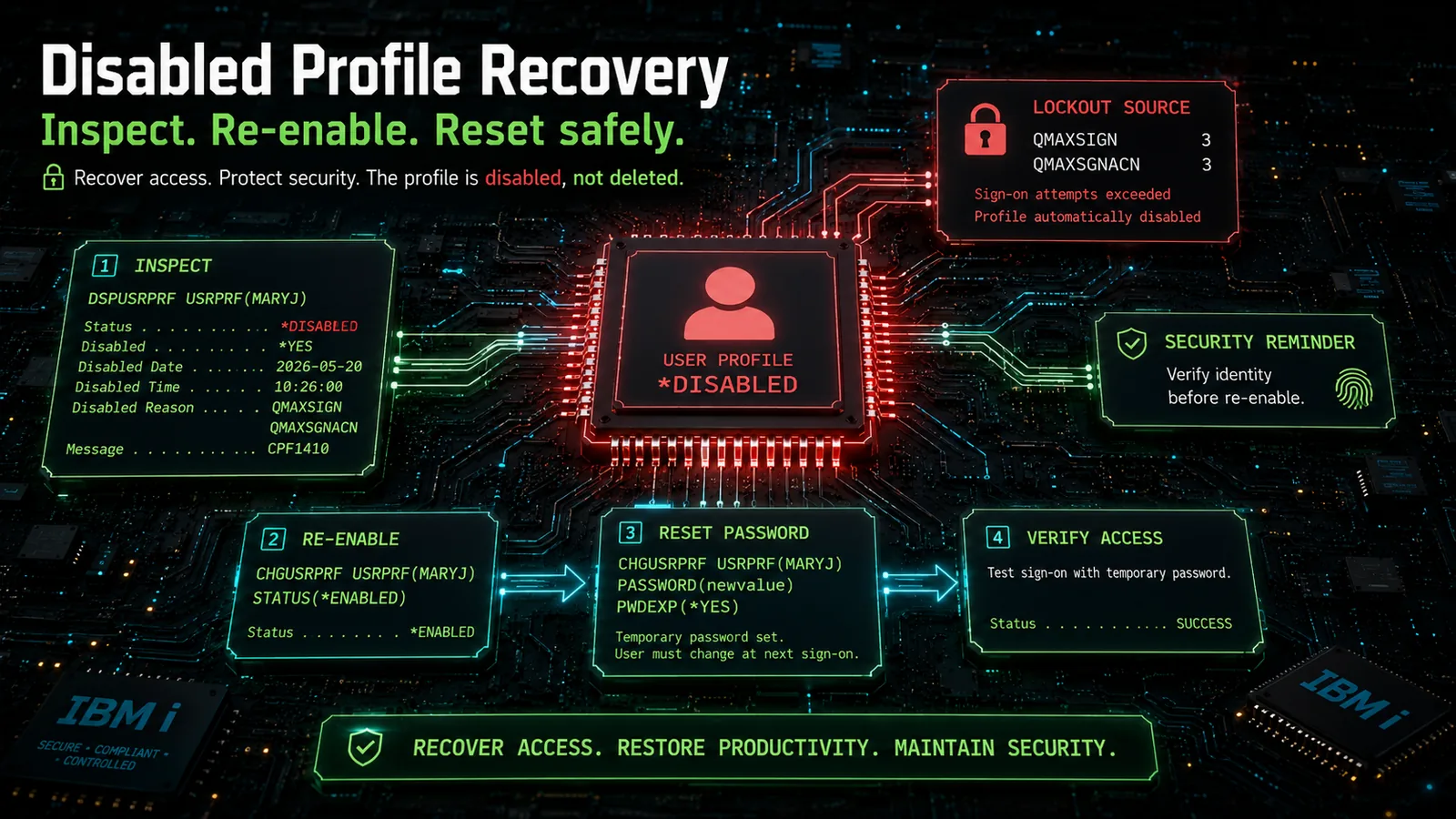 *A disabled profile is locked, not deleted: inspect with DSPUSRPRF, re-enable with STATUS(ENABLED), reset the password only if it was forgotten — and verify the person before clearing the lockout the system just applied.
The diagnosis-and-fix sequence is short:
- Run
DSPUSRPRF USRPRF(name)and read the Status field.*DISABLEDconfirms a lockout; it also shows whether the password is also expired. - If the lockout was a fat-fingered password and the user still knows their credential, simply re-enable:
CHGUSRPRF USRPRF(name) STATUS(*ENABLED). - If the underlying cause was a forgotten password, combine the two operations:
CHGUSRPRF USRPRF(name) PASSWORD(newvalue) PWDEXP(*YES) STATUS(*ENABLED).
The security point is the same one that runs through this entire guide: a disabled profile is exactly the state an attacker wants an unquestioning help desk to clear. The lockout did its job; re-enabling without verifying the person on the other end of the call throws that protection away. Identity verification belongs before step 2, not after. The broader set of sign-on failure causes — expired passwords, authorization failures, connectivity — is the domain of the access troubleshooting guide; this section covers only the credential-and-lockout slice.
Hardening the reset flow
Reset is where a credential changes hands, which makes it the single moment where every other control can be undone. A hardened reset flow is one of the highest-value items on an IBM i security-remediation plan, and it comes down to four controls.
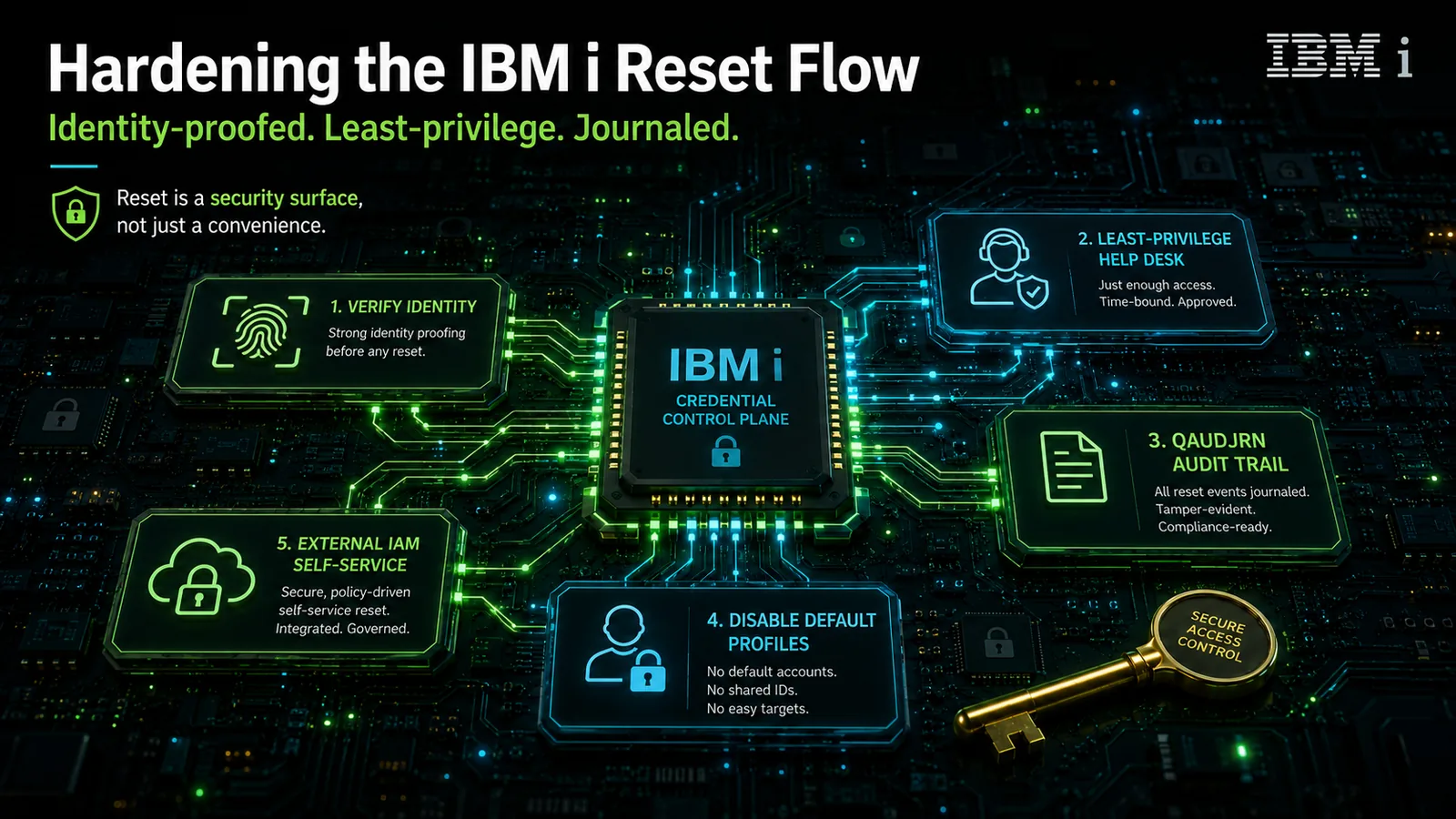 Five controls turn reset from a soft spot into a governed operation: verify identity first, keep the help desk least-privilege, journal every reset, eliminate resettable default credentials, and move routine resets to governed external self-service.
Verify identity before reset. The reset command is trivial; the verification before it is the whole security story. Caller-ID and knowledge-based questions ("what's your employee number?") are not verification — that information is exactly what a social engineer collects first. Reset should be gated on a strong factor: a push to a registered device, a hardware key, or a FIDO2-compatible authenticator. This is the control that most directly stops help-desk-driven account takeover.
Least-privilege help desk. An analyst who resets passwords needs the authority to run CHGUSRPRF against user profiles — not *ALLOBJ, and never the QSECOFR credential itself. Give the help desk a purpose-built limited-authority profile scoped to the reset function. When an analyst signs on as QSECOFR to reset a password, the audit trail loses its meaning and the blast radius of a compromised help-desk session becomes the entire system.
Audit journaling with QAUDJRN. Turn on the security audit journal (QAUDJRN) with security-level auditing so that every password reset and profile change writes a change-profile entry to an immutable journal receiver. Without journaling, a reset is invisible; with it, "who reset whose password, when, from where" is answerable — which is the difference between an auditable control and an act of faith. This is also the evidence a SOX or PCI reviewer will ask for.
Disable default profiles. IBM i ships with well-known profiles — QSECOFR, QPGMR, QUSER, and others — whose default passwords are documented. Change them, lock down the ones you do not use, and never leave a default or shared credential in a freely resettable state. A default credential that survives into production is the first thing an attacker tries and the first thing an auditor flags.
Where IBM i password reset fits the wider credential program
IBM i does not live alone. In a 2026 enterprise it sits alongside Active Directory, cloud IdPs, SaaS applications, and often a z/OS mainframe running RACF — and its credential operations should compose with all of them rather than remain a manual island. The Active Directory login reset reference covers the pre-login reset architecture for domain-joined Windows, and the same principle — reset the credential where the user actually is, after proving who they are — extends to IBM i through a connector.
The composition that matters is governance. When a mature identity platform treats IBM i as one target among many, joiner-mover-leaver events provision and de-provision IBM i profiles as part of one workflow; certification campaigns review IBM i entitlements next to cloud entitlements; and reset flows through the same identity-proofing, approval, and audit pipeline as every other system. The mainframe connector patterns in the RACF user access control guide are the adjacent reference — RACF and IBM i are different platforms, but the integration discipline is the same. For deviceless verification of users who cannot use a smartphone factor, the Identity Challenge Card approach fills the segment that push-to-mobile cannot reach.
What Avatier ships toward this pattern
Avatier Identity Anywhere connects to IBM i as a governed target system. Password reset runs through the platform's workflow rather than as a bare CHGUSRPRF at a green-screen: the requester proves identity through a strong factor — mobile biometric, hardware key, or FIDO2-compatible authenticator — an approval policy applies where required, the profile is reset through the connector, and the event is written to the audit trail. That is what turns "self-service reset," which IBM i lacks natively, into a delivered capability: the user resets their own IBM i credential after proofing, and no administrator ever holds their standing password.
The same connector carries the rest of the lifecycle — provisioning and de-provisioning profiles on joiner-mover-leaver events, including IBM i entitlements in certification campaigns alongside cloud and distributed-system entitlements, and composing the audit record across mainframe and non-mainframe systems. The help desk operates under a least-privilege model rather than sharing QSECOFR, and reset events feed the same audit-log infrastructure a SOX, PCI-DSS, or HIPAA reviewer will want to see.
For Avatier's own security posture, the Avatier Trust Center publishes the current state — SOC 2 Type II with zero exceptions, ISO/IEC 27001:2022 certified, PCI DSS v4.0.1 compliant, CSA STAR Level 1, NIST 800-53 Rev. 5 aligned, and CISA Secure-by-Design Pledge signatory.
ABOUT THE AUTHOR

More from Pillar 4: Login Reset
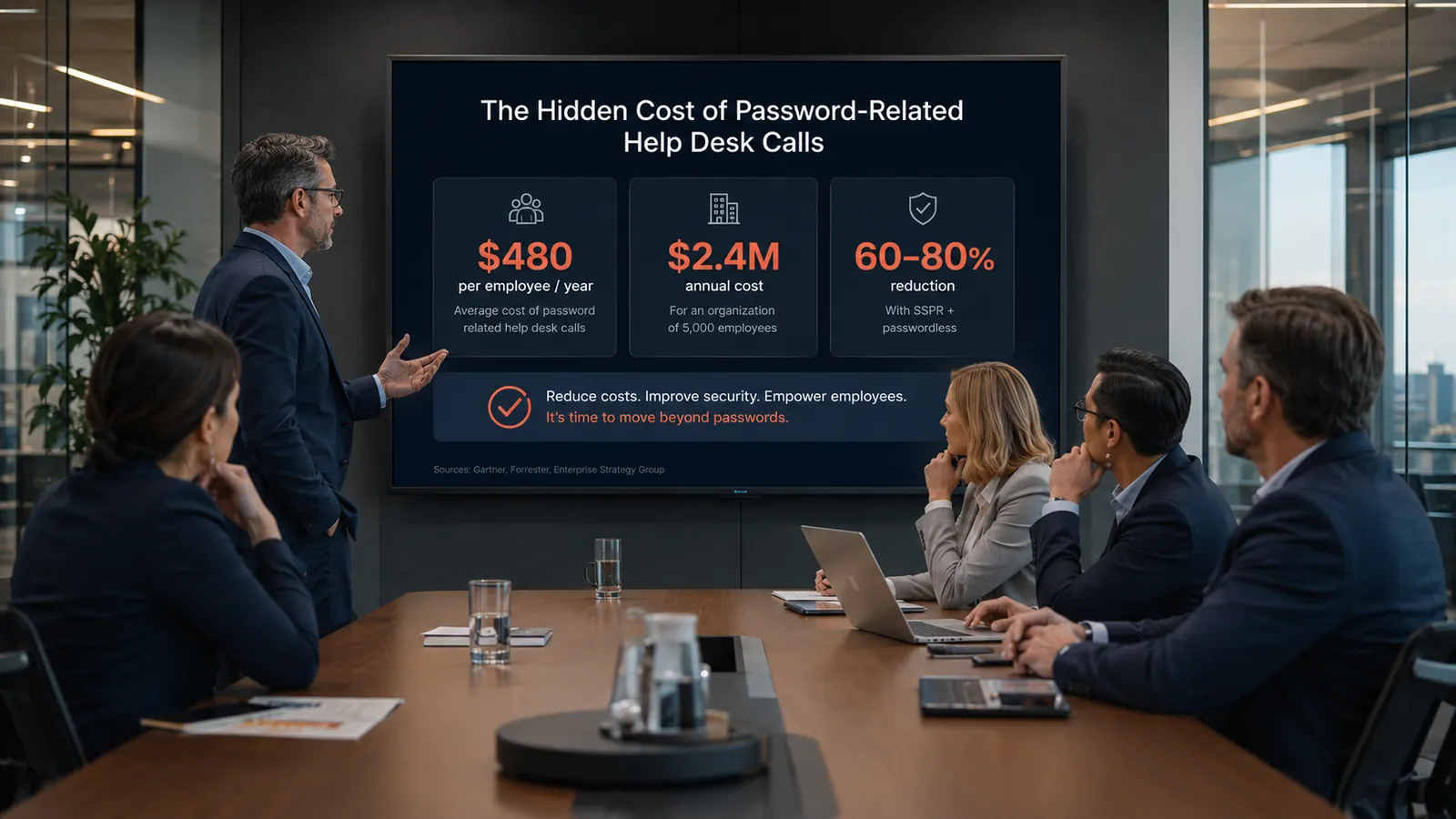
Password Help Desk Cost Analysis: The 2026 $480-Per-Employee Reference
Password-related help desk calls cost the average enterprise $480 per employee per year — a hidden line item that dominates IT operational cost at scale and produces $2.4M in annual burn for a 5,000-employee enterprise. The 2026 enterprise reference on the specific cost components, the volume drivers that scale the number by industry, the SSPR and passwordless architectural interventions that reduce it 60-80%, and the CFO-defensible ROI model that justifies the reduction investment.
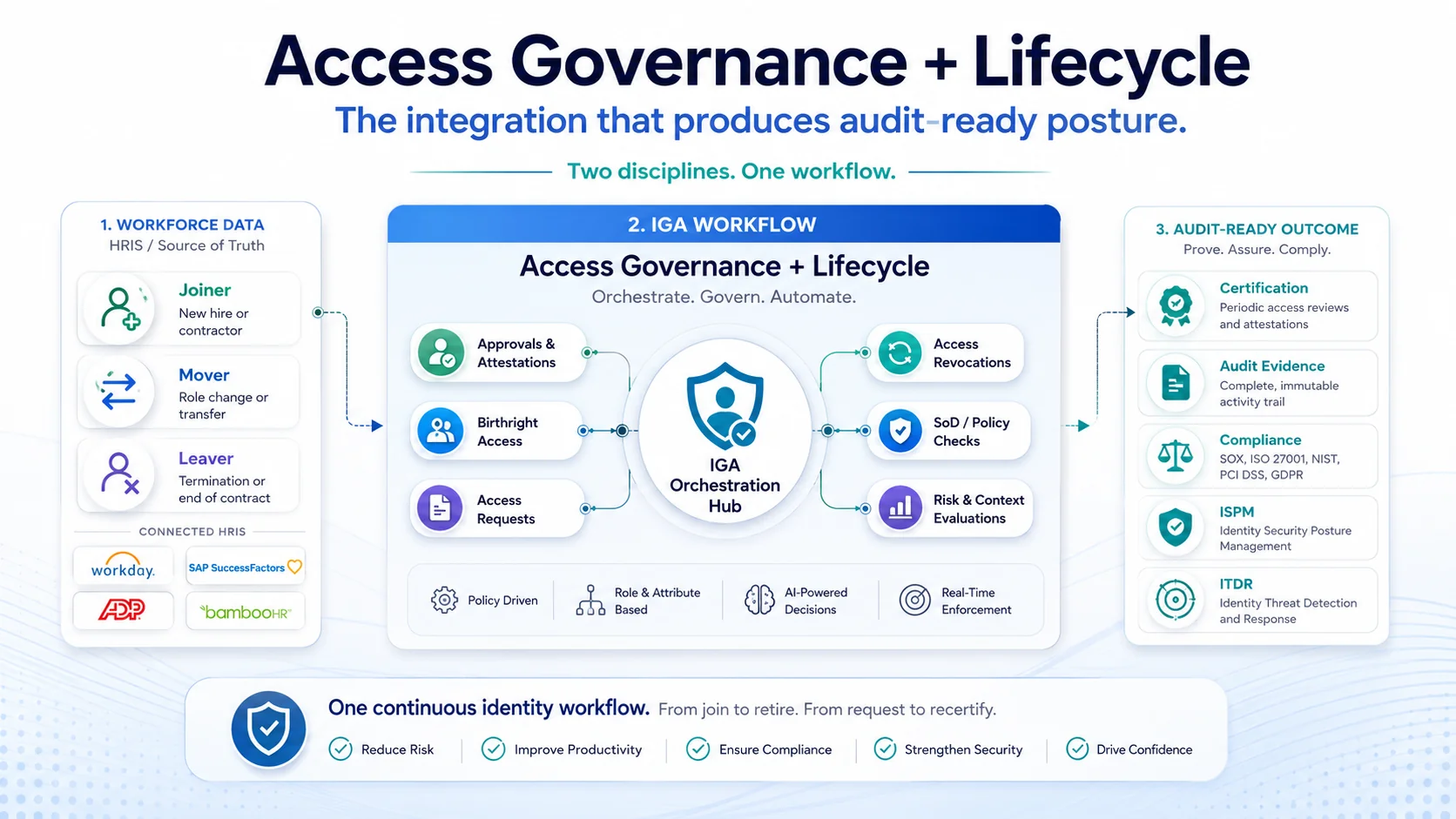
Self-Service Password Reset: The 2026 Enterprise Deployment Reference
Self-service password reset (SSPR) is the operational lever that moves enterprise password reset economics from $70-per-ticket help-desk-only to 60-80% ticket-volume reduction — when deployed with modern authenticator-based verification, coverage across the domain workstation and frontline segment cases, and audit-trail integration that satisfies SOX / PCI-DSS / HIPAA. The 2026 enterprise reference on SSPR deployment architecture, the five configuration elements that determine effectiveness, and the vendor-neutral comparison discipline for SSPR selection.
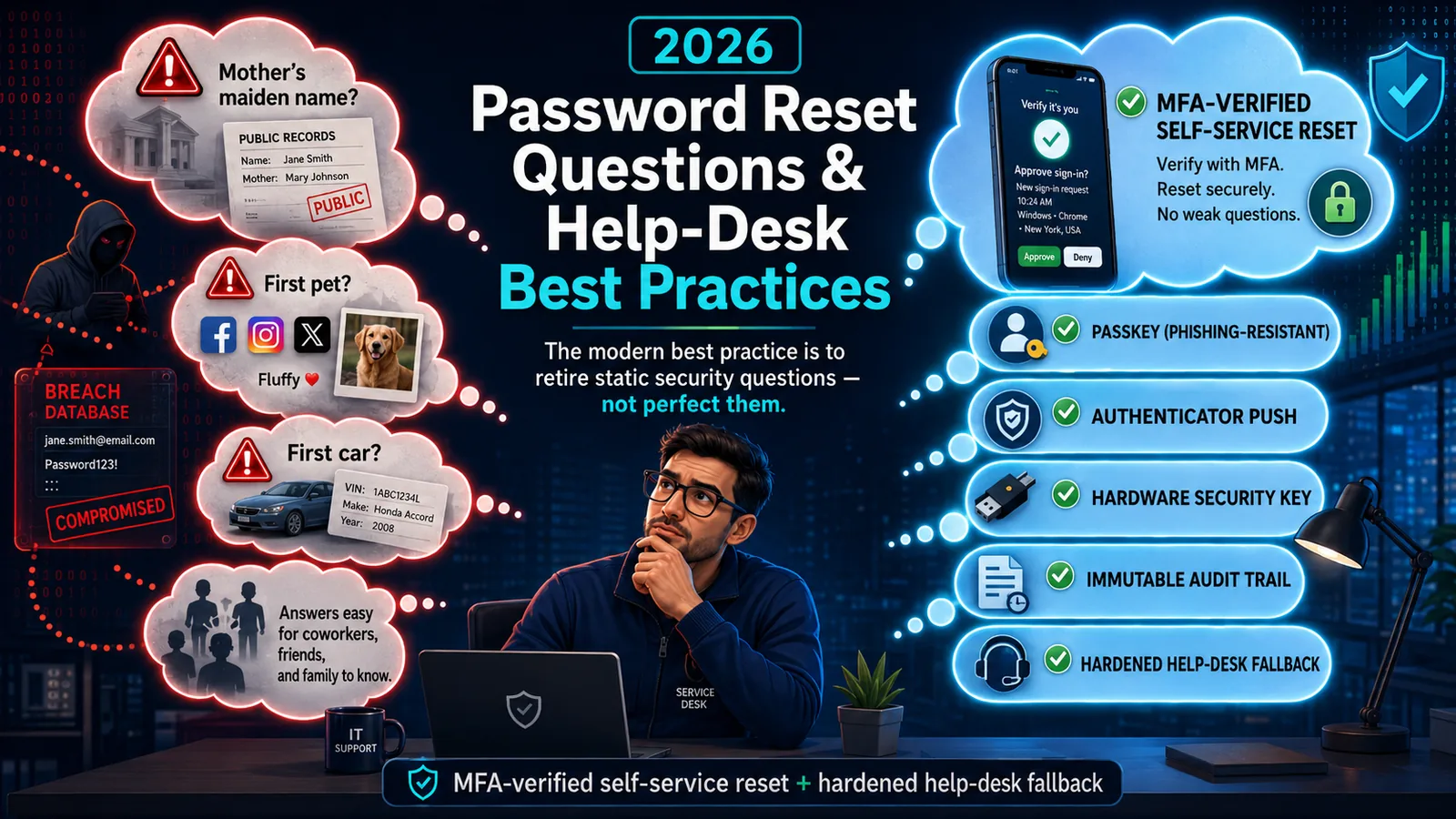
Password Reset Questions & Help-Desk Best Practices (2026)
Static security questions are the weakest link in password reset — OSINT-discoverable, shared, and breach-exposed. The 2026 best practice: retire them for MFA-verified self-service reset.